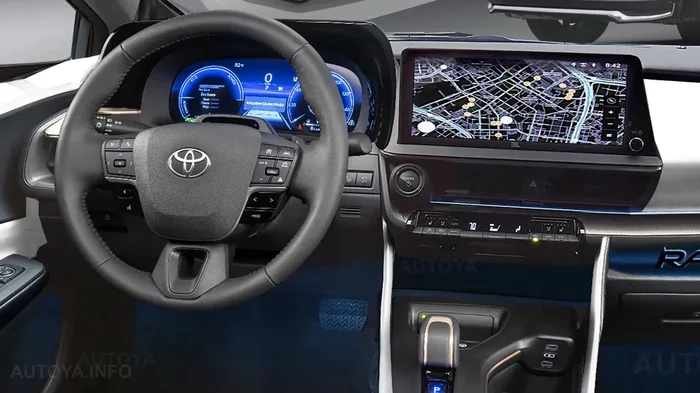
Learn How to Change Time in Toyota RAV4 Step by Step
Changing the time in your Toyota RAV4 is quick and easy once you know where to look. Whether you drive a 2019, 2020, or 2024 model, the process follows a similar path through the infotainment screen. This guide walks you through every step with clear instructions and helpful tips. You will also learn how to fix common clock problems and keep your RAV4 settings perfectly tuned.
Have you ever glanced at your dashboard and realized your Toyota RAV4 clock is off by a few hours? It happens to the best of us. Daylight saving time changes, long road trips across time zones, or even a simple battery disconnect can throw your Toyota RAV4 clock out of sync. The good news is that fixing it takes only a couple of minutes. You do not need a mechanic, a special tool, or even a manual to figure it out. In this guide, we will walk you through every single step to change time in Toyota RAV4 models. Whether you own a 2019, 2020, or 2024 RAV4, the process is straightforward and beginner-friendly. Let us get started.
Knowing how to adjust your vehicle clock is one of those small skills that makes daily driving smoother. It also helps you stay on time for appointments, meetings, and pickups. Many RAV4 owners ignore their dashboard clock until it becomes a problem. By learning the RAV4 time settings now, you save yourself from future headaches. We will cover the exact steps, common problems, and expert tips that make the whole process a breeze. So grab a cup of coffee, sit in your driver seat, and let us dive in.
Key Takeaways
- Easy Access: You can change the time in your Toyota RAV4 through the infotainment home screen in just a few taps.
- Multiple Methods: There are two main ways to adjust the clock, including automatic time zone syncing and manual settings.
- Model Year Matters: The steps vary slightly depending on your RAV4 model year and infotainment version.
- Common Fixes: A dead battery or incorrect time zone setting are the top reasons your RAV4 clock shows the wrong time.
- Quick Tips Help: Simple habits like keeping your GPS location enabled make time adjustments effortless.
- No Tools Needed: You do not need any special equipment to change the clock settings on your RAV4.
📑 Table of Contents
- Why Changing the Time in Your Toyota RAV4 Matters
- How to Change Time in Toyota RAV4: Step-by-Step Guide
- Different Methods to Adjust the Clock
- Common Problems When Changing Time in Toyota RAV4
- Tips to Keep Your RAV4 Clock Accurate All Year Round
- How the RAV4 Clock Compares to Other Toyota Models
- When to Seek Professional Help
- Final Thoughts on Changing the Time in Your Toyota RAV4
Why Changing the Time in Your Toyota RAV4 Matters
Your Toyota RAV4 digital clock does more than just sit there looking pretty. It syncs with your navigation system, trip computer, and even your scheduled maintenance reminders. When the clock is wrong, these features do not work as well as they should. For example, if your RAV4 reminds you about an oil change based on mileage and time, an incorrect clock could throw off the schedule. Keeping your Toyota vehicle clock accurate ensures everything runs in harmony.
Beyond functionality, an accurate clock adds safety. When you are driving at night or in low visibility, your dashboard displays help you track time during long drives. If you rely on your RAV4 for work or family duties, having the right time displayed keeps you organized. It also matters when you are selling or trading in your vehicle. A properly set clock shows that you have taken good care of the RAV4 dashboard and interior features.
How to Change Time in Toyota RAV4: Step-by-Step Guide
Here is the core of our guide. We will walk you through the exact steps to adjust clock Toyota RAV4 settings. The process is nearly identical across most model years, with minor differences we will point out along the way.
Step 1: Start Your Vehicle or Turn on the Infotainment System
First, press the start button or turn the ignition key. You do not need to put the car in drive. Just having the electrical system powered on is enough. The RAV4 infotainment system should light up on the center screen. If your RAV4 has a touch screen, you will see the home menu. Older models without a touch screen may require you to press the menu button on the audio unit itself.
Make sure your vehicle is parked safely before you begin. Even though the car is not moving, having it in park with the parking brake engaged is the safest habit. This keeps your focus entirely on the screen in front of you.
Step 2: Navigate to the Settings Menu
On the home screen, look for the Settings icon. It usually looks like a gear or a wrench symbol. Tap on it to open the RAV4 settings menu. If you cannot find the gear icon, try pressing the Menu button on your steering wheel controls. Some RAV4 models also let you access settings by pressing the Setup button on the audio head unit.
Once inside the settings menu, scroll through the options. You are looking for a section labeled “Setup,” “System,” or “Display Settings.” Different RAV4 model years organize their menus slightly differently. On newer 2024 models, Toyota has simplified the layout, making it even easier to find the clock option.
Step 3: Find the Clock or Time Zone Option
Inside the settings menu, tap on the Clock or Time Zone option. This is where the magic happens. You will see the current time displayed along with options to set it manually or let the system sync automatically. The Toyota RAV4 display settings give you two paths to choose from:
- Automatic Time Zone: This option uses your GPS location to set the correct time automatically. It is the easiest method and works great for daily driving.
- Manual Time Setting: This option lets you type in the time yourself. You can adjust the hour, minute, and choose between AM and PM.
If you travel frequently across time zones, the automatic option is highly recommended. It saves you from having to reset the clock every time you cross a state line.
Step 4: Adjust the Time
Select the manual option if your clock is off or if you prefer to set it yourself. Use the arrow buttons or the touch screen to change the hour and minute values. Make sure you check whether the display shows AM or PM. This is one of the most common mistakes people make when they set time RAV4 manually.
After you have entered the correct time, tap the confirm or save button. The new time should immediately appear on your RAV4 multimedia system display. Take a moment to double-check the time against your phone or watch to make sure everything lines up perfectly.
Step 5: Exit and Verify
Press the back or home button to exit the settings menu. Glance at your dashboard clock to confirm the new time is displaying correctly. If the time still looks off, repeat the steps and make sure you saved the changes before exiting. Sometimes the system needs a few seconds to refresh the display.
Quick Tip: If you recently changed the battery in your RAV4 or experienced a power loss, the clock may reset to a default time. Simply follow these steps again to restore the correct time.
Different Methods to Adjust the Clock
Not all Toyota RAV4 clock adjustments are the same. Depending on your model year and the features your vehicle has, you might have access to different methods. Let us explore the main approaches.
Method 1: Automatic Time Sync via GPS
The simplest way to keep your RAV4 clock accurate is by enabling automatic time zone detection. This feature uses your vehicle’s GPS module to determine your current location and sets the clock accordingly. It works seamlessly whether you are driving locally or crossing into a different time zone.
To enable this feature, go to the Clock settings and toggle on the “Auto Time Zone” option. Make sure your GPS signal is active. You can usually check this by looking at the navigation icon in the bottom corner of your screen. If your GPS signal is weak, the automatic sync may not work properly.
Method 2: Manual Entry via Touch Screen
For those who prefer full control, manual entry gives you complete authority over the time display. This method works on all RAV4 model years and does not rely on GPS signals. You simply navigate to the clock setting, select manual mode, and use the on-screen controls to set the time.
This method is especially useful if you live in an area with poor GPS reception or if you frequently drive through tunnels and rural areas where the signal drops. It is also the go-to method if you want to set your clock to a specific time zone for a trip.
Method 3: Using the Steering Wheel Controls
Some RAV4 models allow you to adjust the clock using buttons on the steering wheel. Look for a button labeled “Menu,” “Setup,” or “Info.” Press it and use the up and down arrows to navigate to the clock setting. Then use the left and right arrows to adjust the time. This method is convenient when you are parked and do not want to touch the center screen.
Common Problems When Changing Time in Toyota RAV4
Even though the process is simple, sometimes things do not go as planned. Here are the most common issues RAV4 owners face when trying to change time in Toyota RAV4 and how to fix them.
Clock Resets After Battery Disconnect
If you recently disconnected your battery for maintenance or replacement, your clock will likely reset to a default value, usually 12:00 AM. This is normal behavior and not a sign of a problem. Simply follow the steps above to set the correct time again. The clock should hold the new setting once you save it.
Time Zone Does Not Update Automatically
If your RAV4 clock fails to update when you cross time zone lines, the automatic time zone feature may be turned off. Go to your clock settings and make sure the auto sync option is enabled. Also check that your GPS signal is strong. A weak signal can prevent the system from detecting your new location accurately.
Touch Screen Becomes Unresponsive in Settings
Occasionally, the touch screen may lag or become unresponsive when you are deep in the settings menu. This usually happens when the system is processing a lot of data. Try restarting the infotainment system by holding down the power button for about 10 seconds. The screen will turn off and back on, and you can try your clock adjustment again.
Wrong Time Displayed After Nightfall
Some RAV4 models have a feature that automatically adjusts the display brightness based on ambient light. This does not affect the actual time, but it can make the clock hard to read at night. If your clock looks correct but is hard to see, adjust the display brightness in the settings menu. You can also switch to a darker theme if your RAV4 supports it.
Tips to Keep Your RAV4 Clock Accurate All Year Round
Keeping your Toyota RAV4 clock accurate does not have to be a constant chore. A few simple habits can save you a lot of time and frustration throughout the year.
- Enable Auto Time Zone: This is the single best thing you can do. Once turned on, your RAV4 handles all the time adjustments for you.
- Keep Your GPS Active: The automatic sync feature relies on a strong GPS signal. Make sure your GPS antenna is not obstructed by any aftermarket accessories mounted on your windshield.
- Check After Battery Service: Every time your battery is disconnected or replaced, make it a habit to check the clock setting.
- Update Your Infotainment Software: Toyota periodically releases software updates that improve clock accuracy and fix bugs. Check with your dealer or visit the Toyota website for update instructions.
- Sync with Your Phone: If your RAV4 supports Apple CarPlay or Android Auto, you can use your phone’s time as a reference when manually adjusting the clock.
Expert Insight: Many RAV4 owners do not realize that the clock setting also affects other features. Your scheduled maintenance alerts, trip interval reminders, and even some safety alerts use the internal clock as a reference. Keeping it accurate ensures all these systems work as Toyota intended. If you ever notice your maintenance reminders are off, a quick clock check might be all it takes to fix the issue.
How the RAV4 Clock Compares to Other Toyota Models
The process to change time in Toyota RAV4 is very similar to other Toyota models. The RAV4 uses the same basic infotainment platform found in the Camry and Highlander. If you have experience adjusting the clock on those vehicles, you will feel right at home with the RAV4. The layout and menu structure are nearly identical, which makes it easy to switch between vehicles.
One nice thing about the RAV4 is that Toyota keeps the interface consistent across model years. Whether you are driving a 2019 model or a brand-new 2024 RAV4, the clock adjustment process follows the same general path. This consistency is a testament to Toyota’s commitment to user-friendly design. It also means that once you learn the steps for your RAV4, you can apply that knowledge to any Toyota you drive.
If you are curious about other Toyota features, learning how to switch to sport mode while driving a Toyota is another great skill to add to your toolkit. Both settings are found in the same general area of the RAV4 infotainment system, so they complement each other well.
When to Seek Professional Help
In most cases, adjusting the clock on your RAV4 is a simple DIY task. However, there are situations where professional help might be needed. If your clock repeatedly resets to the wrong time even after you follow all the steps correctly, there could be a deeper issue with the infotainment unit or the GPS module. In such cases, it is best to visit a Toyota dealership or a qualified mechanic.
You should also seek help if your RAV4 dashboard displays error messages related to the clock or time settings. These could indicate a software glitch or a hardware problem that requires diagnostic equipment to resolve. Toyota dealerships have the tools and expertise to diagnose and fix these issues quickly.
Another scenario that calls for professional attention is when the entire infotainment system freezes or becomes unresponsive after you attempt to change the clock settings. A system restart usually fixes this, but persistent issues may need a software reset or a visit to the service center. Remember: Toyota dealerships can also help you with tasks like turning off steering assist in Toyota vehicles, which shows how interconnected various vehicle settings can be.
Final Thoughts on Changing the Time in Your Toyota RAV4
Learning how to change time in Toyota RAV4 is one of the simplest yet most useful skills every RAV4 owner should have. It takes just a few minutes, requires no special tools, and keeps your vehicle running smoothly. Whether you prefer the automatic GPS sync or the manual entry method, the choice is entirely yours.
We have covered the step-by-step process, common problems, expert tips, and helpful comparisons. Now you have everything you need to keep your RAV4 clock accurate all year round. The next time daylight saving time rolls around or you cross into a new time zone, you will know exactly what to do. Take a few minutes today to check your clock settings and make any needed adjustments. Your future self will thank you every time you glance at that dashboard and see the correct time.
For more Toyota RAV4 tips and guides, explore our other articles to get the most out of your vehicle. If you ever need to reprogram a used Toyota key fob to a different car or tackle other RAV4 settings, our website has you covered with detailed, easy-to-follow instructions for every model and feature.
Frequently Asked Questions
How do I change the time on my Toyota RAV4 clock?
To change the time, start your vehicle and go to the infotainment home screen. Tap the Settings icon, then select the Clock or Time Zone option. Choose manual or automatic mode and adjust the hour and minute values. Save your changes and exit the menu.
Why does my Toyota RAV4 clock keep resetting to the wrong time?
The most common reason is a dead or weak battery. When the battery loses power, the clock resets to a default value. Simply follow the steps to set the correct time again. If it keeps happening, have your battery tested at a Toyota dealership.
Can I set my Toyota RAV4 clock to automatically update for time zones?
Yes. In the Clock settings menu, enable the “Auto Time Zone” or “Automatic Time Sync” option. This uses your vehicle’s GPS to detect your location and adjust the clock accordingly whenever you cross time zone boundaries.
Does changing the time in my RAV4 affect any other features?
Yes. The clock is connected to your maintenance reminders, trip interval trackers, and some safety alert systems. Keeping the time accurate ensures all these features work correctly and on schedule.
What should I do if the touch screen is unresponsive when I try to change the clock?
Try restarting the infotainment system by holding the power button for about 10 seconds. This refreshes the system and usually resolves any temporary glitches. If the problem persists, a full system reset or professional diagnostic may be needed.
Is the process to change the time different for older Toyota RAV4 models?
The process is very similar across all RAV4 model years. Older models without a touch screen may use physical buttons on the audio unit instead of a touch screen. The general steps of navigating to Settings, then Clock, and adjusting the time remain the same.
=== CONCLUSION ===
Changing the time in your Toyota RAV4 is a simple task that anyone can do in just a few minutes. We have walked through every step, from starting the vehicle to verifying the new time on your RAV4 display. You now know how to use both the automatic GPS sync and the manual entry methods. You also understand the common problems that can pop up and how to fix them quickly.
Remember to keep your Toyota RAV4 clock accurate by enabling auto time zone and checking the settings after any battery service. These small habits go a long way in keeping your vehicle running smoothly. If you ever run into issues that you cannot resolve, your local Toyota dealership is always ready to help.
We hope this guide has been helpful and easy to follow. The next time you need to adjust your clock, you will know exactly where to go and what to do. Take a moment today to check your RAV4 settings and enjoy the confidence of having the right time at your fingertips.