How to Remove Maint Reqd on Toyota Corolla Right Now
How to remove maint reqd on Toyota Corolla is easier than you think. This guide walks you through the exact steps to reset the maintenance required light on any Toyota Corolla. You’ll learn why the light appears and how to clear it without a mechanic.
When the maintenance required light starts blinking on your dashboard, it can feel annoying. You know your Toyota Corolla needs attention, but the light won’t go away on its own. How to remove maint reqd on Toyota Corolla is a question many owners search for every day. The good news is that you can often reset this light in just a few minutes. You don’t need expensive tools or a trip to the dealer. This guide will show you exactly how to do it.
The maintenance required light is a simple reminder. It tells you that your car is due for an oil change or other routine service. Once you complete the service, you just need to clear the indicator. But if you skip the service, the light will keep coming back. Understanding how this system works helps you stay on top of your Corolla’s health.
In this article, we cover everything you need to know. We’ll explain what the light means, why it appears, and the step-by-step reset process for different model years. We’ll also share common mistakes and tips to prevent the light from returning. By the end, you’ll feel confident handling this yourself.
Key Takeaways
- Resetting the light is simple: Most Corolla owners can do it in under 10 minutes with no special tools.
- Always service the car first: Never reset the light without completing the recommended maintenance. The light is a reminder, not a suggestion.
- Method depends on your model year: Older models use trip meter or odometer buttons. Newer models use steering wheel controls or a touchscreen menu.
- Persistent lights may need a pro: If the light won’t turn off after a reset, a Toyota technician can diagnose the issue with a scanner.
- Prevention is key: Follow Toyota’s maintenance schedule and reset the counter right after each service to keep the light off.
- Don’t ignore the light: The maintenance required light helps you stay on top of oil changes and other routine services.
📑 Table of Contents
- What Does the Maint Reqd Light Mean on a Toyota Corolla?
- Why Does the Maintenance Required Light Come On?
- How to Remove Maint Reqd on Toyota Corolla: The Full Reset Process
- Common Mistakes When Trying to Remove the Maint Reqd Light
- When to See a Professional Instead of DIY Reset
- How to Prevent the Maintenance Required Light from Returning
- Quick Tips for Keeping Your Toyota Corolla in Top Shape
- Comparison: Reset Methods by Toyota Corolla Model Year
- Key Takeaways
- Conclusion
What Does the Maint Reqd Light Mean on a Toyota Corolla?
The maintenance required light is part of your Corolla’s onboard diagnostic system. It’s not a warning about a broken part. Instead, it’s a scheduled maintenance reminder. Toyota designed this light to help you keep up with regular service intervals. The light typically illuminates after you drive a certain number of miles. For most Corollas, this interval is around 5,000 miles. However, it can vary depending on your driving habits and model year.
The light looks like a small wrench or the word “MAINT” on the dashboard. When you see it, your car is telling you it’s time for an oil change, tire rotation, or inspection. Ignoring the light won’t damage your engine immediately. But it will keep flashing until you reset it. That’s why learning how to remove maint reqd on Toyota Corolla is so useful.
Why the Light Matters
Even if your car feels fine, the light is a helpful nudge. Regular maintenance keeps your engine running smoothly. It also helps you catch small issues before they become big problems. Skipping oil changes can lead to sludge buildup over time. The light reminds you to check fluid levels, filters, and other wear items. So when the light comes on, take it seriously. Reset it only after you’ve completed the service.
Why Does the Maintenance Required Light Come On?
Several factors can trigger the maintenance required light. The most common reason is simply reaching the mileage interval. Your Corolla’s computer tracks your odometer and counts down to the next service. When the counter hits zero, the light appears. But sometimes the light comes on for other reasons.
The Oil Change Reminder
The primary purpose of this light is to remind you about an oil change. Toyota recommends changing the oil every 5,000 to 10,000 miles, depending on the model year and driving conditions. If you’ve recently had an oil change but the light stayed on, you just need to reset it. The system doesn’t automatically know you changed the oil. You must tell it manually.
Other Maintenance Intervals
Beyond oil changes, the light can remind you of other services. These include checking the brake fluid, replacing the air filter, or inspecting the tires. Some Corolla owners use the light as a general service indicator. They reset it after completing any scheduled maintenance. This keeps the dashboard clean and the reminder system accurate.
How to Remove Maint Reqd on Toyota Corolla: The Full Reset Process
Resetting the light is straightforward. The exact steps depend on your Corolla’s model year. Older models use a simple trip meter reset. Newer models with a digital display have a different process. Below, we cover the most common methods. Follow the one that matches your vehicle.
Method 1: Using the Trip Meter Reset (Older Models)
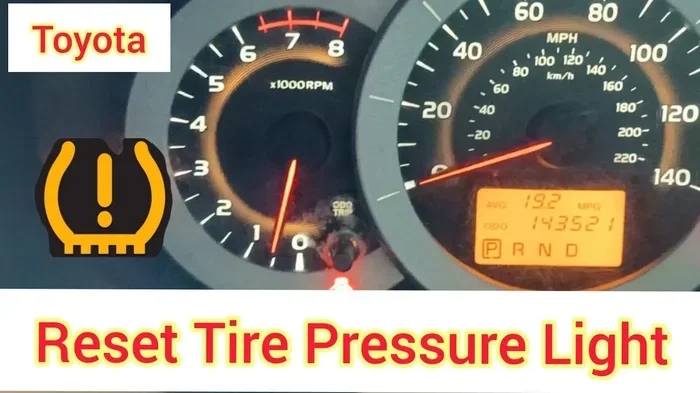
This method works for many Corollas from the 2000s and early 2010s. You’ll need to access the trip meter function on your dashboard. First, turn the ignition to the “ON” position. Do not start the engine. Next, locate the trip meter reset button. It’s usually near the speedometer or on the steering wheel controls. Press and hold the button. Then, turn the ignition off and back on while still holding the button. Keep holding it until the maintenance light starts blinking. Release the button. The light should now be off. If it doesn’t, try the method again.
Method 2: Using the Odometer Button
Some Corolla models use the odometer button to reset the light. Start by turning the key to the “ON” position. Press the odometer button until the odometer display shows the total mileage. Then, turn the key to the “OFF” position. While holding the odometer button, turn the key back to “ON”. Keep holding the button for about 10 seconds. The maintenance light should blink and then turn off. Release the button. This method is simple and works on many older Corollas.
Method 3: For Newer Models with a Display Screen
If your Corolla has a multi-function display, the process is different. Start the engine and press the menu button on the steering wheel. Use the arrow keys to navigate to the “Settings” or “Maintenance” menu. Look for an option called “Reset Maintenance” or “Clear Service Required”. Select it and confirm. The light will turn off immediately. If you can’t find the option, consult your owner’s manual. The menu layout varies by model year. Newer Corollas may also allow you to reset the light through the Toyota touchscreen infotainment system.
What If the Light Won’t Turn Off?
Sometimes the light persists even after you follow the steps. This can happen if the maintenance counter wasn’t properly set to zero. In that case, try repeating the reset process. Make sure you hold the button long enough. If the light still won’t go away, there might be an underlying issue. You may need to visit a Toyota service center. They can diagnose the problem and clear the light with professional tools. You can also check how to get rid of the service light on my dashboard for additional troubleshooting tips. how to get rid of the service light on my dashboard
Another common fix is to disconnect the car battery for a few minutes. This resets the entire electrical system. When you reconnect the battery, the maintenance light may be cleared. However, this method also resets other settings like the radio and clock. Use it as a last resort.
Common Mistakes When Trying to Remove the Maint Reqd Light
Many people make mistakes when trying to reset the maintenance light. Avoid these pitfalls to save time and frustration.
- Resetting the light without completing service: The light exists for a reason. If you reset it before an oil change, you’ll forget about the upcoming maintenance. Always service the car first.
- Not holding the button long enough: The reset process requires you to hold the button for several seconds. Releasing too early will cancel the process. Count to 10 or wait for the blink.
- Using the wrong ignition position: Make sure you’re in the “ON” position, not “ACC” or “START”. The “ON” position powers the electronics without starting the engine.
- Ignoring a persistent light: If the light keeps coming back, it could signal a deeper issue. Don’t just keep resetting it. Have a mechanic inspect the vehicle.
When to See a Professional Instead of DIY Reset
Most of the time, you can reset the light yourself. But there are situations where professional help is the better choice. If you’ve completed the service and the light still won’t turn off, a technician can help. They have diagnostic scanners that communicate directly with your Corolla’s computer. These tools can clear stubborn codes that a simple reset won’t fix.
Also, if you notice other warning lights alongside the maintenance light, don’t ignore them. A flashing check engine light or an oil pressure warning needs immediate attention. In these cases, driving to a Toyota dealership is the safest option. You can also learn more about service lights by reading how to get rid of the service light on my dashboard. how to get rid of the service light on my dashboard This article covers additional scenarios where a reset alone isn’t enough.
Finally, if you’re uncomfortable working with your car’s electronics, a professional can do the job quickly. Many Toyota service centers will reset the maintenance light for free as part of an oil change service. It’s always better to ask for help than to risk damaging the system.
How to Prevent the Maintenance Required Light from Returning
Once you’ve successfully reset the light, you want to keep it off. The best way is to follow Toyota’s recommended maintenance schedule. Regular oil changes are the number one way to prevent the light from appearing too soon. Use high-quality oil and replace the filter at each service interval.
Keep track of your mileage. Use the trip meter to monitor when you’re approaching the 5,000-mile mark. When you get close, schedule your service. This proactive approach means you’ll never be caught off guard by the light. It also helps your Corolla last longer.
Another tip is to reset the maintenance counter immediately after each service. Don’t wait until the next drive. While you’re at the service center, ask the technician to confirm the reset. Many Toyota dealers will do this as part of their routine service. If you do the work yourself, make sure you follow the reset steps carefully. You can also refer to how to get rid of the service light on my dashboard for extra guidance. how to get rid of the service light on my dashboard
Quick Tips for Keeping Your Toyota Corolla in Top Shape
Beyond resetting the maintenance light, there are simple habits that keep your Corolla running strong. Here are a few quick tips:
- Check your oil monthly: Even if the light isn’t on, regular oil checks prevent engine wear. Use the dipstick to verify the level and color.
- Rotate your tires every 5,000 miles: This promotes even wear and improves fuel economy. It’s often done at the same time as an oil change.
- Replace air filters on schedule: A clean air filter helps your engine breathe better. It can also improve acceleration and fuel efficiency.
- Listen for unusual noises: Squealing brakes, grinding sounds, or engine knocks should never be ignored. Early detection saves money on repairs.
- Keep your records: Maintain a log of all services and repairs. This helps you track your Corolla’s history and resale value.
Comparison: Reset Methods by Toyota Corolla Model Year
Not sure which method applies to your Corolla? Use this table to find the right approach.
| Model Year Range | Reset Method | Difficulty Level |
|---|---|---|
| 1997 – 2007 | Trip Meter Reset or Odometer Button | Easy |
| 2008 – 2013 | Trip Meter Reset (Button on Dash) | Easy |
| 2014 – 2019 | Steering Wheel Controls or Menu Reset | Medium |
| 2020 – Present | Touchscreen Display Menu Reset | Medium |
These methods cover the vast majority of Toyota Corolla models. If your year isn’t listed, consult the owner’s manual or a Toyota dealer. The basic principle remains the same: you need to tell the computer that the service is done.
Key Takeaways
- Resetting the maintenance required light is simple: Most Corolla owners can do it in under 10 minutes with no special tools.
- Always service the car first: Never reset the light without completing the recommended maintenance. The light is a reminder, not a suggestion.
- Method depends on your model year: Older models use trip meter or odometer buttons. Newer models use steering wheel controls or a touchscreen menu.
- Persistent lights may need a pro: If the light won’t turn off after a reset, a Toyota technician can diagnose the issue with a scanner.
- Prevention is key: Follow Toyota’s maintenance schedule and reset the counter right after each service to keep the light off.
Conclusion
How to remove maint reqd on Toyota Corolla is a skill every Corolla owner should have. The maintenance required light is just a friendly reminder. Once you’ve serviced your car, you can clear it with a few simple steps. Whether you drive a 2005 Corolla or a 2023 model, the process is manageable. Just follow the instructions for your specific year and model. If you run into trouble, don’t hesitate to visit a Toyota service center. They can help you reset the light and ensure your car is in top shape. With regular maintenance and a quick reset, your Corolla will keep running smoothly for miles to come.
Frequently Asked Questions
Can I drive my Toyota Corolla with the maint reqd light on?
Yes, you can drive short distances with the light on. The light is a maintenance reminder, not an emergency warning. However, you should schedule service soon. Ignoring it for too long could lead to missed oil changes or other neglected maintenance.
Will resetting the maint reqd light clear any error codes?
No, the maintenance required light is separate from error codes like the check engine light. Resetting it only clears the scheduled maintenance reminder. If you have other warning lights, those need their own specific reset process.
How often does the maint reqd light come on in a Toyota Corolla?
Most Toyota Corolla models trigger the light every 5,000 miles. Some newer models with synthetic oil may extend this interval to 10,000 miles. Check your owner’s manual for the exact recommendation for your vehicle.
Can I use a code reader to reset the maint reqd light?
Yes, an OBD-II scanner can sometimes reset the maintenance light. However, not all scanners support the Toyota maintenance reset protocol. For most owners, the manual reset method is faster and free.
What should I do if the maint reqd light flashes instead of staying solid?
A flashing maintenance light often indicates a more urgent service need. It might mean your oil level is critically low or another system requires immediate attention. Check your oil and other fluids right away. If the light continues to flash, visit a Toyota service center promptly.
Is it safe to reset the maint reqd light myself?
Absolutely. The reset process does not require any special tools or mechanical skills. Just follow the steps for your model year carefully. If you feel unsure, a Toyota dealer or independent mechanic can do it for you quickly.