How to Reset the Toyota Tacoma Maintenance Light Fast
Resetting your Toyota Tacoma maintenance light is a simple process you can do at home in just a few minutes. Whether your maintenance reminder is flashing after an oil change or you need to clear the service indicator on your dashboard, this guide walks you through every method. We cover the trip meter reset technique, the odometer button method, and what to do if the light keeps coming back.
There is something satisfying about handling a quick fix on your truck yourself. The Toyota Tacoma maintenance light can pop up at the worst possible time, catching you off guard after a long drive or right before a road trip. But here is the good news. You do not need to visit a dealership or pay a mechanic to turn it off. In most cases, you can handle this fix yourself in just a few minutes.
This guide will walk you through every step to reset the Toyota Tacoma maintenance light quickly and confidently. We will cover the exact methods that work for different model years, explain why the light comes on in the first place, and share tips to prevent it from returning. Whether you are a first-time truck owner or a seasoned Tacoma driver, you will find practical advice here.
The Toyota Tacoma is one of the most reliable trucks on the road. But even the best vehicles need regular care. The maintenance light serves as your truck’s way of reminding you about scheduled service. Understanding how to respond to it is an essential part of truck ownership. Let us dive in and get that light cleared up.
Key Takeaways
- Easy DIY Process: You can reset the maintenance light without a mechanic or expensive tools.
- Multiple Methods Available: The trip meter method and odometer button method both work on most Tacoma models.
- Quick Results: The entire process takes less than five minutes in most cases.
- Prevent Future Issues: Regular maintenance scheduling keeps your Tacoma running smoothly and avoids repeat light triggers.
- Know When to Seek Help: Some persistent lights may signal deeper issues that need professional diagnosis.
- Model Year Matters: Different Tacoma years may use slightly different reset procedures.
📑 Table of Contents
- Why Does the Toyota Tacoma Maintenance Light Come On?
- How to Reset the Toyota Tacoma Maintenance Light Using the Trip Meter Method
- Alternative Reset Methods for Different Tacoma Model Years
- Common Mistakes When Resetting the Maintenance Light
- How to Prevent the Maintenance Light from Coming Back
- When to See a Professional for Maintenance Light Issues
- Quick Tips for a Smooth Reset Experience
- Frequently Asked Questions About the Toyota Tacoma Maintenance Light
- Final Thoughts on Resetting Your Toyota Tacoma Maintenance Light
Why Does the Toyota Tacoma Maintenance Light Come On?
The maintenance light on your Tacoma is not the same as a check engine light. It is a maintenance reminder designed to prompt you to service your vehicle at regular intervals. Think of it as your truck’s way of saying, “Hey, it is time for an oil change or inspection.”
Several common triggers can cause this light to activate:
- Oil change intervals: Most Tacomas reset the light after an oil change, but sometimes it stays on.
- Mileage milestones: The system tracks your mileage and alerts you when you reach a service threshold.
- Time-based reminders: Some models also factor in time, not just mileage.
- Aftermarket parts or modifications: Installing new parts can sometimes interfere with the maintenance system.
- Battery disconnect: Disconnecting your battery may reset the system unexpectedly.
Understanding the root cause helps you decide the best approach for resetting the maintenance light. In most cases, the fix is straightforward. But occasionally, the light may indicate a deeper issue that needs professional attention.
How to Reset the Toyota Tacoma Maintenance Light Using the Trip Meter Method
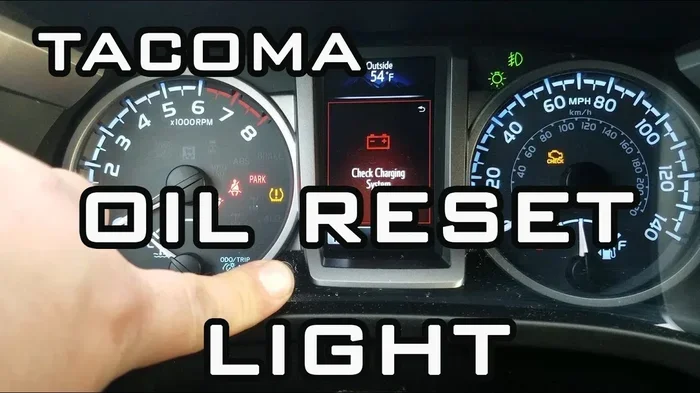
The trip meter method is the most common way to reset the maintenance light on a Toyota Tacoma. This technique works on most model years, especially Tacomas from 2005 onward. Here is exactly how to do it.
Step-by-Step Instructions
- Turn the ignition to ON. Press the start button or turn the key without starting the engine. You should see the dashboard lights illuminate.
- Locate the trip meter button. This is usually on the dashboard or steering wheel, near the instrument cluster.
- Press and hold the trip meter button. Keep holding it for about 10 to 15 seconds.
- Watch the display. The maintenance light should start flashing.
- Release the button. The light should now be reset.
- Turn the ignition off and then back on. This confirms the reset was successful.
If the light does not go off after these steps, do not worry. Try the method again, making sure you hold the button long enough. Some Tacoma models require a slightly longer press. Patience is key here.
Tips for Success
- Make sure the truck is in park before you start.
- Ensure the ignition is in the ON position, not START.
- If the display shows the trip odometer, press the trip button again to cycle to the maintenance menu.
- Some owners find that turning the button press into a quick tap-and-hold rhythm works better than a steady hold.
This method is fast, free, and takes less than two minutes. It is the go-to solution for most Tacoma owners dealing with a persistent maintenance reminder.
Alternative Reset Methods for Different Tacoma Model Years
Not every Toyota Tacoma uses the same reset process. Older models and certain trims may require a slightly different approach. Let us look at the alternatives.
The Odometer Button Method
For some earlier Tacoma models, the odometer reset button works differently. Follow these steps:
- Turn the ignition to the ON position.
- Press the odometer button repeatedly until the maintenance light appears on the display.
- Hold the odometer button down for several seconds.
- The light should turn off and the reset is complete.
The Steering Wheel Controls Method
Newer Tacoma models with steering wheel-mounted controls offer another option:
- Use the steering wheel buttons to navigate to the maintenance menu.
- Select the reset option.
- Confirm the reset when prompted.
When to Consult the Owner’s Manual
Every Tacoma comes with an owner’s manual that includes specific reset instructions for that model year. If the methods above do not work for your truck, the manual is your best resource. You can also find digital versions online if you have misplaced your physical copy. The manual will give you model-specific guidance that generic instructions cannot match.
For owners who are unsure about any step, checking the Toyota Tacoma maintenance light procedures in the manual ensures you do not accidentally trigger another setting. It is always better to be safe than sorry.
Common Mistakes When Resetting the Maintenance Light
Even simple tasks can go wrong if you do not pay attention. Here are common mistakes Tacoma owners make when trying to reset the maintenance light:
Not Holding the Button Long Enough
This is the number one mistake. Many owners release the button too early. The system needs several seconds of continuous pressure to register the reset command. Count to fifteen in your head before letting go.
Turning the Key to START Instead of ON
The ignition has different positions. ON means the dashboard lights up but the engine is off. START cranks the engine. You need the ON position for the reset to work. Starting the engine during the process can interrupt the reset sequence.
Forgetting to Confirm the Reset
After resetting, always turn the ignition off and back on to verify. If the light is still on, repeat the process. Some Tacomas require two reset cycles for the change to fully register.
Ignoring the Root Cause
Resetting the light is not the same as completing the maintenance. If your Tacoma needs an oil change, a new air filter, or a tire rotation, do not just clear the light and move on. Ignoring the actual service need can lead to bigger problems down the road.
How to Prevent the Maintenance Light from Coming Back
Once you have successfully reset the light, you want to keep it off. Here are practical steps to prevent the Toyota Tacoma maintenance light from returning unexpectedly.
Follow a Regular Maintenance Schedule
Sticking to a consistent maintenance schedule is the best way to keep your Tacoma in top shape. Create a routine that includes oil changes every 5,000 to 7,500 miles, tire rotations every 5,000 miles, and regular inspections of your brakes, fluids, and filters.
Consider using a maintenance tracking app or a simple notebook in your glove box. Logging each service helps you stay on top of upcoming needs and gives you peace of mind.
Reset the Light After Every Service
Whenever you complete a service, whether at a dealership or a local shop, ask the technician to reset the maintenance light. This ensures the system accurately reflects your current service status. If you do it yourself, use the methods described above.
Address Dashboard Warnings Promptly
If you notice other lights on your dashboard, do not ignore them. A flashing dashboard warning light could indicate a serious issue. For example, if you see the VSC light or ABS light alongside the maintenance light, these may be connected problems that need immediate attention.
Keep Records of All Services
Maintaining a service history for your Tacoma adds value if you ever decide to sell. Buyers appreciate a well-documented maintenance record. It also helps you track patterns and anticipate future needs.
When to See a Professional for Maintenance Light Issues
Most of the time, resetting the maintenance light is a simple DIY job. But there are situations where professional help makes sense.
If you have tried all the reset methods and the light keeps coming back, there may be an underlying issue. A persistent light could signal a problem with the oil life system, a sensor malfunction, or an electrical issue in the dashboard cluster. In these cases, a qualified technician can run diagnostic tests and identify the root cause.
Similarly, if your Tacoma is showing multiple warning lights at once, do not attempt to reset them all yourself. Multiple lights often point to a systemic issue that requires professional diagnosis. A quick visit to a trusted mechanic can save you from costly repairs down the line.
For owners who are uncomfortable working with their truck’s electronics, there is no shame in seeking help. Many local auto shops offer free or low-cost maintenance light resets. You can also visit a Toyota dealership, though this is usually the most expensive option.
Quick Tips for a Smooth Reset Experience
- Work in a well-lit area so you can clearly see the dashboard display.
- Have your owner’s manual handy for model-specific instructions.
- Do not rush the process. Take your time and follow each step carefully.
- Keep a phone nearby to record the process if you need to refer back to it later.
- Check your oil level before resetting. If the oil is low, address that first.
- Note the date and mileage after resetting so you know when the next service is due.
These small habits make a big difference. They keep your Tacoma running well and help you avoid the frustration of a recurring maintenance light.
Frequently Asked Questions About the Toyota Tacoma Maintenance Light
Can I drive my Toyota Tacoma with the maintenance light on?
Yes, you can generally drive safely with the maintenance light on. It is a reminder for upcoming service, not an urgent warning. However, you should schedule service soon to avoid any potential issues. The light means your truck is due for routine maintenance like an oil change or inspection.
How often should I reset the Toyota Tacoma maintenance light?
You should reset the light every time you complete a scheduled service, such as an oil change or tire rotation. This keeps the maintenance tracking system accurate. Most Tacoma owners reset the light every 5,000 to 7,500 miles, depending on driving conditions and the manufacturer’s recommendations.
Will resetting the maintenance light clear any error codes?
No, the maintenance light is separate from error codes stored in the truck’s computer. Resetting the maintenance light does not affect diagnostic trouble codes. If you have a check engine light or other warning, those require different reset procedures. You can learn more about clearing dashboard lights in our guide on how to get rid of the service light on your dashboard.
What if the maintenance light will not reset?
If the light refuses to reset, try the method again and make sure you are holding the button for at least 15 seconds. If it still does not work, your Tacoma may need a professional reset. A mechanic or Toyota dealer can use specialized tools to clear the light. This is especially common on older models where the maintenance system may need a full system refresh.
Does disconnecting the battery reset the maintenance light?
Disconnecting the battery can sometimes reset the maintenance light, but it is not a recommended method. It can also erase other settings in your truck, such as radio presets and clock settings. The manual reset methods described in this guide are safer and more reliable. They do not risk losing any of your personal settings.
Is it safe to reset the maintenance light myself?
Absolutely. Resetting the maintenance light is a standard, safe procedure that Toyota designed owners to perform. You do not need any special tools or technical expertise. Just follow the steps carefully, and you will have that light cleared in minutes.
Final Thoughts on Resetting Your Toyota Tacoma Maintenance Light
Resetting the Toyota Tacoma maintenance light is one of those small tasks that makes a big difference in your ownership experience. It takes just a few minutes, costs nothing, and keeps your truck’s maintenance tracking system accurate and up to date.
Whether you use the trip meter method, the odometer button method, or the steering wheel controls, the process is straightforward and repeatable. The key is to be patient, follow each step carefully, and confirm the reset was successful before you drive off.
Remember, the maintenance light is your Tacoma’s way of keeping you on top of scheduled service. Do not ignore it. Instead, use it as a reminder to stay current with your maintenance schedule. A well-maintained Tacoma will serve you faithfully for hundreds of thousands of miles.
Keep this guide bookmarked for future reference. The next time that little light pops up on your dashboard, you will know exactly what to do. And if you ever need help with other Tacoma-related questions, from maintenance scheduling to understanding dashboard warnings, you now have the knowledge to handle it with confidence. Happy driving, and keep that Tacoma running strong.