How to Reset the Maintenance Light on 2016 Toyota Camry
Resetting the maintenance light on a 2016 Toyota Camry is a quick and easy process you can do at home. This guide walks you through every step, from understanding why the light appears to completing the reset in under five minutes. You will also learn tips to keep your Camry running smoothly between services.
Key Takeaways
- Simple Process: The maintenance light reset on a 2016 Toyota Camry takes just a few minutes and requires no special tools.
- Two Methods Available: You can reset using the steering wheel controls or the instrument panel buttons.
- Prevention Matters: Regular upkeep and a proper maintenance schedule help avoid unexpected warning lights.
- Common Mistakes Exist: Skipping steps or turning the key too early can cause the reset to fail.
- When to Seek Help: Some issues require a professional mechanic, especially if the light keeps returning.
📑 Table of Contents
- How to Reset the Maintenance Light on 2016 Toyota Camry
- Why Does the Maintenance Light Come On?
- How to Reset the Maintenance Light on 2016 Toyota Camry
- Step-by-Step Reset Instructions
- Common Mistakes When Resetting the Maintenance Light
- Maintaining Your 2016 Toyota Camry Beyond the Reset
- When to See a Professional
- Conclusion
How to Reset the Maintenance Light on 2016 Toyota Camry
That little wrench icon on your dashboard can be annoying. It pops up at the worst time and stays there until you do something about it. If you own a 2016 Toyota Camry, you are not alone in wondering how to make it disappear. The good news is that resetting the maintenance light on this model is straightforward. You do not need a mechanic or expensive tools. In this guide, we walk you through every step with clear instructions.
Whether you just finished an oil change or the light came on too early, this article has you covered. We will explain why the light turns on, show you the exact reset steps, and share tips to keep your Camry in great shape. By the end, you will know exactly what to do and why it works. Let us get started.
The 2016 Toyota Camry is one of the most reliable sedans on the road. Many owners drive theirs for hundreds of thousands of miles. In fact, some wonder if a Toyota Camry can last 30 years with proper care. The answer is yes, but only if you stay on top of maintenance. That includes paying attention to the service reminders your car gives you. The maintenance light is one of the most important signals your Camry sends.
Why Does the Maintenance Light Come On?
The maintenance light on your 2016 Toyota Camry serves a specific purpose. It is not a warning about a broken part. Instead, it reminds you that your car is due for routine service. Toyota programs this light based on mileage intervals. Most Camrys need service every 5,000 miles or 6 months, whichever comes first.
What Triggers the Maintenance Reminder?
Several things can cause the maintenance light to appear on your Toyota Camry dashboard. Here are the most common triggers:
- Mileage Milestone: Your Camry tracks miles since the last reset. When it hits the service interval, the light comes on.
- Time-Based Reminder: Even if you drive less, the system reminds you every 6 months.
- Oil Life Monitor: The oil life monitor tracks driving conditions and adjusts the service interval accordingly.
- After Service: Sometimes the light stays on if the technician forgets to reset it after an oil change.
- Battery Disconnect: If you recently disconnected the battery, the system may reset and trigger the light.
Understanding these triggers helps you know when the light is legitimate and when it is just a reminder. The maintenance light is not the same as a check engine light. It does not indicate a serious problem. However, ignoring it for too long can lead to missed oil changes or other routine services that keep your engine healthy.
If you have ever wondered how to reset my oil life indicator, the process is very similar to resetting the maintenance light. Both systems are tied to the same onboard computer in your Camry. Once you learn one, you essentially know both.
How to Reset the Maintenance Light on 2016 Toyota Camry
Now for the part you have been waiting for. Resetting the maintenance light on a 2016 Toyota Camry is simple. There are two methods you can use. Both work reliably. Choose the one that feels most comfortable for you.
Method 1: Using the Steering Wheel Controls
This is the most common method for the 2016 Camry. You will use buttons on the steering wheel to navigate the instrument panel menu. Follow these steps carefully:
- Turn the ignition to ON. Do not start the engine. Just press the start button once without pressing the brake pedal. The dashboard lights will come on.
- Press the MENU button. This button is on the left side of the steering wheel. It opens the vehicle information menu.
- Use the arrow buttons to scroll. Press the down arrow to highlight the “Maintenance” or “Service” option.
- Press the ENTER button. This is the OK button on the right side of the steering wheel.
- Scroll to “Reset.” Use the arrow buttons again to find the reset option.
- Press and hold the ENTER button. Hold it for about 3 seconds. The display will show “Maintenance Required” changing to “0” or “Done.”
- Turn the ignition off. Press the start button once more to turn the system off.
- Start the engine. The maintenance light should now be off.
If the light is still on after these steps, do not worry. Try Method 2 below. Sometimes the system needs a second attempt.
Method 2: Using the Instrument Panel Buttons
Some 2016 Toyota Camry models do not have the MENU button on the steering wheel. In that case, you can use buttons on the instrument panel itself. Here is how:
- Turn the ignition to ON. Same as before. Do not start the engine.
- Locate the trip meter reset button. This small button is usually on the left side of the instrument cluster.
- Press and hold the button. Hold it down for about 10 seconds.
- Watch the display. You should see the maintenance menu appear on the odometer screen.
- Release the button, then press it again. This cycles through the menu options.
- Find the “Maintenance Reset” option. Use the trip button to select it.
- Hold the button again for 3 seconds. The system will confirm the reset.
- Turn the ignition off and back on. Check if the light is gone.
Both methods are effective. Method 1 is faster if your steering wheel has the controls. Method 2 works as a backup. The key is to hold the buttons long enough for the system to register your input. Rushing through the steps is the most common reason a reset fails.
Once you have successfully completed the reset, you might want to create a maintenance schedule for your Camry. This helps you stay ahead of service intervals and prevents the light from coming on unexpectedly. A simple spreadsheet or phone reminder can save you a lot of trouble down the road.
Step-by-Step Reset Instructions
Let us put it all together in one clean walkthrough. Follow these steps exactly for the best results.
Before You Begin
- Make sure your Camry is parked in a safe, flat location.
- Have your keys or key fob ready.
- Know whether your steering wheel has the MENU button.
- Set aside about 5 minutes of uninterrupted time.
The Reset Process
- Sit in the driver seat and close all doors.
- Press the start button once without pressing the brake. The dash lights should illuminate.
- Locate the MENU button (steering wheel) or trip reset button (instrument panel).
- Navigate to the Maintenance or Service menu.
- Select the Reset option.
- Hold the button for 3 seconds until the display confirms the reset.
- Turn the ignition off completely.
- Start the engine and verify the light is off.
That is it. The entire process takes less than five minutes. You do not need to visit a dealership or pay for a service just to clear this light. However, if the light keeps coming back after a reset, there may be an underlying issue worth investigating.
Some owners ask whether taking a Toyota to any dealer for service is necessary. The answer is no. You can service your Camry at any trusted mechanic. The maintenance light reset is something you can handle yourself. But if you are uncomfortable, any qualified technician can do it for a small fee.
Common Mistakes When Resetting the Maintenance Light
Even though the process is simple, mistakes happen. Here are the most common errors people make when trying to reset the maintenance light on a 2016 Toyota Camry:
- Starting the engine during the reset: This interrupts the process. Always keep the ignition in the ON position, not the START position.
- Not holding the button long enough: The system needs a few seconds to register the command. A quick tap will not work.
- Turning the ignition off too soon: Wait until the display confirms the reset before turning everything off.
- Confusing the maintenance light with the check engine light: These are two different lights. The check engine light signals a serious problem and requires diagnostic testing.
- Skipping the final engine start: Always turn the ignition off, then back on to confirm the reset worked.
Avoiding these mistakes saves time and frustration. If your first attempt does not work, wait 30 seconds and try again. The system sometimes needs a brief pause between attempts.
Another tip: if you recently had your oil changed, ask the technician to reset the maintenance light for you. Many quick-lube shops and dealerships do this as part of their standard service. It costs nothing and saves you the hassle.
Maintaining Your 2016 Toyota Camry Beyond the Reset
Resetting the light is just one piece of the puzzle. True maintenance goes much deeper. Your 2016 Toyota Camry is built to last, but it needs consistent care. Here are some tips to keep your car running strong for years to come.
Follow the Recommended Maintenance Schedule
Toyota provides a detailed maintenance schedule in the owner’s manual. This schedule covers oil changes, tire rotations, brake inspections, and fluid replacements. Sticking to this schedule is the best way to prevent unexpected issues. You can also create a maintenance schedule that tracks your services and reminds you of upcoming needs.
Use the Right Fluids and Parts
Your Camry performs best with the fluids and parts Toyota recommends. For example, many owners ask whether a Toyota Camry can take regular oil. The answer depends on your engine type. The 2016 Camry with the 2.5-liter engine works well with conventional oil, while the V6 model may benefit from synthetic blend. Always check your owner’s manual for the correct specifications.
Keep Up with Oil Changes
Oil is the lifeblood of your engine. Dirty or low oil causes wear and can lead to expensive repairs. The 2016 Camry typically needs an oil change every 5,000 to 7,500 miles, depending on your driving conditions. If you drive in stop-and-go traffic or extreme heat, you may need to change your oil more frequently.
Monitor Other Dashboard Lights
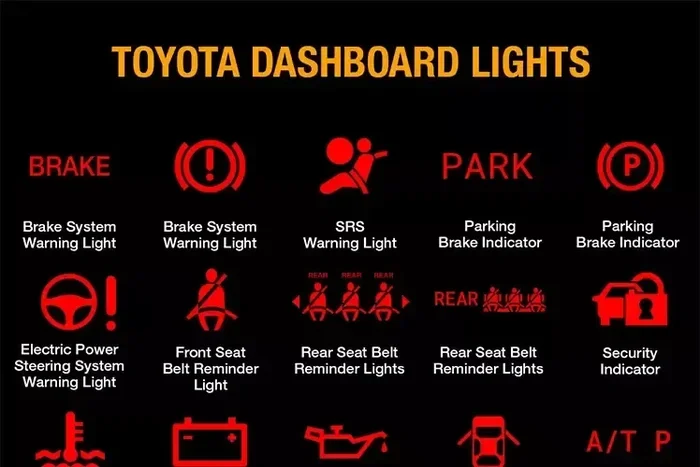
Your Camry’s dashboard has several warning lights. Each one communicates something different. For instance, if the VSC light comes on, you might wonder whether it is safe to drive with the VSC light on. The answer is usually yes, but you should get it checked soon. Understanding your dashboard lights helps you respond appropriately and avoid unnecessary worry.
Store Your Camry Properly
If you do not drive your Camry every day, proper storage matters. Keep the battery charged, tires inflated, and the car covered when possible. These small steps extend the life of your vehicle significantly.
With the right care, your 2016 Camry can easily surpass 200,000 miles. Many owners report that their Camrys run strong well past the 300,000-mile mark. The key is consistency. Small, regular maintenance efforts add up to big savings over time.
When to See a Professional
There are times when resetting the maintenance light is not enough. If the light keeps coming back after a proper reset, something else may be going on. Here are signs you should visit a professional:
- The maintenance light returns immediately after a reset.
- Other warning lights appear alongside the maintenance light.
- You notice unusual sounds, smells, or performance issues.
- The oil pressure light or check engine light is also on.
- Your Camry is due for a major service like a timing belt replacement.
A trusted mechanic can run diagnostic tests and identify hidden problems. Many auto parts stores offer free code reading for check engine lights. This can give you a head start before visiting a shop. If you need to read ABS codes without a scanner, some basic OBD-II readers are affordable and easy to use.
Also, if you are considering a major repair or service, it is worth getting a second opinion. You can take your Toyota to any dealer for service or visit an independent mechanic. Both options have their merits. Dealerships have factory-trained technicians and OEM parts, while independent shops often charge less for labor.
Remember, the maintenance light is a reminder, not an emergency. But staying on top of your Camry’s service needs keeps it safe, reliable, and efficient for the long haul.
Conclusion
Resetting the maintenance light on a 2016 Toyota Camry is one of the simplest things you can do as a car owner. With just a few button presses, you can clear the reminder and get back on the road. Whether you use the steering wheel controls or the instrument panel buttons, the process takes less than five minutes.
But resetting the light is only part of the equation. True car care means staying consistent with oil changes, fluid checks, and regular inspections. Your Camry is built to go the distance, and proper maintenance is what makes that possible. Many owners find that their Camry serves them well for decades, and that starts with paying attention to those small reminders.
We hope this guide has given you the confidence to handle the reset yourself. If you ever feel unsure, a quick visit to any mechanic can take care of it. The most important thing is that you do not ignore the light. Address it promptly, reset it correctly, and keep your 2016 Toyota Camry running at its best.
Frequently Asked Questions
Can I drive my 2016 Toyota Camry with the maintenance light on?
Yes, the maintenance light is not an emergency warning. It simply reminds you that your car is due for routine service. You can drive safely, but try to reset the light or visit a service center soon to stay on schedule with your oil changes and inspections.
How often should I reset the maintenance light on my Toyota Camry?
You should reset the light every time you complete a service, such as an oil change or tire rotation. This keeps the system accurate and ensures you do not miss any upcoming maintenance intervals. Most Camry owners reset the light every 5,000 to 7,500 miles.
Will resetting the maintenance light affect my Toyota warranty?
No, resetting the maintenance light has no effect on your warranty. The light is simply a reminder tool. However, keeping records of your actual service appointments is important for warranty claims. Always service your vehicle at the recommended intervals regardless of the light.
What is the difference between the maintenance light and the check engine light?
The maintenance light is a routine service reminder and is not a cause for concern. The check engine light signals a potential problem with the engine or emissions system and requires diagnostic attention. If both lights are on, address the check engine light first.
Can I reset the maintenance light without starting the engine?
Yes, you only need to turn the ignition to the ON position. You do not need to start the engine. In fact, starting the engine during the reset process can interrupt it. Keep the ignition in ON mode throughout the entire reset procedure.
Why does the maintenance light keep coming back after I reset it?
If the light returns immediately, you may not have completed the reset correctly. Try the process again and make sure you hold the buttons for the full duration. If the light keeps returning after multiple attempts, there may be a system issue that a professional should inspect.