Car Mein Music Baja Kaise Bajaye Best Tips aur Tricks
Car mein music baja kaise bajaye is a common question among car owners who want a better driving experience. This guide covers Bluetooth connection, USB methods, FM radio, and speaker upgrades to help you enjoy great sound on every ride. You will learn practical tips, expert tricks, and easy fixes for common car audio problems.
Driving a car feels incomplete without good music. Whether you are on a long road trip or stuck in traffic, car mein music baja can turn a boring ride into an enjoyable experience. Many car owners want to play their favorite songs but do not know the right way to set up their car audio system.
This guide will teach you car mein music baja kaise bajaye step by step. We will cover Bluetooth, USB cables, FM radio, and even speaker upgrades. You will also learn quick fixes for common car audio problems and expert tips to get the best sound quality. By the end of this article, you will know exactly how to make your car music system sound amazing.
The good news is that you do not need expensive equipment to start. Most of the tips we share are free and easy to follow. So let us dive right in and explore how you can play music in your car like a pro.
Key Takeaways
- Bluetooth Connection: The easiest and most popular way to play music wirelessly in your car.
- USB and Aux Cable: Reliable backup methods that work with almost every car stereo.
- FM Radio and Apps: Free alternatives that give you access to music and radio stations.
- Speaker Upgrade: Swapping stock speakers can dramatically improve your car music quality.
- Equalizer Settings: Small tweaks to your car audio settings can make a big difference in sound.
- Common Fixes: Simple solutions for Bluetooth issues, low volume, and distorted sound.
- Regular Maintenance: Keeping your car audio system clean and updated ensures long-lasting performance.
📑 Table of Contents
Car Music System Kaise Kaam Karta Hai
Before we learn how to baja music car mein, it helps to understand how your car music system works. A basic car audio setup has a few key parts that work together to produce sound. Let us look at each part.
Car Stereo Ka Basic Structure
The car stereo is the brain of your music system. It receives audio signals and sends them to the speakers. Modern car stereos come with Bluetooth, USB ports, and FM radio built in. Older cars may only have a basic radio or an aux input.
Here are the main parts of a car stereo system:
- Head Unit: This is the front panel where you control the music. It has buttons, a screen, and sometimes a touchscreen.
- Amplifier: This boosts the audio signal so your speakers can produce louder and clearer sound.
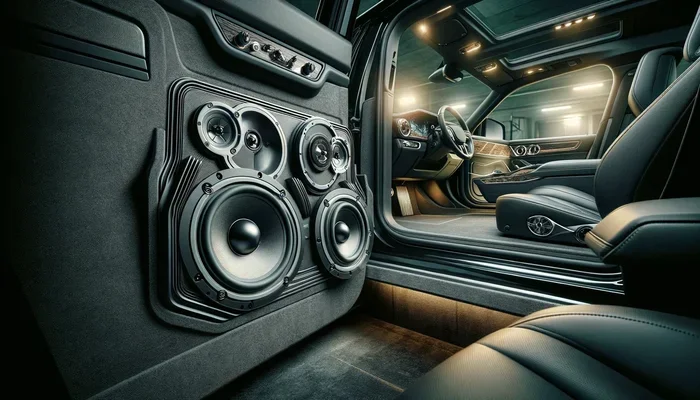
- Speakers: These are the drivers that actually create the sound you hear inside the car.
- Wiring: Cables connect all the parts together and carry the audio signal from one component to another.
When you understand these parts, it becomes easier to troubleshoot any issues. For example, if your car music volume is low, the problem could be with the amplifier, the speakers, or even the head unit settings.
Different Types of Car Music Players
Not all car music systems are the same. Different cars come with different types of music players. Here are the most common ones you will find:
- CD Players: Older cars often have CD players. You can insert a disc and listen to your favorite albums.
- Radio FM/AM: Almost every car has an FM radio. You can tune into local radio stations and listen to music for free.
- Bluetooth Systems: Most modern cars support Bluetooth. You can connect your phone wirelessly and stream music directly.
- USB Ports: Many cars have a USB port where you can plug in your phone or a flash drive with music files.
- Aux Input: An aux cable is a simple 3.5mm jack that connects your phone to the car stereo.
- Apple CarPlay and Android Auto: These are smart systems that let you use phone apps directly on your car screen.
Knowing which type your car has will help you choose the best method to car mein music baja kaise bajaye. Each method has its own advantages, and we will explore all of them in detail below.
Car Mein Music Baja Kaise Bajaye
Now let us get to the main part. Here are the different ways you can play music in your car. Each method works well, so you can pick the one that suits your car and your needs.
Bluetooth Se Music Connect Karein
Bluetooth connection is the most popular way to play music in modern cars. It is wireless, easy to use, and works with almost all smartphones. Here is how you can set it up.
First, turn on Bluetooth on your phone. Then go to your car stereo settings and look for the Bluetooth option. Put your car stereo in pairing mode. Your phone should detect the car system. Tap on the car name to connect.
Once connected, you can open any music app on your phone and the sound will play through your car speakers. You can also take calls using the car system if it supports that feature.
Here are some quick tips for a better Bluetooth experience:
- Keep your phone close to the car stereo for a stable connection.
- Turn off Bluetooth on other devices that might interfere.
- Clear paired devices from your car stereo if you are having connection issues.
- Update your phone software to the latest version for better performance.
Bluetooth car audio has improved a lot over the years. Modern versions like Bluetooth 5.0 offer better sound quality and longer range. If your car supports it, you will notice a big difference in clarity.
USB Aur Aux Cable Se Music Bajaayein
If your car does not have Bluetooth or if you prefer a wired connection, USB and aux cables are great options. These methods give you a direct and stable connection.
Using a USB cable: Plug one end into your phone and the other into your car stereo. Your car should recognize your phone as a media device. You can then browse your music library directly on the car screen and select songs to play.
Using an aux cable: This is the simplest method. Plug the 3.5mm jack into your phone and the other end into the aux input on your car stereo. Select the aux mode on your car and start playing music on your phone.
Both methods work reliably. The USB method also charges your phone while you play music, which is a nice bonus on long drives. The aux cable method works with almost any device, even old MP3 players.
FM Radio Aur Car Music Apps Ka Use
If you do not have your phone with you, FM radio is a reliable backup. Most car stereos have an FM radio tuner built in. You can scan for available stations and listen to music, news, and talk shows.
To use FM radio, press the radio button on your car stereo. Use the seek or scan function to find stations. You can save your favorite stations for quick access later.
Another great option is to use car music apps on your phone. Apps like Spotify, Gaana, JioSaavn, and YouTube Music give you access to millions of songs. You can download playlists for offline listening too. This is perfect for areas with poor network coverage.
Some popular car music apps also have a feature that adjusts the music based on your driving speed. This adds a fun and dynamic element to your ride.
Car Music Quality Improve Karne Ke Best Tips
Playing music is one thing, but making it sound great is another. Here are some proven tips to improve your car music quality without spending a fortune.
Car Speaker Upgrade Karein
The stock speakers that come with most cars are basic and not designed for great sound. Upgrading your car speakers is one of the best ways to improve music quality. You do not need to spend a lot of money either.
A good set of speakers in the range of 2000 to 5000 rupees can make a noticeable difference. Look for speakers with good power handling and frequency response. Brands like JBL, Pioneer, and Sony offer reliable options for car audio upgrades.
Here are some tips for choosing the right speakers:
- Check the size of your existing speakers before buying new ones.
- Choose speakers that match your car stereo power output.
- Consider coaxial speakers for easy installation or component speakers for premium sound.
- Read reviews and ratings before making a purchase.
Equalizer Settings Optimize Karein
Your car stereo has an equalizer or EQ setting. This lets you adjust the bass, midrange, and treble to match your music preferences. Most people never touch this setting, but it can make a huge difference.
For bass-heavy music like hip hop and EDM, boost the low frequencies. For vocals and acoustic music, focus on the midrange. For pop and rock, try a balanced setting with a slight boost in the treble.
You can also find car music equalizer presets online. These are pre-made settings designed for different music genres. Try a few presets and then fine-tune them to your liking. The goal is to find a setting that sounds natural and pleasing to your ears.
Car Interior Acoustic Tips
Did you know that your car interior affects music quality? The materials inside your car can absorb or reflect sound waves, changing how your music sounds. Here are a few simple tricks:
- Add sound-dampening mats to your car doors and floor. These reduce outside noise and improve sound clarity.
- Keep your car windows closed while playing music for better bass response.
- Avoid placing items on your dashboard that can vibrate and create unwanted noise.
- Clean your speakers regularly. Dust buildup can affect sound quality over time.
Common Car Music Problems Aur Unka Solution
Even with the best setup, you might face some issues. Here are the most common problems people face when they try to car mein music baja and how to fix them.
Bluetooth Connection Issues
Bluetooth problems are very common. Your phone might not connect, or the connection might keep dropping. Here is what you can do:
- Turn off Bluetooth on both your phone and car stereo, then turn them back on.
- Delete the car stereo from your phone’s Bluetooth list and pair it again.
- Make sure your phone is not too far from the car stereo.
- Check if another device is already connected to the car stereo and disconnect it first.
- Restart both your phone and your car to refresh the connection.
If the problem still continues, your car stereo’s Bluetooth module might need a firmware update. Check your car manufacturer’s website for updates.
Low Volume Problem
If your car music volume is low, there could be several reasons. First, check if your phone volume is turned up all the way. Then check the car stereo volume. Some cars also have a separate setting for media volume that you might need to adjust.
Another common cause is a faulty aux cable or USB cable. Try using a different cable to see if the volume improves. If you have an amplifier in your car, make sure it is turned on and set to the correct gain level.
Distorted Sound Fix
Distorted or crackling sound is frustrating. This usually happens when the volume is too high and the speakers are being pushed beyond their limits. Try lowering the volume and see if the distortion goes away.
If distortion happens at all volumes, check your wiring. Loose or damaged cables can cause static and crackling sounds. Also, make sure your speaker connections are secure and not touching any metal parts that could cause interference.
Expert Tips For Car Music Lovers
Here are some advanced tips that car audio enthusiasts use to get the best sound experience.
Best Car Music Apps
Choosing the right music app can improve your listening experience significantly. Here are some of the best apps for car music:
- Spotify: Great for streaming and offline playlists. The sound quality is excellent.
- Gaana: Popular in India with a large library of Bollywood and regional music.
- JioSaavn: Offers high-quality audio and a wide range of genres.
- YouTube Music: Good for finding remixes and rare tracks.
- Podcast Apps: Apps like Pocket Casts are great for listening to podcasts during long drives.
Pro tip: Download your playlists for offline listening before you start your journey. This way, you will not face any buffering or network issues while driving.
Car Music System Maintenance Tips
Your car audio system needs regular care to perform at its best. Here are some maintenance tips:
- Clean your stereo screen and buttons regularly with a soft cloth.
- Check your cables for wear and tear every few months.
- Update your car stereo firmware when new updates are available.
- Do not leave your phone connected to the car stereo when the engine is off, as it can drain your phone battery.
- Store your aux and USB cables properly to prevent damage.
Taking care of your car audio system will extend its life and keep your music sounding great for years to come.
Car Mein Music Baja Kaise Bajaye: Quick Comparison
Here is a quick comparison of the different methods to play music in your car:
| Method | Pros | Cons | Best For |
|---|---|---|---|
| Bluetooth | Wireless, easy to connect, no cables needed | Can have connection drops, slight audio delay | Daily commuting and casual listening |
| USB Cable | Stable connection, charges phone, good sound quality | Cable length limits movement, phone needs to be connected | Long drives and navigation use |
| Aux Cable | Simple, works with any device, no setup needed | Cable can tangle, no charging, basic sound quality | Quick and easy connection |
| FM Radio | Free, no phone needed, works everywhere | Limited to radio stations, ads and interruptions | When phone is not available |
| Car Music Apps | Huge music library, offline mode, custom playlists | Needs internet or downloaded content | Music lovers who want variety |
Each method has its strengths. The best approach is to use Bluetooth for daily driving and keep a USB cable or aux cable as a backup. This way, you are always prepared no matter what situation you are in.
Conclusion
Car mein music baja kaise bajaye is a skill every car owner should have. With the right setup and a few simple tips, you can transform your driving experience. Whether you use Bluetooth, USB, aux cable, or FM radio, the key is to find what works best for your car and your preferences.
We covered everything from setting up your car music system to improving car music quality with speaker upgrades and equalizer settings. We also shared practical fixes for common problems like Bluetooth issues, low volume, and distorted sound.
Remember to maintain your car audio system regularly and explore car music apps to keep your playlists fresh and exciting. The goal is not just to play music but to enjoy every note and every beat during your drive.
Start with one or two tips from this guide today. You will notice the difference immediately. Happy listening and safe driving!
Frequently Asked Questions
Can I play music in my car without Bluetooth?
Yes, you can use a USB cable, aux cable, or FM radio to play music without Bluetooth. These are simple and reliable alternatives that work with almost every car stereo system.
Why is my car music volume so low?
Low volume can be caused by a faulty cable, low phone volume, or incorrect car stereo settings. Try using a different cable, check your phone and car volume levels, and make sure the aux or USB mode is selected correctly on your car stereo.
What is the best car music app for offline listening?
Spotify, Gaana, and JioSaavn all offer excellent offline download features. You can download your favorite playlists and songs before your drive and enjoy them without needing an internet connection.
How can I improve my car speaker sound quality?
Upgrading your car speakers is the most effective way to improve sound quality. You can also adjust the equalizer settings on your car stereo, add sound-dampening mats, and keep your speakers clean for better performance.
Is it safe to use Bluetooth while driving?
Yes, Bluetooth is safe to use while driving. It allows you to play music and take calls hands-free. However, always set up your connection before you start driving to avoid distractions on the road.
Can I install a car amplifier myself?
While it is possible to install a car amplifier yourself, it is recommended to get professional help. A proper installation ensures safe wiring, good sound quality, and avoids damage to your car electrical system.