How to Change Time in BMW 5 Series Your Complete Guide
Changing the time in your BMW 5 Series is simple once you know where to look. Whether you drive a newer model with the iDrive system or an older version with a manual setup, this guide walks you through every method. You will learn how to adjust the clock, change the time zone, and fix common issues that prevent your BMW 5 Series clock from updating correctly.
This is a comprehensive guide about How to Change Time in BMW 5 Series.
Key Takeaways
- Multiple Methods Available: You can change the time through the iDrive system, the instrument cluster, or the automatic GPS time sync feature.
- Works Across All Model Years: From the F10 to the G38 generation, the process is similar with minor menu differences.
- Auto Time Sync Is a Game Changer: BMW 5 Series models with GPS can automatically update the time based on your location.
- Common Issues Are Fixable: A dead battery or faulty module often causes the clock to reset or display the wrong time.
- No Special Tools Needed: You do not need any dealer equipment to adjust the time on your BMW 5 Series.
[FEATURED_IMAGE_PLACEHOLDER]
Why Getting the Time Right in Your BMW 5 Series Matters
Your BMW 5 Series is more than just a car. It is a machine packed with technology designed to make your life easier. One small but important detail that often gets overlooked is the clock. You rely on it for navigation timing, scheduling, and even tracking your daily drives.
When the time is wrong, it throws off your whole experience. The navigation system gives you wrong arrival times. Your scheduled maintenance reminders show up at the wrong hour. Even your radio presets and comfort settings can feel off when the clock does not match your real-world time.
Changing the time in BMW 5 Series models is straightforward, but the exact steps depend on your model year and the iDrive version you have. Newer models from 2017 onward use the latest iDrive system, which makes the process even easier. Older models from the F10 generation (2010-2017) require a few extra steps, but it is still very doable at home.
In this guide, we will cover every method. You will learn how to manually set the time, how to enable automatic time updates, and what to do when the clock refuses to cooperate. Let us dive right in.
Understanding Your BMW 5 Series Clock System
How the BMW 5 Series Clock Works
The clock in your BMW 5 Series is connected to several systems. It talks to the infotainment center, the instrument cluster, and sometimes even the GPS module. This is why you have multiple ways to adjust it. The clock also syncs with your time zone, which is helpful when you travel across regions.
Here is a quick look at the components involved:
- iDrive Controller: The main interface for accessing clock settings in newer models.
- Instrument Cluster: Displays the time on the dashboard and allows quick adjustments in some models.
- GPS Module: Automatically updates the time based on your location and satellite data.
- Real-Time Clock (RTC): The internal battery-powered clock that keeps running even when the car is off.
Understanding these parts helps you troubleshoot when something goes wrong. For example, if your BMW 5 Series clock keeps resetting, the issue is often the RTC battery or a power loss to the system.
Which BMW 5 Series Model Year Do You Have?
The process varies slightly depending on your model year. Here is a quick breakdown:
- F10 Generation (2010-2017): Uses iDrive 5 or iDrive 6. Clock settings are found under the vehicle setup menu.
- G38 Generation (2017-Present): Uses the newer iDrive 7 or iDrive 8 system. The clock is more accessible and offers auto-sync features.
- Older E60 Generation (2003-2010): Has a simpler display. Clock adjustment is done through the on-board computer menu.
Knowing your model year helps you follow the right steps. If you are unsure, check your owner manual or look at the iDrive version on your system.
How to Change Time in BMW 5 Series Using the iDrive System
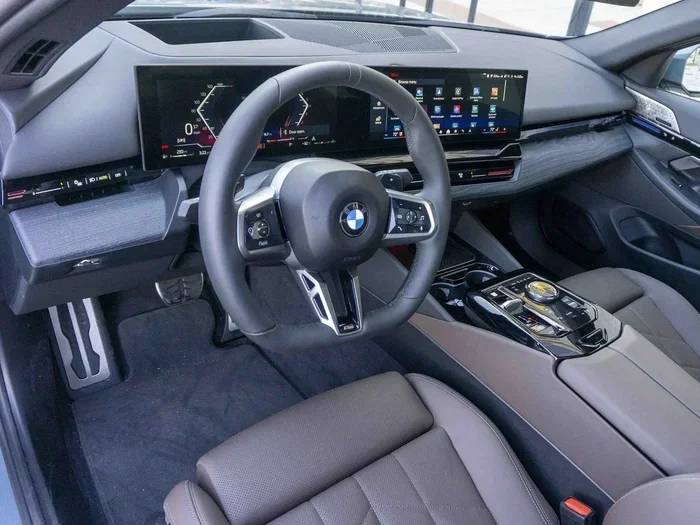
The iDrive system is the brain of your BMW 5 Series. It controls everything from climate settings to navigation. Changing the time through iDrive is the most common method, and it works across most model years.
Step-by-Step Instructions for iDrive 7 and Newer
Follow these steps to adjust the clock on newer BMW 5 Series models:
- Press the Home Button: This brings up the main iDrive menu on your BMW digital display.
- Navigate to Settings: Use the controller to scroll to the Settings icon. It looks like a gear.
- Select Vehicle Settings: Tap on this option to access vehicle-specific controls.
- Choose Date and Time: You will see options for the clock, time zone, and automatic time sync.
- Adjust the Time: Use the controller to set the hour and minute. Confirm your selection.
- Set the Time Zone: If you travel often, enabling auto time zone detection saves you hassle.
That is it. Your BMW 5 Series clock should now display the correct time. The change takes effect immediately.
Steps for iDrive 5 and iDrive 6 (F10 Models)
Older iDrive versions have a slightly different menu layout, but the process is very similar:
- Press the Menu Button: On the iDrive controller, press the menu button to open the main options.
- Go to Vehicle Settings: Scroll down and select the vehicle or settings option.
- Find the Clock Setting: Look for a section labeled “Time” or “Clock” under the vehicle menu.
- Enter the Setup Mode: You may need to press the setup or confirm button to enter adjustment mode.
- Change the Hours and Minutes: Use the controller to scroll through the digits and set the correct time.
- Save and Exit: Press the confirm button to save your changes and exit the menu.
If you find the menus confusing, do not worry. BMW designed these systems to be intuitive once you get used to them. The key is to look for the gear icon or the settings menu on your BMW 5 Series infotainment system.
Using the Instrument Cluster to Adjust the Time
Some BMW 5 Series models let you adjust the time directly from the instrument cluster. This is a quick method if you do not want to dig through the iDrive menus. However, not all models support this feature.
How to Access the Clock via the Instrument Cluster
On certain F10 and G38 models, you can use the steering wheel controls to access the clock quickly:
- Pull the Left Steering Wheel Lever: This opens the on-board computer menu.
- Scroll to the Clock Section: Use the arrow buttons on the steering wheel to navigate.
- Select the Time Option: Press the button to enter the time adjustment screen.
- Adjust Using the Buttons: Use the up and down arrows to change the hour and minute values.
- Confirm the Change: Press the confirm button to save the new time.
This method is perfect for quick adjustments when you are parked at a gas station or waiting in your driveway. It is faster than navigating through the full iDrive system.
Pro Tip: If you want to adjust the clock BMW drivers without using the iDrive screen, this instrument cluster method is your best bet. It works on most models from 2010 onward.
Enabling Automatic Time Sync on Your BMW 5 Series
One of the best features of the modern BMW 5 Series is automatic time synchronization. This feature uses your GPS location to set the correct time and time zone automatically. Once enabled, you never have to worry about adjusting the clock manually again.
How to Enable Automatic Time Sync
Here is how you can turn on this helpful feature:
- Go to the iDrive Settings Menu: Follow the same steps as the manual method above to reach the settings.
- Select Date and Time: Find the time settings section in the vehicle menu.
- Toggle Auto Time Sync: Look for an option labeled “Automatic Time” or “Sync with GPS.”
- Enable the Feature: Switch it on and wait a few seconds for the system to lock onto the correct time.
Once enabled, your BMW 5 Series will update the time whenever you start the car. This is especially useful if you frequently drive across time zones. The system detects your location and adjusts accordingly.
When Automatic Sync Does Not Work
Sometimes the auto sync feature fails. This can happen for several reasons:
- GPS Signal Lost: If you are in a tunnel or underground parking, the system cannot sync.
- Software Glitch: A minor software issue can prevent the GPS module from communicating with the clock.
- Factory Reset Needed: If you recently reset your iDrive system, the auto sync setting may have been turned off.
In most cases, restarting the iDrive system fixes the problem. Simply turn off the car, wait 30 seconds, and restart it. If the issue persists, you may need to visit a service center.
Troubleshooting Common BMW 5 Series Clock Problems
Even with a straightforward system like the BMW 5 Series clock, things can go wrong. Here are the most common issues and how to fix them.
The Clock Resets Every Time You Turn Off the Car
This is one of the most frustrating problems. If your clock resets to a default time every time you start the car, the culprit is usually a dying RTC battery. The Real-Time Clock has a small battery that keeps it running when the car is off. When this battery dies, the clock loses its memory.
To fix this, you will need to replace the RTC battery. This is a simple fix that a mechanic or even a handy DIYer can handle. The battery is usually a small CR2032 coin cell. You can find it at any auto parts store.
Another possible cause is a power drain. If something in your BMW electronics setup is drawing power when the car is off, it can drain the main battery. This can cause the clock to reset along with other settings. If you notice other electrical issues, like your car won’t start in cold weather but battery is good, a parasitic drain might be the real problem.
The Clock Shows the Wrong Time Zone
If your clock is off by exactly one or more hours, the time zone setting is likely wrong. This is common if you recently moved or traveled. Simply go into the iDrive settings and update your time zone. If you have auto sync enabled, the system should handle this automatically.
The Clock Won’t Change at All
If the clock is frozen and will not budge, try these steps:
- Restart the iDrive System: Hold down the power button on the infotainment screen for 10 seconds. The system will reboot.
- Check for Software Updates: BMW occasionally releases updates that fix clock-related bugs.
- Inspect the Fuse: A blown fuse related to the instrument cluster can prevent the clock from working.
- Visit a Dealer: If none of the above works, a dealer can run diagnostics to find the issue.
Most clock problems in the BMW 5 Series are easy to fix at home. Only in rare cases do you need professional help.
Comparing Manual vs. Automatic Time Setting Methods
Both manual and automatic methods have their advantages. Here is a quick comparison to help you decide which approach works best for you:
| Feature | Manual Setting | Automatic GPS Sync |
|---|---|---|
| Ease of Use | Requires a few steps each time | Set once and forget it |
| Accuracy | Depends on your input | Always correct based on GPS |
| Time Zone Handling | Must be changed manually | Updates automatically |
| Works Without GPS | Yes | No |
| Best For | Older models or simple setups | Newer models with GPS capability |
Most BMW 5 Series owners prefer the automatic method. It saves time and eliminates the hassle of manual adjustments. However, if your model does not support GPS sync, the manual method works just fine.
Quick Tips for Maintaining Your BMW 5 Series Clock
Keeping your BMW 5 Series clock accurate does not require much effort. Here are some quick tips that help:
- Keep Your GPS Active: A strong GPS signal ensures the clock stays synced at all times.
- Replace the RTC Battery Every 3-5 Years: This prevents unexpected clock resets.
- Avoid Fully Draining the Battery: A completely dead car battery can reset all your settings, including the clock.
- Check for Software Updates: BMW releases updates that improve system stability, including clock accuracy.
- Note Your Time Zone Settings: After a software reset or battery replacement, double-check your time zone.
These small habits keep your clock running smoothly. They also help prevent the kinds of issues that send people searching for fixes online.
When to Seek Professional Help for Your BMW 5 Series Clock
Most clock issues are easy to handle at home. But there are times when professional help is the right call. If you have tried restarting the system, replacing the RTC battery, and checking the fuses, and the clock still does not work, it is time to see an expert.
A BMW dealership or qualified mechanic can run a full diagnostic scan. They can check the iDrive module, the instrument cluster, and the GPS receiver all at once. This saves you time and frustration. If you are wondering whether you can take your BMW to any dealer for service, the answer is generally yes for BMW-specific issues, but independent shops can also handle clock repairs.
Keep in mind that some issues, like a faulty instrument cluster, may require reprogramming or replacement. These are more involved repairs, but a professional can handle them efficiently.
Final Thoughts
Knowing how to change time in BMW 5 Series models is a simple skill that pays off every day. Whether you use the iDrive system, the instrument cluster, or the automatic GPS sync, the process is quick and user-friendly. Most BMW 5 Series owners can adjust the clock in under two minutes once they know where to look.
The key is to understand your specific model year and iDrive version. Newer models offer more convenience with auto sync, while older models require a bit more manual input. Either way, the steps are clear and easy to follow.
If you run into issues, start with the basics. Restart the system, check the battery, and verify your settings. Nine times out of ten, these simple steps solve the problem. Your BMW 5 Series clock will be back on track in no time.
Take a few minutes today to check your clock settings. It is one of those small things that makes a big difference in your daily driving experience. Your BMW 5 Series is a precision machine, and keeping the time accurate is a small part of keeping it running at its best.
Frequently Asked Questions
Can I change the time on my BMW 5 Series without using the iDrive screen?
Yes, on most models you can use the instrument cluster and steering wheel controls to adjust the time. Simply pull the left steering wheel lever to access the on-board computer, scroll to the clock section, and use the arrow buttons to make changes. This works on F10 and G38 models from 2010 onward.
Why does the clock in my BMW 5 Series keep resetting?
The most common cause is a dying RTC battery. This small battery powers the internal clock when the car is off. When it weakens, the clock loses its memory and resets to a default time. Replacing the battery is inexpensive and usually solves the problem right away.
Does the BMW 5 Series automatically update the time when I travel to a different time zone?
Yes, if you have the automatic time sync feature enabled, your BMW 5 Series uses GPS data to detect your location and update the time zone accordingly. This feature is available on models from 2017 onward with iDrive 7 or newer. Make sure the feature is turned on in your vehicle settings.
How long does it take to change the time in a BMW 5 Series?
The entire process takes less than two minutes. Whether you are using the iDrive system or the instrument cluster, the steps are straightforward. If you have never done it before, give yourself a few extra minutes the first time to familiarize yourself with the menus.
Can a dead car battery affect the clock settings on my BMW 5 Series?
Yes, a dead or weak car battery can reset your clock along with other electronic settings. When the battery loses power completely, the system forgets saved data like the time, time zone, and radio presets. Keeping your battery healthy and avoiding deep discharges helps preserve these settings.
Do I need to reset anything after changing the time on my BMW 5 Series?
No, there is no reset required after changing the time. The new time takes effect immediately once you confirm it. However, if you also replaced the RTC battery or the car battery, you may need to recheck the time after a few days to make sure it is holding correctly.
=== CONCLUSION ===
Changing the time in your BMW 5 Series is a quick and easy task that anyone can do. Whether you prefer the iDrive menu, the instrument cluster controls, or the automatic GPS sync, BMW gives you multiple ways to get it right. The steps are simple, the tools you need are already in your car, and the results are immediate.
Remember to check your time zone settings if you travel, and consider replacing the RTC battery every few years to prevent annoying clock resets. These small maintenance steps keep your BMW 5 Series running smoothly and your dashboard looking sharp. If you ever run into persistent issues, a quick visit to a service professional can sort things out in no time.