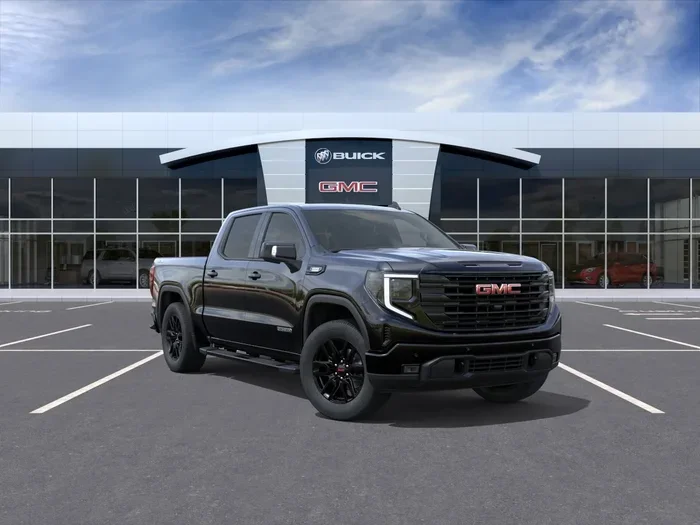
How to Engage 4 Wheel Drive on Your GMC Sierra Truck
Engaging 4 wheel drive on your GMC Sierra is simple once you understand the system. Whether you drive a Sierra 1500, 2500, or 3500, this guide walks you through every step. You will learn about 4WD high, 4WD low, automatic 4WD, and how to shift between modes safely. Follow our tips to avoid common mistakes and get the most from your truck’s drivetrain.
Owning a GMC Sierra means you have a powerful truck built for work and play. One of the best features of the Sierra is its 4 wheel drive system. Whether you are heading down a muddy trail or navigating a snowy highway, knowing how to engage 4 wheel drive on your GMC Sierra makes a huge difference. This guide breaks down everything you need to know in plain, simple language.
The 4WD system on a Sierra truck is not complicated, but it does require a bit of understanding. You need to know which mode to use, when to shift, and how to avoid damaging your drivetrain. In this article, we will walk you through every step. By the end, you will feel confident engaging your Sierra’s 4WD system anytime you need it.
We will cover the different 4WD modes, the step-by-step process for engaging them, and helpful tips to keep your system running strong. We will also compare the Sierra’s 4WD setup with other popular trucks to give you broader context. Let us get into it.
Key Takeaways
- Know Your System: GMC Sierra trucks use electronic shift-on-the-fly 4WD systems that are easy to operate from the dashboard.
- 4WD High vs. Low: Use 4WD high for highway and loose surfaces, and 4WD low for serious off-road crawling and steep terrain.
- Speed Matters: Always slow down to a safe speed before shifting into 4WD to protect your drivetrain.
- Automatic 4WD Is Convenient: The auto mode lets the Sierra switch between 2WD and 4WD based on traction needs.
- Avoid Common Mistakes: Never engage 4WD on dry pavement at high speed, and always return to 2WD when driving on normal roads.
- Maintenance Matters: Regularly check your transfer case fluid and front axle engagement for smooth 4WD operation.
- Compare With Other Trucks: If you are curious how other truck 4WD systems work, explore guides on whether Toyota Tacomas are four-wheel drive and whether Toyota 4Runners are all-wheel drive for a broader perspective.
📑 Table of Contents
- Understanding the GMC Sierra 4 Wheel Drive System
- Step-by-Step Guide to Engaging 4 Wheel Drive
- Common Mistakes When Engaging 4WD on a GMC Sierra
- When Should You Use 4WD on Your GMC Sierra?
- Maintenance Tips for Your GMC Sierra 4WD System
- Comparing the GMC Sierra 4WD System With Other Trucks
- Quick Tips for Engaging 4WD on Your GMC Sierra
- Final Thoughts
Understanding the GMC Sierra 4 Wheel Drive System
Before you engage 4 wheel drive, it helps to understand how the system works on a GMC Sierra. The Sierra uses an electronic shift-on-the-fly 4WD system. This means you can change modes while driving, as long as you follow the right speed guidelines. The system sends power to all four wheels instead of just the rear wheels, giving you better grip and control.
How the Transfer Case Works
The transfer case is the brain of your 4WD system. It takes power from the engine and splits it between the front and rear axles. On a GMC Sierra, the transfer case has different positions. These include 2HI, 4HI, 4LO, and sometimes Auto 4WD. Each position changes how power flows through the drivetrain. When you are on dry pavement in 2WD, only the rear wheels get power. When you shift into 4WD, the front axle engages too.
Difference Between 4WD High and 4WD Low
Understanding the difference between 4WD high and 4WD low is essential. Here is a quick breakdown:
- 4WD High (4HI): This mode is for driving on loose surfaces like gravel, mud, snow, or sand. You can use it at normal driving speeds, usually up to 55 mph. It gives you extra traction without slowing down your truck too much.
- 4WD Low (4LO): This mode is for slow-speed, high-torque situations. Think rock crawling, steep inclines, or deep mud. In 4LO, the truck moves much slower but with significantly more torque. You should keep your speed under 10 to 15 mph in this mode.
Knowing when to use each mode will protect your drivetrain and improve your driving experience. For more insight into how other trucks handle 4WD, check out our guide on whether Toyota Tacomas are four-wheel drive to compare systems across brands.
Step-by-Step Guide to Engaging 4 Wheel Drive
Now let us get into the practical part. Engaging 4 wheel drive on your GMC Sierra is straightforward. Follow these steps carefully to ensure a smooth and safe shift.
Step 1: Find the 4WD Controls
On most GMC Sierra models, the 4WD controls are located on the dashboard or the center console. Newer models have a rotary dial or a push-button panel. Older models may have a manual shifter lever on the floor. Look for labels like 2HI, 4HI, 4LO, or Auto. If you are unsure where your controls are, check your owner’s manual. It will have a detailed diagram showing the exact location.
Step 2: Slow Down to a Safe Speed
This is the most important step. Before shifting into any 4WD mode, you need to slow down. The recommended speed is usually under 60 mph for shifting into 4HI. For 4LO, slow down to under 15 mph. Shifting at too high a speed can damage the transfer case and other drivetrain components. Always come to a complete stop if you are unsure about the speed.
Step 3: Engage the Mode You Need
Once you are at a safe speed, turn the dial or press the button for your desired mode. Here is what each mode does:
- 2HI: Standard driving on paved roads. Only the rear wheels receive power.
- Auto 4WD: The system automatically engages 4WD when it detects lost traction. This is great for unpredictable weather conditions.
- 4HI: Engages all four wheels for improved traction on loose or slippery surfaces.
- 4LO: Engages 4WD with a low gear ratio for maximum torque at slow speeds.
You will usually hear a click or feel a slight shift when the system engages. Wait a few seconds before accelerating to let the system fully lock in.
Step 4: Confirm the Mode Is Engaged
After shifting, check your dashboard display. The Sierra has a message center that shows the current drivetrain mode. You should see 4HI or 4LO displayed on the screen. If you do not see the confirmation, try the shift again. Sometimes the system needs a moment to register the change.
Step 5: Return to 2WD When Done
Once you are back on normal roads, shift back to 2HI or Auto. Driving in 4WD on dry pavement for extended periods can cause drivetrain binding and unnecessary wear. This is a common mistake that many new Sierra owners make. Get into the habit of returning to 2WD as soon as conditions allow.
Common Mistakes When Engaging 4WD on a GMC Sierra
Even experienced truck owners can make mistakes with their 4WD system. Here are the most common errors and how to avoid them.
Shifting at Too High a Speed
One of the biggest mistakes is shifting into 4WD while driving too fast. The transfer case gears need time to engage properly. If you try to shift at highway speeds, you risk grinding the gears or damaging the system. Always slow down first. If you are ever in doubt, pull over and stop completely before shifting.
Forgetting to Return to 2WD
Leaving your Sierra in 4WD on dry pavement is another frequent error. The 4WD system locks the front and rear axles together. On dry pavement, this creates resistance that can damage the drivetrain over time. It can also reduce your fuel efficiency. Make it a routine to check your dashboard display after you leave off-road conditions.
Engaging 4LO While on Pavement
4WD Low is designed for off-road use only. Engaging 4LO on pavement can cause severe drivetrain damage. The low gear ratio creates too much torque for paved surfaces, leading to wheel bind and potential component failure. Only use 4LO when you are on loose dirt, gravel, mud, or snow.
Ignoring Warning Lights
If your dashboard shows a 4WD warning light, do not ignore it. The light usually means the system has detected a problem. This could be anything from a faulty transfer case motor to a sensor issue. Continuing to drive with the warning light on can make the problem worse. Have a qualified mechanic check your Sierra as soon as possible.
When Should You Use 4WD on Your GMC Sierra?
Knowing when to engage 4 wheel drive is just as important as knowing how. Here are the best situations to use each mode.
Use 4HI When:
- Driving on wet roads or light snow
- Navigating gravel or dirt roads
- Towing a trailer on uneven terrain
- Driving through shallow water or mud
- Experiencing reduced traction on any surface
Use 4LO When:
- Rock crawling or off-roading over large obstacles
- Driving up or down steep inclines
- Deep mud or sand where you need maximum torque
- Heavy towing in challenging terrain
- Slow-speed off-road maneuvering
Use Auto 4WD When:
- Driving in variable weather conditions
- You want the system to manage traction automatically
- You are not sure which mode to select
The Auto mode is a great feature on newer Sierra models. It takes the guesswork out of 4WD engagement. The system monitors traction and automatically switches between 2WD and 4WD as needed. This is especially helpful during winter driving when conditions can change quickly. If you want to compare how other trucks handle similar drivetrain choices, check out our article on whether Toyota 4Runners are all-wheel drive for a helpful comparison.
Maintenance Tips for Your GMC Sierra 4WD System
Keeping your 4WD system in good shape ensures it works when you need it most. Here are some simple maintenance tips.
Check Transfer Case Fluid Regularly
The transfer case contains fluid that lubricates the gears and keeps everything running smoothly. Over time, this fluid can break down or get contaminated. Check your transfer case fluid every 30,000 miles or as recommended in your owner’s manual. If the fluid looks dark or smells burnt, it is time for a change. Fresh fluid keeps the gears shifting cleanly and reduces wear.
Inspect Front Axle Engagement
When you engage 4WD, the front axle engages to send power to the front wheels. Over time, the engagement mechanism can wear or get dirty. Listen for any unusual clicking or grinding when you shift into 4WD. If you notice any noise, have a technician inspect the front axle and engagement system.
Keep Your Tires Balanced and Aligned
4WD puts extra stress on your tires and drivetrain. Tires that are not properly balanced or aligned can cause vibrations and uneven wear. This is especially true when driving in 4WD mode. Get your tires rotated and aligned regularly to keep your Sierra handling its best.
Service the Differential
Your Sierra has both a front and rear differential that work with the 4WD system. These need regular fluid changes to operate properly. Check your owner’s manual for the recommended service interval. Keeping your differentials well-maintained extends the life of your entire drivetrain.
Comparing the GMC Sierra 4WD System With Other Trucks
The GMC Sierra is not the only truck with a 4WD system. Many popular trucks offer similar capabilities. Understanding how the Sierra compares can help you appreciate its strengths.
For example, the Toyota Tacoma is a popular mid-size truck with its own 4WD system. The Tacoma’s 4WD operates on a similar principle of sending power to all four wheels, but the engagement method and gearing differ. Meanwhile, the Toyota 4Runner uses a full-time 4WD system that provides constant power to all wheels. If you are curious about how the 4Runner’s all-wheel drive setup compares, you can read more about it in our guide on whether Honda Civics are all-wheel drive, which covers AWD systems across different vehicle types.
The GMC Sierra stands out with its electronic shift-on-the-fly system and the convenient Auto 4WD mode. These features make it easy to switch between 2WD and 4WD without stopping. For most drivers, this is the most user-friendly approach to 4WD engagement. The Sierra also offers a two-speed transfer case with 4LO, which gives it serious off-road capability that rivals any truck in its class.
Quick Tips for Engaging 4WD on Your GMC Sierra
Here are some quick tips to keep in mind every time you engage your Sierra’s 4 wheel drive system:
- Always slow down before shifting. Speed is the number one cause of drivetrain damage during 4WD engagement.
- Listen for the engagement click. If you do not hear or feel the shift, the system may not have engaged properly.
- Check the dashboard display. Confirm the mode is active before driving in challenging conditions.
- Do not use 4LO on pavement. This is the fastest way to damage your drivetrain.
- Return to 2WD on normal roads. This protects your drivetrain and improves fuel economy.
- Keep your transfer case fluid fresh. Clean fluid ensures smooth shifting and long component life.
- Practice in a safe, open area. If you are new to 4WD, practice shifting modes in a safe location before you need it in the field.
These simple habits will keep your Sierra’s 4WD system working reliably for years to come. The more familiar you become with the system, the more confident you will feel taking your Sierra off the beaten path.
Final Thoughts
Knowing how to engage 4 wheel drive on your GMC Sierra truck is an essential skill for any Sierra owner. Whether you are heading off-road, towing through rough terrain, or navigating a snowy morning commute, the right 4WD mode gives you the traction and confidence you need. The process is simple: slow down, shift to the appropriate mode, confirm on your dashboard, and drive safely.
Remember to avoid the common mistakes we covered. Do not shift at high speeds, do not leave 4WD engaged on dry pavement, and always return to 2WD when conditions improve. Regular maintenance of your transfer case, differentials, and drivetrain components keeps everything running smoothly.
The GMC Sierra’s 4WD system is one of the best in the truck class. It is intuitive, reliable, and built to handle tough conditions. With the knowledge you have gained from this guide, you are now ready to use your Sierra’s 4WD system with confidence. Get out there and enjoy the full capability of your GMC Sierra.
Frequently Asked Questions
Can I engage 4WD while driving on the highway?
You can shift into 4HI while driving, but you must slow down first. The recommended speed for shifting into 4HI is under 60 mph. Always check your owner’s manual for the exact speed limit for your specific Sierra model. Shifting at too high a speed can damage the transfer case.
What is the difference between Auto 4WD and 4HI on the GMC Sierra?
Auto 4WD lets the system decide when to engage 4WD based on traction conditions. 4HI locks the front and rear axles together for constant four-wheel power. Auto mode is more fuel-efficient and convenient for daily driving, while 4HI gives you full control in challenging conditions.
Can I engage 4LO while the truck is moving?
Yes, but you must be moving very slowly, usually under 5 to 10 mph. The transfer case needs to be in 4HI before you can shift down to 4LO. Always come to a near-stop or slow crawl when engaging 4LO to avoid drivetrain damage.
Why is my 4WD not engaging on my GMC Sierra?
If your 4WD is not engaging, it could be due to a faulty transfer case motor, a bad vacuum actuator, or a sensor issue. Check your dashboard for warning lights. If you see a 4WD warning, have a qualified mechanic diagnose the problem before attempting to use 4WD.
How often should I change my transfer case fluid?
Most GMC Sierra owners should change their transfer case fluid every 30,000 to 60,000 miles. Check your owner’s manual for the exact interval for your model year. Fresh fluid keeps the gears lubricated and prevents premature wear in the transfer case.
Is it bad to drive in 4WD on dry pavement?
Yes, driving in 4WD on dry pavement for extended periods is bad for your drivetrain. The front and rear axles are locked together, which causes binding and unnecessary wear. Always return to 2WD or Auto mode when driving on normal paved roads.
=== CONCLUSION ===
Engaging 4 wheel drive on your GMC Sierra is a straightforward process once you understand the basics. From the dashboard controls to the different modes and the right situations to use them, you now have everything you need to know. Remember to slow down before shifting, confirm the mode on your display, and return to 2WD when you are done. Keep up with your maintenance, and your Sierra’s 4WD system will serve you well for many years. Get out there and make the most of your truck’s incredible capability.