How to Remote Start a GMC Terrain Quickly and Easily
Remote starting your GMC Terrain is simple once you know the right steps. This guide covers everything from key fob setup to troubleshooting common issues. You will learn how to warm up or cool down your truck from anywhere with just the push of a button.
There is nothing quite like stepping into a warm GMC Terrain on a freezing winter morning. Or walking out to a cooled-down truck on a scorching summer day. The remote start feature makes both of these possible with just a few taps on your key fob.
If you own a GMC Terrain and have never used the remote start function, you are missing out on serious convenience. This feature lets you start your engine from a distance without being inside the vehicle. It works through your key fob and is built into most newer Terrain models.
In this guide, we will walk you through everything you need to know about remote starting your GMC Terrain. We will cover how the system works, how to set it up, what to do when things go wrong, and tips to get the most out of the feature. Whether you are a new Terrain owner or have been driving one for years, this guide has something useful for you.
Key Takeaways
- Remote start works with your key fob: Press the lock button three times to start the engine from a distance.
- Setup is quick: Most GMC Terrain models come with remote start built in or available through a dealer install.
- Key fob battery matters: A weak battery can prevent remote start from working properly.
- Range is limited but reliable: You can start your Terrain from up to 195 feet away under normal conditions.
- Safety features protect your vehicle: The system shuts off automatically if doors open or the hood is lifted.
- Cold weather benefits are huge: Remote start lets your engine warm up before you get in.
📑 Table of Contents
Understanding the GMC Terrain Remote Start System
The remote start system on the GMC Terrain is designed to make your life easier. It lets you turn on the engine without being inside the truck. The system communicates between your key fob and the vehicle’s computer. When you send the signal, the engine fires up and the climate control kicks in.
How Remote Start Works on the GMC Terrain
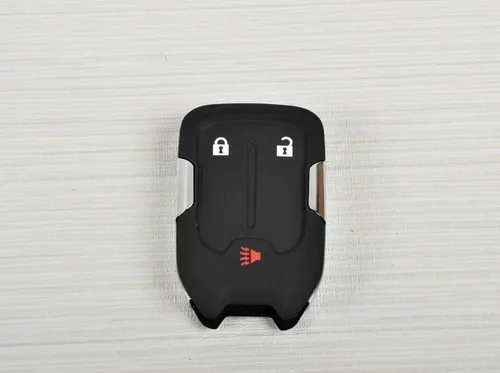
Here is how the process works in simple terms. You press a specific sequence of buttons on your key fob. That signal travels to the truck. The truck’s computer receives the command and starts the engine. The vehicle stays locked the entire time. You can then walk up to a warm or cooled truck ready to go.
The remote start system is not magic. It relies on a few key parts working together:
- The key fob: This is your remote control. It sends the signal to the truck.
- The vehicle’s computer: This receives the signal and processes the command.
- The ignition system: This turns the engine on without a physical key turn.
- The climate control: This heats or cools the cabin based on your last settings.
Understanding these parts helps you troubleshoot when something does not work. It also helps you get the most from your GMC Terrain remote start system.
Remote Start Range and Limitations
The remote start on the GMC Terrain has a limited range. You can typically start the truck from about 195 feet away. This distance can vary based on obstacles like buildings or other vehicles. The signal works best when you have a clear line of sight to the truck.
There are also some built-in safety limits. The engine will not start if the doors are unlocked. It will not start if the hood is open. The system also shuts off after a set time, usually around 10 to 15 minutes. This prevents the truck from running indefinitely and wasting fuel.
Some owners wonder if the system works the same way as remote starting a Toyota with the key fob. While the basic concept is similar, the button sequence and range differ between brands. Each manufacturer designs their system to work best with their specific vehicles.
How to Set Up Remote Start on Your GMC Terrain
Setting up remote start on your GMC Terrain is straightforward. The exact steps can vary slightly depending on your model year and trim level. But the general process is the same across most Terrain models.
Step-by-Step Setup Guide
Follow these steps to get your remote start working:
- Sit inside the truck: Make sure all doors are closed and the vehicle is in park.
- Turn the ignition on: Press the start button without pressing the brake pedal.
- Access the vehicle settings: Use the touchscreen or the steering wheel controls to enter the vehicle settings menu.
- Find the remote start option: Look for the remote start or vehicle settings section.
- Enable remote start: Toggle the remote start feature to on. You may need to confirm your choice.
- Exit and test: Leave the truck and use your key fob to test the remote start function.
Some GMC Terrain models may require a visit to the dealer for initial setup. This is especially true for older models or vehicles that did not come with remote start from the factory. A dealer can install the system and program your key fob correctly.
If your Terrain does not have remote start built in, you can have an aftermarket system installed. Many auto shops offer this service at a reasonable cost. Just make sure the installer is familiar with GMC Terrain models specifically.
Programming Your Key Fob for Remote Start
Your key fob needs to be properly programmed for remote start to work. The programming process usually involves a specific sequence of button presses. Here is the general process:
- Press and release the lock button on the key fob.
- Press and release the lock button again.
- Press and hold the lock button for three seconds.
- The truck should respond with a flash of the lights or a honk.
Always refer to your GMC Terrain owner’s manual for the exact programming steps. The manual will have the most accurate instructions for your specific model year.
Using the Remote Start Feature
Once your remote start is set up and programmed, actually using it is very easy. The process takes just a few seconds and can be done from your driveway, a parking lot, or even inside a building near your truck.
The Button Sequence
To remote start your GMC Terrain, follow this sequence:
- Make sure you are within range: Stay within about 195 feet of the truck.
- Press the lock button once: This locks the doors.
- Press the lock button a second time: The truck is now locked.
- Press the lock button a third time and hold: Hold it for about two to three seconds.
- Wait for confirmation: The truck’s lights will flash and the engine will start.
That is it. Your GMC Terrain should now be running with the climate control set to your last preferences. The truck will stay locked the entire time, so no one can get in without your key fob.
What Happens When the Engine Starts
Once the remote start command is sent, several things happen automatically:
- The engine turns on and idles.
- The heater or air conditioner activates based on your last settings.
- The headlights turn off (if they were on when you left).
- The doors lock automatically.
- The climate system begins warming or cooling the cabin.
You can also use the remote start to cool down the truck in summer. Just make sure the climate control was set to cool before you left the truck. The system remembers your last settings and applies them when the engine starts remotely.
Extending the Remote Start Time
Most GMC Terrain remote start systems allow you to extend the engine run time. If you need more than the initial 10 to 15 minutes, you can send another remote start command while the engine is already running. This gives you an additional 10 to 15 minutes of run time.
However, there is a limit. The system will not let the engine run indefinitely. After a certain number of extensions, the truck will shut off and require you to be physically present to start it again. This is a safety feature designed to protect the engine and prevent fuel waste.
Troubleshooting Common Remote Start Issues
Like any vehicle feature, the remote start system can sometimes have issues. The good news is that most problems are easy to fix. Here are the most common issues and how to solve them.
Remote Start Does Not Respond
If your key fob does not seem to work, the first thing to check is the battery. A weak key fob battery is the most common cause of remote start failure. Replacing the battery is simple and inexpensive. You can find instructions for replacing your key fob battery in the owner’s manual. After a new battery, the remote start should work again.
Another reason the remote start might not respond is distance. Make sure you are within the 195-foot range. Obstacles like thick walls or large vehicles can block the signal. Try moving closer to the truck and pressing the buttons again.
Sometimes the truck’s computer needs a reset. Try locking and unlocking the doors with the key fob. Then attempt the remote start sequence again. This simple step often fixes minor electronic glitches.
Engine Starts but Shuts Off Immediately
If the engine starts but shuts off right away, there are a few possible causes:
- The doors may not be fully locked.
- The hood latch may not be fully closed.
- The transmission may not be in park.
- The brake pedal may need to be pressed.
Check each of these items before trying again. The system has safety checks that prevent the engine from running if any of these conditions are not met.
Remote Start Stops Working After Battery Replacement
If you recently replaced your key fob battery and remote start stopped working, you may need to reprogram the key fob. The new battery can sometimes reset the fob’s connection to the truck. Follow the programming steps in your owner’s manual to re-pair the fob with the vehicle. This is a quick fix that usually takes less than a minute.
Some owners also wonder if they need to take any special steps after replacing the key fob battery. The answer is usually no, but it is always good to check your vehicle’s specific instructions. Taking a moment to verify everything is working after a battery swap can save you headaches later.
Tips and Best Practices for Remote Starting Your GMC Terrain
To get the best experience from your GMC Terrain remote start, follow these practical tips and best practices.
Keep Your Key Fob Battery Fresh
The remote start system depends entirely on your key fob. If the battery is weak, the signal may not reach the truck. Replace your key fob battery at least once a year. This simple maintenance step keeps everything working smoothly. You can learn more about what to do after replacing a key fob battery to make sure your system stays reliable.
Use Remote Start Before You Leave
For the best experience, start your truck a few minutes before you plan to leave. This gives the engine time to warm up in winter or cool down in summer. Five to ten minutes is usually enough time for the cabin to reach a comfortable temperature.
Always Lock the Doors
The remote start system requires the doors to be locked. Always use the lock button on your key fob before sending the remote start command. This is both a safety feature and a requirement for the system to work.
Be Aware of Local Laws
Some areas have laws about idling vehicles. Check your local regulations before using remote start regularly. In most cases, the short run times for warming up or cooling down are perfectly legal. But it is always good to know the rules in your area.
Do Not Use Remote Start in Enclosed Spaces
Never use remote start in a closed garage. The exhaust fumes can be dangerous. Always use remote start in open or well-ventilated areas. This is a basic safety rule that every truck owner should follow.
Keep the Truck Clean and Maintained
A well-maintained truck responds better to remote start. Keep your engine in good shape with regular oil changes and maintenance checks. A healthy engine starts more reliably, whether you are using the key or the remote start system.
Safety Features of the GMC Terrain Remote Start
GMC built several safety features into the remote start system. These features protect both you and your vehicle. Understanding them helps you use the system with confidence.
The remote start system will automatically shut off if any door is opened while the engine is running remotely. This prevents anyone from entering a running vehicle without your knowledge. The system also monitors the engine for any warning signs and will shut down if something seems wrong.
Another important safety feature is the automatic shutoff timer. The engine will not run forever when started remotely. After the preset time limit, the engine turns off on its own. This protects the engine from overheating and saves fuel.
The system also requires the transmission to be in park for remote start to work. This prevents the truck from moving unexpectedly. You can start the engine remotely, but you cannot shift into drive until you are physically inside the vehicle with your foot on the brake.
These safety features make the remote start system one of the most convenient and secure features on the GMC Terrain. You get all the comfort benefits without compromising on safety.
Conclusion
Remote starting your GMC Terrain is one of the most convenient features you will ever use. It saves you time, keeps you comfortable, and adds real value to your daily driving experience. Whether you are dealing with harsh winter cold or sweltering summer heat, the remote start system has you covered.
The process is simple once you know the steps. Lock the doors, press the lock button three times, and hold. Your truck starts, the climate control kicks in, and you are ready to go. Keep your key fob battery fresh, stay within range, and follow the safety guidelines. With these basics in mind, you will get years of reliable service from your GMC Terrain remote start system.
Take a few minutes today to make sure your remote start is set up correctly. Test it in a safe location. Get comfortable with the button sequence. Once you make remote start a habit, you will wonder how you ever lived without it.
Frequently Asked Questions
Can I remote start my GMC Terrain with the key fob?
Yes, the GMC Terrain remote start system works directly through your key fob. You simply press the lock button three times in sequence to send the start command. Make sure you are within about 195 feet of the truck for the signal to reach it.
Why does my GMC Terrain remote start not work?
The most common reason is a weak key fob battery. Replace the battery and try again. Other causes include being too far from the truck, doors not being fully locked, or the transmission not being in park. Check each of these before assuming something is broken.
How far away can I be from my GMC Terrain to use remote start?
The standard remote start range for the GMC Terrain is approximately 195 feet. This distance can be reduced by obstacles like walls, buildings, or other vehicles blocking the signal. For best results, stay within a clear range of your truck.
Is it safe to remote start my GMC Terrain in a closed garage?
No, you should never remote start any vehicle in an enclosed garage. Exhaust fumes contain carbon monoxide, which is dangerous and potentially lethal. Always use remote start in open or well-ventilated areas to keep yourself and others safe.
Can I extend the remote start run time on my GMC Terrain?
Yes, you can send another remote start command while the engine is already running. This adds an additional 10 to 15 minutes of run time. However, the system will not allow unlimited extensions. After a certain number of cycles, the engine will shut off and require you to be inside the vehicle to restart it.
Do I need to visit a dealer to set up remote start on my GMC Terrain?
Not always. Many GMC Terrain models come with remote start already built in and just need to be enabled through the vehicle settings menu. However, some models or older vehicles may require a dealer visit or aftermarket installation to add the feature. Check your owner’s manual for specific guidance.