How to Remove the Battery From Your Dodge Ram 2500
Removing the battery from your Dodge Ram 2500 is a straightforward task you can do at home with basic tools. This guide walks you through every step, from safety prep to proper disposal, so you can handle the job confidently and avoid costly trips to the mechanic.
Have you been putting off removing the battery from your Dodge Ram 2500? Maybe you need to replace it, or perhaps you are storing the truck for the winter. Either way, this job is easier than most people think. You do not need a mechanic or a fancy garage. With the right tools and a little know-how, you can pull that battery out in under 30 minutes.
In this guide, we walk you through every single step. We cover safety tips, the tools you need, what to expect, and how to handle the old battery afterward. Whether you drive a gas or diesel Ram 2500, this guide has you covered. By the end, you will feel confident tackling this job on your own.
Removing the battery from a Dodge Ram 2500 is one of the most common truck maintenance tasks. It comes up when batteries die, need replacement, or when you are preparing a vehicle for long-term storage. Knowing how to do it yourself saves time and money. Let us get into it.
Key Takeaways
- Safety first: Always disconnect the negative cable first to prevent short circuits.
- Basic tools are all you need: A wrench, gloves, and safety glasses are enough for most battery removals.
- Know your battery type: Diesel and gas Ram 2500s may have different battery setups and locations.
- Clean before you reconnect: Corrosion on terminals is common and easy to handle with simple solutions.
- Dispose properly: Never throw old batteries in the trash. Take them to a recycling center.
- Reset may be needed: Some systems may need a reset after battery removal on your Dodge Ram.
- You can do it yourself: Most owners complete this job in under 30 minutes.
📑 Table of Contents
- Why You Might Need to Remove Your Battery
- Safety Precautions Before You Start
- Tools and Materials You Will Need
- Step-by-Step Guide to Removing the Battery
- Common Mistakes to Avoid
- What to Do With the Old Battery
- Reinstalling the New Battery
- When to Call a Professional
- Frequently Asked Questions
- Final Thoughts
Why You Might Need to Remove Your Battery
There are several reasons you may need to take the battery out of your Ram 2500. Understanding the reason helps you prepare properly. Here are the most common scenarios:
- Battery replacement: Old batteries lose their charge over time. When your truck struggles to start, it might be time for a new one.
- Long-term storage: If you are storing your Ram 2500 for the winter or an extended period, removing the battery prevents drain and damage.
- Electrical work: Some upgrades or repairs require you to disconnect the battery for safety.
- Corrosion buildup: Heavy corrosion on terminals can cause electrical problems. Removing the battery gives you access to clean the tray and cables.
- Wrench light issues: Sometimes a bad battery can cause the wrench light to come on in your Dodge Ram. Removing and testing the battery helps diagnose this problem.
No matter the reason, the process is largely the same. The key is to follow the steps in the right order and prioritize safety throughout.
Safety Precautions Before You Start
Working with batteries involves acid and electrical current. Taking shortcuts here can lead to burns, sparks, or damage to your truck. Do not skip these precautions.
Wear the Right Gear
Put on safety glasses and rubber gloves before touching anything. Battery acid can cause serious burns on skin and eyes. A pair of nitrile gloves works well. If you have safety goggles, use them.
Work in a Ventilated Area
Batteries release hydrogen gas, which is flammable. Never work near open flames or sparks. If you are in a closed garage, open the doors and work in a well-ventilated space.
Turn Off the Engine
Make sure your Dodge Ram 2500 is completely off. Set the parking brake and remove the key from the ignition. This prevents any accidental electrical shorts.
Keep Metal Tools Away from Terminals
Never let a wrench or metal tool touch both battery terminals at the same time. This creates a short circuit that can spark, damage cables, or even hurt you.
What to Do If Battery Acid Touches Your Skin
If acid makes contact with your skin or eyes, rinse immediately with plenty of water. Seek medical attention if irritation persists. Keep a box of baking soda nearby. It neutralizes battery acid on surfaces and skin.
Tools and Materials You Will Need
You do not need a lot of tools for this job. Here is a simple list of everything you should have ready before starting:
- Combination wrench set (8mm, 10mm, and 13mm are the most common sizes for Ram 2500 batteries)
- Battery terminal cleaner or a wire brush
- Baking soda and water solution (for cleaning corrosion)
- Rubber gloves
- Safety glasses
- Battery terminal protector spray or petroleum jelly
- A memory saver device (optional, but helpful for preserving radio settings and computer memory)
- A multimeter to test the battery voltage before removal
Before you begin, you may want to test your car battery with a multimeter. This tells you whether the battery is simply dead or if there is a deeper electrical issue. A healthy battery should read around 12.6 volts when the engine is off.
Step-by-Step Guide to Removing the Battery
Now let us get into the actual process. Follow these steps carefully, and you will have that battery out in no time.
Step 1: Locate the Battery
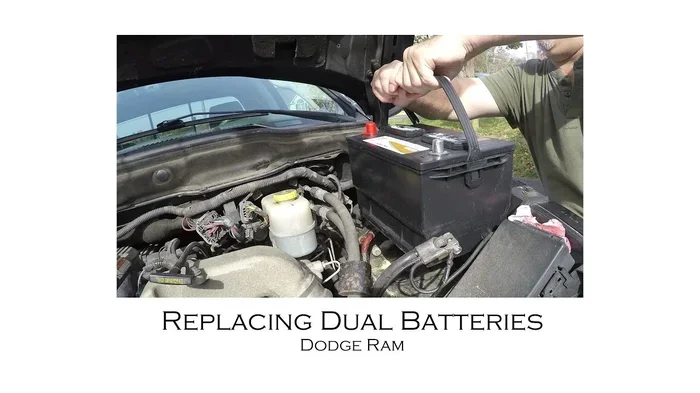
On most Dodge Ram 2500 models, the battery sits in the engine bay on the driver’s side. Open the hood and look for a large rectangular box with two cables attached. The battery is held in place by a hold-down bracket or strap.
If you have trouble finding it, check your owner’s manual. Some models, especially those with diesel engines, may have a secondary battery or a different battery location. Diesel Ram 2500s sometimes have the battery mounted in the rear or under the cab, depending on the model year.
Step 2: Disconnect the Negative Cable First
This is the most important safety step. Always disconnect the negative cable first. The negative terminal is marked with a minus sign (-) and usually has a black cable. Use your wrench to loosen the nut on the negative terminal clamp. Once loose, carefully twist and pull the cable off the terminal. Tuck it away from the battery so it cannot accidentally touch the terminal again.
Why negative first? Disconnecting the negative cable first breaks the ground connection. This prevents any accidental short circuits if your wrench accidentally touches metal parts of the truck while you work.
Step 3: Disconnect the Positive Cable
The positive terminal is marked with a plus sign (+) and usually has a red cable. Loosen the nut on the positive terminal clamp and remove the cable. Set it aside, keeping it away from the negative cable and the battery.
Remember the order: Negative first, positive second. When reconnecting, you will do the opposite — positive first, then negative.
Step 4: Remove the Battery Hold-Down
The battery is secured by a bracket or strap to keep it from shifting while driving. Look for a bolt or clamp holding the battery in place. Use your wrench to remove the bolt or release the clamp. Set the hold-down hardware aside in a safe spot.
Some Ram 2500 models use a top-mount bracket, while others use a side clamp. The principle is the same — free the battery from its mounting point.
Step 5: Lift the Battery Out
Car batteries are heavy. A standard truck battery can weigh 40 to 50 pounds. Use both hands to lift it straight up and out of the tray. If the battery feels stuck, check for any additional bolts or clips you may have missed.
If lifting is difficult, you can use a battery carrying strap or ask a friend for help. Never tilt the battery sideways during removal. This can cause acid to leak out of the vent caps.
Step 6: Inspect the Battery Tray
With the battery removed, take a moment to look at the tray. Check for corrosion, acid residue, or damage. If you see white or blue-green buildup, clean it with a mixture of baking soda and water. Use a wire brush to scrub away any stubborn corrosion.
A clean tray ensures good contact with the new battery and prevents future corrosion issues.
Common Mistakes to Avoid
Even simple jobs can go wrong if you are not careful. Here are mistakes people make when removing a battery from a Dodge Ram 2500:
- Disconnecting the positive cable first: This is the number one mistake. It increases the risk of short circuits and sparks near the battery.
- Forgetting to reset systems: After battery removal, your radio, power windows, and some computer settings may need to be reset. Keep your radio code handy before you start.
- Dropping the battery: Batteries are heavy and awkward. Dropping one can crack the case and cause acid to spill. Always lift with care.
- Leaving cables touching metal: After disconnecting, make sure the cable ends do not touch any metal parts of the truck.
- Ignoring corrosion: If you just pull the battery out without cleaning the tray, the new battery will corrode faster. Take the extra five minutes to clean up.
- Not testing the old battery: Before you toss it, test the battery with a multimeter. You might be able to save it with a charge instead of buying a new one.
What to Do With the Old Battery
Once you have the battery out, do not just throw it in the trash. Car batteries contain sulfuric acid and lead, both of which are toxic and environmentally harmful. Here is what you should do instead:
- Take it to an auto parts store: Most stores like AutoZone, O’Reilly, or Advance Auto Parts accept old batteries for recycling. Many will even give you a core deposit refund.
- Visit a recycling center: Your local waste management facility likely has a battery recycling drop-off point.
- Check with your dealership: If you bought your battery from a dealership, they can often take the old one back.
Never dispose of a car battery in household trash or pouring it down a drain. The chemicals can contaminate water and soil. Recycling is the only responsible option.
Reinstalling the New Battery
If you are replacing the battery, here are quick tips for putting the new one in:
- Place the new battery in the tray, making sure the terminals are on the correct side (positive on the correct side based on your truck’s layout).
- Secure the hold-down bracket or strap tightly. The battery should not move when you push on it.
- Connect the positive cable first. Tighten the nut firmly.
- Connect the negative cable second. Tighten the nut firmly.
- Apply a thin layer of petroleum jelly or terminal protector spray to both terminals. This prevents future corrosion.
- Start your truck and test all electrical systems.
After reinstalling, some systems may need a reset. Your radio code, power window calibration, and idle relearn may require attention. Refer to your owner’s manual for specific reset procedures.
When to Call a Professional
Most people can remove a battery from a Dodge Ram 2500 without any issues. However, there are times when you should call in a professional:
- The battery is frozen or cracked. Do not attempt to remove a damaged battery.
- You notice a strong sulfur or rotten egg smell. This indicates a leaking battery that needs careful handling.
- The terminals are severely corroded and won’t budge. A professional has the right tools to break loose stubborn corrosion without damaging the cables.
- Your truck has a secondary battery or an unusual setup. Diesel Ram 2500s can have complex battery systems that require specialized knowledge.
- You are uncomfortable working with batteries. There is no shame in asking for help. A mechanic can do this job quickly and safely.
If you notice electrical issues after battery removal, it could be related to your battery health. A car battery can die while driving if the alternator is failing or the battery is too old. If this happens, have your charging system checked right away.
Frequently Asked Questions
Can I remove the battery while the engine is running?
No. Always turn off the engine and remove the key from the ignition before disconnecting the battery. Working on a running engine increases the risk of electrical shorts, sparks, and injury.
How long does it take to remove a battery from a Dodge Ram 2500?
Most people complete the job in 15 to 30 minutes. The actual removal is quick once you have the right tools. The bulk of the time goes toward safety prep and cleaning the tray.
Do I need to reset anything after removing the battery?
Yes. After reconnecting a new battery, you may need to reset your radio code, power window auto-up/down settings, and in some cases, the idle air control module. Check your owner’s manual for specific reset instructions.
Can I drive my truck with the battery disconnected?
No. You cannot drive a vehicle without a battery connected. The battery provides the initial electrical power needed to start the engine and run the truck’s computer systems. If you are curious about what happens when a vehicle operates without electrical power, you can learn more about whether a car can run without a battery to understand the relationship between the electrical system and the alternator.
How do I know if my battery is bad or just needs charging?
Use a multimeter to test the voltage. A fully charged battery should read 12.6 volts or higher. If it reads below 12.0 volts, the battery may need charging or replacement. If you are unsure, take the battery to an auto parts store. Most stores will test it for free.
Is it safe to remove the battery in the rain?
It is not ideal. Water increases the risk of electrical shorts and can cause corrosion on terminals. If you must work in wet conditions, cover the battery and terminals with a waterproof tarp and work on a dry surface as much as possible.
Final Thoughts
Removing the battery from your Dodge Ram 2500 does not have to be intimidating. With the right tools, proper safety gear, and a clear set of steps, you can handle this job confidently in your own driveway. The key is to take it slow, follow the correct order of disconnecting cables, and never skip the safety precautions.
Whether you are replacing an old battery, storing your truck for the season, or doing electrical work, knowing how to safely remove and handle your battery is an essential skill for every Ram 2500 owner. Once you have done it a couple of times, it becomes second nature.
Remember to dispose of your old battery properly at a recycling center or auto parts store. And when you install the new battery, take a few extra minutes to clean the tray and protect the terminals. These small steps go a long way in extending the life of your new battery and keeping your Dodge Ram 2500 running strong for years to come.