How to Turn Off the Interior Lights on a Cadillac CTS
Turning off the interior lights on a Cadillac CTS is simple once you know the right switches and settings. Whether your dome light stays on by accident or you want to prevent battery drain, this guide covers every method. You will learn manual switches, automatic timeout settings, door jamb switch fixes, and troubleshooting tips for common interior light problems on the Cadillac CTS.
There is nothing more frustrating than walking to your car after a long day and seeing a glowing dome light draining your battery. If you own a Cadillac CTS, you are not alone. Many drivers deal with interior lights that refuse to turn off or stay on longer than they should. The good news is that fixing this issue is usually straightforward. In this guide, we will walk you through every method to turn off the interior lights on a Cadillac CTS. You will also learn why lights stay on, how to prevent battery drain, and when to call a professional for help.
The Cadillac CTS comes with several interior lighting features designed for convenience. These include the dome light, courtesy lights, map lights, and dashboard illumination. Each of these can be controlled independently or set to automatic mode. Understanding how the system works is the first step to mastering your interior lighting. Whether you are dealing with a light that will not turn off or simply want to know the controls better, this article has you covered.
Key Takeaways
- Multiple Methods Exist: You can turn off Cadillac CTS interior lights using the manual switch, the automatic timeout setting, or by checking the door jamb switches.
- Battery Drain Is Real: Leaving interior lights on can drain your Cadillac CTS battery in just a few hours, especially when the car is not running.
- Common Culprits: Stuck door jamb switches, faulty dimmer settings, and malfunctioning automatic timers are the most common reasons interior lights stay on.
- Easy Fixes at Home: Most interior light issues on a Cadillac CTS can be resolved without a mechanic using simple checks and adjustments.
- Prevention Is Key: Regularly checking your light settings and door switch alignment can save you from unexpected battery problems.
📑 Table of Contents
- Understanding the Interior Light System on a Cadillac CTS
- Step-by-Step Guide to Turning Off Interior Lights on a Cadillac CTS
- Why Won’t My Interior Lights Turn Off on a Cadillac CTS?
- How to Prevent Interior Light Battery Drain
- When to See a Professional for Interior Light Issues
- Quick Tips for Cadillac CTS Interior Light Management
- Conclusion
Understanding the Interior Light System on a Cadillac CTS
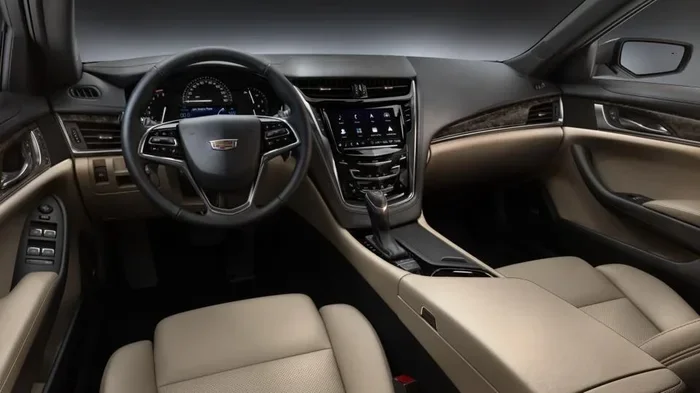
The interior lighting system on a Cadillac CTS is more sophisticated than a simple on-off switch. The car uses a combination of manual controls, automatic timers, and sensor-based switches to manage your lights. Let us break down the main components so you understand what is happening every time you open that door.
The Dome Light
The dome light sits in the center of your cabin, usually on the ceiling near the rearview mirror. It provides general illumination when you enter or exit the vehicle. On the Cadillac CTS, the dome light has a switch with three positions: On, Off, and Door. The Door setting means the light turns on automatically when any door opens and turns off after a short delay when all doors are closed.
The Courtesy Lights
Courtesy lights are the smaller lights located near the sun visors and sometimes under the dashboard. They activate when you open a door or when you turn the ignition to the accessory position. These lights are designed to help you find your belongings or see your instruments in low-light conditions. They typically follow the same automatic shutoff timing as the dome light.
The Door Jamb Switches
Every door on your Cadillac CTS has a small switch mounted on the door frame. This switch tells the car whether a door is open or closed. When a door is open, the switch sends a signal to turn on the interior lights. When the door closes, the switch resets and the lights should turn off. If this switch is faulty or misaligned, your lights may stay on even when all doors are shut.
Step-by-Step Guide to Turning Off Interior Lights on a Cadillac CTS
Now that you understand the system, let us get into the practical steps. Here is exactly how to turn off every interior light on your Cadillac CTS, from the dome light to the dashboard glow.
Method 1: Use the Manual Dome Light Switch
The quickest way to kill the dome light is to flip the switch on the light itself. Follow these steps:
- Look up at the dome light in the center of your cabin.
- Locate the small switch on the side or bottom of the light housing.
- Move the switch to the Off position.
- The light should turn off immediately.
This method works regardless of whether the doors are open or closed. It is the most reliable way to ensure the light is off. If the switch is stuck or the light still does not respond, there may be an electrical issue we will address later.
Method 2: Adjust the Automatic Timeout Setting
The Cadillac CTS has an automatic timeout feature that turns off interior lights after a set period when a door is closed. To check or adjust this:
- Turn the ignition to the On position without starting the engine.
- Use the infotainment system to navigate to the Vehicle Settings menu.
- Look for the Lighting or Interior Lights section.
- Check the timeout duration and adjust it to your preference.
Some model years of the Cadillac CTS have a fixed timeout of about 30 seconds after door closure. If your car does not have a customizable setting, the timeout is built into the vehicle computer and cannot be changed.
Method 3: Check the Door Jamb Switches
If your lights stay on because a door is not fully closed or a switch is stuck, here is what to do:
- Open each door fully and check that the latch engages properly.
- Listen for a clicking sound when the door closes, which indicates the switch is being activated.
- Inspect the door jamb area for any debris or obstructions around the switch.
- Gently press the switch by hand to test if it clicks and releases smoothly.
A sticky or dirty door jamb switch is one of the most common reasons interior lights stay on in a Cadillac CTS. A quick cleaning with a dry cloth or a small amount of electrical contact cleaner can often fix the problem.
Method 4: Use the Dimmer Control
The Cadillac CTS has a dashboard dimmer knob or touchscreen control that adjusts the brightness of all interior lights. Turning the dimmer all the way down effectively turns off the ambient lighting:
- Locate the dimmer control on the left side of the instrument panel or in the infotainment settings.
- Rotate the knob or slide the slider to the lowest setting.
- The interior lights should dim to off or a very faint glow.
This is especially useful at night when you want a dark cabin but still need enough light to see your controls.
Why Won’t My Interior Lights Turn Off on a Cadillac CTS?
If you have tried the methods above and your interior lights are still on, do not panic. There are several common reasons this happens, and most of them are easy to fix.
Stuck Door Jamb Switch
A stuck door jamb switch is the number one cause of interior lights staying on. The switch gets stuck in the open position, which tricks the car into thinking a door is still open. This is especially common in older Cadillac CTS models where the switch wears out over time. You can test each switch by pressing it manually while watching the dome light. If the light does not respond, the switch likely needs replacement.
Faulty Dome Light Bulb or Wiring
Sometimes the issue is not the switch but the bulb or wiring itself. A corroded connector or frayed wire can keep the circuit complete even when the switch is off. If you notice flickering lights or lights that behave inconsistently, there may be a wiring problem behind the dashboard or door panel.
Software or Computer Glitch
Modern Cadillac CTS models rely on the body control module to manage interior lights. Occasionally, a software glitch can cause the system to forget to turn the lights off. A simple reset of the infotainment system or a battery disconnect/reconnect often resolves this. If the problem persists, a dealership visit may be needed to update the software.
Electrical Drain from a Bad Battery
In some cases, a failing battery can cause strange electrical behavior, including lights that will not turn off properly. A weak battery may not provide enough power to fully disengage the interior light circuit. If you are also experiencing other electrical issues, it is worth checking your battery health. Interestingly, a bad battery can cause the wrench light to come on as well, which shows how interconnected your car’s electrical system really is.
How to Prevent Interior Light Battery Drain
Leaving interior lights on is one of the fastest ways to drain a car battery. Here is how to prevent this from happening on your Cadillac CTS.
Always Check the Dome Light Switch Before Leaving the Car
Get into the habit of glancing up at the dome light before you walk away. Make sure it is in the Off or Door position. This simple habit can save you from a dead battery and a very frustrating morning.
Set the Automatic Timeout to the Shortest Duration
If your Cadillac CTS allows you to adjust the timeout, set it to the shortest available option. This ensures the lights turn off quickly after you close the door, reducing the chance of accidentally leaving them on.
Avoid Leaving the Car Idling with Lights On
Some drivers leave their car running while parked and forget about the interior lights. If you ever find yourself in this situation, you might wonder how long it is safe to let your car idle. Leaving the engine running with the interior lights on puts extra load on the alternator and can still drain the battery over time. It is always best to turn off all lights before stepping out of the vehicle.
Inspect Door Jamb Switches Regularly
A quick visual inspection of your door jamb switches every few months can catch problems early. Look for any signs of corrosion, dirt buildup, or physical damage. A clean, properly functioning switch will keep your interior lights working as intended and prevent unexpected battery drain.
When to See a Professional for Interior Light Issues
Most interior light problems on a Cadillac CTS are easy to fix at home. However, some situations call for professional attention. You should visit a mechanic or dealership if:
- The interior lights stay on even after you replace the door jamb switches.
- You notice a burning smell or visible damage near the light fixtures.
- Multiple electrical systems in your car start malfunctioning at the same time.
- The dashboard warning lights, such as the wrench light, come on alongside the interior light issue.
- You have tried all the basic fixes and the problem persists for more than a few days.
A professional technician can run diagnostic tests on the body control module and wiring harness to pinpoint the exact cause. In some cases, a software update or a replacement part may be needed. Do not ignore persistent electrical issues, as they can worsen over time and lead to more expensive repairs.
Quick Tips for Cadillac CTS Interior Light Management
Here are some extra tips to keep your interior lighting in great shape:
- Use LED bulbs: Upgrading to LED bulbs for your dome and courtesy lights reduces power draw and extends bulb life.
- Keep a flashlight in your car: If your interior lights fail, a small flashlight can help you find items in the dark.
- Clean the switches regularly: A quick wipe-down of the dome light switch and door jamb switches prevents buildup that can cause sticking.
- Check the owner manual: Your Cadillac CTS owner manual has specific instructions for your model year, including unique features or settings you might not know about.
- Set a routine: Before turning off the engine, do a quick scan of all interior lights to make sure they are off.
Many modern vehicles, including the Cadillac CTS, come equipped with automatic light shutoff features. If you have ever wondered whether your headlights turn off automatically, the same technology applies to interior lights in most cases. The car monitors door positions, ignition status, and ambient light levels to decide when to turn off the interior illumination. Understanding this system helps you use it more effectively and troubleshoot problems faster.
Taking care of your interior lighting system is a small effort that pays off in a big way. A well-maintained lighting system means no surprises, no dead batteries, and a cabin that feels comfortable every time you get behind the wheel. With the tips and steps in this guide, you are now fully equipped to handle any interior light issue on your Cadillac CTS.
Remember that electrical systems in modern cars are interconnected. A problem in one area can sometimes cause symptoms in another. For example, if you are dealing with persistent warning lights alongside your interior light issues, a bad battery could be the root cause. Just as a failing battery can trigger the wrench light, it can also disrupt the normal operation of your interior lighting circuits. Keeping your battery healthy is one of the best things you can do for your entire electrical system.
Finally, if you ever find yourself stranded with a dead battery because of left-on interior lights, you might consider how long a car can sit without being driven. This knowledge helps you plan better and avoid situations where your battery loses its charge entirely. Prevention and awareness are your best tools for keeping your Cadillac CTS running smoothly.
Conclusion
Turning off the interior lights on a Cadillac CTS is a simple task once you know where the controls are and how the system works. Whether you use the manual switch, adjust the automatic timeout, or fix a sticky door jamb switch, you now have all the tools you need. Regular maintenance and good habits will keep your interior lights working perfectly and your battery healthy. If the problem persists beyond basic fixes, do not hesitate to seek professional help. Your Cadillac CTS deserves the best care, and a well-functioning interior light system is a small but important part of that.
Frequently Asked Questions
How do I turn off the dome light on a Cadillac CTS?
Locate the small switch on the side or bottom of the dome light unit in the center of your cabin. Move the switch to the Off position. This will turn off the dome light immediately, regardless of whether the doors are open or closed.
Why do my interior lights stay on when all doors are closed on a Cadillac CTS?
The most common reason is a stuck or misaligned door jamb switch. Each door has a small switch that tells the car whether the door is open or closed. If one of these switches is dirty, worn, or misaligned, it can keep the interior lights on. Cleaning the switch or adjusting its position usually fixes the problem.
Can leaving the interior lights on drain my Cadillac CTS battery?
Yes, absolutely. Leaving interior lights on can drain your battery in just a few hours, especially if the car is not running. The dome light and courtesy lights draw power continuously, and a fully charged battery may not survive a full night with the lights on. Always double-check that your lights are off before leaving the vehicle.
Is there an automatic shutoff for interior lights on the Cadillac CTS?
Yes, the Cadillac CTS has an automatic timeout feature that turns off interior lights after a set period when all doors are closed. The default timeout is usually around 30 seconds. You can check this setting in the Vehicle Settings menu on the infotainment system if your model year supports customization.
What should I do if the interior lights on my Cadillac CTS flicker or behave erratically?
Flickering or erratic behavior often points to a wiring issue, a loose bulb connection, or a failing door jamb switch. Start by checking all door jamb switches for debris or corrosion. If the switches are clean and the problem continues, inspect the wiring behind the affected light fixture. If you are not comfortable doing this yourself, a professional technician can diagnose the issue quickly.
Can a bad battery cause interior light problems on a Cadillac CTS?
Yes. A weak or failing battery can cause unusual electrical behavior throughout the car, including interior lights that will not turn off or lights that dim unexpectedly. If you are experiencing interior light issues alongside other electrical symptoms, it is a good idea to test your battery and charging system. A professional can check the battery voltage and alternator output to confirm whether the battery is the culprit.