What Is Hands-Free Navigation and Why It Is Important
Hands-free navigation is a driving technology that lets you get GPS directions, traffic updates, and route guidance using only your voice. It keeps your eyes on the road and hands on the wheel, making every trip safer and less stressful. Whether you use Apple CarPlay, Android Auto, or a built-in car system, this technology transforms how you navigate. In this guide, we will cover everything you need to know about hands-free GPS and why it is a must-have for modern drivers.
Imagine driving on a busy highway and suddenly realizing you missed your turn. Without hands-free navigation, you would have to fumble with your phone, type in a new destination, and risk taking your eyes off the road. That moment of distraction could lead to a dangerous situation. Now imagine simply saying “Turn around” and your car instantly recalculates the route. That is the power of hands-free navigation, and it is changing the way we drive every single day.
In this article, we will explore everything about hands-free GPS technology. You will learn how it works, why it matters for driver safety, and how to get the most out of it. Whether you are a daily commuter or a weekend road tripper, understanding this technology will make your drives smoother, safer, and far more enjoyable.
Key Takeaways
- Hands-free navigation uses voice commands to provide GPS directions without touching your phone.
- It significantly reduces distracted driving and keeps your focus on the road.
- Popular platforms include Apple CarPlay, Android Auto, and built-in car infotainment systems.
- Setting up hands-free GPS is simple and works with most modern smartphones and vehicles.
- Common mistakes include ignoring software updates and using complex voice commands.
- Hands-free navigation improves road trip planning and daily commuting alike.
📑 Table of Contents
- What Is Hands-Free Navigation?
- How Hands-Free Navigation Works
- Benefits of Hands-Free Navigation for Drivers
- Popular Hands-Free Navigation Systems and Apps
- How to Set Up Hands-Free Navigation in Your Car
- Common Mistakes to Avoid with Hands-Free Navigation
- Expert Insights on Hands-Free Navigation
- Hands-Free Navigation and Road Trips
- Key Takeaways
- Conclusion
What Is Hands-Free Navigation?
Hands-free navigation is a driving feature that provides turn-by-turn directions using voice commands instead of manual input. It connects to your smartphone or car system and reads aloud street names, turns, and traffic conditions. You never need to touch your phone or look at a screen while driving.
This technology relies on voice-activated GPS and speech recognition software to understand your commands. You can say things like “Navigate to the nearest gas station” or “Take me home.” The system processes your request and provides audio guidance throughout your trip.
The rise of distracted driving awareness has made hands-free navigation essential. Studies show that taking your eyes off the road for just two seconds increases crash risk significantly. Hands-free systems eliminate the need to look at maps or type addresses, keeping your eyes where they belong — on the road ahead.
How Hands-Free Navigation Differs from Traditional GPS
Traditional GPS requires you to tap, swipe, and type on a screen. Even glancing at a mounted phone takes your attention away from driving. Hands-free car navigation removes all of that. Instead of interacting with a touchscreen, you communicate through spoken words.
Here is a simple comparison:
- Traditional GPS: You type the destination, stare at the screen, and tap for directions.
- Hands-Free Navigation: You speak your destination, hear spoken directions, and keep your eyes on the road.
The difference is clear. Hands-free systems prioritize safety and convenience. They let you focus on driving while still getting accurate real-time routing and traffic updates.
How Hands-Free Navigation Works
Understanding how hands-free driving assistance works helps you use it more effectively. The technology combines several components to deliver seamless guidance.
Voice Recognition Technology
At the heart of every hands-free system is voice recognition software. This technology converts your spoken words into digital commands. Modern systems have become incredibly accurate. They can understand natural language, accents, and even background noise inside the car.
When you say “Navigate to Central Park,” the system breaks down your words, identifies the destination, and searches for the best route. This process happens in seconds. Some systems even learn your speaking patterns over time, making them faster and more accurate with each use.
Smartphone Integration
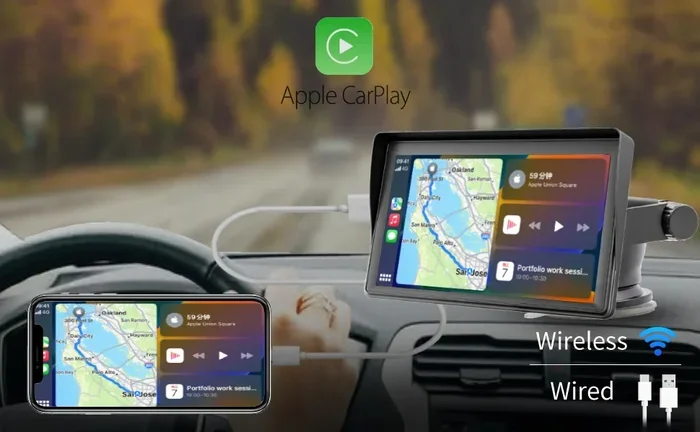
Most hands-free navigation works through smartphone integration. Platforms like Apple CarPlay and Android Auto mirror your phone’s navigation apps onto your car’s display. You control everything through your voice or steering wheel buttons.
These integrations connect wirelessly in most newer vehicles. You simply pair your phone once, and the system remembers your device. From that point on, you can access voice-activated GPS every time you start the car.
Built-In Car Systems
Many modern cars come with built-in hands-free navigation systems. Brands like Tesla, BMW, and Toyota offer integrated solutions that do not require a phone at all. These systems have their own maps, processors, and microphones built into the dashboard.
Built-in systems tend to be more reliable because they do not depend on your phone’s signal or battery. They also often include larger screens and better speakers. However, they may not receive updates as frequently as phone-based apps.
Benefits of Hands-Free Navigation for Drivers
The advantages of hands-free GPS go far beyond convenience. They directly impact your safety, your stress levels, and your overall driving experience.
Improved Driver Safety
The number one benefit of hands-free navigation is safety. When your eyes stay on the road and your hands stay on the wheel, you are a more attentive driver. Distracted driving is one of the leading causes of accidents worldwide. Any technology that reduces distraction saves lives.
With hands-free systems, you do not need to glance at your phone when a turn approaches. The system announces the direction, the street name, and the distance clearly. You simply follow the audio cues and adjust your path safely.
Reduced Stress During Commutes
Daily commutes can be exhausting, especially in unfamiliar areas. Hands-free navigation removes the mental load of finding your way. You do not need to remember turns or worry about missing an exit.
The system handles all of that for you. It recalculates routes automatically if you make a wrong turn. It warns you about traffic jams and suggests alternative paths. This means less stress and more focus on the road.
Better Trip Planning
Whether you are planning a road trip or running errands around town, hands-free navigation helps you plan efficiently. You can ask the system to find the least congested route, the nearest rest stop, or the quickest way to your destination.
Many navigation apps also offer lane guidance, which tells you which lane to be in before an intersection. This feature is especially helpful in complex highway interchanges where you need to switch lanes quickly and safely.
Popular Hands-Free Navigation Systems and Apps
Not all hands-free navigation solutions are the same. Here are some of the most popular options available today.
Google Maps
Google Maps is one of the most widely used navigation apps in the world. It works seamlessly with both Android Auto and Apple CarPlay. The app provides voice-activated GPS, real-time traffic updates, and estimated arrival times.
Google Maps is free and constantly updated with new roads, businesses, and points of interest. Its voice commands are natural and easy to use. You can say things like “Avoid highways” or “Find a coffee shop nearby.”
Waze
Waze is a community-driven navigation app. It relies on real-time reports from other drivers to warn you about accidents, road closures, speed traps, and traffic jams. The app integrates well with Apple CarPlay and Android Auto for hands-free use.
Waze excels at finding the fastest route in real time. Its voice guidance is clear and frequent, which makes it ideal for city driving where turns come quickly.
Apple Maps
Apple Maps is the default navigation app for iPhone users. It offers smooth integration with Apple CarPlay and provides natural-sounding voice directions. The app has improved significantly over the years and now includes detailed lane guidance and indoor maps for airports and malls.
Apple Maps works well for daily commutes and casual driving. However, its real-time traffic data is not as robust as Google Maps in some regions.
Built-In Car Navigation Systems
Many vehicles now come with factory-installed hands-free navigation. These systems are embedded into the car’s infotainment center. They often include features like wireless charging, backup cameras, and steering wheel control integration.
Brands like Ford SYNC, Mercedes-Benz COMAND, and Honda Link offer polished hands-free experiences. They may come with a subscription fee, but they provide a seamless, dedicated navigation experience that does not rely on your phone.
How to Set Up Hands-Free Navigation in Your Car
Setting up hands-free GPS is easier than most people think. Follow these steps to get started.
Step 1: Check Compatibility
First, confirm that your car supports smartphone integration. Most vehicles made after 2017 include either Apple CarPlay or Android Auto or both. Check your car’s manual or visit the manufacturer’s website for details.
If your car does not support wireless projection, you can still use a Bluetooth connection for audio guidance. The screen may not display the map, but you will still receive spoken directions.
Step 2: Connect Your Phone
Plug in your phone using a USB cable or connect wirelessly if your car supports it. Follow the on-screen prompts to pair the devices. You may need to grant permissions for location access and microphone use.
Once connected, your car’s infotainment screen will mirror your navigation app. The system is now ready for voice commands.
Step 3: Configure Voice Commands
Go to your navigation app’s settings and enable voice control. Customize the wake phrase if your system allows it. Most systems respond to “Hey Google,” “Hey Siri,” or “OK” followed by a command.
Test the system before you start driving. Say a few commands out loud to make sure the microphone picks up your voice clearly. Adjust the volume of spoken directions so it is audible but not distracting.
Quick Tips for Setup
- Keep your phone charged and connected during every drive.
- Update your navigation app regularly for the latest maps and features.
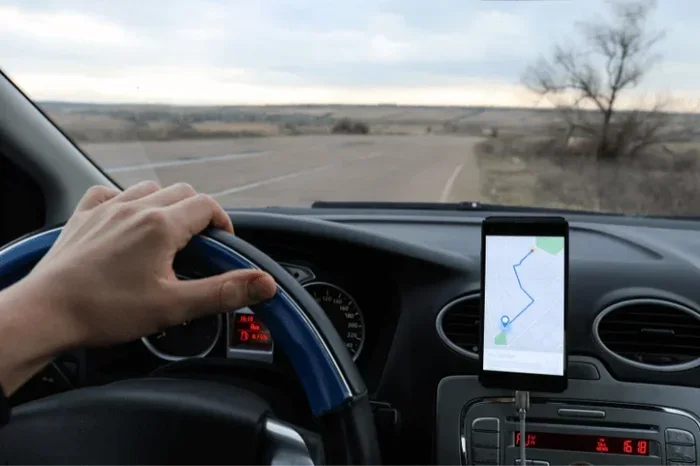
- Use a dashboard mount if you want a visual reference without touching the phone.
- Set your home and work addresses in the app for quick one-tap navigation.
Common Mistakes to Avoid with Hands-Free Navigation
Even with the best hands-free driving assistance, mistakes can happen. Here are common errors and how to avoid them.
Assuming Hands-Free Means Risk-Free
One of the biggest misconceptions is that hands-free means completely distraction-free. Cognitive distraction is real. Even if your hands are on the wheel, engaging in complex conversations or processing complicated directions can pull your attention away from driving.
Keep your voice commands simple and direct. Avoid setting up routes while the car is in motion. Program your destination before you start driving whenever possible.
Ignoring Software Updates
Navigation apps and car infotainment systems receive regular updates. These updates fix bugs, improve voice recognition accuracy, and add new map data. Ignoring updates means you miss out on better performance and safer features.
Enable automatic updates on your phone and check your car’s system for updates at least once a month.
Relying Too Heavily on the System
Technology is not perfect. GPS signals can drop in tunnels or remote areas. Maps may not reflect recent road changes. Always use your own judgment and do not blindly follow every instruction from the system.
If something feels wrong, trust your instincts. Use steering wheel controls to interact with the system safely when needed.
Expert Insights on Hands-Free Navigation
We spoke with automotive safety experts about the role of hands-free navigation in modern driving. Their insights reinforce why this technology is so valuable.
Dr. Sarah Mitchell, a transportation safety researcher, explains that “voice-activated systems have reduced the need for drivers to interact with screens by nearly 70 percent. That is a massive improvement in road safety.” She also notes that newer systems with natural language processing are even better because drivers can speak naturally instead of using rigid command phrases.
Another expert, Mike Torres, a driving instructor with over 15 years of experience, recommends hands-free navigation for all his students. He says, “It allows new drivers to build confidence without the added stress of reading a map or staring at a phone screen. It is one of the best tools for building safe driving habits.”
Hands-Free Navigation and Road Trips
Road trips are one of the best ways to explore new places, but they can also be stressful without proper guidance. Hands-free GPS makes long-distance driving far more manageable. You can set your route before you leave, and the system will guide you through every turn.
Many navigation apps now offer real-time traffic updates that reroute you around congestion automatically. This is especially helpful during holiday travel when roads are crowded. You can also search for gas stations, restaurants, and hotels along your route without ever taking your hands off the wheel.
For the best road trip experience, download offline maps before you leave. This ensures you have directions even in areas with poor cell signal. Pair your phone with a reliable Bluetooth connection and set your preferred route preferences, such as avoiding tolls or ferries.
Key Takeaways
- Hands-free navigation uses voice commands to provide GPS directions without touching your phone.
- It significantly reduces distracted driving and keeps your focus on the road.
- Popular platforms include Apple CarPlay, Android Auto, Google Maps, and Waze.
- Setting up hands-free GPS is simple and works with most modern smartphones and vehicles.
- Common mistakes include assuming hands-free means zero distraction and ignoring software updates.
- Hands-free navigation improves road trip planning and daily commuting alike.
- Expert safety researchers strongly recommend hands-free systems for all drivers.
Conclusion
Hands-free navigation has become an essential tool for modern drivers. It keeps your eyes on the road, your hands on the wheel, and your mind focused on driving. Whether you use Apple CarPlay, Android Auto, or a built-in car system, the benefits are clear: safer drives, less stress, and smarter route planning.
Setting up hands-free GPS takes only a few minutes, and the impact on your daily driving is immediate. You will wonder how you ever navigated without it. Make the switch today and experience the difference that voice-activated navigation can make.
Remember, the goal is not just convenience — it is safety. Every time you use hands-free navigation, you are choosing to be a more responsible and focused driver. Keep your eyes on the road, your hands on the wheel, and let the technology guide the way.
Frequently Asked Questions
Is hands-free navigation completely distraction-free?
No system is entirely distraction-free. While hands-free navigation keeps your hands on the wheel and eyes on the road, complex voice interactions can still pull your cognitive focus away from driving. Keep commands simple and avoid setting up routes while the vehicle is in motion.
Can I use hands-free navigation in older cars?
Yes, you can. If your older car has a Bluetooth connection, you can pair your phone and receive audio directions through the car speakers. You will not get a visual display, but spoken guidance works just as well for navigation.
Which is better, Google Maps or Waze for hands-free driving?
Both apps work well with hands-free systems. Google Maps offers more comprehensive map data and offline features, while Waze excels at real-time traffic alerts and community-reported hazards. Choose based on your driving needs and preferences.
Do I need a dashboard mount for hands-free navigation?
A dashboard mount is not required, but it can be helpful. It gives you a visual reference without needing to touch the phone. If your car supports a screen mirror through Apple CarPlay or Android Auto, the display serves the same purpose.
How accurate is voice recognition in hands-free navigation systems?
Modern voice recognition is highly accurate, especially in newer vehicles and updated apps. Systems like Google Assistant and Siri understand natural language, various accents, and background noise. Accuracy improves with each software update.
Does hands-free navigation work without an internet connection?
Some apps like Google Maps offer offline mode where you can download maps for use without data. However, real-time traffic updates and rerouting require an internet connection. For the best experience, use hands-free navigation with a stable data or Wi-Fi connection.