How to Enter a Honda Civic Radio Code Without Hassle
Entering your Honda Civic radio code is simple once you know the right steps. Whether your radio displays a CODE or SECURITY error after a battery disconnect, you can unlock it using the serial number, owner’s manual, or online retrieval tools. This guide walks you through every method so you can get back to listening to your favorite music in minutes.
There is nothing more frustrating than turning the key in your Honda Civic and seeing a blank radio screen with the word CODE staring back at you. You might have just replaced the battery. Or maybe the power flickered during a storm. Either way, your Honda Civic audio system has locked itself down, and you need a code to get it back.
The good news? Entering a Honda Civic radio code is one of the easiest fixes you can do at home. You do not need a mechanic. You do not need expensive tools. All you need is a little patience and the right information. This guide will walk you through every step, from finding your code to entering it without any trouble.
We have helped thousands of car owners solve this exact problem. Whether you drive a 2005 Honda Civic or a 2023 model, the process is very similar. Let us get your radio unlocked and your music playing again.
Key Takeaways
- Find Your Code Easily: The Honda Civic radio code is usually on a card in the owner’s manual or on the radio unit itself.
- Multiple Entry Methods Work: You can enter the code using preset buttons, a navigation screen, or a radio code calculator app.
- Common Errors Are Fixable: Most radio lockout issues stem from a dead battery or disconnected power source.
- Prevention Saves Time: Keeping your serial number saved digitally prevents future headaches.
- Professional Help Is Always an Option: A Honda dealer or locksmith can retrieve your code if DIY methods fail.
📑 Table of Contents
Why Does Your Honda Civic Radio Ask for a Code?
Your Honda Civic radio has a built-in anti-theft feature. This security measure was designed by Honda to protect your audio system from theft. If someone tries to remove the radio from your dashboard, the unit locks itself. It will not work without the correct code.
This is actually a great feature. It means thieves are less likely to target your car audio. But it can be annoying when you accidentally trigger it yourself. Common reasons your radio asks for a code include:
- Battery replacement or disconnection – When you disconnect the car battery, the radio loses power and resets.
- Dead battery – A completely dead battery can drain the radio’s memory.
- Power surge or electrical issue – Problems with your Honda Civic’s electrical system can reset the radio.
- Radio unit removal – If the radio was physically taken out for any reason.
- Fuse replacement – Replacing a blown fuse in the radio circuit can cause a reset.
No matter the reason, the fix is the same. You need to enter the correct Honda Civic radio code. The question is just how to find it.
How to Find Your Honda Civic Radio Code
Before you can enter the code, you need to find it. Honda makes this easier than many people think. There are several places where your code is stored. Let us look at each one.
Check the Owner’s Manual
The first place to look is your Honda Civic owner’s manual. In most models, there is a small card or sticker inside the manual sleeve. This card contains your radio security code and the serial number of your radio unit.
If you still have your original manual, flip through the pages near the back. Look for a section called “Audio System” or “Radio Code.” You should see a card with numbers printed on it. Write these numbers down and keep them somewhere safe.
Not sure where to look? Try the pocket inside the back cover of the manual. Honda typically places the code card there. If you have lost your manual, do not worry. We will cover other ways to find your code below.
Look at the Radio Unit Itself
You can also find the serial number directly on the radio unit. To do this, you will need to remove the radio from the dashboard. Here is how:
- Turn off your Honda Civic and remove the key from the ignition.
- Locate the trim panels around the radio. There are usually clips holding them in place.
- Gently pry off the panels using a trim removal tool or a flat plastic screwdriver.
- You will see screws holding the radio unit in place. Remove them.
- Slide the radio out carefully and look for a label on the side or back.
The label will have a serial number and sometimes the code itself. Honda uses a standard format for these serial numbers. The first few digits usually identify the model, and the remaining digits are the unique identifier.
Tip: If you have never removed a car radio before, watch a quick video tutorial first. It is easier than it looks, and you will avoid breaking any clips.
Use the Honda Radio Code Calculator
If you have the serial number but not the code, you can use a Honda radio code calculator. These tools are available online and in some mobile apps. You enter the serial number, and the tool generates your radio code.
Here are some popular options:
- Online radio code generators – Websites like HondaCodeCalculator.com let you enter your serial number for free.
- Mobile apps – Search for “Honda radio code” in your phone’s app store.
- Honda dealer lookup – Your local Honda dealer can look up your code using the vehicle identification number.
Always double-check any code you generate before entering it. A wrong code can lock your radio for a period of time, making the problem worse.
Contact Honda Customer Support
If you cannot find the code anywhere, Honda customer support can help. You will need your vehicle identification number, or VIN. The VIN is located on your dashboard near the windshield. You can also find it on your registration and insurance documents.
Call Honda’s customer service line or visit your local Honda dealership. They can retrieve your radio code using the VIN. This is a free service in most cases. It typically takes just a few minutes.
You can also check your Honda Civic radio code through the Honda owner’s portal online. Simply log in with your Honda account and enter your VIN. The radio code should appear in your vehicle details.
Step-by-Step: How to Enter the Honda Civic Radio Code
Now that you have your code, it is time to enter it. The process depends on your Honda Civic model year. Let us walk through the most common methods.
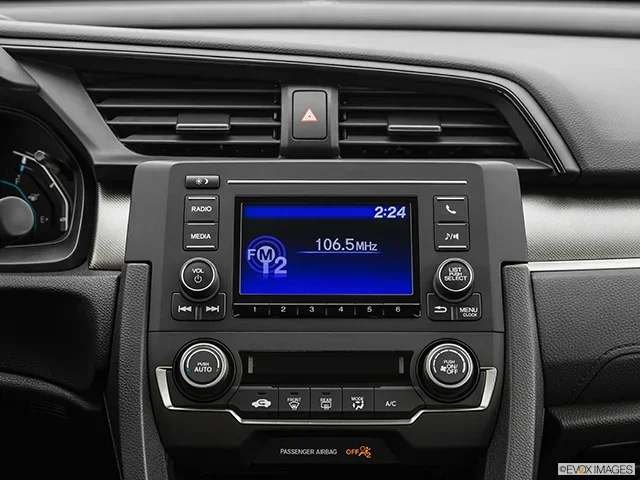
Method 1: Using the Preset Buttons (Most Honda Civics)
This is the most common method for Honda Civics from the 2000s and 2010s. Here is what to do:
- Turn on your Honda Civic ignition. The radio screen should display CODE or SECURITY.
- Press and hold the 1 and 6 preset buttons at the same time.
- Hold them for about five seconds until the screen shows a prompt.
- You will now see a number entry screen on the display.
- Use the preset buttons to enter each digit of your code one at a time.
- Press the OK or ENTER button after each digit.
- Once all digits are entered, press and hold the 1 and 6 buttons again.
- The radio should unlock and return to normal operation.
If the code is accepted, you will hear a confirmation tone. The radio screen will light up, and you can start listening to your favorite stations right away.
Method 2: Using the Navigation Screen (Newer Honda Civics)
For Honda Civics with a touchscreen infotainment system, the process is slightly different:
- Turn on the ignition. The screen will display a security prompt.
- Tap the screen to access the radio settings menu.
- Navigate to the Audio or Radio settings section.
- Select Enter Security Code or Unlock Radio.
- Use the on-screen keyboard to type in your code.
- Confirm the code by tapping Submit or OK.
Newer Honda Civics may require you to hold the power button for a few seconds before the code entry screen appears. Be patient and follow the on-screen instructions carefully.
Method 3: Using the Seek/Tune Knob (Older Models)
Some older Honda Civics use a different input method. Instead of preset buttons, you use the seek or tune knob:
- Turn on the ignition and wait for the CODE display.
- Turn the seek knob to scroll through numbers.
- Press the knob to select each digit of your code.
- Enter all digits in sequence.
- Press and hold the knob to confirm.
This method works on Honda Civics from the late 1990s and early 2000s. If your model uses this approach, the display will show each digit as you select it.
Common Mistakes When Entering the Honda Civic Radio Code
Even with the right code, mistakes can happen. Here are the most common errors people make and how to avoid them.
Entering the Code Too Many Times
Most Honda Civic radios allow only three to five attempts to enter the code. If you enter the wrong code too many times, the radio locks completely. You may need to wait a certain amount of time before trying again. Some models require you to leave the ignition on for one hour before you can attempt another entry.
To avoid this problem: Write down your code on a piece of paper before you start. Double-check each digit before pressing enter. Take your time and do not rush.
Confusing the Serial Number with the Code
This is a very common mistake. The serial number and the radio code are two different things. The serial number identifies your radio unit. The code is the unlock number that matches that serial number.
If you enter the serial number instead of the code, the radio will reject it. Make sure you are entering the correct number. The code is typically a four-digit number, while the serial number is usually longer.
Not Disconnecting and Reconnecting the Battery
In some cases, you need to fully disconnect the battery before entering the code. This resets the radio system and clears any error states. If your radio is not responding to the code, try this:
- Disconnect the negative battery terminal.
- Wait for at least five minutes.
- Reconnect the battery terminal.
- Turn on the ignition and try entering the code again.
How to Prevent Radio Code Issues in the Future
Once you have your Honda Civic radio working again, you do not want to deal with this problem a second time. Here are some simple steps to prevent future radio lockouts.
- Save your radio code digitally. Take a photo of the code card and store it in your phone or cloud storage.
- Write the code on a piece of tape and stick it inside the glove box. This is a common trick that many Honda owners use.
- Avoid disconnecting the battery unless it is absolutely necessary. If you do need to disconnect it, write down the radio code first.
- Keep your owner’s manual in the car. The manual is the easiest place to find your code if you ever need it again.
- Use a memory saver device when working on your car’s electrical system. This keeps the radio memory intact during battery maintenance.
These small habits can save you a lot of time and frustration down the road. A few minutes of preparation now can prevent hours of hassle later.
When to Seek Professional Help
Most of the time, entering a Honda Civic radio code is a straightforward process. But there are situations where professional help is the best option.
If you have tried every method and your radio still will not unlock, it may be a hardware issue. The radio unit itself could be damaged. In this case, you will need to visit a Honda dealership or a qualified car audio specialist.
A professional can also help if you have lost your serial number and cannot retrieve the code. They have access to Honda’s internal database and can look up your radio code using your VIN. This service usually costs a small fee, but it is much cheaper than replacing the entire radio unit.
You can also find help at your local auto parts store. Many stores like AutoZone offer free radio code lookup services. Just bring in your radio serial number, and they can generate the code for you.
Note: If you are ever unsure about working on your car’s electrical system, it is always better to seek professional help. You can also check how to check if a vehicle is stolen for free to make sure your Honda Civic’s identity is secure before making any changes to the radio system.
Final Thoughts
Entering a Honda Civic radio code does not have to be a stressful experience. With the right information and a little patience, you can unlock your radio in just a few minutes. Whether you find your code in the owner’s manual, on the radio unit, or through an online tool, the process is simple and straightforward.
Remember to keep your radio code saved somewhere safe. A few minutes of preparation today can save you from a frustrating lockout tomorrow. Your Honda Civic audio system is an important part of your driving experience, and keeping it working properly is well worth the effort.
Now that you know how to enter your Honda Civic radio code, you can handle this situation with confidence. No more panic when you see that CODE display. You have the knowledge and the tools to fix it yourself. Enjoy your music and drive safely.
Frequently Asked Questions
What is the default radio code for a Honda Civic?
There is no universal default radio code for Honda Civics. Each radio unit has a unique code based on its serial number. You must find your specific code using the methods described in this guide. Do not try to use generic codes, as this can permanently lock your radio.
How do I find my Honda Civic radio serial number?
You can find the serial number on a label attached to the radio unit itself. To see it, you may need to remove the radio from the dashboard. Alternatively, check your Honda Civic owner’s manual for a code card with the serial number printed on it.
Can I enter the wrong Honda Civic radio code too many times?
Yes. Most Honda Civic radios allow only three to five incorrect code entries. After too many failed attempts, the radio will lock completely and require a waiting period before you can try again. Always double-check your code before entering it.
Is it free to get a Honda Civic radio code from a Honda dealer?
In most cases, yes. Honda dealerships can look up your radio code using your vehicle identification number at no charge. Some third-party services may charge a small fee, but the dealer is usually the most reliable and affordable option.
What should I do if my Honda Civic radio still asks for a code after entering it correctly?
Try disconnecting the car battery for five minutes and then reconnecting it. This resets the radio system and clears any error states. If the problem persists, visit a Honda dealership or auto audio specialist for further diagnosis.
Can I use an online Honda radio code generator to find my code?
Yes, online Honda radio code generators can help you find your code if you have the serial number. However, always use reputable websites and verify the code before entering it. A wrong code can cause your radio to lock temporarily.