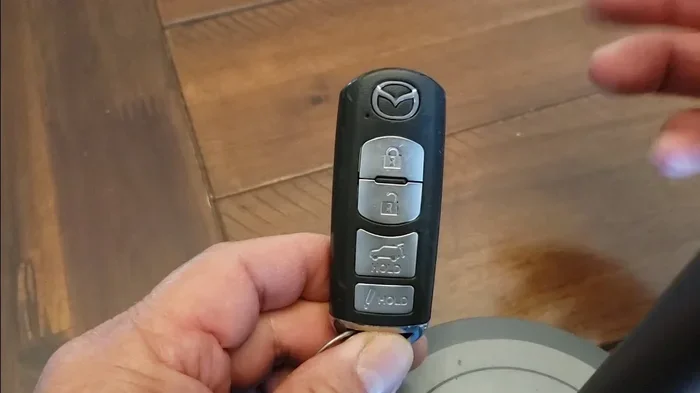
How to Reset a Mazda Key Fob in Simple Steps Today
Resetting your Mazda key fob is easier than you think and can save you a trip to the dealership. Whether your Mazda key fob stopped working after a battery change or needs a full reprogram, this guide walks you through every step with confidence. You will learn the exact buttons to press, the right battery to use, and common mistakes to avoid.
Have you ever stood by your Mazda, ready to drive, only to realize the key fob is not responding? It is a frustrating moment that can ruin your morning routine. The good news is that resetting your Mazda key fob is something you can do at home without calling a mechanic or visiting the dealership.
This guide gives you simple, clear steps to reset your Mazda remote in just a few minutes. We cover battery replacement, reprogramming, and troubleshooting for popular models like the Mazda 3, Mazda CX-5, and Mazda CX-9. By the end, you will feel confident handling the reset yourself.
A Mazda key fob reset is not just about fixing a broken remote. It is also about understanding how your keyless entry system works. Once you know the basics, you can prevent future problems and keep your car running smoothly. Let us dive right in.
Key Takeaways
- Quick Reset Method: A simple 3-step process works for most Mazda models in under two minutes.
- Battery Matters: Using the correct CR2025 or CR2032 battery prevents most key fob issues.
- No Special Tools Needed: You do not need expensive equipment to reset your Mazda remote.
- Model-Specific Steps: Different Mazda models may require slightly different reset procedures.
- When to Seek Help: Some problems need a professional, especially with the Mazda immobilizer system.
- Prevention Tips: Regular maintenance keeps your Mazda key fob working reliably for years.
📑 Table of Contents
- Why Your Mazda Key Fob Might Need a Reset
- How to Reset a Mazda Key Fob: Step-by-Step Guide
- Mazda Model-Specific Reset Instructions
- When to Replace Your Mazda Key Fob Instead of Resetting
- Common Mistakes to Avoid When Resetting a Mazda Key Fob
- How to Prevent Mazda Key Fob Problems in the Future
- How Much Does It Cost to Reset or Replace a Mazda Key Fob?
- Frequently Asked Questions About Mazda Key Fob Resets
- Final Thoughts on Resetting Your Mazda Key Fob
Why Your Mazda Key Fob Might Need a Reset
Before we get into the steps, it helps to understand why your Mazda remote might stop working. Key fobs are small electronic devices that send a signal to your car. Over time, several things can interfere with that signal.
The most common reason is a dead battery. Key fob batteries typically last two to three years, but heavy use can shorten that lifespan. Other reasons include signal interference, moisture damage, or a need to reprogram after a battery swap.
Sometimes the issue is not the fob at all. Your car’s immobilizer system might need a reset too. Understanding the root cause helps you choose the right fix. Below, we break down the most common reasons your Mazda key fob may need attention.
Dead Battery in the Key Fob
A weak or dead battery is the number one culprit. If your Mazda key fob works intermittently or not at all, the battery is likely the problem. You can test this by standing close to your car and pressing the buttons. If the car does not respond even at close range, a new battery is probably needed.
Signal Interference
Electronic devices near your key fob can cause interference. Phones, laptops, and even USB chargers can block the signal. Try moving away from these devices and testing the fob again. If it works, interference was the issue.
Need for Reprogramming
After replacing the battery, some Mazda models require reprogramming. This is not the same as a full reset, but it is an important step. The Mazda key fob reprogramming process ensures the car recognizes the remote again.
How to Reset a Mazda Key Fob: Step-by-Step Guide
Now that you understand why resets happen, let us walk through the process. The steps below work for most Mazda models. However, always check your owner’s manual for model-specific details.
Step 1: Replace the Key Fob Battery
Start by opening the key fob. Most Mazda remotes have a small tab or screw that holds the casing together. Use a flathead screwdriver or a coin to gently pry it open.
Remove the old battery and note its type. Most Mazda key fobs use a CR2025 or CR2032 coin cell battery. You can find these at any pharmacy or auto parts store. Insert the new battery with the positive side facing up. Snap the casing back together.
Quick Tip: Always buy a fresh battery from a reputable brand. Cheap batteries die quickly and may cause the same problem again within weeks.
Step 2: Perform the Reset Sequence
With the new battery in place, sit inside your Mazda and close all doors. Turn the ignition to the “On” position without starting the engine. Within five seconds, press and hold the lock button on the key fob for three seconds, then press the unlock button.
Release both buttons. The doors should lock and then unlock, confirming the reset worked. If you hear a beep or see the dashboard lights flash, the Mazda key fob reset was successful.
If nothing happens, do not worry. Try the sequence again. Sometimes it takes two or three attempts. Make sure you are within the required time window between steps.
Step 3: Test the Key Fob
Walk a few feet away from the car and test all buttons. Try locking, unlocking, and pressing the panic button if your fob has one. Test from different distances to make sure the signal is strong.
If the fob works from a reasonable distance, your reset was successful. If not, move on to the next section for additional troubleshooting.
Mazda Model-Specific Reset Instructions
Not all Mazda models follow the exact same reset process. Here are some specific details for popular models.
Resetting the Mazda 3 Key Fob
The Mazda 3 uses a straightforward reset process. After replacing the battery, turn the ignition to the “On” position. Press and hold the lock button for five seconds, then press the unlock button twice. The headlights will flash to confirm the reset.
Resetting the Mazda CX-5 Key Fob
For the Mazda CX-5, the process is slightly different. Close all doors and the liftgate. Turn the ignition to “On” and press the lock button on the fob. Within ten seconds, press the unlock button and then the lock button again. The power mirrors should adjust to confirm success.
Resetting the Mazda CX-9 Key Fob
The Mazda CX-9 follows the general reset steps outlined above. However, if you have a smart key system, you may also need to reset the push-button start. Refer to your CX-9 owner’s manual for the smart key reset procedure.
When to Replace Your Mazda Key Fob Instead of Resetting
Sometimes a reset is not enough. If your Mazda key fob still does not work after following all the steps, it might be time for a replacement. Physical damage, water exposure, or worn-out internal electronics can make a reset ineffective.
Before buying a new fob, check the price. A Mazda key fob replacement can cost between $50 and $200 depending on the model and where you buy it. You can find replacement fobs at auto parts stores or online retailers.
Keep in mind that some replacement fobs need to be programmed by a dealer or locksmith. If you are handy with electronics, you can also program many fobs yourself using the steps in your owner’s manual.
Common Mistakes to Avoid When Resetting a Mazda Key Fob
Even simple tasks can go wrong if you rush through them. Here are the most common mistakes people make when resetting their Mazda remote.
- Skipping the battery type check: Using the wrong battery can damage the fob or cause it to malfunction. Always match the battery type listed in your manual.
- Not closing all doors: The reset sequence requires all doors to be fully closed. A slightly open door will prevent the process from working.
- Timing the steps too slowly: The reset sequence has a narrow time window. If you take too long between steps, the car will not register the commands.
- Ignoring the immobilizer light: If the immobilizer warning light stays on after the reset, there may be a deeper issue that needs professional attention.
- Forcing the fob open: Key fobs are small and fragile. Using too much force can crack the casing or damage the circuit board inside.
Avoiding these mistakes will save you time and frustration. Take your time and follow each step carefully.
How to Prevent Mazda Key Fob Problems in the Future
Prevention is always better than cure. Here are simple habits that keep your Mazda key fob working reliably for years.
Replace the Battery on a Schedule
Do not wait for the fob to stop working. Replace the battery every two to three years as a preventive measure. This avoids the surprise of a dead fob when you need it most.
Keep the Fob Dry
Moisture is the enemy of electronics. Avoid leaving your key fob in the bathroom, near a pool, or in a wet glove compartment. If the fob gets wet, dry it immediately with a soft cloth.
Store the Fob Away from Strong Signals
Keep your fob away from strong electromagnetic sources. Do not store it next to your phone charger, laptop, or microwave. A dedicated spot in your bag or pocket works best.
Handle the Fob Gently
Key fobs take a beating in our daily lives. Dropping them on hard surfaces can loosen internal connections. Use a protective case if you tend to be rough with your remotes.
How Much Does It Cost to Reset or Replace a Mazda Key Fob?
The cost of resetting a Mazda key fob is essentially zero if you do it yourself. You only need a new battery, which costs around $3 to $5. However, if you need professional help or a replacement fob, the costs add up.
A dealership will typically charge between $100 and $300 for a new key fob and programming. Independent locksmiths often offer lower prices. Some auto parts stores, like Autozone, can help you find the right battery and even sell replacement fobs at competitive prices. You can check how much Autozone charges for a transponder key to get a ballpark idea of costs.
Comparing prices before committing to a purchase is always smart. A little research can save you a significant amount of money.
Frequently Asked Questions About Mazda Key Fob Resets
Can I reset my Mazda key fob without a mechanic?
Yes, you can reset most Mazda key fobs at home using the steps in this guide. You do not need any special tools or mechanical knowledge. Just follow the battery replacement and reset sequence carefully. If the reset does not work, it may be time to consult a professional or check for deeper electrical issues.
How long does a Mazda key fob battery last?
A Mazda key fob battery typically lasts between two and three years. Heavy daily use can shorten this lifespan. If you notice the range of your key fob getting shorter, it is a good sign that the battery needs replacing soon.
What should I do if my Mazda key fob still does not work after a reset?
If the reset does not fix the problem, try replacing the battery again with a fresh one from a trusted brand. If that does not work, the fob may have internal damage or a fault in the car’s receiver module. In this case, a visit to the dealership or a qualified locksmith is the best next step.
Can I drive my Mazda without a key fob if it stops working?
Most modern Mazdas have a mechanical key hidden inside the key fob that you can use to unlock the door and start the car. You can still drive your vehicle even if the remote is not functioning. However, you will not have access to features like remote start or keyless entry until the fob is fixed.
How do I know if my Mazda key fob needs a new battery or a full replacement?
If the fob works intermittently or has a very short range, a new battery is usually the fix. If the fob is physically damaged, water-damaged, or does not respond at all even after a battery swap and reset, a full replacement is likely needed.
Is it safe to buy a used Mazda key fob and reprogram it?
Yes, it is generally safe to buy a used key fob and reprogram it to your Mazda. However, make sure the fob is compatible with your specific model and year. Some used fobs may need to be fully reprogrammed at a dealership, especially if they were previously paired to a different vehicle.
Final Thoughts on Resetting Your Mazda Key Fob
Resetting your Mazda key fob does not have to be a stressful experience. With the right steps and a little patience, you can have your remote working again in just a few minutes. The process is straightforward, costs almost nothing, and puts you back in control of your daily routine.
Remember to start with the battery. A fresh CR2025 or CR2032 battery solves the majority of key fob problems. Then follow the reset sequence carefully, paying attention to timing and door closure. Test your fob from different distances to confirm everything works.
If the reset does not resolve the issue, do not force the problem. Consider professional help or a replacement fob. Taking care of your Mazda remote with regular maintenance will keep it reliable for years to come.
Whether you drive a Mazda 3, Mazda CX-5, or Mazda CX-9, the reset process is similar and manageable. You now have the knowledge to handle this common car maintenance task on your own. Share this guide with a friend who might be struggling with their Mazda key fob too. A little know-how goes a long way toward keeping your car running smoothly and your day stress-free.