How Do I Activate Toyota Remote Connect Step by Step
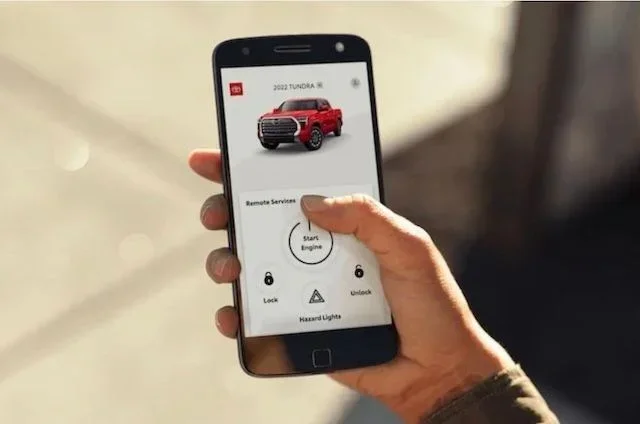
Toyota Remote Connect lets you lock, unlock, start, and monitor your Toyota from anywhere using the Toyota app. Activating it is simple: download the app, create an account, link your vehicle, and subscribe to Toyota Connected Services. This guide walks you through every step so you can start using Toyota Remote Connect right away.
Toyota Remote Connect is one of the most useful features available for Toyota owners today. It lets you control your vehicle from your phone. You can start the engine, lock the doors, and even check your fuel level without stepping foot inside the car. But before you can use any of these features, you need to activate the service first.
If you have been wondering how to get started, you are in the right place. This guide walks you through the entire process step by step. We cover everything from downloading the app to linking your vehicle and activating your subscription. By the end, you will know exactly how to activate Toyota Remote Connect and start enjoying the convenience it offers.
The process is straightforward, but there are a few things you need to know beforehand. Make sure you have your Toyota model year, your vehicle identification number, and a compatible smartphone ready. Let us dive into the full activation process.
Key Takeaways
- Easy Setup: Activating Toyota Remote Connect takes just a few minutes with the Toyota app and your vehicle info.
- Remote Features: You can lock, unlock, start the engine, and check vehicle status from your phone.
- Subscription Required: Toyota Remote Connect requires an active Toyota Connected Services subscription plan.
- Key Fob Integration: The system works alongside your Toyota key fob for seamless remote operations.
- Broad Compatibility: Most Toyota models from recent years support Toyota Remote Connect.
- Security Built In: Toyota uses secure login and verification to protect your vehicle access.
📑 Table of Contents
- What Is Toyota Remote Connect?
- What You Need Before Activating Toyota Remote Connect
- Step by Step Guide to Activate Toyota Remote Connect
- Features You Get With Toyota Remote Connect
- Troubleshooting Common Activation Issues
- Toyota Remote Connect Subscription Plans
- Tips to Get the Most Out of Toyota Remote Connect
- How Toyota Remote Connect Compares to Other Remote Start Systems
- Final Thoughts on Activating Toyota Remote Connect
What Is Toyota Remote Connect?
Toyota Remote Connect is a connected services feature that lets you interact with your Toyota vehicle remotely. It works through the Toyota app on your smartphone. Once activated, you can perform many tasks without being near your car.
The service is part of Toyota Connected Services. It uses telematics technology to communicate between your vehicle and the cloud. This means your Toyota can send and receive data over a cellular network, just like your phone does.
With Toyota Remote Connect, you get access to features like remote engine start, remote lock and unlock, and vehicle status checks. Some plans also include roadside assistance and emergency services. It is a powerful tool that makes owning a Toyota even more convenient.
What You Need Before Activating Toyota Remote Connect
Before you start the activation process, gather a few things. Having everything ready will save you time and prevent frustration.
Your Vehicle Information
- Vehicle Identification Number (VIN): You can find this on the driver side dashboard or on your registration card.
- Model Year: Make sure your Toyota model supports Remote Connect. Most Toyotas from 2017 onward are compatible.
- Trim Level: Some trims come with Remote Connect included, while others require a subscription.
Your Smartphone
- Use an iPhone or Android phone with the latest operating system.
- Make sure you have a stable internet connection.
- Download the Toyota app from the App Store or Google Play Store.
Your Toyota Key Fob
Your key fob plays a role in the setup process. You will need it to verify your vehicle. If you have lost your Toyota key fob, you may need to get a replacement before activating the service.
Step by Step Guide to Activate Toyota Remote Connect
Now let us get into the actual activation process. Follow each step carefully to ensure everything goes smoothly.
Step 1: Download the Toyota App
Open the App Store on your iPhone or Google Play Store on your Android device. Search for “Toyota” and download the official Toyota app. Make sure you are downloading the correct app from Toyota Motor Corporation. There are many copycat apps, so always check the developer name.
Once downloaded, open the app and grant it the necessary permissions. It will need access to your location and notifications to function properly. This is normal and required for the service to work.
Step 2: Create Your Toyota Account
Open the Toyota app and tap on “Sign Up” or “Create Account.” You will need to provide your name, email address, and create a password. Use a strong password that you can remember but others cannot guess.
After filling in your details, check your email for a verification link. Click on it to confirm your account. If you do not see the email, check your spam folder. This verification step is important for security.
Step 3: Link Your Vehicle to the App
Once your account is set up, go to the “My Vehicles” section in the app. Tap on “Add Vehicle.” You will be asked to enter your VIN. Type it in carefully, as even one wrong digit will cause an error.
The app will verify your vehicle information. This may take a few moments. Once verified, your Toyota will appear in your vehicle list. You can now add multiple Toyotas if you own more than one vehicle.
Step 4: Activate the Remote Connect Service
With your vehicle linked, go to the Remote Connect section. You will see options to subscribe to the service. Toyota offers different plans, so choose the one that fits your needs. Some plans include a free trial period, which is a great way to test the features before committing.
Follow the on-screen prompts to complete your subscription. You will need to enter payment information. Once your subscription is active, the Remote Connect features will unlock immediately.
Step 5: Test Your Remote Connect Features
Now comes the fun part. Try using the features from a safe distance. Start by locking and unlocking your doors remotely. Then try the remote engine start feature. Check the vehicle status screen to see your fuel level and tire pressure.
If everything works, you are all set. If something does not work, double-check your internet connection and make sure your subscription is active. You can also visit your Toyota dealer for help with activation issues.
Features You Get With Toyota Remote Connect
Once Toyota Remote Connect is activated, you gain access to a range of powerful features. Here is what you can do with the service.
Remote Engine Start
This is one of the most popular features. You can start your Toyota engine from your phone. This is especially useful in cold weather when you want to warm up the car before driving. You can also cool down the car on hot summer days. The engine runs for a set time, usually 10 to 20 minutes, before shutting off automatically.
Remote Lock and Unlock
Forget whether you locked your car or not? No problem. With Toyota Remote Connect, you can lock and unlock your doors from anywhere. This is incredibly handy when you are at the grocery store and realize you left something in the car.
Vehicle Status Check
The app shows you real-time information about your vehicle. You can check your fuel level, tire pressure, and oil life. You can also see if any warning lights are on. This helps you stay on top of maintenance and avoid surprises.
Find My Vehicle
Ever parked in a huge lot and forgotten where you left your car? Toyota Remote Connect includes a “Find My Vehicle” feature. It shows you the exact location of your Toyota on a map. This is a lifesaver in large parking areas.
Troubleshooting Common Activation Issues
Sometimes the activation process does not go perfectly. Here are common issues and how to fix them.
App Won’t Connect to Your Vehicle
If the app cannot find your vehicle, check your internet connection first. Both your phone and your Toyota need a data connection. Restart the app and try again. If the problem persists, log out and log back into your account.
Subscription Not Activating
If your subscription does not activate, verify your payment information. Make sure your card has enough funds. Contact Toyota customer support if the issue continues. They can help resolve billing problems quickly.
Features Not Working After Activation
Some features may take a few minutes to become active after subscription. If they still do not work, try uninstalling and reinstalling the app. Make sure your phone operating system is up to date. You can also check if your vehicle needs a software update.
Can I Drive My Toyota Without a Key Fob After Activation?
Activating Toyota Remote Connect does not replace your key fob entirely. You still need your key fob to drive the car. However, the Toyota app and Remote Connect features work alongside your key fob to provide extra convenience.
Toyota Remote Connect Subscription Plans
Toyota offers different subscription tiers for Remote Connect. The basic plan usually includes remote lock, unlock, and engine start. Higher-tier plans add features like roadside assistance, trip planning, and concierge services.
Subscription costs vary by plan and region. Most plans range from $80 to $150 per year. Some Toyota dealerships offer bundled packages that include Remote Connect with other services. It is worth asking your dealer about available options.
You can manage your subscription directly through the Toyota app. If you want to cancel or upgrade, you can do so from the settings menu. Keep in mind that canceling your subscription will deactivate the remote features until you resubscribe.
Tips to Get the Most Out of Toyota Remote Connect
- Keep Your App Updated: Toyota regularly releases updates that improve performance and add new features. Always install the latest version.
- Use Strong Wi-Fi When Setting Up: The initial setup process uses a lot of data. Use a stable Wi-Fi connection to avoid interruptions.
- Enable Notifications: Turn on app notifications so you get alerts about your vehicle status, low fuel, and maintenance reminders.
- Share Access With Family: You can add multiple users to your Toyota Remote Connect account. This lets family members control the vehicle too.
- Check Your Subscription Renewal: Set a reminder before your subscription expires so you do not lose access to your features.
How Toyota Remote Connect Compares to Other Remote Start Systems
There are many remote start systems available for vehicles. Here is how Toyota Remote Connect stacks up against common alternatives.
| Feature | Toyota Remote Connect | Aftermarket Remote Start |
|---|---|---|
| Installation | No installation needed | Professional installation required |
| App Control | Yes, through Toyota app | Varies by brand |
| Vehicle Diagnostics | Yes | Limited or none |
| Subscription Required | Yes | Some brands require it |
| Warranty Impact | No impact on warranty | May void warranty if not installed properly |
| Security | Built-in Toyota security | Varies widely |
Toyota Remote Connect has a clear advantage because it is factory-integrated. There is no need for extra hardware or professional installation. Everything works through the Toyota app, which is designed specifically for your vehicle.
Final Thoughts on Activating Toyota Remote Connect
Activating Toyota Remote Connect is a simple process that anyone can follow. You just need the Toyota app, your vehicle information, and a subscription plan. Once set up, the convenience is hard to beat. You can start your car, lock your doors, and check your vehicle status from practically anywhere.
Take your time during the setup process. Make sure each step is completed correctly. If you run into any issues, Toyota customer support is always available to help. You can also visit your local Toyota dealer for hands-on assistance with activation.
Toyota Remote Connect is a great example of how modern technology makes car ownership easier. Once you activate it, you will wonder how you ever managed without it. Follow the steps in this guide, and you will be enjoying all the features in no time.
Frequently Asked Questions
How long does it take to activate Toyota Remote Connect?
The actual activation process takes about 10 to 15 minutes if you have all your information ready. Downloading the app and creating an account may take a few extra minutes. Overall, you should be up and running in under 30 minutes.
Do I need a special phone to use Toyota Remote Connect?
No, you do not need a special phone. Any modern iPhone or Android smartphone will work. Just make sure your operating system is up to date and you have a reliable internet connection for the app to communicate with your vehicle.
Can I activate Toyota Remote Connect myself or do I need a dealer?
You can absolutely activate Toyota Remote Connect yourself. The process is designed to be user-friendly and done from your phone. However, if you prefer hands-on help, you can visit a Toyota dealer to assist you with the setup.
What happens if I cancel my Toyota Remote Connect subscription?
If you cancel your subscription, the remote features will be deactivated. You will no longer be able to start the engine, lock, or unlock your car remotely. You can resubscribe at any time to regain access to these features.
Is Toyota Remote Connect available on all Toyota models?
Toyota Remote Connect is available on most Toyota models from recent years, typically 2017 and newer. However, some older models or base trims may not be compatible. Check with your Toyota dealer or the Toyota website to confirm your specific model supports the service.
Can I use Toyota Remote Connect alongside my key fob?
Yes, Toyota Remote Connect works alongside your key fob. They do not replace each other. Your key fob is still needed to drive the vehicle, while Remote Connect provides additional convenience features like remote start and lock/unlock from your phone.