Learn How to Change the Battery in Your Toyota Car Key
Changing the battery in your Toyota car key is a quick and easy DIY task you can do in minutes. Most Toyota key fobs use a common CR2032 battery that you can find at any store. This guide walks you through every step, from identifying the right battery to reassembling your key fob without damage.
There is nothing more frustrating than standing by your car, pressing the button on your Toyota car key, and getting no response. A dead key fob battery can leave you stranded in the parking lot or stuck outside your own driveway. The good news is that fixing this problem is incredibly simple. You do not need a mechanic, and you do not need to spend a fortune.
In this guide, we will show you exactly how to change the battery in your Toyota car key. Whether you drive a Camry, a RAV4, or a Highlander, the process is very similar across most Toyota models. We will cover everything from finding the right battery to reassembling your key fob like a pro. By the end of this article, you will feel confident doing it yourself.
So grab a flathead screwdriver, find a well-lit spot, and let us get started. This is one of the easiest car maintenance tasks you will ever do.
Key Takeaways
- Most Toyota keys use a CR2032 battery, which is widely available and affordable.
- You can replace the battery yourself at home with just a small flathead screwdriver or coin.
- Knowing the warning signs of a dying key battery helps you avoid getting locked out.
- Proper handling prevents damage to the key fob casing and internal electronics.
- Replacing the battery takes under 5 minutes once you know the steps.
- Regular maintenance extends key fob life and keeps your Toyota smart key working reliably.
📑 Table of Contents
- Why Your Toyota Key Battery Matters
- Signs Your Toyota Key Battery Needs Replacing
- What Battery Does Your Toyota Key Use?
- Step-by-Step Guide to Changing Your Toyota Key Battery
- Tips to Make Your Toyota Key Battery Last Longer
- When to Replace Your Toyota Key Instead of Just the Battery
- Common Mistakes to Avoid When Changing Your Toyota Key Battery
- Expert Insight: How Often Should You Replace Your Toyota Key Battery?
- Final Thoughts
Why Your Toyota Key Battery Matters
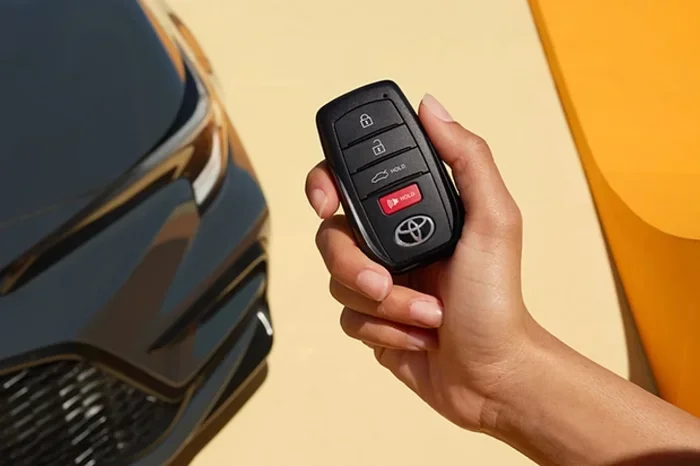
Your Toyota key fob is more than just a remote. It is a small computer that sends coded signals to your car. When the battery dies, the key stops communicating with the vehicle. This means no locking, no unlocking, and no push-to-start function.
Many people do not realize how much they rely on their key fob until it stops working. You use it every single day. You press the button to lock the doors when you walk away. You press it again to unlock when you come back. You might even use it to open the trunk or start the engine without taking the key out of your pocket.
A low Toyota key fob battery does not just cause inconvenience. It can also be a safety concern. If your key battery dies at night or in an unfamiliar area, getting back into your car becomes a real challenge. That is why it is smart to replace the battery proactively, before it fully dies.
How Long Does a Toyota Key Battery Last?
Most Toyota key fob batteries last between two and four years. The exact lifespan depends on how often you use the key. If you live in a cold climate, the battery may drain faster. Frequent use of the remote lock and unlock buttons also shortens the battery life.
Some Toyota models with smart key systems use more power than basic remotes. The push-to-start feature requires constant communication between the key and the car. This means the battery may need replacing sooner on these models.
Signs Your Toyota Key Battery Needs Replacing
Catching a dying key battery early saves you from a lot of hassle. Here are the most common signs that your Toyota key battery is low:
- Reduced range: You have to stand closer to the car for the remote to work. Previously, you could unlock the car from across the parking lot. Now you need to be right next to it.
- Intermittent working: The key works sometimes but not others. You press the button and nothing happens. Then you try again a few seconds later and it works. This inconsistency is a classic sign of a fading battery.
- Delayed response: There is a noticeable lag between pressing the button and the car responding. The lock or unlock action takes a second or two longer than usual.
- Warning light on the dashboard: Some Toyota models display a warning message about the key battery. If you see a message about the smart key system, check the battery immediately.
- Key fob not working at all: This is the most obvious sign. If pressing any button does nothing, the battery is almost certainly dead.
If you notice any of these signs, do not wait too long. Replace the battery as soon as you can. Knowing how to tell if your key battery is low is the first step to staying ahead of this problem.
What Battery Does Your Toyota Key Use?
Most Toyota car keys use a CR2032 battery. This is a standard 3-volt coin cell battery. You can find it at almost any grocery store, pharmacy, or auto parts shop. They cost between one and five dollars, so they are very affordable.
Here are some common battery types used in Toyota keys:
- CR2032: The most common battery for Toyota key fobs. Used in most models from 2010 onward.
- CR2025: Slightly thinner than the CR2032. Some older Toyota models use this battery.
- CR2016: Even thinner. Found in some compact Toyota key fobs.
Always double-check your owner manual to confirm the correct battery type. Using the wrong battery can damage the key fob or cause it to malfunction. If you are unsure, a CR2032 will work for the vast majority of Toyota vehicles.
When buying a replacement battery, look for reputable brands like Energizer, Duracell, or Panasonic. Cheap off-brand batteries may not last as long and could leak, which can damage the internal components of your key fob.
Step-by-Step Guide to Changing Your Toyota Key Battery
Now for the part you have been waiting for. Let us walk through the process of replacing the battery in your Toyota car key. The steps are simple, but you should be gentle and patient to avoid damaging the key fob.
Step 1: Gather Your Tools
You will need very few tools for this job. Here is what to have ready:
- A new CR2032 battery (or the correct type for your model)
- A small flathead screwdriver or a coin
- A clean, soft cloth or towel
- A well-lit workspace
That is it. You do not need any special equipment. Everything you need is probably already in your home.
Step 2: Open the Key Fob
This is the trickiest part, but it is still very easy. Most Toyota key fobs have a small seam running along the middle. Look for a tiny gap between the two halves of the fob.
Insert your flathead screwdriver or a coin into the gap. Gently twist and pry the two halves apart. Work slowly around the edges. Do not force it. Toyota key fobs are designed to open without tools, but they do require a little patience.
Pro tip: Place a soft cloth underneath your work area. If the key fob pops open unexpectedly, the small screws and battery will not roll away or get lost.
Step 3: Remove the Old Battery
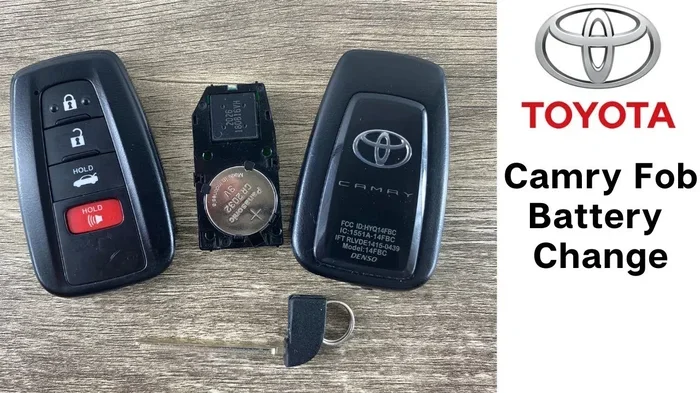
Once the key fob is open, you will see the old battery sitting in a small compartment. It is usually held in place by a tiny metal clip or simply resting in a slot.
Carefully lift the old battery out. You can use the tip of your screwdriver or your fingernail. Pay attention to which side of the battery faces up. The positive side (marked with a plus sign and the number 2032) should be facing up in most Toyota keys.
Take a photo with your phone before removing the battery. This makes it easy to remember the correct orientation when you insert the new one.
Step 4: Insert the New Battery
Take your new CR2032 battery and place it in the compartment. Make sure the positive side faces up, just like the old battery. Push it gently into place until it sits flat and snug.
Do not force the battery. It should drop in easily and stay in place on its own. If it feels loose, double-check that you are using the correct battery type.
Step 5: Reassemble the Key Fob
Now it is time to put the key fob back together. Align the two halves carefully. Press them together firmly but gently. You should hear or feel a click when the two halves snap into place.
Make sure the seam is completely flush all the way around. If the halves are not properly aligned, the key fob may not close correctly. This can lead to water getting inside or the buttons feeling mushy.
Step 6: Test Your Toyota Key
After reassembling the key fob, step back and test it. Stand a few feet from your car and press the lock and unlock buttons. Check that all functions work properly.
If the key does not work right away, do not panic. Sometimes the car needs a moment to recognize the new battery. Try standing closer to the vehicle and pressing the buttons again. If it still does not work, open the key fob again and make sure the battery is seated correctly.
For Toyota models with push-to-start, you may need to hold the key fob directly against the start button. This is a backup feature that lets you start the car even if the key fob battery is completely dead. If your car starts using this method, the battery replacement was successful.
Tips to Make Your Toyota Key Battery Last Longer
You have just replaced the battery. Now you want to make it last as long as possible. Here are some simple tips to extend the life of your Toyota car key battery:
- Avoid extreme temperatures: Do not leave your key fob in a hot car or outside in freezing weather. Heat and cold both drain batteries faster.
- Do not drop the key fob: Physical shocks can damage the internal battery and circuit board. Treat your key fob with care.
- Keep it away from other electronics: Strong electromagnetic fields from large speakers or devices can interfere with the key fob signal and drain the battery.
- Remove the key fob from the charger: If you use a key fob charger or holder, do not leave it on the charger continuously. Overcharging can shorten battery life.
- Replace the battery proactively: Do not wait until the key completely stops working. Replace the battery at the first sign of weakness.
Following these simple tips can add months or even years to your key fob battery life. It is a small effort that pays off in the long run.
When to Replace Your Toyota Key Instead of Just the Battery
Sometimes, replacing the battery is not enough. If you have put in a brand-new battery and the key fob still does not work, there may be a deeper issue. Here are some situations where you should consider replacing the entire key:
- Water damage: If your key fob has been submerged in water or exposed to heavy moisture, the internal electronics may be corroded. A new battery will not fix this.
- Cracked or broken casing: A damaged key fob can let moisture and dirt inside, which damages the battery and circuit board.
- Buttons are unresponsive: If specific buttons do not work even with a new battery, the internal contact pads may be worn out.
- The key still does not work after battery replacement: Sometimes the issue is not the battery at all. The key fob may need reprogramming or replacement.
In these cases, you might need to visit a Toyota dealership or a qualified locksmith. The cost to program a push to start key fob can vary, but it is usually much less than buying a completely new key. If you are considering a used replacement key, make sure it can be properly paired to your vehicle.
Can You Reprogram a Used Toyota Key Fob?
If you are using a replacement key fob, you may wonder whether it needs to be programmed to your Toyota. The answer depends on the model and year of your vehicle. Some Toyota keys come pre-programmed, while others require professional programming. Reprogramming a used Toyota key fob to a different car is possible in many cases, but it requires the right tools and knowledge. When in doubt, consult a Toyota dealer or a trusted automotive locksmith.
Common Mistakes to Avoid When Changing Your Toyota Key Battery
Even though this is a simple task, mistakes can happen. Here are the most common errors people make when changing their Toyota key battery:
- Using the wrong battery type: Always confirm the battery model before purchasing. A CR2025 will not fit properly in a compartment designed for a CR2032.
- Forcing the key fob open: Toyota key fobs are not built to withstand heavy force. If you are struggling to open it, you are probably using the wrong tool or technique.
- Installing the battery backwards: Putting the battery in upside down will not damage the key fob, but it will not work either. Always check the orientation.
- Touching the battery with wet hands: Moisture can damage the battery contacts. Make sure your hands are dry before handling the battery.
- Losing the small screws: Some Toyota key fobs have tiny internal screws. Keep them somewhere safe during the replacement process.
Avoiding these mistakes will make the process smoother and protect your key fob from damage.
Expert Insight: How Often Should You Replace Your Toyota Key Battery?
Automotive experts recommend replacing your Toyota key fob battery every two to three years as a preventive measure. This ensures you never get caught off guard by a dead battery. Even if the key still works, a fresh battery provides stronger signal strength and more reliable performance.
Some Toyota owners keep a spare CR2032 battery in their glove box at all times. This is a smart habit. If your battery dies unexpectedly, you will have a replacement ready to go within seconds.
It is also worth noting that the process for checking your oil level or other routine maintenance tasks is similar in simplicity. Just like checking your oil, replacing a key fob battery is a quick check you can do at home without any professional help. Both tasks keep your Toyota running smoothly and save you time and money.
Final Thoughts
Changing the battery in your Toyota car key is one of the simplest and most useful things you can do as a car owner. It takes less than five minutes, costs just a few dollars, and saves you from the hassle of a dead key fob. With the steps outlined in this guide, you have everything you need to do it yourself confidently.
Remember to use the right battery type, handle the key fob gently, and test the key after replacement. If you ever run into issues that a new battery cannot fix, do not hesitate to reach out to a Toyota dealer or a professional locksmith.
Keep this guide bookmarked for future reference. You never know when you will need to swap out that battery again. Stay prepared, and your Toyota key will keep working reliably for years to come.
Frequently Asked Questions
What type of battery does a Toyota car key use?
Most Toyota car keys use a CR2032 battery, which is a standard 3-volt coin cell battery. Some older models may use a CR2025 or CR2016, so always check your owner manual to confirm the correct type for your specific Toyota model.
How do I know if my Toyota key battery is low?
Common signs include reduced remote range, intermittent operation, delayed response from the car, and a dashboard warning light about the smart key system. If you notice any of these symptoms, it is time to replace the battery.
Can I replace the Toyota key battery myself?
Absolutely. Replacing a Toyota key battery is a simple DIY task that requires only a small flathead screwdriver or coin and a new CR2032 battery. The entire process takes less than five minutes and no special tools or expertise.
How much does it cost to replace a Toyota key battery?
A CR2032 battery costs between one and five dollars. You do not need to pay for labor since it is a DIY job. If you visit a dealership or locksmith, the service fee may be higher, but the battery itself remains very inexpensive.
What should I do if my Toyota key still does not work after replacing the battery?
First, make sure the battery is inserted with the correct orientation. If the key still does not work, the issue may be with the key fob itself rather than the battery. In that case, you may need reprogramming or a full key replacement.
How often should I replace my Toyota key fob battery?
Most experts recommend replacing the battery every two to three years as a preventive measure. Even if the key still works, a fresh battery ensures strong signal strength and reliable performance every time you use your Toyota.