How to Change Toyota Key Battery in Under Five Minutes
Changing your Toyota key battery is quick, easy, and costs just a few dollars. This guide shows you exactly how to replace the battery in your Toyota key fob in under five minutes, whether you have a traditional key or a push-button start model. You will learn the tools you need, the step-by-step process, and tips to make your Toyota key fob last longer.
Your Toyota key fob stops working at the worst possible moment. Maybe you are standing in the rain outside the grocery store. Maybe you are late for work and the car will not unlock. The first thing most people think is that the key is broken or the car has a serious problem. But more often than not, the real issue is a dead battery inside the key fob.
Changing a Toyota key battery is one of the easiest car maintenance tasks you can do at home. You do not need special tools. You do not need to visit a mechanic. And you certainly do not need to spend money at a dealership. In most cases, the whole process takes less than five minutes.
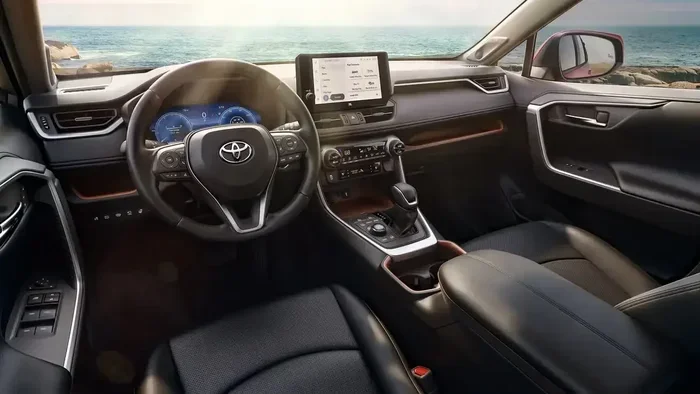
This guide walks you through every single step. Whether you drive a Toyota Camry, a Toyota RAV4, or a Toyota Highlander, the process is very similar. We will cover how to open the key fob, which battery to use, how to insert it correctly, and how to reset the key afterward. By the end, you will feel confident handling this simple repair on your own.
Let us start with the basics so you know exactly what you are dealing with before you open up that little key fob.
Key Takeaways
- Fast and Simple: You can change your Toyota key battery in under five minutes with basic tools.
- Common Battery Type: Most Toyota keys use a CR2032 coin cell battery that is easy to find.
- No Dealer Needed: You do not need to visit a dealership or pay for a professional to replace the battery.
- Preventive Tips: Simple habits can extend your Toyota key fob battery life significantly.
- Reset Is Easy: After replacing the battery, a quick reset usually restores full function.
- Know the Signs: Recognizing low battery symptoms early helps you avoid being locked out.
📑 Table of Contents
Why Your Toyota Key Battery Dies
Understanding why batteries die helps you prevent surprises. Most Toyota key fobs use a small CR2032 coin cell battery. These batteries are reliable, but they do not last forever. On average, a Toyota key fob battery lasts between two and four years.
Several factors can shorten that lifespan:
- Cold weather: Low temperatures drain batteries faster than normal.
- Frequent use: If you press the buttons dozens of times every day, the battery wears out sooner.
- Humidity and moisture: Exposure to water or high humidity can corrode the battery contacts.
- Storing the key near electronics: Devices that emit strong signals can slowly drain the battery.
- Old age: Even if you rarely use the key, the battery naturally loses charge over time.
If you notice your Toyota key fob not working from far away, that is often the first sign. The range shrinks before the battery dies completely. You might need to stand right next to the car for the push button start to recognize the key.
Some Toyota models also show a warning on the dashboard when the key battery is low. If you see a flashing light or a message about the key fob, do not ignore it. It means the battery is running low and you should replace it soon.
What You Need Before You Start
Before you dive in, gather everything you need. The good news is that the list is very short.
Tools and Materials
- Replacement battery: A CR2032 coin cell battery. You can find these at any grocery store, pharmacy, or auto parts shop for about two to five dollars.
- Small flathead screwdriver: A tiny screwdriver helps pry open the key fob shell. A coin like a dime also works in a pinch.
- Clean cloth: A soft cloth helps wipe the inside of the key fob before you close it back up.
- Good lighting: Make sure you can see clearly inside the key fob cavity.
That is it. No expensive tools. No special skills. Just a new battery and a few minutes of your time.
Where to Buy the Right Battery
CR2032 batteries are one of the most common battery types in the world. You can buy them almost anywhere. Drugstores, supermarkets, convenience stores, and online retailers all carry them. Look for reputable brands like Energizer, Duracell, or Panasonic for the best results.
Avoid buying the cheapest off-brand batteries you find. They may not last as long and could leak inside your key fob, causing damage. Spending a couple of extra dollars on a quality battery saves you from bigger headaches later.
Step-by-Step Guide to Changing Your Toyota Key Battery
Now for the part you have been waiting for. Here is the full process broken down into simple steps. Follow along carefully and you will have a working key fob in no time.
Step 1: Locate the Seam on the Key Fob
Hold your Toyota key fob in your hand and look closely at the edges. There is almost always a small seam or gap running along the middle of the fob. This is where the two halves of the shell separate.
On most Toyota models, the seam runs horizontally across the key fob. Some older models have the seam running vertically. Either way, the goal is the same: to pop the two halves apart gently.
If your Toyota key has a traditional metal key built in, you will also see a small release button or slider that lets you slide the metal key out first. Removing the metal key gives you better access to the seam.
Step 2: Open the Key Fob Shell
Insert your small flathead screwdriver or a thin coin into the seam. Start at one corner and gently twist the screwdriver to pop the shell open.
Do not force it. The two halves are held together by small plastic clips. If you apply too much pressure, you can crack or break those clips. Go slow and work your way around the seam until the top half lifts off.
If the fob feels stuck, try running the screwdriver along the entire seam to release all the clips at once. Patience is your best friend here.
Step 3: Remove the Old Battery
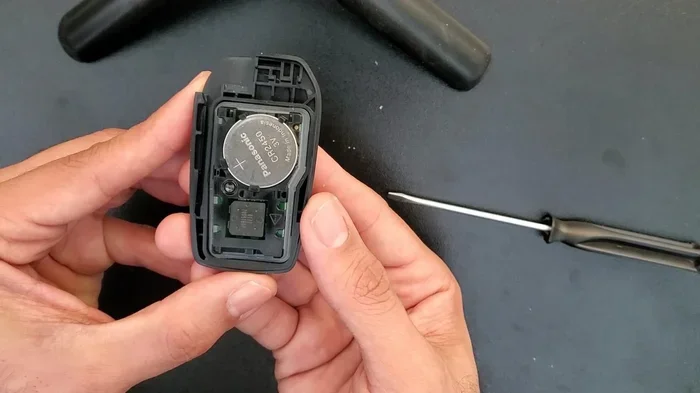
Once the shell is open, you will see the battery sitting in a small compartment. The battery is held in place by a metal clip or a small plastic tab.
Take a close look at how the battery sits. Notice which side faces up. The positive side (marked with a plus sign and the number 2032) usually faces up in Toyota key fobs. This detail matters a lot when you insert the new battery.
Gently pry the old battery out using the screwdriver or your fingernail. Be careful not to damage the metal contacts underneath. If the old battery is stuck, try wiggling it gently from side to side until it loosens.
Dispose of the old battery properly. Do not throw it in the regular trash. Most stores that sell batteries have recycling bins for used batteries. This is a small step that makes a big difference for the environment.
Step 4: Insert the New Battery
Take your new CR2032 battery out of the packaging. Hold it with the positive side facing up and gently place it into the compartment.
The metal clip or tab should snap back into place and hold the battery securely. Make sure the battery sits flat and does not tilt to one side. A loose battery can cause intermittent problems with the key fob.
If the battery feels loose even after the clip is engaged, double-check that you are using the correct battery type. Using the wrong size or type of battery is a common mistake that causes issues.
Step 5: Close the Key Fob Shell
Align the two halves of the key fob shell carefully. Make sure no wires or small parts get pinched between the halves. Press the top half down firmly until you hear the clips click into place.
Give the fob a gentle squeeze all around. If any part feels loose or the shell does not sit flush, open it back up and check that everything is seated correctly.
Step 6: Test the Key Fob
This is the most satisfying part. Stand near your Toyota and press the unlock button. The doors should respond immediately.
Test all the buttons: lock, unlock, trunk release, and panic alarm if your model has one. If the push button start is not working, stand close to the car and press the start button with the key fob right next to the ignition.
If everything works, congratulations. You just changed your Toyota key battery in under five minutes. If something is not working, do not worry. We will cover troubleshooting in a moment.
Common Problems and How to Fix Them
Sometimes the new battery does not solve the problem right away. This is normal and usually easy to fix. Here are the most common issues and what to do about them.
The Key Fob Still Does Not Work After Replacing the Battery
This happens more often than you might think. The most common reason is that the new battery is not seated properly. Open the fob again and check that the battery is sitting flat and the contacts are clean. A quick wipe with a dry cloth can remove any dust or corrosion on the contacts.
Another possibility is that the battery is inserted the wrong way. Flip it over and try again, making sure the positive side faces up. If you accidentally inserted the battery backward, do not panic. Just flip it to the correct orientation.
Sometimes the key fob needs a reset after a battery change. For most Toyota models, this simply means standing within a few feet of the car and pressing the lock and unlock buttons at the same time. Hold both buttons for about five seconds. The doors should lock and then unlock, confirming the reset worked.
The Range Is Still Short After the Battery Change
If the key fob works but only from very close range, the new battery might be a low-quality one. Try a different brand of CR2032 battery. Name-brand batteries from Energizer or Duracell tend to perform much better than generic alternatives.
Cold weather can also reduce the effective range of your key fob. If you are replacing the battery in winter, the cold may still be affecting performance even with a fresh battery. Once the car warms up, the range should improve.
The Dashboard Still Shows a Key Fob Warning
Some Toyota models have a message that stays on the dashboard even after you replace the battery. This usually means the car needs to relearn the key fob signal.
To fix this, try sitting in the car with all doors closed. Insert the key into the ignition (even if it is a push-button start model, there is usually a key slot hidden somewhere). Turn the ignition to the “On” position and then back to “Off” three times in quick succession. The dashboard message should clear after the third cycle.
If this does not work, you may need to consult your Toyota owner’s manual or visit a Toyota dealership. How Much Does It Cost To Program A Push To Start Key Fob can vary, but a simple relearn is often free at the dealership.
How to Make Your Toyota Key Fob Battery Last Longer
Once you have replaced the battery, you probably want to make it last as long as possible. Here are some simple habits that extend the life of your Toyota key fob battery.
- Do not press the buttons unnecessarily. Every press uses a small amount of battery power. Only press the buttons when you actually need to.
- Keep the key fob away from other electronics. Storing it next to your phone or laptop can cause slow battery drain over time.
- Store the key fob in a cool, dry place. Heat and moisture are the biggest enemies of coin cell batteries.
- Replace the battery at the first sign of weakness. Waiting too long after the battery gets low can cause the key fob to stop working entirely, and in some cases, it may need a longer reset process.
- Carry a spare battery. Keeping a CR2032 battery in your glove box means you are always prepared if the key fob dies unexpectedly.
These small habits add up. Many Toyota owners find that following these tips helps their key fob battery last three to five years instead of the average two to four.
When to Seek Professional Help
Most of the time, changing a Toyota key battery is a simple DIY job. But there are situations where professional help makes sense.
If you have replaced the battery and the key fob still does not work after trying the reset steps, there may be a deeper issue. The key fob itself could be damaged, the car’s receiver module could have a problem, or the internal circuitry of the fob might be worn out.
Also, if your Toyota key fob is a newer model with advanced features like a smart key or proximity sensor, the battery replacement process can be slightly different. Some models require you to be near the car during the entire process, and the car needs to recognize the new battery quickly.
If you are unsure about any step, it is always okay to ask for help. A Toyota dealership can walk you through the process, and many will do it for free or a very small fee. You can also check How Do I Know If My Key Battery Is Low to better understand the warning signs before the battery dies completely.
And if you ever find yourself in a situation where the key fob fails and you need to get into the car, remember that most Toyota models have a physical key slot hidden in the door handle or near the ignition. This backup method works even when the electronic key fob has no battery at all.
Final Thoughts
Changing your Toyota key battery is one of those small maintenance tasks that saves you time, money, and frustration. It takes less than five minutes, costs just a few dollars, and requires no special skills or tools. Once you have done it the first time, you will never need to pay a dealership or a locksmith for a simple battery replacement again.
Keep a spare CR2032 battery in your glove box, watch for the early signs of a weak battery, and you will always be ready. Your Toyota key fob will keep working reliably for years to come with just this one small maintenance habit.
The next time your Toyota key fob starts acting up, do not panic. Open it up, swap the battery, and get back on the road in minutes. It really is that simple.
Frequently Asked Questions
What type of battery does a Toyota key fob use?
Most Toyota key fobs use a CR2032 coin cell battery. This is a very common battery size that you can find at any grocery store, pharmacy, or auto parts shop for just a few dollars.
How do I know when my Toyota key battery is low?
The first sign is usually reduced range. You may need to stand closer to the car for the key fob to unlock the doors. Some Toyota models also show a warning message on the dashboard. You can learn more about the specific signs by reading this guide on how to know if your key battery is low.
Can I drive my Toyota if the key fob battery dies?
Yes, in most cases you can still drive your Toyota even if the key fob battery dies. Toyota vehicles have a backup physical key slot in the door handle or near the ignition. You can also usually start the car by placing the dead key fob directly against the push-button start. If you are curious about your options, check out whether you can drive your Toyota without a key fob at all.
How long does a Toyota key fob battery last?
A Toyota key fob battery typically lasts between two and four years. The exact lifespan depends on how often you use the key fob, the weather conditions, and the quality of the battery you use.
Do I need to reprogram my Toyota key fob after changing the battery?
In most cases, no. Simply replacing the battery and pressing the lock and unlock buttons near the car is enough to reset the key fob. However, some Toyota models may require a relearn process if the dashboard warning light stays on after the battery change.
How much does it cost to replace a Toyota key battery?
The battery itself costs only two to five dollars. You do not need to pay a mechanic or dealership for this simple task. If you prefer professional help, the labor cost is usually minimal since the process takes less than five minutes.