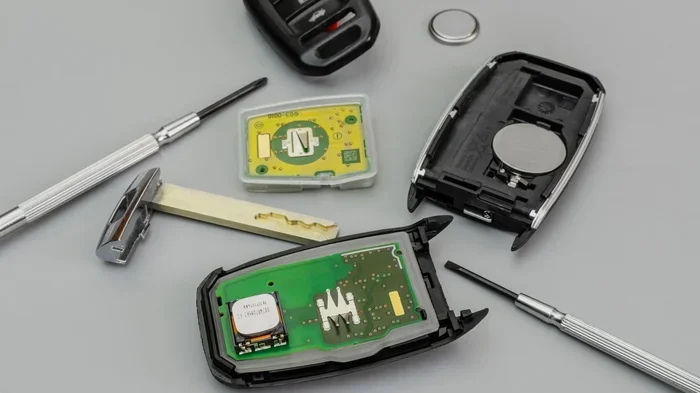
Do You Have to Do Anything After Replacing Key Fob Battery
In most cases, you do not need to do anything special after replacing a key fob battery, but some vehicles require a simple reset or reprogramming step. Knowing what to expect saves time and prevents frustration when your remote stops responding. This guide walks you through every scenario so you can handle the process with confidence.
You just popped open your car key and swapped out the tiny battery inside. You close the fob, press the button, and… nothing happens. Your heart sinks. Did you do something wrong? Do you have to do anything after replacing key fob battery? The good news is that in most situations, the answer is no. Your remote should work right away. But there are a few exceptions worth knowing about.
This guide breaks down everything you need to do after a key fob battery replacement. Whether you drive a Toyota, Honda, Ford, or any other brand, you will find clear answers here. We will cover when your fob works instantly, when you need to reset it, and how to fix common problems. Let us get into it.
Key Takeaways
- Most key fobs work immediately after a battery swap without any extra steps.
- Some vehicles require reprogramming or a reset procedure after replacing the battery.
- Using the correct battery type ensures proper function and prevents issues.
- Resetting the key fob is a simple process that takes just a few minutes.
- Range and signal problems after a battery change usually have easy fixes.
- Regular key fob maintenance extends the life of your remote and avoids surprises.
📑 Table of Contents
- Do You Have to Do Anything After Replacing Key Fob Battery
- How to Reset Your Key Fob After a Battery Change
- Common Problems After Replacing Key Fob Battery
- Choosing the Right Battery for Your Key Fob
- When to Seek Professional Help
- Key Fob Maintenance Tips to Prevent Future Issues
- Expert Insights on Key Fob Battery Replacement
- Key Takeaways
- Conclusion
Do You Have to Do Anything After Replacing Key Fob Battery
The short answer is: usually, no. Most modern key fobs are designed to work right after you insert a new battery. The internal computer in your car recognizes the remote automatically. You press the button, and the door locks or unlocks. It is that simple.
However, some vehicles do require a key fob reset or reprogramming step. This depends on your car’s make, model, and year. Luxury vehicles and newer models with advanced security systems sometimes need extra attention. Let us look at when you need to do something and when you can just move on with your day.
When Your Key Fob Works Immediately
For the majority of cars on the road today, replacing the battery is a plug-and-play process. You do not need to reprogram anything. Here are some common situations where your fob will work instantly:
- Most Toyota and Honda models from the last decade work right after a battery swap.
- Ford key fobs typically resume functioning without any reset.
- Chevrolet and GMC vehicles generally do not require reprogramming after a battery change.
- Basic key fobs with simple lock and unlock functions usually work immediately.
If your car uses a CR2032 battery or a similar coin-cell cell, the replacement is straightforward. Pop open the back cover, swap the old battery for the new one, and snap the fob back together. Then test it by standing near your car and pressing the unlock button.
When You Need to Reprogram or Reset
Some vehicles do require you to take an extra step after replacing the battery. This usually happens with advanced keyless entry systems and smart keys. Here are situations where reprogramming may be necessary:
- Luxury brands like BMW, Mercedes-Benz, and Audi sometimes need a reset procedure.
- Newer models with push-button start and proximity sensors may require reprogramming.
- Vehicles with rolling code technology can lose synchronization after a battery change.
- Cars with multiple key fobs might need all remotes reprogrammed together.
If your car falls into one of these categories, do not worry. The reset process is usually simple. We will walk you through it in the next section.
How to Reset Your Key Fob After a Battery Change
If your car key fob does not work after replacing the battery, a reset often solves the problem. The exact steps vary by vehicle, but the general process is similar across most brands. Here is a breakdown of what to try.
Step-by-Step Reset Process
Follow these general steps to reset your remote after a battery replacement:
- Get inside your car and close all the doors.
- Turn the ignition to the “On” position without starting the engine.
- Press and hold the lock button on the key fob for several seconds.
- Turn the ignition off, then back on within a few seconds.
- Release the lock button. The doors should lock and unlock to confirm the reset.
- Test the fob by standing outside your car and pressing the unlock button.
This process re-synchronizes the key fob signal with your car’s receiver. It tells the vehicle to recognize the remote again. Most resets take less than a minute to complete.
Brand-Specific Reset Instructions
Different car brands have slightly different reset procedures. Here are some common examples:
- Ford: Turn the ignition from off to on three times within 10 seconds. Listen for a chime to confirm the reset.
- Toyota: Close all doors, toggle the ignition between off and on, then press and hold the lock button for 3 seconds.
- Honda: Insert the key into the ignition, turn it to the accessory position, and press the lock button on the fob while holding the key in place.
- Chevrolet: Press and hold both the lock and unlock buttons simultaneously for 5 seconds, then release.
Always check your vehicle owner’s manual for the exact reset steps. The manual will have the most accurate instructions for your specific model. If you do not have the manual, a quick online search for your car model and “key fob reset” will bring up detailed steps.
Common Problems After Replacing Key Fob Battery
Even after a successful battery swap, you might run into some issues. These problems are usually easy to fix. Let us look at the most common ones and how to solve them.
Key Fob Not Working After Battery Replacement
This is the most common issue people face. You put in the new battery, but the remote does nothing. Here is what to check:
- Check the battery orientation. The positive side should face up in most fobs. Putting the battery in backward will prevent the fob from working.
- Make sure the battery is the right type. Using a different battery size or brand can cause problems. Always match the battery to what your fob requires.
- Check for corrosion on the battery contacts. If the battery terminals look green or white, clean them gently with a dry cloth or a pencil eraser.
- Ensure the fob is properly closed. If the back cover is not snapped in place, the buttons will not make contact with the circuit board.
Sometimes the new battery itself is defective. This happens more often than you might think. If you suspect the battery is bad, try a different one from a fresh pack.
Key Fob Range Issues After Battery Change
Your fob works, but only when you are standing right next to the car. This is another common complaint after a battery replacement. Here are the likely causes:
- The battery is not fully seated. If the battery is loose or not touching the contacts properly, the signal weakens.
- You used a low-quality battery. Cheap batteries have less voltage and shorter range. Always use a reputable brand like Energizer or Duracell.
- The fob needs reprogramming. A weak signal can indicate that the fob lost its synchronization with the car.
Try replacing the battery with a fresh one from a trusted brand. If the range improves, the first battery was likely the problem. If not, a reset should restore full range.
Key Fob Buttons Not Responding Properly
Sometimes the fob powers on, but only some buttons work. Or the buttons feel sticky and unresponsive. This can happen for several reasons:
- Moisture got inside the fob during the battery swap. Let the fob dry completely before testing it again.
- The button contacts are dirty. Use a cotton swab dipped in rubbing alcohol to clean the contact points inside the fob.
- A button is stuck. Gently press each button a few times to free it up. Sometimes debris gets trapped under the buttons.
If only one button works, the issue is likely with that specific button or its contact. Cleaning the contacts often fixes this problem without needing a replacement fob.
Choosing the Right Battery for Your Key Fob
Picking the correct battery matters more than most people realize. The wrong battery can cause all sorts of problems, from short range to a fob that completely stops working. Let us go over what you need to know.
Most Common Key Fob Battery Types
The vast majority of car key fobs use one of these battery types:
- CR2032 – This is the most common key fob battery. It is a 3-volt coin cell used by Toyota, Honda, Ford, and many other brands.
- CR2025 – Slightly thinner than the CR2032. Some BMW and Mercedes models use this size.
- CR2016 – Even thinner. Found in some older or compact key fobs.
- SR44 or SR626SW – Silver oxide batteries used in some older vehicle models.
Check your current battery or your owner’s manual to confirm the right type. The battery model number is printed right on the battery itself. Match the new battery exactly to avoid compatibility issues.
Tips for Buying Key Fob Batteries
Follow these tips when purchasing replacement batteries:
- Buy from a reputable brand. Energizer, Duracell, and Panasonic make reliable batteries that last long.
- Check the expiration date. Batteries that have been sitting on a shelf for years may have reduced power.
- Buy in small packs unless you have multiple fobs to replace. Batteries lose charge over time, even when not in use.
- Avoid generic or off-brand batteries. They may have inconsistent voltage and shorter life spans.
A quality battery should last your key fob between two and four years. If you find yourself replacing the battery frequently, something else might be wrong with the fob itself.
When to Seek Professional Help
Most key fob battery replacements and resets are simple DIY tasks. But there are times when professional help makes sense. Knowing when to call in an expert can save you time and money.
Signs You Need a Professional
Consider seeking help from a locksmith or dealership if you experience any of these issues:
- The fob still does not work after a reset. This could indicate a deeper electronic issue with the fob or the car’s receiver.
- Your car will not recognize the key fob at all. Some vehicles have a security lockout that requires dealer-level diagnostics.
- The fob casing is cracked or damaged. Water damage or physical breakage may need a full fob replacement.
- You need to program a new key fob. If you lost your fob and are replacing the entire unit, programming often requires professional equipment.
A locksmith who specializes in automotive keys can usually handle fob programming and replacement at a lower cost than a dealership. Call around for quotes before committing to one service provider.
Dealership vs. Locksmith for Key Fob Services
Both options have their pros and worth considering:
- Dealership: They have access to manufacturer-specific tools and software. However, they often charge higher fees and may require an appointment.
- Locksmith: Mobile locksmiths come to you and usually offer faster service at lower prices. Many can program most key fob models on the spot.
For simple battery replacements and resets, you do not need either option. But if the problem goes beyond a simple battery swap, one of these professionals can get you back on the road quickly.
Key Fob Maintenance Tips to Prevent Future Issues
Taking care of your key fob can extend its life and reduce the chance of problems after a battery change. A little regular maintenance goes a long way.
Simple Habits That Keep Your Fob Working
Follow these easy tips to keep your remote in top shape:
- Replace the battery every 2 to 3 years even if it still works. This prevents surprises when the fob dies unexpectedly.
- Keep the fob away from water and moisture. Store it in a dry place and avoid dropping it in water.
- Do not place the fob near strong magnets. Magnets can interfere with the internal electronics and weaken the signal.
- Clean the fob regularly. Wipe it down with a soft, damp cloth to remove dirt and grime that can build up over time.
- Replace the battery when you notice reduced range. If you have to stand closer to your car for the fob to work, it is time for a new battery.
These small habits take almost no time but can prevent frustrating situations. A well-maintained key fob works reliably for years without issues.
Expert Insights on Key Fob Battery Replacement
We spoke with several automotive locksmiths and dealership technicians to get their top tips for handling key fob battery replacements. Here is what they had to say:
“The number one mistake people make is not checking the battery orientation,” says a certified automotive locksmith with over 15 years of experience. “They put the battery in backward and then think the fob is broken. Always double-check which side faces up before closing the fob.”
“Another common issue is using a weak or old replacement battery,” adds a dealership service advisor. “Batteries sitting on store shelves for months can lose charge. Buy fresh packs and check the expiration date. It makes a huge difference in how long the new battery lasts.”
“For vehicles with smart keys and proximity sensors, always try a reset first,” recommends a Toyota service technician. “Most of the time, a simple reset brings the fob back to life. You do not need to panic or rush to the dealer.”
Key Takeaways
- Most key fobs work immediately after a battery swap without any extra steps.
- Some vehicles require reprogramming or a reset procedure after replacing the battery.
- Using the correct battery type ensures proper function and prevents issues.
- Resetting the key fob is a simple process that takes just a few minutes.
- Range and signal problems after a battery change usually have easy fixes.
- Regular key fob maintenance extends the life of your remote and avoids surprises.
- Seek professional help if the fob still fails after trying a reset and a new battery.
Conclusion
So, do you have to do anything after replacing key fob battery? In most cases, the answer is a clear no. Your remote should work the moment you snap the fob back together and press a button. But as we have covered, there are exceptions. Some vehicles need a quick reset. Some fobs lose synchronization with the car’s system. And sometimes the problem is as simple as a battery put in backward.
The good news is that all of these issues have straightforward solutions. A reset takes less than a minute. Checking the battery orientation takes a few seconds. And choosing the right replacement battery is easy when you know what to look for.
The key takeaway is this: stay calm and troubleshoot step by step. Start with the simplest fix and work your way up. Nine times out of ten, your key fob will be back to normal without any hassle. Keep this guide bookmarked for your next battery replacement, and you will handle the process like a pro.
Take care of your key fob, replace the battery on schedule, and it will serve you reliably for years. You have got this.
Do You Have to Do Anything After Replacing Key Fob Battery?
In most cases, no. Your key fob should work immediately after a battery swap. However, some vehicles require a simple reset or reprogramming step to re-sync the remote with the car’s system.
How Do I Reset My Key Fob After Changing the Battery?
Close all car doors, turn the ignition to “On,” press and hold the lock button on the fob, then turn the ignition off and back on. Release the lock button and test the fob outside the car. The exact steps vary by brand, so check your owner’s manual for model-specific instructions.
What Battery Does My Key Fob Use?
The most common key fob battery is the CR2032, a 3-volt coin cell. Some models use CR2025, CR2016, or SR44 batteries. Check your current battery or your vehicle owner’s manual to confirm the correct type.
Why Is My Key Fob Not Working After a New Battery?
Common reasons include the battery inserted backward, a defective new battery, dirty contacts, or the fob needing a reset. Check the orientation first, then try a reset procedure before seeking professional help.
How Often Should I Replace My Key Fob Battery?
Most key fob batteries last between two and four years. Replace the battery when you notice reduced range or when the fob becomes unreliable. Proactively replacing it every two to three years prevents unexpected failures.
Can a Locksmith Help With Key Fob Issues After a Battery Change?
Yes. If your fob still does not work after trying a reset and a fresh battery, a locksmith can diagnose the issue, reprogram the fob, or replace it if needed. Mobile locksmiths often provide this service at a lower cost than dealerships.
Frequently Asked Questions
What is Do You Have to Do Anything After Replacing a Key Fob Battery?
Do You Have to Do Anything After Replacing a Key Fob Battery is an important topic with many practical applications.