Can You Update a Lexus Navigation System Heres How
Yes, you can update a Lexus navigation system using several methods including USB drives, disc updates, and dealer visits. This guide walks you through the entire process, from checking your current map version to completing a successful update without stress.
Your Lexus navigation system is one of the most useful features in your vehicle. It guides you to new places, helps you avoid traffic, and makes road trips feel effortless. But here is the thing most owners overlook: navigation maps get outdated fast. Roads change. Businesses open and close. New highways appear. When your maps fall behind, your Lexus navigation system starts sending you the wrong way.
So, can you update a Lexus navigation system? The short answer is yes. You absolutely can. Whether you drive a sleek Lexus ES, a rugged Lexus RX, or a sporty Lexus LC, updating your GPS maps is within reach. The process is simpler than most people think. You just need to know the right steps and a few helpful tips along the way.
In this guide, we will cover everything you need to know. We will walk through every update method, explain how to check your current map version, and troubleshoot the most common problems. By the end, you will feel confident updating your Lexus GPS update without visiting a dealer. Let us get started.
Key Takeaways
- Multiple update methods exist: You can update your Lexus navigation system via USB, disc, or by visiting a dealer.
- Regular updates keep maps accurate: Updated navigation data ensures you get the correct routes, new roads, and current points of interest.
- DIY updates save money: Performing a USB-based update yourself is straightforward and avoids dealer fees.
- Check compatibility first: Not all Lexus models support the same update methods or navigation software versions.
- Common issues are fixable: Frozen screens, failed downloads, and error messages usually have simple solutions.
- Updates improve overall performance: Beyond maps, updates can enhance system speed and add new features.
📑 Table of Contents
- Why Updating Your Lexus Navigation Matters
- How to Check Your Current Navigation Map Version
- Methods to Update Your Lexus Navigation System
- Which Lexus Models Support Navigation Updates?
- Common Problems When Updating Lexus Navigation
- Quick Tips for a Smooth Navigation Update
- How Often Should You Update Your Lexus Navigation?
- Expert Insights on Lexus Navigation Updates
- Frequently Asked Questions
- Final Thoughts
Why Updating Your Lexus Navigation Matters
Many Lexus owners forget about their navigation system until it stops working correctly. But keeping your maps current is about more than just finding addresses. It is about safety, convenience, and getting the most out of your vehicle.
Here is why a Lexus navigation update should be on your maintenance checklist:
- New roads and highways: Cities expand constantly. Your navigation needs fresh data to route you correctly.
- Accurate business listings: Restaurants, gas stations, and shops change locations or close. Updated maps reflect these changes.
- Improved routing algorithms: Software updates often include smarter route calculations that save you time and fuel.
- Enhanced safety features: Some updates add speed limit alerts, school zone warnings, and improved traffic data.
- Better points of interest: Fresh databases include more search results, making it easier to find what you need.
- System stability: Navigation software updates fix bugs and improve overall touchscreen performance.
Think of your navigation system like a smartphone. You update apps regularly to get the best experience. Your Lexus navigation software deserves the same care. A simple update can make a huge difference in how smoothly your system runs.
How to Check Your Current Navigation Map Version
Before you update anything, you need to know what version you are currently running. Checking your map version takes just a few minutes and helps you understand what kind of update you need.
Step-by-Step Check Process
Follow these simple steps to find your current navigation data version:
- Start your Lexus and let the system fully boot up.
- Press the Nav button on your touchscreen or dashboard controls.
- Look for a Settings or Setup menu. This is usually a gear icon.
- Navigate to the Map or Navigation Settings section.
- Select Map Version or Map Data Information.
- Write down the version number and the date of your current map data.
Once you have this information, you can compare it to the latest available version on the Lexus website. If your map is more than a year old, it is definitely time for an update.
What the Version Number Tells You
The version number on your Lexus navigation screen tells you how current your map data is. Newer numbers mean more recent updates. Lexus typically releases map updates once or twice a year. If your version number is significantly behind, you may be missing important road changes in your area.
Some older Lexus models use a disc-based system. In those cases, the version information is printed directly on the navigation disc. Check the disc label if your vehicle came with a physical map disc.
Methods to Update Your Lexus Navigation System
There are three main ways to update a Lexus navigation system. Each method has its own advantages. Let us break them down so you can choose the best option for your situation.
Method 1: USB Map Update (DIY)
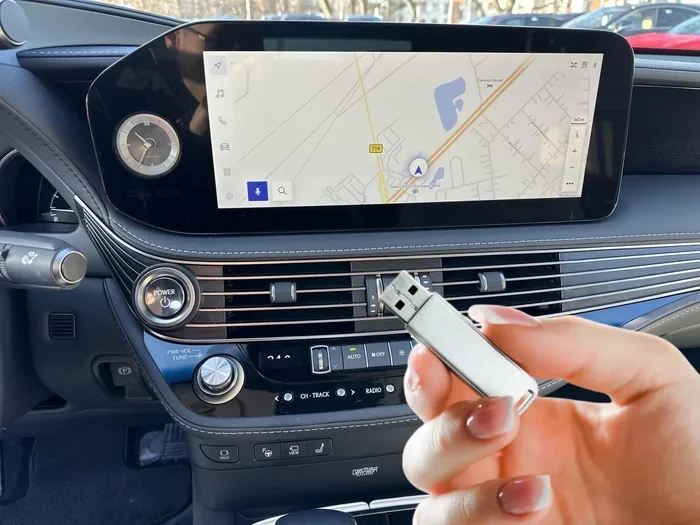
This is the most popular method for owners who want to handle the update themselves. You download the latest map data from the Lexus website, save it to a USB drive, and plug it into your vehicle.
Here is how it works:
- Visit the Lexus navigation update page on the official Lexus website.
- Enter your vehicle information, including the model year and VIN.
- Purchase the map update if required. Some updates are free for newer models.
- Download the update file to your computer.
- Format a USB drive to FAT32 and copy the update files to it.
- Plug the USB drive into your Lexus infotainment port.
- Follow the on-screen prompts to begin the installation.
- Wait for the process to complete. Do not turn off the vehicle during the update.
The USB method is convenient and saves you a trip to the dealer. Most owners complete the process in about 30 to 60 minutes. Make sure your USB drive is empty or backed up before starting, since the format step will erase all data on the drive.
Method 2: Navigation Disc Update
Older Lexus models use a DVD-based navigation system. If your vehicle falls into this category, you will need to order a map update disc from Lexus or an authorized dealer.
Here is what to expect:
- Order the disc through your Lexus dealer or online.
- Insert the disc into your vehicle’s disc player.
- Follow the on-screen instructions to install the new map data.
- The process may take 30 minutes to an hour depending on your system.
Disc updates work well but come with a downside. You are limited to the maps on that specific disc. If a road changes shortly after you install the disc, your system will not know about it until the next disc release.
Method 3: Dealer or Service Center Update
If you prefer not to handle the update yourself, visiting a Lexus dealer is a great option. A technician will connect your vehicle to their system and install the latest navigation maps for you.
Here are the pros and cons:
- Pros: Professional installation, no risk of errors, and the technician can check for other software updates at the same time.
- Cons: It may cost money, and you need to schedule an appointment and wait for service.
Many dealers offer free or discounted navigation updates as part of a routine service visit. It is worth calling ahead and asking about current promotions.
Which Lexus Models Support Navigation Updates?
Most modern Lexus vehicles support navigation map updates. However, the method and availability depend on your specific model and year. Here is a quick look at what to expect across different Lexus lines.
| Lexus Model | Update Method | USB Support | Disc Support |
|---|---|---|---|
| Lexus ES (2015+) | USB and Dealer | Yes | No |
| Lexus RX (2016+) | USB and Dealer | Yes | No |
| Lexus IS (2014+) | USB and Dealer | Yes | No |
| Lexus GX (2013+) | USB and Disc | Yes | Yes (older) |
| Lexus LX (2015+) | USB and Dealer | Yes | No |
| Lexus NX (2015+) | USB and Dealer | Yes | No |
| Lexus LC (2018+) | USB and Dealer | Yes | No |
Always check your owner’s manual or contact your dealer to confirm which update methods your specific model supports. Some older vehicles may have limited options, and some very new models may even support over-the-air updates through a connected app.
Common Problems When Updating Lexus Navigation
Updating your Lexus navigation system is usually smooth, but sometimes things go wrong. Here are the most common issues owners face and how to fix them.
USB Drive Not Recognized
If your vehicle does not detect the USB drive, try these steps:
- Make sure the USB drive is formatted to FAT32.
- Try a different USB port in your vehicle.
- Use a USB drive with no more than 32GB of storage.
- Remove other files from the USB drive before inserting it.
- Check that the update files were copied correctly.
Sometimes a simple reformat and retry solves the problem. A USB 2.0 drive tends to work more reliably than USB 3.0 in older Lexus systems.
Update Fails Midway
An interrupted update can leave your navigation system in an unstable state. If this happens:
- Turn off the vehicle completely and wait five minutes.
- Restart the system and try the update again.
- If the problem persists, visit a Lexus dealer for assistance.
- Never disconnect the USB drive while the update is in progress.
To avoid this problem in the future, make sure your vehicle has enough battery charge before starting an update. You can leave the engine running during the process to keep the battery topped off.
Navigation Screen Freezes After Update
A frozen screen after an update can be alarming but is usually temporary. Try a system reset by holding the power button for 10 to 15 seconds. If the screen remains unresponsive, you may need to perform a full system reboot by disconnecting the battery for a few minutes.
Quick Tips for a Smooth Navigation Update
Follow these practical tips to make your Lexus map update experience as easy as possible:
- Back up your favorites: Before any update, save your saved locations and favorite destinations. Some updates may clear your stored data.
- Use a reliable USB drive: A brand-name USB drive with no errors works best. Cheap, generic drives sometimes cause problems.
- Update in a safe location: Park in a garage or shaded area. Do not attempt the update while driving.
- Check for Wi-Fi connectivity: Some newer Lexus models can download updates over Wi-Fi. Check if your model supports this feature.
- Keep your VIN handy: You will need your vehicle identification number to purchase the correct update from the Lexus website.
- Read the instructions carefully: The Lexus website provides model-specific instructions. Follow them closely for the best results.
- Be patient: Updates can take time. Let the process finish completely before using your navigation again.
How Often Should You Update Your Lexus Navigation?
Lexus recommends updating your navigation maps at least once a year. Roads change frequently, and outdated maps can lead to missed turns, wrong exits, and unnecessary detours.
If you use your navigation system daily, consider updating every six months. Frequent travelers and road trippers benefit the most from current map data. Even if you use your navigation only occasionally, an annual update keeps your system running smoothly and ensures you are not relying on stale information.
Some Lexus dealerships send reminders when a new map update becomes available. Keep an eye on your email or the Lexus Owner Portal for notifications. You can also check the Lexus website periodically to see if a newer map version exists for your vehicle.
Expert Insights on Lexus Navigation Updates
Many Lexus owners assume navigation updates are complicated or expensive. In reality, the USB update process is designed to be user-friendly and straightforward. Most owners complete it without any professional help.
From a technical standpoint, the navigation system in a Lexus is closely tied to the vehicle’s infotainment platform. When you update your maps, you are also refreshing the underlying software that powers the touchscreen interface. This means a navigation update can actually improve the overall responsiveness and speed of your vehicle’s digital systems.
One thing many people overlook is the importance of keeping your vehicle’s firmware current alongside your map data. Lexus occasionally releases firmware updates that improve Bluetooth connectivity, audio quality, and system stability. Checking for these updates at the same time as your map update is a smart habit.
Frequently Asked Questions
Can You Update a Lexus Navigation System Without Going to the Dealer?
Yes, you absolutely can. Most Lexus models released after 2014 support USB-based navigation updates that you can complete at home. Simply download the map files from the Lexus website, transfer them to a USB drive, and follow the on-screen prompts in your vehicle. This method saves you time and money compared to a dealer visit.
How Much Does It Cost to Update Lexus Navigation Maps?
The cost varies depending on your model and the type of update. Some Lexus vehicles come with free map updates for the first few years of ownership. After that, a full map update typically costs between $100 and $300. Check the Lexus website or contact your dealer for the exact price for your vehicle.
Can You Use Any USB Drive to Update Lexus Navigation?
Not just any USB drive will work. Your drive should be formatted to FAT32 and have no more than 32GB of storage. A standard USB 2.0 flash drive is the most reliable option. Avoid USB hubs, card readers, or drives with special software installed, as these can cause compatibility issues.
What Happens If the Navigation Update Interrupted?
If the update stops midway, your navigation system may become unstable. Turn off the vehicle, wait five minutes, and restart the system. Try running the update again from the beginning. If the problem continues, a Lexus dealer can help restore your system safely.
Do Newer Lexus Models Support Over-the-Air Updates?
Some newer Lexus models with connected services can receive navigation updates over Wi-Fi or through the Lexus Enform app. Check your vehicle’s manual or the Lexus website to see if your specific model supports wireless updates. This feature is still limited to select newer vehicles and trim levels.
How Long Does a Lexus Navigation Update Take?
A typical navigation update takes between 20 and 60 minutes. The exact time depends on the size of the map data and the speed of your USB connection. Keep the engine running during the update and avoid using the navigation system until the process is fully complete.
Final Thoughts
Updating your Lexus navigation system is one of the simplest ways to keep your vehicle running at its best. Whether you choose the USB method, a disc update, or a dealer visit, the process is well worth the effort. Current maps mean better routes, fewer wrong turns, and a more enjoyable driving experience every time you get behind the wheel.
Remember, a Lexus GPS update is not just about finding addresses. It is about safety, efficiency, and staying connected to the world around you. Roads change. Businesses move. New shortcuts appear. Your navigation system deserves fresh data to keep up with all of these changes.
Take a few minutes today to check your current map version. If an update is available, grab a USB drive and get started. Your future self will thank you the next time you are navigating unfamiliar streets with confidence. Keep your maps current, keep your drives smooth, and enjoy every mile in your Lexus.