Can I Upgrade My Toyota Entune to the Latest Version
Yes, you can upgrade your Toyota Entune system, and it is easier than you think. Whether you have an older Entune version or want to move to Entune 3.0, this guide walks you through every step. You will learn about compatibility, upgrade methods, costs, and the best ways to keep your Toyota infotainment running smoothly.
If you own a Toyota and love the Entune system, you might wonder whether you can get it to work better. The short answer is yes. You can upgrade your Toyota Entune system, and doing so can make a big difference in how your car feels and functions.
Toyota introduced Entune as its infotainment platform several years ago. Since then, the system has gone through multiple versions. Each new version brings faster performance, better maps, and more features. But not every Toyota comes with the latest version out of the box. That is where upgrading comes in.
Whether you drive a Camry, a RAV4, or a Tacoma, this guide will help you understand your options. We will cover everything from checking your current version to choosing the right upgrade path. By the end, you will know exactly what to do.
Key Takeaways
- Toyota Entune can be upgraded: Most models support version updates through USB, dealer visits, or firmware downloads.
- Entune 3.0 is the latest version: It offers improved navigation, faster response times, and better smartphone integration.
- Upgrade methods vary by model year: Newer models support wireless updates, while older ones may need a USB drive or dealer visit.
- Aftermarket head units are an option: If your Toyota model does not support the latest Entune, you can install an aftermarket system.
- Regular updates improve performance: Keeping your system updated ensures better Bluetooth connectivity, map accuracy, and app support.
- Some upgrades are free: Basic firmware updates and map downloads often come at no cost through your Toyota dealer.
- Check compatibility first: Not all Toyota models support the same Entune features, so verify your system before upgrading.
📑 Table of Contents
- Understanding Toyota Entune and Its Versions
- Can You Upgrade Toyota Entune to the Latest Version?
- How to Upgrade Your Toyota Entune System
- Benefits of Upgrading Your Toyota Entune
- Toyota Entune vs Aftermarket Alternatives
- Common Problems When Upgrading Toyota Entune
- How to Check Your Current Entune Version
- How Often Should You Update Your Toyota Entune?
- Frequently Asked Questions
- Final Thoughts
Understanding Toyota Entune and Its Versions
Before you upgrade, it helps to know what you are working with. Toyota Entune is the brand’s infotainment system. It controls your audio, navigation, phone calls, and more. The system connects to your smartphone and gives you access to apps, music streaming, and real-time traffic updates.
Over the years, Toyota has released several versions of Entune. Each one brought improvements. Let us look at the main versions you might encounter.
Entune 1.0 and 2.0
Entune 1.0 was the first version. It debuted around 2011. It offered basic audio and navigation features. The system used a CD-based map system and had limited app support. Entune 2.0 came next, around 2014. It added Bluetooth connectivity, a better touchscreen, and App Suite support. You could access Pandora, iHeartRadio, and other apps through the system.
Both versions are now considered older. They still work, but they lack the speed and features of newer systems.
Entune 3.0
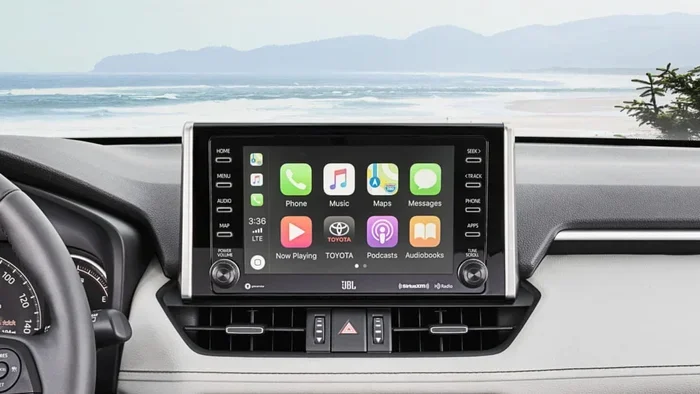
Entune 3.0 is the latest version. It launched with newer Toyota models starting around 2018. This version features a faster processor, a cleaner interface, and built-in Wi-Fi hotspot capability. It supports wireless Apple CarPlay and Android Auto on select models. The maps are stored on the system, so you do not need a CD. Navigation is faster, and the overall user experience is much smoother.
Entune Audio Plus and Premium JBL Audio
Toyota also offers different audio tiers within the Entune system. Entune Audio Plus gives you a better touchscreen display and more connectivity options. Premium JBL Audio adds high-quality speakers and a subwoofer. These are not separate software versions, but they do affect your overall experience.
Can You Upgrade Toyota Entune to the Latest Version?
This is the big question. The answer depends on your vehicle model, year, and current system. Here is what you need to know.
Models That Support Upgrades
Most Toyota vehicles from 2012 onward can receive some form of Entune update. If you have a vehicle with Entune 2.0, you may be able to upgrade to Entune 3.0. However, this is not always a simple software download. In many cases, you will need to visit a Toyota dealer for the upgrade.
Here are some common Toyota models that support Entune upgrades:
- Toyota Camry (2015 and newer)
- Toyota RAV4 (2013 and newer)
- Toyota Corolla (2014 and newer)
- Toyota Highlander (2014 and newer)
- Toyota Tacoma (2016 and newer)
- Toyota Tundra (2014 and newer)
- Toyota 4Runner (2015 and newer)
- Toyota Sienna (2015 and newer)
Models That May Not Support Full Upgrades
Older Toyota models, especially those from before 2012, may not support the latest Entune version. The hardware in these vehicles simply is not powerful enough to run Entune 3.0. In these cases, you can still update the software you have, but you will not get the full Entune 3.0 experience.
Some older models can benefit from an aftermarket head unit replacement. This means swapping out the factory radio for a new one that supports modern features like Apple CarPlay and Android Auto. We will discuss this option in more detail later.
Free vs Paid Upgrades
Not all upgrades cost money. Basic firmware updates and map updates are often free. Toyota dealers can perform these updates at no charge in many cases. However, major version upgrades or hardware changes may come with a fee.
Here is a quick look at what typically costs:
- Firmware updates: Usually free
- Map updates: Often free for the first year, then a small fee
- Entune 3.0 upgrade (software): May be free or low-cost depending on the dealer
- Aftermarket head unit installation: $200 to $800 depending on the unit
- Entune subscription services: Some features require a monthly or annual fee
How to Upgrade Your Toyota Entune System
Now that you know whether your vehicle can be upgraded, let us look at the actual steps. There are three main ways to upgrade your Toyota Entune system.
Method 1: Visit a Toyota Dealer
The most reliable way to upgrade is through a Toyota dealer. They have the tools and software to update your system properly. Here is what to expect:
- Call your local Toyota dealer and ask about Entune upgrade availability for your model.
- Schedule an appointment or drop off your vehicle.
- The dealer will check your current system version.
- They will perform the upgrade, which usually takes one to two hours.
- Pick up your vehicle and enjoy the updated system.
This method is the safest. It ensures your upgrade is done correctly and does not void any warranties. Many owners find this the easiest path.
Method 2: USB Update
Some Toyota models allow you to update the system using a USB drive. This method works best for map updates and minor firmware upgrades. Here is how it works:
- Go to the Toyota website or your dealer’s website.
- Download the latest update file to a USB drive (usually FAT32 formatted).
- Insert the USB drive into your vehicle’s USB port.
- Follow the on-screen prompts to install the update.
- Wait for the installation to complete. Do not turn off the vehicle during this process.
Quick Tip: Always make sure your vehicle is parked and the engine is running during a USB update. Do not disconnect the USB drive while the system is installing. This can cause problems.
Method 3: Wireless Update (Newer Models)
If you have a newer Toyota with Entune 3.0, your vehicle may support wireless updates. This means the system can download updates over Wi-Fi without any USB drive. Here is what to do:
- Connect your vehicle to a Wi-Fi network.
- Go to the settings menu on your Entune screen.
- Look for the “System Update” or “Software Update” option.
- Select “Check for Updates.”
- If an update is available, follow the prompts to download and install it.
Wireless updates are the most convenient method. They save you a trip to the dealer. However, not all models support this feature. Check your owner’s manual or ask your dealer to confirm.
Benefits of Upgrading Your Toyota Entune
Why should you bother upgrading? There are many real benefits that make the effort worthwhile.
Better Navigation
Updated maps mean more accurate directions. New roads, changed speed limits, and updated points of interest are all included in the latest map data. If you use your Toyota navigation system regularly, this alone is a great reason to upgrade.
Improved Smartphone Integration
Newer Entune versions offer better smartphone integration. You can connect your phone more easily, stream music, and use voice commands. If you have an iPhone or Android device, you will notice a smoother experience after an upgrade.
Faster Performance
Older Entune systems can feel slow. Menus take time to load, and responses lag. Upgrading to a newer version or a better hardware setup can make the system feel much faster. The overall responsiveness improves significantly.
New Features and Apps
Each new version of Entune brings new features. You might gain access to new apps, better voice recognition, or enhanced Bluetooth connectivity. Some updates even add support for new streaming services.
Better Safety Features
Some updates include improvements to safety features. Better integration with backup cameras, blind-spot monitoring, and collision warnings can come through software updates. Staying current keeps your vehicle safer.
Toyota Entune vs Aftermarket Alternatives
Sometimes upgrading the factory Entune system is not possible or affordable. In these cases, an aftermarket head unit can be a great alternative. Let us compare the two options.
Factory Entune Upgrade
A factory upgrade keeps your original Toyota look and feel. It maintains the vehicle’s warranty and integrates seamlessly with other Toyota systems. The downside is that it may be limited by the hardware in your vehicle. You might not get the full Entune 3.0 experience on older models.
Aftermarket Head Unit
An aftermarket head unit replaces the factory radio with a modern system. These units often come with large touchscreens, built-in GPS, Apple CarPlay, Android Auto, and even backup camera support. Popular brands include Pioneer, Kenwood, and Sony.
Common Mistakes to Avoid: Do not buy an aftermarket unit without checking compatibility first. Make sure the unit fits your Toyota’s dashboard and wiring harness. Also, be aware that installing an aftermarket unit may void your factory warranty on the audio system.
Comparison Table
| Feature | Factory Entune Upgrade | Aftermarket Head Unit |
|---|---|---|
| Cost | Free to low cost | $200 to $800 |
| Warranty Impact | No impact | Possible impact on audio system |
| Installation | Dealer installed | DIY or professional install |
| Apple CarPlay | Select models only | Most units support it |
| Android Auto | Select models only | Most units support it |
| Integration with Toyota | Seamless | May require extra adapters |
| Map Updates | Through Toyota | Through manufacturer app |
Common Problems When Upgrading Toyota Entune
Upgrading is usually smooth, but problems can happen. Here are some issues owners face and how to fix them.
Update Fails or Freezes
If your update freezes during installation, do not panic. Turn off the vehicle, wait a few minutes, and restart. Try the update again. If it keeps failing, visit your dealer. They can perform the update manually.
Loss of Bluetooth Pairing
After an update, you may need to re-pair your phone. This is normal. Simply go to the Bluetooth settings on your Entune screen and reconnect your device.
Navigation Maps Not Updating
Sometimes map updates do not install correctly. Make sure your USB drive is formatted correctly (FAT32) and that the map file is not corrupted. Download the map again from the Toyota website if needed.
System Reboots During Update
The system may reboot during a major update. This is expected. Let the process finish completely before using the system again.
Expert Insight: According to Toyota service advisors, the most common upgrade issue is using an improperly formatted USB drive. Always double-check the format before starting an update.
How to Check Your Current Entune Version
Before upgrading, you need to know what version you currently have. Here is how to check:
- Turn on your vehicle and the Entune system.
- Press the “Settings” button on the screen.
- Look for “System Information” or “About.”
- Your current version number will be displayed there.
Write down this version number. You can use it when talking to your dealer or searching for the right update file online.
How Often Should You Update Your Toyota Entune?
Toyota releases updates periodically. Major version upgrades may come once every few years. Map updates are usually available several times a year. Firmware updates can happen more frequently.
A good rule of thumb is to check for updates once every six months. This keeps your system current and ensures you get the best performance. You can check the Toyota website or ask your dealer during regular service visits.
Frequently Asked Questions
Can I upgrade Toyota Entune myself?
Yes, if your vehicle supports USB or wireless updates. You can download the update file and install it yourself. However, for major version upgrades, visiting a Toyota dealer is recommended to avoid any issues.
Is upgrading Toyota Entune free?
Many firmware and map updates are free. However, some major upgrades or subscription-based features may involve a cost. Check with your Toyota dealer for specific pricing.
What is the latest version of Toyota Entune?
The latest version is Entune 3.0. It offers improved navigation, faster performance, and better smartphone integration. Not all Toyota models support Entune 3.0, so check your vehicle’s compatibility first.
Can I upgrade Entune 2.0 to Entune 3.0?
In many cases, yes. However, this depends on your vehicle model and year. Some older hardware may not support the full Entune 3.0 experience. Contact your Toyota dealer to confirm.
How long does a Toyota Entune upgrade take?
A typical upgrade takes one to two hours at a dealer. USB updates may take 15 to 30 minutes. Wireless updates vary depending on your internet connection speed.
Will upgrading void my Toyota warranty?
No. Upgrading through a Toyota dealer or using official update methods will not void your warranty. However, installing an aftermarket head unit may affect your audio system warranty.
Final Thoughts
Upgrading your Toyota Entune system is one of the best ways to keep your vehicle feeling modern and responsive. Whether you choose a dealer visit, a USB update, or a wireless download, the process is straightforward and well worth the effort. A simple upgrade can bring you better navigation, faster performance, and new features that make every drive more enjoyable.
Start by checking your current Entune version. Then, explore your upgrade options based on your vehicle model and year. If your Toyota supports the latest Entune 3.0, take advantage of it. If not, consider an aftermarket solution that fits your needs and budget.
Remember, keeping your Toyota infotainment system up to date is part of good vehicle ownership. It keeps you connected, informed, and safe on the road. So go ahead, check your version today, and take the next step toward a better driving experience.
Your Toyota is a long-term investment. Keeping its technology current ensures you get the most out of every drive. Upgrade your Toyota Entune and enjoy the difference it makes.