Can I Unlock My Car With the Toyota App Quick Answer
Yes, you can unlock your car with the Toyota app. The Toyota app unlock car feature works through Toyota Remote Connect and Toyota MyT services. You just need a compatible Toyota model, a working internet connection, and the app installed on your phone. This guide covers setup steps, supported models, common issues, and safety tips to help you get started fast.
Have you ever stood outside your Toyota, keys in hand, and wondered if there was an easier way in? The good news is that you can unlock your car with the Toyota app. This handy feature lets you access your vehicle from your phone. No more digging through bags or pockets. No more stressing when you forget your keys inside.
The Toyota app unlock car feature is part of a bigger system called Toyota Remote Connect. It lets you lock, unlock, and even start your car remotely. But not every Toyota has this capability. And getting it set up takes a few simple steps. In this guide, we walk you through everything you need to know. From setup to troubleshooting, we cover it all.
Whether you own a new RAV4 or an older Camry, this article helps you figure out if your car supports remote access. We also share practical tips to make the most of your Toyota mobile app features. So let us dive right in and explore how this technology works.
Key Takeaways
- Remote unlock is possible: You can unlock your Toyota from anywhere using the Toyota app and Remote Connect services.
- Not all models qualify: You need a compatible Toyota with the right tech package and active subscription.
- Setup is simple: Download the app, link your vehicle, and follow a few easy steps to enable remote features.
- Troubleshooting is straightforward: Most issues come from Wi-Fi, login, or subscription problems and are easy to fix.
- Safety features are built in: The app uses secure login and encryption to protect your vehicle from unauthorized access.
- Extra features add value: Beyond unlocking, the app offers remote start, GPS tracking, and vehicle health alerts.
- Keep your app updated: Regular updates fix bugs and improve performance for a smoother experience.
📑 Table of Contents
- How the Toyota App Unlock Feature Works
- Which Toyota Models Support Remote Unlock
- How to Set Up the Toyota App for Car Access
- Troubleshooting Common Issues With the Toyota App
- Tips for Getting the Most From Toyota App Features
- Is It Safe to Unlock Your Car With the Toyota App?
- Comparing Toyota App Remote Unlock With Other Methods
- Common Mistakes People Make With the Toyota App Unlock Feature
- Expert Insights on Toyota App Remote Access
- Key Takeaways
- Frequently Asked Questions
- Final Thoughts
How the Toyota App Unlock Feature Works
The Toyota app unlock car feature uses cloud-based connectivity. Your phone sends a signal to Toyota servers. Those servers then send a command to your vehicle. The car receives the signal and unlocks the doors. All of this happens in seconds.
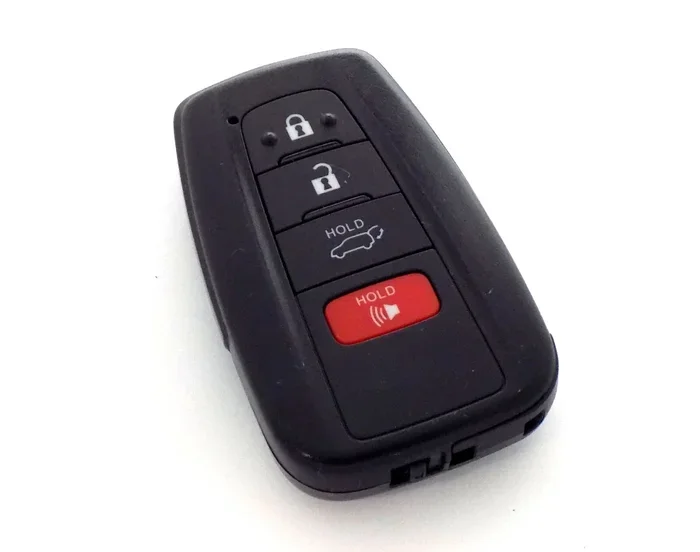
But there is a bit more to it. Your Toyota needs a built-in modem or a compatible Toyota Smart Key system. Older models may not have the hardware needed for remote access. Newer Toyotas from around 2017 onward usually come with the right tech already installed.
Toyota Remote Connect vs. Toyota MyT
Toyota offers two main apps for connected services. The first is Toyota Remote Connect. This app works with vehicles that have the Remote Connect package. It lets you lock, unlock, and start your car from your phone.
The second app is Toyota MyT. This app is designed for newer Toyota models. It includes features like vehicle tracking, maintenance alerts, and remote lock and unlock. Both apps use similar technology. The main difference is which Toyota models they support.
What You Need for Remote Unlock
Before you can use the Toyota keyless entry feature through the app, you need a few things:
- A compatible Toyota model with built-in connectivity
- An active Toyota Connected Services subscription
- A smartphone with the Toyota app installed
- A stable Wi-Fi or cellular data connection
- A registered Toyota account linked to your vehicle
Without all of these pieces, the remote unlock feature will not work. Check your vehicle manual or contact your dealer to confirm your Toyota has the right hardware.
Which Toyota Models Support Remote Unlock
Not every Toyota on the road can be unlocked with an app. The Toyota vehicle connectivity feature depends on the model year and trim level. Here is a look at which Toyotas generally support remote access.
Models That Work With the Toyota App
Most Toyota models from 2018 onward come with Toyota Entune or a newer infotainment system. These systems include the hardware needed for app-based access. Popular models that support remote unlock include:
- Toyota RAV4 (2019 and newer, with Remote Connect package)
- Toyota Camry (2018 and newer, select trims)
- Toyota Corolla (2020 and newer, with Connected Services)
- Toyota Highlander (2020 and newer)
- Toyota Tacoma (2023 and newer, with T-Connect)
- Toyota 4Runner (2024 and newer)
- Toyota Prius (2019 and newer, select trims)
Models That May Not Support Remote Unlock
Older Toyotas and base trims often lack the needed technology. If your Toyota does not have a built-in modem or Toyota Smart Key system, you may not be able to use the app for remote access. Some models that typically do not support this feature include:
- Toyota models from before 2017
- Base trim levels without the technology package
- Toyota models sold without the Remote Connect add-on
When in doubt, check with your Toyota dealer. They can look up your vehicle identification number and confirm what features are available.
How to Set Up the Toyota App for Car Access
Setting up the Toyota app unlock car feature is straightforward. You do not need to be a tech expert. Just follow these steps carefully and you will be good to go.
Step 1: Download the Right App
Go to the Apple App Store or Google Play Store. Search for Toyota Remote Connect or Toyota MyT. Download the app that matches your Toyota model. Make sure you are downloading the official Toyota app. Avoid third-party apps that claim to offer similar features.
Step 2: Create or Log Into Your Toyota Account
Open the app and sign in with your Toyota Connected Services account. If you do not have one yet, tap the sign-up option. You will need your vehicle identification number and some basic personal information. The app will guide you through the process.
Step 3: Link Your Vehicle to the App
Once logged in, go to the vehicle settings section. Follow the prompts to pair your phone with your Toyota. This usually involves entering a pairing code that appears on your car’s infotainment screen. The process takes about two minutes.
Step 4: Enable Remote Unlock
After your vehicle is linked, navigate to the remote features menu. Look for the lock and unlock option. Make sure remote unlock is turned on. Some Toyotas require you to activate the Remote Connect subscription first. You can do this through the app or by contacting your dealer.
Quick Tips for a Smooth Setup
- Use a strong Wi-Fi connection during setup
- Keep your phone Bluetooth turned on
- Make sure your car is parked in an area with good cellular signal
- Restart the app if it does not connect on the first try
- Update your phone operating system before installing the app
Troubleshooting Common Issues With the Toyota App
Even with a great setup, things can go wrong. The Toyota app not working for unlock is a common issue. Here are the most frequent problems and how to fix them.
The App Won’t Connect to Your Vehicle
This usually happens when your phone has a weak data connection. Try switching between Wi-Fi and cellular data. Also, make sure your Toyota’s modem is active. Some older models need a Toyota Connected Services renewal to keep the modem running.
Unlock Command Does Not Work
If you tap unlock and nothing happens, check a few things first. Is your car parked in an area with poor signal? Are you logged into the correct Toyota account? Sometimes simply logging out and back in fixes the problem. You can also try closing the app completely and reopening it.
Delayed Response Times
A slow response can be frustrating. This often happens when too many devices are linked to one account. Try removing extra devices from the app. Also, make sure your Toyota MyT or Toyota Remote Connect app is up to date. Outdated versions can cause lag and connectivity issues.
Subscription or Account Problems
If your Toyota Remote Connect subscription has expired, remote features will stop working. Check your subscription status in the app. Most subscriptions last one to three years. You can renew directly through the app or by calling Toyota customer service.
When to Contact Toyota Support
Sometimes the problem is not something you can fix alone. Contact Toyota support if:
- The app crashes every time you try to unlock
- Your vehicle does not appear in the app
- You get error messages that do not go away
- Remote features stopped working after a recent update
Toyota has a dedicated support team for connected services. They can run remote diagnostics on your vehicle and help restore the connection.
Tips for Getting the Most From Toyota App Features
The Toyota app unlock car feature is just the beginning. Once you have the app set up, you can explore many other useful tools. These features make owning a Toyota more convenient and safer.
Remote Start Your Toyota
One of the most popular features is remote start Toyota. You can warm up or cool down your car before you get in. This works great in cold mornings or hot afternoons. Just open the app, tap remote start, and your engine turns on. Make sure your car is parked in a well-ventilated area before using this feature.
Track Your Vehicle Location
The Toyota MyT app includes a GPS tracking feature. You can see where your car is on a map. This is helpful if you forget where you parked in a big lot. It also adds a layer of security if you worry about theft.
Get Vehicle Health Alerts
The app sends you notifications about your car’s health. You will get alerts for low tire pressure, oil changes, and battery status. These reminders help you stay on top of Toyota maintenance without guessing.
Lock and Unlock All Doors Remotely
Beyond just the driver door, the app lets you lock and unlock all doors at once. This is great when you have passengers or groceries to load. You can also set the car to auto-lock after a certain time.
Use the Digital Key Feature
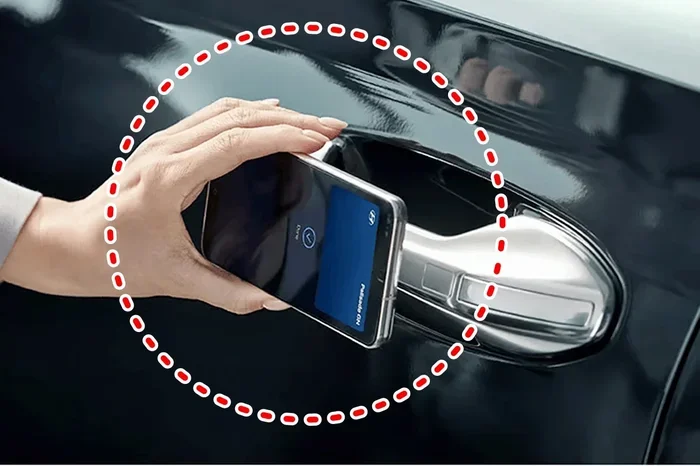
Some newer Toyotas support a Toyota digital key. This lets you use your phone as a key. You can unlock and start the car without ever taking your phone out of your pocket. This feature works through Bluetooth and Near Field Communication technology.
Is It Safe to Unlock Your Car With the Toyota App?
Safety is a top concern for any car security app. Toyota takes this seriously. The app uses multiple layers of protection to keep your vehicle safe.
Encryption and Secure Login
The Toyota Remote Connect app uses bank-level encryption. Your login credentials are protected with secure servers. You also need to set up a personal identification number or biometric login for extra security. This means someone cannot just guess their way into your car.
Two-Factor Authentication
Toyota offers two-factor authentication for added safety. When you log in from a new device, you receive a code on your registered phone number. You must enter this code before you can access your vehicle controls. This prevents unauthorized users from unlocking your car even if they know your password.
What Happens If Your Phone Is Lost or Stolen
If your phone goes missing, you can still protect your Toyota. Log into your Toyota account from another device and remove the lost phone. You can also call Toyota support to temporarily disable remote access. Once you get a new phone, you can re-link it to your account easily.
Tips to Keep Your Toyota App Secure
- Use a strong, unique password for your Toyota account
- Enable two-factor authentication in the app settings
- Never share your login details with others
- Keep your phone operating system and the Toyota app updated
- Log out of the app when using a shared or public device
- Review linked devices in your account regularly
Following these simple steps keeps your Toyota vehicle connectivity safe and sound. You can use the app with confidence every day.
Comparing Toyota App Remote Unlock With Other Methods
There are several ways to unlock your Toyota. The app is just one option. Here is how it compares to other methods.
| Method | Convenience | Security | Works Without Key |
|---|---|---|---|
| Toyota App Remote Unlock | Very high | High with encryption | Yes, with phone |
| Smart Key Fob | High | High | Yes, with fob |
| Manual Key | Low | Medium | Yes, with physical key |
| Third-Party App | Medium | Varies widely | Yes, with phone |
The Toyota app offers a great balance of convenience and security. It is more reliable than most third-party options. And it is far more convenient than carrying a manual key everywhere. The Toyota Smart Key fob is also very convenient, but the app adds the benefit of remote access from anywhere.
Common Mistakes People Make With the Toyota App Unlock Feature
Even though the setup is easy, some users run into avoidable problems. Here are the most common mistakes and how to prevent them.
- Forgetting to renew the subscription: Your remote features stop working when the Toyota Connected Services subscription expires. Set a reminder to renew before it lapses.
- Using the wrong app: There are multiple Toyota apps. Make sure you download the one that matches your model and year.
- Ignoring app updates: Outdated apps can cause bugs and connection problems. Turn on auto-updates in your app store.
- Poor Wi-Fi during setup: A weak connection during pairing can cause the setup to fail. Always use a strong Wi-Fi network when linking your vehicle.
- Not enabling notifications: You miss important alerts about your vehicle if you turn off push notifications for the app.
Avoiding these simple mistakes keeps your Toyota app unlock car experience smooth and hassle-free.
Expert Insights on Toyota App Remote Access
According to Toyota’s official documentation, the Toyota Remote Connect system is designed with user safety as the top priority. The company has invested heavily in making sure the remote access features are both reliable and secure.
Automotive experts also point out that app-based vehicle access is the future. More car manufacturers are moving toward smart phone car access as a standard feature. Toyota has been ahead of the curve with its connected services. The app continues to improve with each update, adding new features and fixing bugs.
One thing experts recommend is to always keep your vehicle’s software updated. Just like your phone, your Toyota’s modem and infotainment system receive updates. These updates improve performance and patch security vulnerabilities. A well-maintained system gives you the best Toyota keyless entry experience.
Key Takeaways
- Remote unlock is possible: You can unlock your Toyota from anywhere using the Toyota app and Remote Connect services.
- Not all models qualify: You need a compatible Toyota with the right tech package and active subscription.
- Setup is simple: Download the app, link your vehicle, and follow a few easy steps to enable remote features.
- Troubleshooting is straightforward: Most issues come from Wi-Fi, login, or subscription problems and are easy to fix.
- Safety features are built in: The app uses secure login and encryption to protect your vehicle from unauthorized access.
- Extra features add value: Beyond unlocking, the app offers remote start, GPS tracking, and vehicle health alerts.
- Keep your app updated: Regular updates fix bugs and improve performance for a smoother experience.
Frequently Asked Questions
Can I unlock my Toyota without a key fob using the app?
Yes, you can unlock your Toyota without the key fob if your vehicle supports Toyota Remote Connect or Toyota MyT. The app sends a secure signal to your car to unlock the doors. This works as long as your subscription is active and your phone has a data connection.
Is the Toyota app unlock feature free to use?
The app itself is free to download. However, you need an active Toyota Connected Services subscription to use remote unlock and other connected features. Subscription costs vary by model and plan. Some Toyotas come with a free trial period when you purchase the vehicle.
What Toyota models support the app unlock feature?
Most Toyota models from 2018 onward support the app unlock feature. Popular models include the RAV4, Camry, Corolla, Highlander, Tacoma, and Prius. Check your specific model and trim to confirm compatibility. You can also contact your Toyota dealer for confirmation.
Can I unlock my Toyota from far away using the app?
Yes, you can unlock your Toyota from a distance as long as you have an internet connection. The app uses cloud-based servers to send commands to your vehicle. This means you can unlock your car from work, a store, or even while traveling abroad.
What should I do if the Toyota app won’t unlock my car?
First, check your internet connection. Make sure you are logged into the correct Toyota account. Restart the app and try again. If the problem persists, check your subscription status and update the app. Contact Toyota support if none of these steps resolve the issue.
Is it safe to use the Toyota app to unlock my car?
Yes, it is very safe. Toyota uses bank-level encryption and two-factor authentication to protect your account. The app also allows you to remove lost or stolen devices remotely. Following basic security practices like using strong passwords keeps your vehicle secure.
Final Thoughts
The Toyota app unlock car feature is a game changer for daily driving. It adds a layer of convenience that modern life demands. Whether you forgot your keys inside the house or just want to warm up the car before your morning commute, the app delivers.
Getting started is simple. Download the right app, link your vehicle, and follow the setup steps. Keep your subscription active and your app updated for the best experience. And remember, if you run into any issues, Toyota support is always there to help.
The world of Toyota vehicle connectivity is growing fast. With each update, the app becomes more powerful and more reliable. Embrace the technology and enjoy the ease of having your Toyota right at your fingertips. Unlock your car, start your engine, and hit the road with confidence.