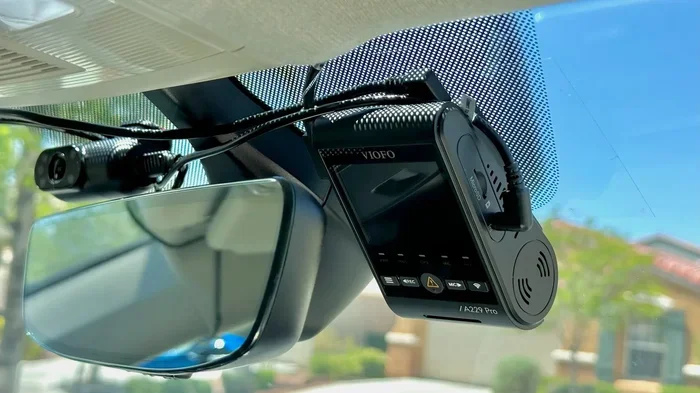
Do You Really Leave a Dash Cam in the Car All the Time
Leaving a dash cam in the car all the time is one of the smartest moves you can make for vehicle security. A dash cam runs continuously to capture video evidence whether you are driving or parked, which can save you thousands of dollars in insurance disputes. Most modern dash cams are built to handle constant power, but there are a few important setup steps you need to follow to avoid draining your car battery.
This is a comprehensive guide about Do You Leave a Dash Cam in the Car All the Time?.
Key Takeaways
- Always-on protection: A dash cam left in the car captures incidents 24/7, even when you are not behind the wheel.
- Parking mode is a game changer: It lets your dash cam record only when motion or impact is detected, saving battery life.
- Hardwiring is the best approach: A hardwire kit connects your dash cam directly to the car’s electrical system for safe, continuous power.
- Battery drain is manageable: With the right settings and a quality dash cam, you will not ruin your car battery.
- Video evidence matters: Footage from a dash cam can speed up insurance claims and protect you from false accusations.
- Regular maintenance helps: Cleaning the lens and updating firmware keeps your dash cam performing at its best.
[FEATURED_IMAGE_PLACEHOLDER]
Why You Should Consider Leaving Your Dash Cam in the Car All the Time
You just spent a few hundred dollars on a dash cam. You mounted it on the windshield, plugged it in, and started recording your daily commute. Now you are wondering: should you leave it in the car all the time? The short answer is yes. The long answer is even more convincing.
A dashboard camera is not just a driving accessory. It is a security system for your car. When you leave it plugged in and running, it constantly monitors what happens around your vehicle. This means if someone dings your car in a parking lot or hits it and drives off, you have a clear video record of what happened.
Think about how often you park your car in public spaces. Grocery stores, office lots, airports, shopping centers. These are all places where dings, scratches, and collisions happen every single day. Without a car security camera running, you have no proof. You have no way to identify the other driver. You are left paying for repairs out of your own pocket or relying on your insurance company to figure it out.
Leaving your dash cam plugged in also gives you peace of mind when you are not around. Whether you are at work, running errands, or sleeping at home, your vehicle is being watched. That sense of security is priceless, especially if you live in an area with high crime rates or frequent hit-and-run incidents.
The real question is not whether you should leave it in the car. It is whether you can afford not to. Let us break down exactly why keeping your dash cam running around the clock makes so much sense.
The Protection You Get When You Are Not Driving
Most people think of dash cams as tools for recording while they drive. But the truth is, the most valuable footage often happens when you are not in the car. Parked car surveillance is where dash cams really shine.
Here are some common situations where an always-on dash cam saves the day:
- Hit-and-run incidents: Someone hits your car in a parking lot and drives away. Your dash cam captures the license plate, the make and model, and the direction they fled.
- Vandalism: Keying, denting, or breaking a window on your car gets recorded on video, giving you clear evidence for the police and your insurance company.
- Theft attempts: If someone tries to break into your car, the dash cam records the entire event, which can help authorities catch the suspect.
- Falling debris: A tree branch falls on your car, or a grocery cart rolls into it. You have video proof that it was not your fault.
- Insurance fraud: Someone stages an accident with your car. Dash cam footage proves they are lying.
Each of these scenarios is more common than most people realize. According to studies on vehicle damage in parking lots, thousands of incidents go unreported every year because drivers have no evidence. A dash cam changes that completely.
The Benefits of Keeping Your Dash Cam Running 24/7
There are many real-world benefits to running your dash cam continuously. Let us look at the biggest advantages that come with leaving your device in the car all the time.
1. Continuous Video Evidence for Insurance Claims
When you file an insurance claim, the first question the adjuster asks is: do you have any proof? A dash cam provides exactly that. Instead of relying on conflicting stories from witnesses or blurry security camera footage from a nearby store, you have your own high-quality recording of the event.
This is especially powerful for minor accidents that happen in parking lots or low-traffic areas. Without a witness, these incidents often become he-said-she-said situations. Dash cam footage settles the dispute quickly and fairly. Many insurance companies even offer lower premiums to drivers who use dash cams because the footage reduces the number of fraudulent claims.
2. GPS Tracking and Speed Logging
Most modern dash cams include a GPS tracking module. When you leave the dash cam running all the time, it continuously logs your location and speed. This data is incredibly useful in several situations.
If you ever need to prove where you were at a specific time, the GPS data provides that information. If you are involved in a dispute about speed, the dash cam records how fast you were actually going. Some dash cams even create a map of your route, giving you a visual record of everywhere your car has been.
3. Wide-Angle Coverage and Night Vision
Today’s dash cams come with impressive wide-angle lens technology that captures a broad view of the road and surroundings. Many models also feature excellent night vision capabilities, so they record clearly even in low-light conditions.
When your dash cam runs 24/7, it uses these features around the clock. This means your car is monitored day and night, in all lighting conditions. The continuous recording ensures there are no gaps in your coverage, which is critical when every second of footage matters.
4. Loop Recording Keeps Everything Organized
One of the most important features of any dash cam is loop recording. This means the camera constantly overwrites the oldest footage when the memory card fills up. You never have to worry about running out of storage space.
When the dash cam is left in the car all the time, loop recording ensures that the most recent footage is always saved. If an incident occurs, the camera has already overwritten hours or days of older clips, but the most important footage the event itself remains on the card.
Potential Downsides of Leaving a Dash Cam Plugged In
Now let us talk about the other side of the story. Leaving a dash cam in the car all the time is not without its challenges. Understanding the potential downsides helps you set up your system correctly and avoid problems.
Battery Drain: The Biggest Concern
The number one worry people have is battery drain. A dash cam that runs constantly draws power from the car’s electrical system. If the car sits unused for days or weeks, the dash cam can slowly drain the battery until the car will not start.
However, this problem is largely avoidable with the right setup. Modern dash cams are designed to be energy efficient. Many models draw less than 100 milliamps in standby mode. Combined with a proper hardwire kit and smart power management, battery drain becomes a non-issue for most drivers.
Heat and Weather Damage
Cars get hot. In the summer, the temperature inside a parked car can soar above 150 degrees Fahrenheit. Electronics do not love extreme heat. Over time, constant exposure to high temperatures can reduce the lifespan of your dash cam’s battery, lens, and internal components.
This is another reason why choosing a quality dash cam matters. Cheap models with poor heat tolerance will fail faster when left in the car constantly. Investing in a well-built unit with a robust design pays off in the long run.
Memory Card Wear and Storage Limits
Continuous recording puts constant read-and-write cycles on your memory card. Over time, this can wear out cheaper SD cards. Using a high-quality, high-endurance memory card designed for dash cams helps prevent data loss and card failure.
You also need to keep an eye on storage capacity. A 32GB card can hold several hours of footage. A 64GB or 128GB card gives you much more breathing room. Make it a habit to check your card periodically and format it to keep things running smoothly.
Privacy and Security of Recorded Data
Your dash cam records everything that happens around your car. This means it also captures other people, their license plates, and potentially their faces. While this is useful for evidence, it also raises privacy considerations.
Keep your footage secure. Do not share it publicly unless it is needed for an insurance claim or legal matter. Regularly back up important clips to a separate device or cloud storage so you do not lose critical evidence if the memory card fails.
How to Set Up Your Dash Cam for All-Day Recording
Setting up your dash cam to run all the time is straightforward, but there are a few key steps that make the difference between a reliable setup and a frustrating one.
Step 1: Use a Hardwire Kit Instead of the Cigarette Lighter
The best way to power a dash cam continuously is with a hardwire kit. This device connects your dash cam directly to the car’s fuse box. It provides a stable power source and often includes a battery backup or capacitor that protects against power surges.
A hardwire kit also enables parking mode, which is one of the most valuable features for anyone who leaves their dash cam in the car all the time. Without a hardwire kit, you are limited to the cigarette lighter adapter, which usually turns off when the car is parked.
Step 2: Enable Parking Mode and Motion Detection
Parking mode is a smart feature that puts your dash cam into a low-power state when the car is parked. It only starts recording when the impact sensor (also called a G-sensor) detects a collision or when motion detection picks up movement in front of the camera.
Here is how parking mode works in practice:
- You turn off the car and walk away.
- The dash cam switches to parking mode automatically.
- The camera enters a low-power standby state.
- If someone hits your car or walks near it, the G-sensor or motion detection triggers recording.
- The dash cam saves the clip and goes back to standby.
This approach dramatically reduces battery consumption while still giving you full coverage of any incidents that occur while your car is parked.
Step 3: Choose the Right Memory Card
Not all memory cards are created equal. For a dash cam that runs 24/7, you need a card built for heavy, continuous use. Look for cards labeled as high-endurance or microSD cards designed for surveillance cameras.
Avoid using regular SD cards from your phone or camera. They are not built for the constant write cycles that dash cams demand. A good quality card will last longer, perform better, and reduce the risk of corrupted footage.
Step 4: Adjust Your Recording Settings
Most dash cams let you customize recording settings. For all-day use, here are some recommended adjustments:
- Resolution: 1080p is usually enough for clear evidence. 4K uses more storage and battery but provides sharper detail.
- Frame rate: 30 frames per second is standard. 60 fps gives smoother footage but fills the card faster.
- Loop recording: Make sure this is turned on so old footage is automatically overwritten.
- G-sensor sensitivity: Set it to medium or high so the camera locks footage during impacts but does not lock it for every bump on the road.
Dash Cam Parking Mode: What It Does and Why It Matters
If you are serious about leaving your dash cam in the car all the time, you need to understand parking mode. This feature is the key to balancing constant protection with battery preservation.
How Parking Mode Works
When your car is turned off and you walk away, parking mode activates. The dash cam powers down its main recording functions and enters a standby state. It uses very little power in this mode. Then, when the impact sensor or motion detection system detects something noteworthy, the camera wakes up and starts recording.
Some dash cams also offer a time-lapse mode in parking settings. This records short clips at set intervals, such as every 30 seconds or every minute. It uses more battery than pure standby mode but gives you a longer visual record of what happened around your car.
Super Capacitor vs. Battery Backup
Not all dash cams handle parking mode the same way. There are two main power backup technologies:
| Feature | Super Capacitor | Battery Backup |
|---|---|---|
| Heat tolerance | Excellent handles high temps well | Poor batteries degrade in heat |
| Power duration | Short to medium bursts | Longer sustained power |
| Lifespan | Very long no degradation | Moderate batteries wear over time |
| Best for | Hot climates, summer driving | Cold climates, extended parking |
| Cost | Slightly more expensive | More common in budget models |
If you live in a hot climate, a dash cam with a super capacitor is the better choice. It can handle the extreme heat inside a parked car without degrading. If you live in a colder climate and need longer parking mode duration, a battery backup model works well.
Real-World Example of Parking Mode in Action
Imagine you park your car at the mall on a Saturday morning. You leave the dash cam in parking mode. Three hours later, another driver backs into your car in the parking lot and drives away without leaving a note. Your dash cam detects the impact, wakes up, and records the entire incident. When you come back, you have clear video of the other car, its license plate, and the damage to yours.
Without parking mode, the dash cam would have been off the entire time you were shopping. You would have no footage and no way to identify the other driver. Parking mode turns your dash cam into a 24/7 security guard for your vehicle.
Common Mistakes People Make with Dash Cams
Even with the best dash cam, mistakes in setup and maintenance can reduce its effectiveness. Here are the most common errors people make and how to avoid them.
Forgetting to Format the Memory Card Regularly
Over time, memory cards accumulate fragmented data and temporary files. This slows down recording and increases the risk of errors. Format your card in the dash cam (not on your computer) at least once a month to keep everything running smoothly.
Mounting the Dash Cam Incorrectly
Placement matters. A dash cam mounted too low might not capture the license plates of other vehicles. One mounted near the rearview mirror gets the best view of the road. Make sure it is not blocking your line of sight and that it is securely attached so it does not shift while driving.
Ignoring Firmware Updates
Dash cam manufacturers regularly release firmware updates that fix bugs, improve performance, and add new features. Check for updates every few months and install them through the companion app or USB connection. An outdated dash cam may have issues that have already been resolved.
Using the Wrong Power Source
Running a dash cam off a cheap USB adapter or an unstable power source can cause it to shut off unexpectedly or corrupt files. Always use the power adapter that comes with the dash cam or invest in a quality hardwire kit for a clean, stable connection.
Not Cleaning the Lens
Dust, fingerprints, and grime on the lens create blurry footage that is nearly useless as evidence. Wipe the lens with a microfiber cloth once a week. It takes five seconds and makes a huge difference in footage quality.
Expert Tips for Maximizing Dash Cam Longevity and Performance
Getting the most out of your dash cam means taking a few extra steps beyond just plugging it in and forgetting about it.
Invest in a Quality Unit from the Start
Budget dash cams are tempting, but they often have poor heat tolerance, weak sensors, and unreliable storage handling. Spending a bit more on a reputable brand pays off with better footage, longer lifespan, and more reliable features like parking mode and G-sensor detection.
Use a Wi-Fi-Enabled Model for Easy Footage Access
Many modern dash cams connect to your phone via Wi-Fi. This lets you pull footage off the memory card without removing the card or connecting to a computer. Some models even send alerts to your phone when motion or impact is detected while the car is parked.
Keep the Dash Cam Cool
Heat is the number one enemy of electronics. If you live in a hot climate, consider using a small sunshade for the dash cam when parking for long periods. Parking in the shade or a garage whenever possible also helps extend the life of the unit.
Review Your Footage Periodically
Do not just let the dash cam record endlessly without ever checking the footage. Every few weeks, review recent clips on your phone or computer. This helps you spot any issues with the camera angle, focus, or storage. It also gives you a chance to save important clips before they get overwritten by loop recording.
Pair Your Dash Cam with a Good Insurance Policy
Even the best dash cam works best when paired with a solid car insurance policy. Many insurers offer discounts for dash cam users. The combination of video evidence and proper coverage means you are fully protected no matter what happens on the road or in a parking lot.
Frequently Asked Questions
Will leaving a dash cam in the car all the time drain the battery?
It can, but only if you do not set it up correctly. Using a hardwire kit with parking mode and motion detection dramatically reduces power consumption. Most quality dash cams draw so little power in standby mode that they will not drain a healthy car battery, even after several days of sitting idle.
What is the best dash cam for all-day recording?
Look for a dash cam with a super capacitor or large battery backup, excellent night vision, and reliable parking mode. Popular models from brands like BlackVue, Nextbase, and Vantrue are well-regarded for continuous use. Choose one that fits your budget and climate needs.
Can a dash cam record while the car is off?
Yes, as long as it is connected to a constant power source through a hardwire kit or a battery backup system. The dash cam enters a low-power standby state and only records when the impact sensor or motion detection triggers it.
How long can a dash cam record on a single memory card?
This depends on the card size and video quality. A 64GB card at 1080p with loop recording can hold anywhere from 6 to 12 hours of continuous footage. With parking mode enabled, the dash cam uses far less storage because it only records when triggered by motion or impact.
Is dash cam footage admissible in court?
In most cases, yes. Dash cam footage is widely accepted as video evidence in insurance disputes and legal proceedings. Make sure the footage is clear, unedited, and shows the date and time stamp provided by the dash cam. Keep the original file intact for maximum credibility.
How do I protect my dash cam from extreme heat?
Choose a model with a super capacitor instead of a built-in battery. Use a small shade or keep the car in a garage when possible. Wipe the lens regularly to prevent heat-related fogging. Avoid placing the dash cam in direct sunlight when the car is parked for long periods.
Final Thoughts
Leaving a dash cam in the car all the time is one of the simplest and most effective things you can do to protect your vehicle and yourself on the road. The benefits far outweigh the minor setup requirements and occasional maintenance tasks.
With the right dash cam, a proper hardwire kit, and smart settings like parking mode and loop recording, you get round-the-clock surveillance without worrying about battery drain or data loss. The video evidence it provides can save you from financial headaches, legal disputes, and the stress of dealing with hit-and-run drivers or insurance fraud.
Take the time to set up your dash cam correctly. Keep the lens clean, use a quality memory card, and review your footage regularly. Your dash cam works hard for you every single day. A little care and attention goes a long way toward making sure it keeps working reliably for years to come.
The bottom line is simple. If you care about your car, your safety, and your peace of mind, leave that dash cam in the car all the time. It is always watching when you are not there, and that makes all the difference.
Frequently Asked Questions
What is Do You Leave a Dash Cam in the Car All the Time??
Do You Leave a Dash Cam in the Car All the Time? is an important topic with many practical applications.