How to Unlock Your Chevrolet Radio Without the Manual
Unlocking your Chevrolet radio is straightforward once you know the right steps, even without the original manual. You can retrieve your radio code using the serial number, VIN, or by contacting a Chevrolet dealer. This guide covers every method, from finding the serial number on your dashboard to troubleshooting common lockout issues.
There is nothing more frustrating than climbing into your Chevrolet and turning the key, only to be greeted by a blank dashboard display and a locked radio. Whether your battery died over the winter, you recently replaced the unit, or the system reset after a service, a locked radio can put a real damper on your day. The good news is that how to unlock Chevrolet radio is a skill anyone can learn with the right guidance.
You do not need the original owner manual, and you do not need to visit a dealer right away. There are several reliable methods to retrieve your radio code and get your sound system back up and running. This guide walks you through every step in plain, simple language. By the end, you will know exactly what to do, what tools you need, and how to prevent this from happening again.
Let us start with the basics so you understand why your radio locked in the first place and what you are dealing with.
Key Takeaways
- Find the serial number: Your Chevrolet radio has a unique serial number located on the face of the unit or behind the dashboard.
- Multiple code retrieval methods: You can get your unlock code through Chevrolet dealerships, online generators, or by calling customer service.
- Battery disconnects can cause lockouts: Disconnecting your car battery may trigger the radio anti-theft feature, requiring a code to restore.
- Basic tools are all you need: Most unlock processes require only simple hand tools and about 15 to 30 minutes of your time.
- Prevention is simple: Write down your radio code and store it in a safe place to avoid future lockouts.
- Electrical health matters: A weak battery or electrical issue can cause radio lockouts, so keep your car electrical system in good shape.
📑 Table of Contents
Understanding Why Your Chevrolet Radio Is Locked
Most Chevrolet vehicles come equipped with a radio anti-theft feature. This is a security measure built into the factory car audio system to deter theft. When the radio loses power or detects a disconnect, it locks itself and displays a code request on the dashboard display. The system is designed so that only someone with the correct radio security code can turn the unit back on.
Here are the most common reasons your Chevrolet radio might lock up:
- Battery death or disconnect: If your battery died or you disconnected it for maintenance, the radio may lock as a security response.
- Fuse replacement: Replacing a blown fuse can cut power to the radio and trigger a lockout.
- Radio removal: If the unit was physically removed from the dashboard, it will require a code to reactivate.
- System reset after a service: Some dealership services or software updates can reset the radio, requiring a new code.
- Electrical surge: A power surge from a jump start or alternator issue can cause the system to lock.
The anti-theft feature is not a flaw. It is there to protect your investment. The challenge is simply knowing how to get past it. That is exactly what this guide will show you.
Does a Bad Battery Affect Your Radio?
Your car’s electrical system powers everything from the headlights to the infotainment system. When your battery is weak or failing, it can cause all sorts of quirky behavior. If you have noticed other electrical gremlins alongside the radio lockout, it is worth checking the overall health of your battery. For more on this, see whether a bad battery can cause the wrench light to come on.
How to Find Your Chevrolet Radio Serial Number
The first step in how to unlock Chevrolet radio is finding the serial number. This number is unique to your specific unit and is what you will use to retrieve the correct code. Without it, you are essentially locked out until you can get professional help.
Here is where to look:
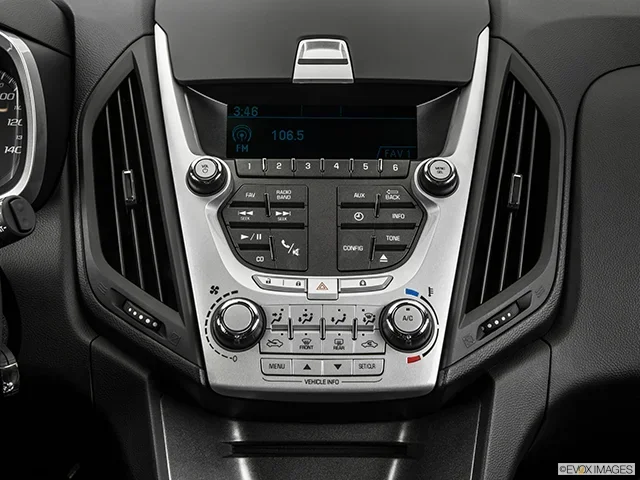
- On the radio face: Turn the ignition on without starting the engine. Look at the radio display. In many Chevrolet models, the serial number appears on the screen or is printed on a label on the radio face.
- Behind the dashboard: You may need to remove the radio trim panel to see a sticker or engraving on the back of the unit. Use a screwdriver or trim removal tool to gently pop off the panel.
- In the owner documents: If you still have any paperwork from when you bought the vehicle, the serial number or radio code may be listed there.
- On the original window sticker: If you have the Monroney sticker from when the car was new, the radio information may be included.
Write the serial number down carefully. Even one wrong digit will give you an incorrect code. Take a photo with your phone as a backup.
What If You Cannot Find the Serial Number?
Do not panic. There are other ways to identify your radio. You can check the vehicle identification number, or VIN, which is located on the driver side dashboard and door jamb. The VIN contains coded information about your vehicle, including the radio model. You can also check your Chevrolet model documentation or contact a Chevrolet dealer with your VIN and they can look up the radio details for you.
Getting Your Chevrolet Radio Unlock Code
Once you have the serial number, the next step is retrieving the actual unlock code. There are several ways to do this, and you do not need to be a mechanic to handle any of them.
Method 1: Contact a Chevrolet Dealer
The most straightforward approach is to call or visit your local Chevrolet dealer. They can look up your radio code using the serial number or VIN. Here is what to expect:
- Call the dealer service department and provide your serial number and VIN.
- They will verify your ownership with registration or proof of purchase.
- The dealer will provide the code, often free of charge or for a small fee.
This method is reliable and works for all Chevrolet models. It is also the safest option if you are not comfortable with online tools.
Method 2: Use an Online Radio Code Generator
Several websites offer radio code retrieval services online. You enter your serial number and the site generates the code. Here are some tips for using this method safely:
- Stick to well-known, reputable sites with good reviews.
- Never pay for a code that does not work on the first try.
- Have your serial number ready before you start.
Online generators are fast and convenient, but always double-check that the code matches your specific radio model.
Method 3: Call Chevrolet Customer Service
Chevrolet customer service can also help you retrieve your code. Have your VIN and serial number handy. They will verify your vehicle details and provide the correct radio code. This is a great option if you do not want to visit a dealer in person.
Step-by-Step: How to Unlock Your Chevrolet Radio
Now that you have your code, let us walk through the actual unlock process. This is the part where everything comes together, and your radio will be back to playing your favorite tunes in no time.
Step 1: Turn the Ignition On
Insert your key into the ignition and turn it to the “On” position. Do not start the engine. The radio display should light up and show a code request or a series of dashes.
Step 2: Enter the Code Using the Preset Buttons
Use the preset buttons on the radio to enter the code. Each button corresponds to a digit. For example, if your code is 1234, you would press preset 1, then preset 2, then preset 3, then preset 4. Press and hold each button until the display changes.
Step 3: Press and Hold the Hour Button
After entering all the digits, press and hold the hour button for about two to three seconds. The radio should unlock and return to normal operation. You will hear a click or see the display change to show the radio is active.
Step 4: Test the Radio
Turn the volume up and scan through the stations to confirm everything is working. If the radio powers on and plays normally, you are all set. If not, double-check the code and try again.
Quick Tips for a Smooth Unlock
- Make sure your battery is fully charged before starting. A weak battery can cause the process to fail.
- Have your code written down on paper before you begin entering digits.
- If you make three incorrect attempts, the radio may lock for a cooldown period. Wait at least 30 minutes before trying again.
- Some models require you to press and hold the volume knob instead of preset buttons. Check your specific model.
Common Problems and Radio Troubleshooting
Even with the right code, sometimes things do not go smoothly. Here are the most common issues people run into when trying to unlock car radio systems and how to fix them.
The Radio Displays “Code” but Will Not Accept Input
This usually means the radio is in code entry mode but is not registering your button presses. Try turning the ignition off and back on. If that does not work, check your battery voltage. A low battery can prevent the radio from accepting input. For related electrical issues, see whether a bad battery can cause the wrench light to come on.
The Code Does Not Work
If the code you entered does not work, double-check that you have the correct serial number. A single wrong digit will produce an invalid code. If you are sure the serial number is correct, contact your Chevrolet dealer for assistance. Do not keep entering codes randomly, as this can trigger a lockout timer.
The Radio Resets After You Turn Off the Engine
This is a sign of a deeper electrical issue. Your radio should retain its settings and code after the ignition is turned off. If it resets every time, your battery may be weak or there could be a wiring problem. It is worth having a mechanic check your electrical system.
Similar Reset Processes in Other Car Systems
The process of resetting your radio code is similar to other car maintenance resets. For example, after an oil change, you may need to reset the service light. Understanding these reset procedures helps you become more comfortable working with your vehicle’s systems.
Preventing Future Radio Lockouts
The best way to deal with a locked radio is to never have one in the first place. Here are simple steps you can take to prevent future lockouts.
- Write down your code: Store your radio code in a safe place, such as your glove box or a digital note on your phone.
- Keep a record of your serial number: Take a photo of the serial number and save it in your phone or cloud storage.
- Avoid disconnecting the battery unnecessarily: If you do need to disconnect the battery for maintenance, note the radio code beforehand.
- Use a memory saver device: When working on your car electrical system, a memory saver keeps all your radio settings intact.
- Keep your battery healthy: A strong battery prevents unexpected power loss that can trigger a lockout.
Taking these small precautions can save you a lot of time and frustration down the road. A few minutes of preparation now can prevent hours of hassle later.
Conclusion
How to unlock Chevrolet radio does not have to be a mystery. With the right serial number and the correct code, you can have your radio working again in under 30 minutes. Whether you choose to contact a Chevrolet dealer, use an online code generator, or call customer service, the process is simpler than most people think.
Remember to keep your code and serial number stored safely. A little preparation goes a long way toward avoiding future lockouts. Your radio is an important part of your driving experience, and now you have the knowledge to keep it running smoothly for years to come.
Do not let a locked radio ruin your day. Follow the steps in this guide, and you will be back to enjoying your favorite music, podcasts, and news in no time.
Frequently Asked Questions
What do I do if my Chevrolet radio asks for a code after a battery change?
This is completely normal and is part of the radio anti-theft feature. Simply find your serial number, retrieve the code using one of the methods in this guide, and enter it using the preset buttons. The process takes just a few minutes.
Can I unlock my Chevrolet radio for free?
Yes, in most cases. Chevrolet dealers often provide the code at no charge, and several online radio code retrieval tools are free to use. You only need to pay if you use a paid third-party service, which is usually unnecessary.
How many attempts do I get before the radio locks permanently?
Most Chevrolet radios allow three to five incorrect code attempts before triggering a cooldown period. After the cooldown, you can try again. If you exceed the maximum attempts, you may need to visit a dealer for a manual reset.
Do I need any special tools to unlock my Chevrolet radio?
No special tools are needed. You just need the radio serial number and the correct code. Basic tools like a screwdriver may help if you need to access the serial number behind the dashboard, similar to the basic tools you would need when you do you need a tool to change windshield wipers.
Will unlocking my radio erase my presets and saved stations?
No, unlocking the radio should not erase your presets or saved stations. The code only removes the lockout. However, if you disconnect the battery entirely, you may lose some radio memory settings.
Can I use the same code for a different Chevrolet radio unit?
No, each radio unit has a unique serial number and requires its own specific code. The code is tied to the individual unit, not the vehicle. If you replace the radio, you will need a new code for the new unit.