How to Use Launch Control on a Dodge Charger Properly
Launch control on a Dodge Charger helps you achieve maximum acceleration from a standstill by managing engine power and tire traction. This system is a game-changer for both drag racing enthusiasts and performance driving fans who want the best possible start every time. Knowing how to activate and use launch control properly can dramatically improve your quarter-mile times and protect your drivetrain from unnecessary wear.
There is something undeniably thrilling about dropping the hammer on a Dodge Charger and feeling the power surge through the wheels. Whether you are a seasoned drag racer or someone who simply loves the feeling of raw horsepower, launch control on a Dodge Charger is a feature that can transform your driving experience. This system takes the guesswork out of getting off the line and puts you in control of your acceleration like never before.
But here is the thing. Many Charger owners have this feature sitting right under their fingertips and never use it correctly. They might fire it up without understanding the settings, or they might skip it entirely because they do not know where to find it. That is a missed opportunity. Using launch control properly does not just make you faster. It also protects your transmission, reduces tire wear, and gives you repeatable results every single time you step on the gas.
In this guide, we are going to walk you through everything you need to know about how to use launch control on a Dodge Charger. From understanding what the system does to walking through each activation step, we have got you covered. We will also share practical tips, highlight common mistakes, and answer the questions that most drivers have. By the end, you will feel confident firing up your Charger and nailing the perfect launch every time.
Key Takeaways
- Launch control optimizes your Dodge Charger’s acceleration by controlling engine RPM and torque delivery during a launch.
- Activation methods vary by model year, so always check your owner’s manual for the exact steps.
- Practice in safe, controlled environments like closed tracks or drag strips to master the technique.
- Avoid common mistakes such as excessive RPM or neglecting tire condition, which can cause wheel spin or drivetrain damage.
- Launch control works best with performance tires and proper alignment for maximum grip.
- Regular maintenance matters for consistent launch performance over time.
📑 Table of Contents
What Is Launch Control on a Dodge Charger?
Launch control is an electronic system designed to help you achieve the fastest possible acceleration from a standstill. It works by managing engine output and limiting wheel spin during the initial moments of acceleration. Think of it as a smart assistant that figures out exactly how much power your tires can handle and delivers it in the most efficient way possible.
The system uses data from several sensors to make real-time decisions. These include wheel speed sensors, throttle position sensors, and transmission input speed sensors. When you activate launch control, the system holds your engine at a preset RPM level and then releases the power in a controlled manner. This prevents the wheels from spinning out and ensures that all that horsepower delivery actually translates into forward motion.
How the System Works Under the Hood
When you engage launch control, several things happen almost simultaneously. The engine control module (ECM) receives a signal that you want to launch. It then adjusts the fuel injection timing, ignition timing, and throttle response to hold the engine at the optimal launch RPM. At the same time, the traction control system monitors wheel speed and will intervene if it detects any slipping.
The torque management aspect of launch control is particularly important. Without it, a sudden surge of power can shock the drivetrain components. The system modulates torque delivery so that the transmission, axles, and wheels all experience a smooth and gradual increase in force. This is especially important for the Dodge Charger, which comes with serious performance driving capabilities in models like the SRT and Hellcat variants.
The engineering behind these systems is remarkable. It takes thousands of man hours to build a car like the Dodge Charger, and the launch control feature represents just one small piece of that complex puzzle. Every sensor, every algorithm, and every calibration choice serves a purpose in making your launches as consistent and powerful as possible.
How to Activate Launch Control on a Dodge Charger
Activating launch control on a Dodge Charger is straightforward, but the exact steps depend on your model year and trim level. Newer models from 2015 onward generally have a more intuitive process, while older models might require a slightly different approach. Let us break it down.
For Models with a Dedicated Launch Control Button
Some Dodge Charger trims, particularly the SRT and Hellcat versions, come with a dedicated launch control button. This is usually located near the shifter or on the steering wheel. Here is how to use it:
- Step 1: Start your Charger and make sure the engine is warmed up. The system works best when the engine is at operating temperature.
- Step 2: Press the brake pedal firmly with your left foot.
- Step 3: Press and hold the launch control button.
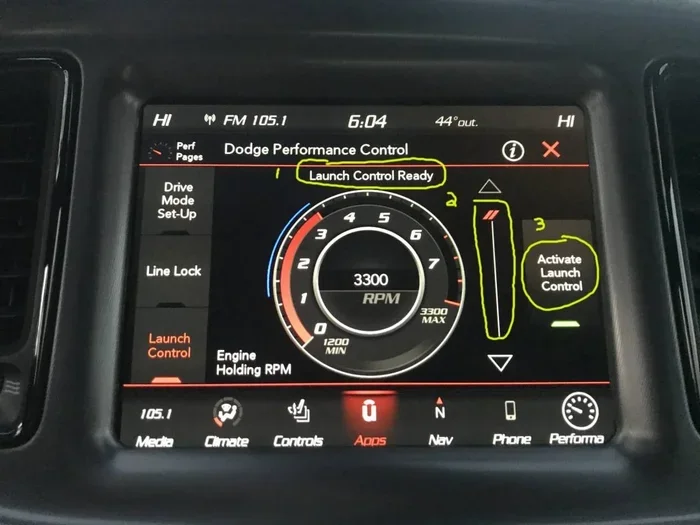
- Step 4: You will see a notification on the dashboard indicating that launch control is active.
- Step 5: Release the brake and floor the accelerator pedal.
- Step 6: The system will hold the engine at the preset RPM and then manage the power delivery for you.
For Models without a Dedicated Button
If your Charger does not have a launch control button, do not worry. You can still access the feature through the vehicle settings menu. On models with the Uconnect infotainment system, navigate to the performance or drive settings section. Look for the launch control option and toggle it on. Once enabled, the system will be ready to activate whenever you follow the brake-and-accelerate procedure described above.
It is also worth noting that the launch control feature may behave differently depending on which driving mode you have selected. If your Charger has selectable drive modes like Sport, Track, or Performance, switching to one of these modes may change the launch RPM settings and overall behavior of the system. Always check your manual to understand how each mode affects launch control.
Step-by-Step Guide to Using Launch Control
Now that you know how to activate the system, let us walk through the actual process of using launch control from start to finish. Following these steps will help you get the most out of every launch.
Step 1: Prepare Your Vehicle
Before you attempt any launch, make sure your vehicle is ready. Check that your tires are properly inflated and in good condition. Tire grip is the single most important factor in a successful launch. Worn or underinflated tires will cause wheel spin no matter how good your launch control system is. If you are serious about performance launches, consider investing in performance tires designed for drag racing or street racing applications.
Also, make sure your fuel tank has enough gas and that you are using the correct fuel type. If you are wondering can a flex fuel car use regular gas, the short answer is yes, but using the recommended fuel grade will give you the best performance results. For most Charger models, premium fuel is recommended for optimal launch control performance.
Step 2: Find a Safe Location
This cannot be stressed enough. Only practice launch control in safe, legal environments. Open drag strips, closed tracks, or large empty parking lots are ideal. Never attempt high-speed launches on public roads. Not only is it dangerous and illegal, but it also puts yourself and others at serious risk.
Step 3: Position Your Vehicle
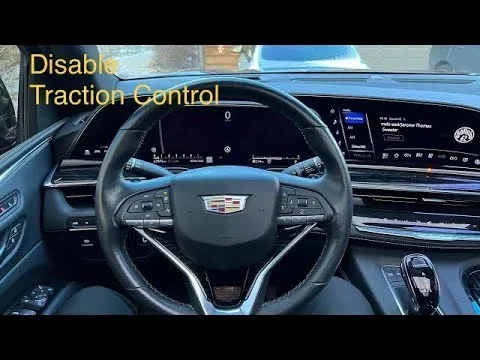
Line up your Charger facing forward in your chosen location. Make sure there is plenty of straight runway ahead of you. Engage the transmission in drive (or first gear if you are using a manual transmission). Turn off any stability control features if your model allows it, as these can interfere with the launch sequence.
Step 4: Activate and Launch
Follow the activation steps we outlined earlier. Press the brake, engage launch control, and then release the brake while applying full throttle. The system will handle the RPM management, and you will feel the Charger surge forward with impressive force. Pay attention to how the system feels and make note of the results.
Step 5: Analyze and Adjust
After each launch, take a moment to evaluate what happened. Did the wheels spin at all? How was the acceleration feel? If you have a performance monitoring device or app, check your 60-foot times and overall elapsed time. Use this data to fine-tune your technique for the next launch.
The beauty of launch control is that it gives you repeatable results. Unlike a manual launch where every attempt is different, the system allows you to dial in a consistent process. This is incredibly valuable if you are competing in drag racing events or simply trying to improve your personal best times.
Tips for Getting the Best Launch
Using launch control is one thing. Getting the best possible results is another. Here are some expert tips that will help you squeeze every ounce of performance out of your Dodge Charger.
Tire Selection Matters
The tires on your Charger are the only thing connecting your car to the road. That means they play a huge role in how well your launch control system performs. For the best results, use tires with a high grip rating and appropriate tread patterns for your driving surface. Drag radials are a popular choice among Charger enthusiasts because they offer excellent traction off the line while still being street-legal.
Watch Your Launch RPM
Every Charger model has an optimal launch RPM range. Going too low means you will not充分利用 the engine’s power band. Going too high can cause excessive wheel spin and waste energy. Most launch control systems have a default RPM setting that works well for most conditions. However, if your model allows you to adjust the launch RPM, experiment within the recommended range to find your sweet spot.
Keep Your Alignment in Check
Proper wheel alignment affects how power is transferred to the ground. If your wheels are misaligned, you may experience uneven tire wear and inconsistent launch performance. Have your alignment checked regularly, especially if you notice that your Charger pulls to one side or your tires are wearing unevenly.
Warm Up the Engine
Cold engines do not produce optimal power. Before attempting a launch, let your Charger warm up for at least 5 to 10 minutes. This allows the oil to circulate, the engine to reach operating temperature, and the launch control system to calibrate properly. You will notice a noticeable difference in launch quality between a cold start and a warmed-up engine.
Use Performance Mode When Appropriate
If your Dodge Charger has selectable drive modes, switching to Performance or Track mode can enhance your launch control experience. These modes typically adjust throttle response, shift points, and stability control parameters to favor aggressive acceleration. Just remember to switch back to Normal or Street mode when you are driving in everyday conditions.
Maintain Your Drivetrain
Launch control puts extra stress on your drivetrain components. Regular maintenance of your transmission, differential, and driveshaft is essential for consistent performance. Check your transmission fluid level and condition regularly, and follow the manufacturer’s recommended service intervals. A well-maintained drivetrain will reward you with smoother, more reliable launches every time.
Common Mistakes to Avoid
Even with a great system like launch control, it is easy to make mistakes that can hurt your performance or damage your vehicle. Here are the most common errors that drivers make and how to avoid them.
Neglecting Tire Condition
This is the number one mistake we see. People focus all their attention on the electronics and engine tuning but forget about the tires. No matter how sophisticated your launch control system is, it cannot create traction from thin air. Worn tires, low tire pressure, or the wrong tire type will all lead to poor launches and potential safety hazards.
Using Launch Control Excessively
While launch control is designed to handle repeated use, excessive launches can still cause wear on your tires and drivetrain components. If you are at a track day or drag racing event, space out your launches to allow your tires to cool down between attempts. Overheating your tires can lead to a dramatic loss of grip and potentially dangerous situations.
Ignoring Error Messages
If your launch control system is not working properly, your dashboard will usually display a warning light or error message. Do not ignore these warnings. Common issues include faulty wheel speed sensors, low transmission fluid, or problems with the throttle body. Addressing these issues promptly will keep your Dodge Charger performance at its best.
Skipping the Break-In Period
If you have a brand-new Charger, avoid using launch control aggressively during the break-in period. The engine, transmission, and tires all need time to seat properly. Refer to your owner’s manual for the recommended break-in procedures and wait until that period is complete before pushing your launch control system to its limits.
Not Accounting for Weather Conditions
Weather plays a significant role in launch performance. Cold temperatures can make your tires stiffer and reduce grip. Wet or icy conditions are obviously dangerous for any high-power launch. Always assess your environment before using launch control and adjust your expectations accordingly. A rainy day is not the time to experiment with aggressive launches.
When Should You Use Launch Control?
Understanding when to use launch control is just as important as knowing how to use it. The system shines in specific situations and can be counterproductive in others.
At the Drag Strip
This is the ideal environment for launch control. The flat, straight surface and controlled conditions allow you to fully exploit the system’s capabilities. Whether you are running a competitive drag race or just having fun on a Saturday afternoon, launch control will help you achieve consistent and impressive quarter-mile times.
During Performance Driving Events
If you participate in track days or performance driving events, launch control can be a valuable tool for getting off corners quickly and efficiently. The ability to deliver maximum power without wheel spin gives you a significant advantage, especially in cars like the Dodge Charger that are known for their straight-line speed.
On the Street (Responsibly)
While launch control can be fun to use on the street, always prioritize safety and legality. Use the system only in appropriate locations and at appropriate times. The thrill of a quick launch is undeniable, but it should never come at the expense of your safety or the safety of others.
Remember, the Dodge Charger is an incredible machine that represents decades of American muscle car engineering. Every single one of these vehicles comes off the assembly line after careful assembly and quality control, and the launch control system is just one more example of how much thought and precision goes into making these cars exceptional. With proper use and regular maintenance, your Charger’s launch control will continue to deliver thrilling performance for years to come.
Conclusion
Mastering launch control on a Dodge Charger is one of the best things you can do for your driving experience. It is a feature that combines technology, engineering, and raw power to give you the perfect start every time. By following the steps in this guide, avoiding common mistakes, and practicing in safe environments, you will unlock a new level of performance from your Charger.
Take the time to understand your specific model’s launch control system. Read the owner’s manual, experiment with different settings, and pay attention to how your car responds. Each launch is an opportunity to learn and improve. Whether you are chasing personal bests on the drag strip or simply enjoying the thrill of acceleration on an open road, launch control is a tool that deserves your attention and respect.
So fire up your Charger, find a safe place to practice, and put what you have learned here into action. The road (or track) ahead is waiting, and with launch control in your corner, you are ready to make every launch count.
Frequently Asked Questions
Can you use launch control on any Dodge Charger model?
Most Dodge Charger models from 2015 onward come equipped with launch control, but the exact activation method may vary. Higher-performance trims like the SRT and Hellcat variants often have more advanced launch control systems with customizable settings. Always check your owner’s manual to confirm whether your specific model has this feature and how to use it.
Does launch control damage your car?
When used correctly, launch control does not damage your car. In fact, it is designed to protect your drivetrain by managing power delivery and preventing excessive wheel spin. However, using launch control excessively or on worn tires can increase stress on components over time. Regular maintenance and responsible use are key to keeping your Charger in great shape.
What is the difference between launch control and traction control?
Launch control and traction control serve different purposes. Launch control is specifically designed to optimize your initial acceleration from a standstill by managing engine RPM and torque delivery. Traction control, on the other hand, works continuously during driving to prevent wheel slip when you are already in motion. Many modern vehicles like the Dodge Charger have both systems working together for optimal performance.
Can you use launch control on the street legally?
Using launch control on public roads is generally not recommended and may be illegal depending on your location. High-speed launches on public streets pose serious safety risks and can result in traffic violations. Always reserve launch control for controlled environments like drag strips, tracks, or large private property where it is safe and legal to do so.
How do you deactivate launch control on a Dodge Charger?
Deactivating launch control is typically straightforward. You can usually press the launch control button again to turn it off, or navigate to the vehicle settings menu on the Uconnect system and toggle the feature off. Some models also allow you to disable it through the drive mode settings. Refer to your owner’s manual for the specific procedure for your model year.
Is launch control only useful for drag racing?
While launch control is most commonly associated with drag racing, it has broader applications. It is useful in any situation where you need quick, controlled acceleration, such as merging onto highways, passing other vehicles, or participating in performance driving events. The system’s ability to deliver consistent power makes it valuable in many driving scenarios beyond just the drag strip.