Why Is My Tesla Charging So Slow at Home All The Time
Your Tesla may charge slowly at home due to a weak electrical panel, an old mobile charger, cold weather, or software glitches. Understanding your charging setup and making a few simple adjustments can dramatically improve your Tesla charging speed and get you back on the road faster.
There is nothing more frustrating than plugging in your Tesla overnight and waking up to a partial charge. You expect your electric vehicle to be ready to go every morning. So why is my Tesla charging so slow at home all the time? This is a question Tesla owners ask every single day, and the answer is usually simpler than you think.
Slow home charging can ruin your daily routine. You plan your day around a full car, only to find the battery percentage barely moved overnight. The good news is that most causes of slow charging are easy to fix. Whether it is your power outlet, your cable, or even the weather outside, understanding the root cause puts you back in control. This guide walks you through every reason your Tesla charging speed might be lacking and gives you clear steps to fix each one.
Let us dive into the most common culprits behind slow Tesla home charging and get you charging faster starting tonight.
Key Takeaways
- Home Power Supply Matters: Your electrical panel and outlet type directly limit how fast your Tesla charges at home.
- Wall Connector Upgrades Help: Switching from a mobile charger to a Tesla Wall Connector can significantly boost your charging rate.
- Cold Weather Slows Charging: Low temperatures affect battery performance and can reduce your Tesla charging speed noticeably.
- Software Updates Are Key: Keeping your Tesla firmware updated can resolve many slow charging issues automatically.
- Charging Habits Count: Charging during off-peak hours and avoiding frequent supercharging can improve your battery and home charging efficiency.
📑 Table of Contents
Understanding Your Home Charging Setup
Before you troubleshoot anything, it helps to understand how your Tesla charges at home. The speed of your charge depends on a few key components working together. Each piece plays a role in determining your charging rate and overall charging speed.
What Controls Charging Speed?
Three main factors control how fast your Tesla charges at home. First, your electrical panel supplies power. Second, the cable or charger you use delivers that power. Third, your Tesla itself manages how much power it accepts. When any one of these is limited, your charging speed drops.
Think of it like filling a bathtub. Your electrical panel is the water supply. The charger is the faucet. And your Tesla battery is the tub. If the supply is weak or the faucet is small, the tub fills slowly no matter how big it is.
Types of Home Charging Options
Most Tesla owners use one of three charging methods at home. Each offers a different charging rate:
- NEMA 5-15 Outlet (Standard Wall Plug): This is the basic outlet found in every home. It provides the slowest home charging speed, adding about 2 to 3 miles of range per hour.
- NEMA 14-50 Outlet (Dryer Plug): This 240-volt outlet is much faster. It adds roughly 30 to 40 miles of range per hour.
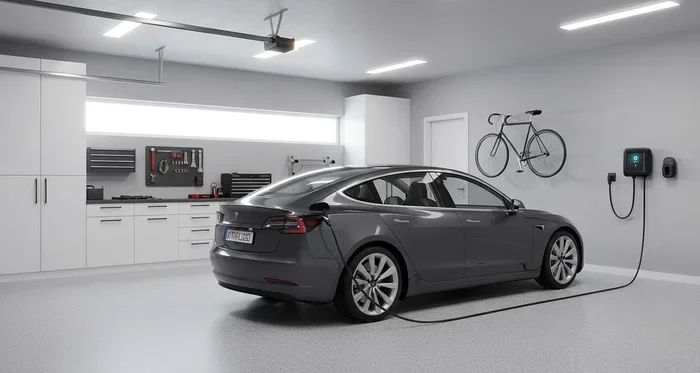
- Tesla Wall Connector: This is the fastest home option. It can add up to 44 miles of range per hour depending on your Tesla model.
If you are using a standard wall plug, that alone could explain why your Tesla charging speed feels so slow. Upgrading your outlet or getting a Wall Connector is the single biggest improvement you can make.
Electrical Panel Limitations
Your home’s electrical panel is the heart of your charging setup. If your panel cannot supply enough power, your Tesla will charge slowly no matter what charger you use. This is one of the most overlooked reasons for slow Tesla charging at home.
How Old Is Your Electrical Panel?
Older homes often have 100-amp panels. Modern Teslas need more power to charge quickly. A 100-amp panel may not support a high-speed home charging station. Newer homes typically have 200-amp panels, which handle fast charging much better.
If your panel is old or undersized, consider having an electrician upgrade it. This investment pays for itself in faster charging rates and better overall performance.
Circuit Breaker Tripping
Sometimes your panel trips the circuit breaker during charging. This cuts power completely and stops your Tesla charging. Frequent tripping means your circuit is overloaded. You may need to dedicate a separate circuit to your charger or reduce the amperage settings on your device.
Charger and Cable Issues
The equipment you use to charge your Tesla matters more than most people realize. A damaged cable or an outdated charger can cut your charging speed in half without you even knowing it.
Mobile Connector vs Wall Connector
The Tesla Mobile Connector comes with every new car. It works, but it is not designed for fast home charging. If you rely on the mobile connector every night, your Tesla charging speed will always be limited.
The Tesla Wall Connector is built specifically for home use. It delivers consistent power and charges your battery much faster. Many owners report a huge difference after switching. If you want to know more about charging setups, check out Can I Start My Highlander With My Phone for insights on how vehicle connectivity affects charging behavior.
Damaged or Faulty Cables
Inspect your charging cable regularly. Frayed wires, bent connectors, or exposed insulation can reduce power flow. Even small damage affects your charging rate. Replace any cable that shows wear immediately. Tesla sells replacement cables directly, and they are easy to install yourself.
Adapter Problems
If you use an adapter to plug into a non-standard outlet, it may limit your charging speed. Adapters add resistance to the connection. This resistance reduces the power reaching your battery. Whenever possible, plug directly into a NEMA 14-50 outlet or use the Wall Connector for the best home charging performance.
Weather and Temperature Effects
Cold weather is a silent killer of Tesla charging speed. If you live in a colder climate, you have probably noticed your car charges slower in winter. This is completely normal, but it can be managed.
How Cold Weather Affects Battery Charging
Tesla batteries perform best between 60 and 80 degrees Fahrenheit. When temperatures drop, the battery chemistry slows down. The car must first warm the battery before it can accept a fast charge. This preconditioning step takes time and reduces your overall charging rate.
In extreme cold, your Tesla charging speed can drop by 30 to 50 percent. This is why many owners wake up to less charge than expected during winter months.
Battery Preconditioning Tips
You can improve cold-weather charging with a few simple habits:
- Plug in your Tesla as soon as you get home. This starts the warming process early.
- Use the Tesla app to precondition the battery before you go to sleep.
- Set a scheduled departure time so the car warms the battery right before you need it.
- Keep your Tesla plugged in overnight even if the battery is already full. This keeps the battery warm and ready.
For more on how temperature affects vehicle performance, check out Car Won’t Start In Cold Weather But Battery Is Good for related battery insights that apply to electric vehicles too.
Software and Settings That Affect Charging Speed
Your Tesla is a computer on wheels. Software settings directly impact how fast your car charges. Many owners do not realize that a simple setting change can improve charging speed significantly.
Charging Limit Settings
By default, Tesla recommends charging to 90 percent for daily use. If you have set your charging limit lower, the car will stop earlier. This does not mean charging is slow. It means the car reached its target and stopped. Check your charging limit in the settings to make sure it is set appropriately for your needs.
Scheduled Charging
Tesla offers a scheduled charging feature. This lets you set specific times for charging to begin. It is great for taking advantage of off-peak electricity rates. However, if the schedule is set incorrectly, it can make it seem like your Tesla charging speed is slow when really the car just has not started yet.
Always double-check your scheduled charging times. You can adjust them in the Controls menu under Charging.
Overnight Software Updates
Tesla occasionally pushes software updates overnight. During an update, your car cannot charge. If you plug in and the car shows no progress, a background update may be the cause. This is normal and temporary. Once the update finishes, your charging speed returns to normal.
Common Mistakes That Slow Down Charging
Even experienced Tesla owners make habits that unknowingly reduce their home charging speed. Avoiding these mistakes can make a big difference.
Charging Every Night Without Need
If your daily commute is short, you do not need to charge every single night. Frequent charging cycles can actually reduce battery efficiency over time. Your Tesla battery prefers partial charges. Try to keep your battery between 20 and 80 percent for optimal charging performance.
Using the Wrong Outlet
Plugging into a standard 120-volt outlet is convenient but painfully slow. If you have a 240-volt outlet available, always use it. The difference in charging rate is dramatic. A 120-volt outlet adds about 3 miles of range per hour. A 240-volt setup adds 30 or more miles per hour.
For owners who rely on app-based features, also note that vehicle connectivity issues can sometimes interfere with charging behavior. Learn more about app-related vehicle functions in Can I Unlock My Car With The Toyota App for a broader look at how mobile apps interact with vehicle systems.
Ignoring Maintenance Alerts
Tesla sends maintenance alerts when something needs attention. Ignoring these can lead to reduced charging speed. For example, a degraded battery or a faulty charging port will slow everything down. Always respond to maintenance notifications promptly.
Charging During Peak Hours
While this does not directly slow your charging rate, it does affect your electricity cost. Charging during off-peak hours saves money and keeps your energy grid stable. Many Tesla owners set their scheduled charging to start after midnight for the best rates.
When to Seek Professional Help
Most slow charging issues are easy to fix at home. But some problems need a professional touch. Knowing when to call for help saves time and prevents further damage.
Signs You Need an Electrician
Call a licensed electrician if you notice any of these signs:
- Your circuit breaker trips every time you plug in your Tesla.
- Your lights dim when the car starts charging.
- Your outlet feels warm to the touch during charging.
- Your Tesla charging speed does not improve after changing cables and settings.
Tesla Service Center Visits
If you have ruled out all home factors, the issue may be with the car itself. A Tesla service center can run diagnostic tests on your battery and charging port. They can check if your battery health is declining or if a software fix is needed. For more on when vehicle issues require professional attention, visit Can I Drive My Car With A Low Key Battery for related guidance on battery-related driving concerns.
Final Thoughts
Slow Tesla charging at home is almost always fixable. Start by checking your outlet type and electrical panel. Upgrade to a Wall Connector if you have not already. Inspect your cables for damage. Adjust your software settings and charging habits. And do not let cold weather catch you off guard, use preconditioning to keep your battery ready.
Small changes add up to big improvements in your Tesla charging speed. Within a few days of making adjustments, most owners see a noticeable difference. Your morning routine should start with a full battery and a confident drive. Take control of your home charging setup today, and enjoy the peace of mind that comes with a fully charged Tesla every single morning.
Frequently Asked Questions
Why is my Tesla charging so slow all of a sudden at home?
A sudden drop in Tesla charging speed is often caused by a tripped circuit breaker, a damaged cable, or a software glitch. Check your outlet, inspect your cable, and restart your car. If the problem persists, update your Tesla software or contact Tesla support for a diagnostic check.
Does cold weather really slow down Tesla home charging?
Yes, cold weather significantly reduces Tesla charging speed. When temperatures drop below freezing, the battery must warm up before it can accept a fast charge. This preconditioning step can cut your charging rate by 30 to 50 percent until the battery reaches optimal temperature.
Should I charge my Tesla every night?
It depends on your daily driving needs. For most owners, charging to 80 or 90 percent overnight is enough. Charging to 100 percent every night can reduce long-term battery health. Keeping your battery between 20 and 80 percent for daily use supports better charging efficiency and battery longevity.
Can a bad outlet cause slow Tesla charging?
Absolutely. A worn-out or improperly wired outlet limits the power your Tesla receives. If your outlet is not delivering the correct voltage, your charging speed will suffer. Have an electrician check your outlet and electrical panel to ensure they can support fast home charging.
How much faster is a Tesla Wall Connector than a mobile charger?
A Tesla Wall Connector is typically 3 to 5 times faster than the Mobile Connector. While a mobile charger adds about 2 to 3 miles of range per hour, a Wall Connector can add up to 44 miles per hour depending on your Tesla model and electrical setup. Investing in a Wall Connector is the best way to improve your Tesla charging speed at home.
Can software updates fix slow Tesla charging?
Yes, Tesla regularly releases software updates that improve charging algorithms and fix bugs that affect charging speed. Keeping your Tesla updated ensures optimal performance. If you notice slow charging, check for pending updates in your vehicle settings before trying other fixes.
=== CONCLUSION ===
Slow Tesla charging at home does not have to be your normal. By understanding your electrical setup, choosing the right charger, and adjusting a few settings, you can dramatically improve your Tesla charging speed. Start with the basics, work through the checklist, and enjoy faster charging every single night. Your future self, standing by a full battery on a busy morning, will thank you.