Where Is the Factory Reset Button Located on Devices
Knowing where the factory reset button is located can save you time and frustration when your device acts up. Whether it is a hidden pinhole on your phone, a button on your car’s infotainment system, or a reset switch on your router, we cover every major device type. This guide gives you clear, simple instructions so you can find and use the reset button with confidence.
Have you ever stared at your device, wondering where on earth the factory reset button is hidden? You are not alone. People search for this information every single day, and for good reason. When your phone freezes, your car screen goes blank, or your router stops working, knowing how to reset your device can feel like a superpower.
A factory reset button is a simple tool that can bring your device back to life. It restores everything to the way it came out of the box. But here is the tricky part. The location of that button changes from device to device. Some devices hide it well. Others do not have one at all. In this guide, we walk you through exactly where to find the reset button on every type of device you own.
We will cover phones, tablets, laptops, cars, TVs, routers, and more. Each section gives you clear, step-by-step instructions. No jargon. No confusion. Just straightforward help you can use right away. Let us dive in and find that elusive reset button together.
Key Takeaways
- Factory reset buttons vary by device type: phones use hidden pinholes, while cars and TVs have dedicated buttons on the unit.
- Soft resets and hard resets are different: a soft reset restarts your device, while a hard reset wipes your data back to factory settings.
- Always back up your data first: performing a factory reset erases everything, so save your files before you start.
- Some devices have no physical reset button: many modern phones and smart TVs use software-based reset options instead.
- Router reset buttons are usually recessed: look for a small pinhole labeled “Reset” on the back of your router.
- Car infotainment systems often hide the reset option: check the settings menu or use a specific button combination.
- When in doubt, consult your device manual: manufacturers provide specific instructions for their reset procedures.
📑 Table of Contents
- What Is a Factory Reset and Why Do You Need It?
- Where Is the Factory Reset Button on Phones and Tablets?
- Where Is the Factory Reset Button on Laptops and Computers?
- Where Is the Factory Reset Button on Cars and Infotainment Systems?
- Where Is the Factory Reset Button on TVs and Streaming Devices?
- Where Is the Factory Reset Button on Routers and Networking Devices?
- Where Is the Factory Reset Button on Wearable Devices?
- Common Mistakes People Make When Factory Resetting Devices
- Expert Insights on Factory Reset Buttons
- Key Takeaways
- Conclusion
What Is a Factory Reset and Why Do You Need It?
Before we find those buttons, let us talk about what a factory reset actually does. A factory reset wipes all your personal data, apps, settings, and files from a device. It returns the device to the exact state it was in when you first took it out of the box. Think of it as a clean slate.
There are two main types of resets you should know about. A soft reset simply restarts your device. It does not erase anything. You use this when your device freezes or runs slowly. A hard reset, also called a factory reset, erases everything and restores the original software. You use this when your device has serious software problems or before selling it.
People perform factory resets for many reasons. Maybe your phone has been acting strange for weeks. Perhaps you are selling your laptop and want to protect your personal information. Or your car’s infotainment system is glitching and a simple restart did not fix it. Whatever the reason, knowing where the reset button is makes the process much easier.
Where Is the Factory Reset Button on Phones and Tablets?
Smartphones and tablets are the most common devices people need to reset. But finding the reset button on these devices is not always obvious. The location depends on whether you have an iPhone or an Android device.
iPhone Factory Reset Button Location
Apple does not put a physical factory reset button on iPhones. Instead, you use the software menu to restore factory settings. Here is how you do it. Open the Settings app. Tap General. Scroll down and tap Transfer or Reset iPhone. Then tap Erase All Content and Settings. You will need to enter your passcode to confirm.
Some older iPhones have a recessed hole on the back near the bottom. This is not a factory reset button though. It is the SIM card ejector tool. Do not confuse the two. If your iPhone is completely frozen and unresponsive, you can perform a force restart by pressing and holding the side button and a volume button together for about 10 seconds.
Android Factory Reset Button Location
Most Android phones also do not have a dedicated physical factory reset button. You access the reset through the settings menu. Go to Settings. Tap System. Tap Reset options. Then tap Erase all data to perform the factory reset.
However, some Android devices do have a small pinhole reset button on the side or bottom edge. This is especially common on older models or budget phones. You need a SIM ejector tool or a paperclip to press it. The pinhole is usually labeled with a small reset icon that looks like a circle with an arrow.
For tablets like the Samsung Galaxy Tab or Amazon Fire tablet, the process is very similar. Look in the settings menu under System or Device Options. The reset device option is always in the same general area regardless of the brand.
Quick Tips for Phone and Tablet Resets
- Always back up your data first. A factory erase removes everything permanently.
- Make sure your battery is charged above 50 percent before starting the reset process.
- Know your Google or Apple account credentials. You will need them after the reset to set up the device again.
- Remove your SIM card and SD card before performing the reset if possible.
Where Is the Factory Reset Button on Laptops and Computers?
Laptops and desktop computers handle resets differently than phones. Most do not have a single physical button you can press. Instead, the reset process happens through the operating system. But there are exceptions, especially with certain brands.
Windows Laptop Reset Button Location
On most Windows laptops, you reset the device through the Settings app. Click Start. Go to Settings. Tap Update and Security. Click Recovery. Under Reset this PC, click Get Started. You can choose to keep your files or remove everything.
Some Windows laptops have a tiny reset pinhole on the bottom or side of the chassis. This is more common on business laptops from brands like Dell and Lenovo. Look for a small hole labeled “Reset” or with a circular arrow icon. Use a paperclip to press it gently. The laptop will power off and restart in recovery mode.
MacBook Factory Reset Process
Apple MacBooks do not have a physical factory reset button. To restore factory settings on a Mac, you need to boot into Recovery Mode. Shut down the laptop. Then turn it on while holding Command and R until the Apple logo appears. From the recovery menu, select Disk Utility to erase the drive, then reinstall macOS.
Reset Without Losing Data
If you just want to fix a glitch without erasing everything, try a soft reset first. On a Windows laptop, hold the power button for 10 seconds to force a shutdown. Then turn it back on. On a MacBook, press and hold Control, Command, and the power button together. This restarts the system without touching your files.
Where Is the Factory Reset Button on Cars and Infotainment Systems?
Modern cars have complex infotainment systems that sometimes need a reset. The location of the reset button varies greatly depending on the car brand and model. Let us look at some common scenarios.
General Car Infotainment Reset
Most car infotainment systems have a reset option in the settings menu. Look for Settings. Then find System or Device Preferences. You should see an option to restore factory settings or reset the system. This wipes all your paired phones, saved addresses, and custom settings.
Some vehicles have a physical reset button on the infotainment unit itself. It is usually a small recessed button on the face of the screen or on the dashboard near the unit. You may need a pen or paperclip to press it. The button is often labeled “Reset” or has a circular arrow symbol.
Resetting the Check Engine Light and Car Codes
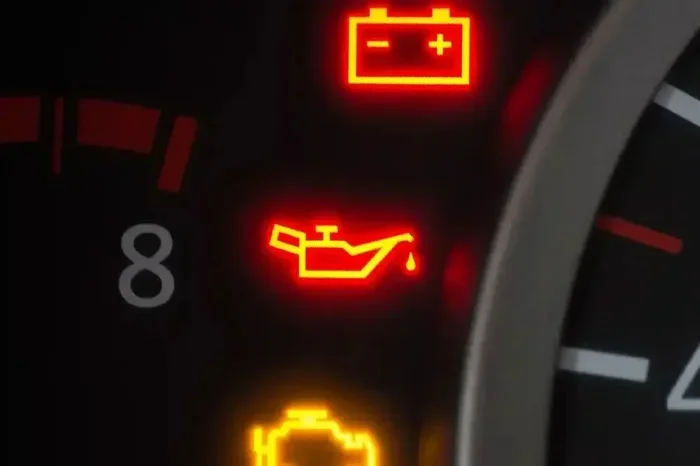
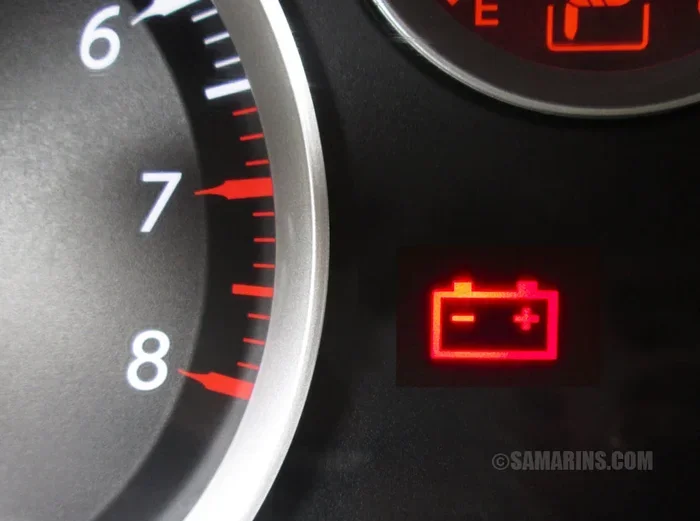
If your car’s check engine light is on, you might be looking for a reset button. Many people search for ways to reset car codes without visiting a mechanic. Some cars have a reset button near the odometer or on the steering wheel controls. You can also disconnect the battery for a few minutes to clear codes. However, always be careful when disconnecting your car battery. It can reset other systems like your radio presets and clock.
For more specific car reset questions, you might want to check articles about resetting your oil change light or resetting the check engine light without disconnecting the battery. These topics cover common car reset scenarios in detail.
Common Car Reset Mistakes
- Do not reset while driving. Always park your car and turn off the engine first.
- Do not disconnect the battery unless you know what you are doing. It can cause other issues.
- Check your owner’s manual first. Every car brand has slightly different reset procedures.
- Be aware that some resets require a code or tool. Certain car models need a diagnostic scanner to clear codes.
Where Is the Factory Reset Button on TVs and Streaming Devices?
Smart TVs and streaming devices like Roku, Fire Stick, and Apple TV also have reset options. But unlike phones, they rarely have a physical reset button. The reset is almost always done through the settings menu.
Smart TV Reset Button Location
On Samsung, LG, and Sony smart TVs, go to Settings. Look for General or System. Then find Reset or Factory Data Reset. Enter your PIN if prompted (the default is usually 0000 or 1234). Confirm the reset and the TV will restart with all original settings.
Some older TV models have a small reset button on the back or side panel. It is usually a recessed button that you need to press with a pin or paperclip. Look carefully around the edges of the TV. The button is tiny and easy to miss.
Streaming Device Reset Options
For Roku devices, you can reset through the Settings menu. Go to System. Tap Advanced System Settings. Then tap Factory Reset. On an Amazon Fire Stick, go to Settings. Select My Fire TV. Tap Reset to Factory Defaults.
Most streaming devices do not have a physical reset button. The reset is always done through the menu system. This is actually a good thing because it prevents accidental resets. You do not have to worry about someone pressing the wrong button and wiping your device.
Where Is the Factory Reset Button on Routers and Networking Devices?
Routers are one of the few devices that have a clearly labeled physical reset button. Finding it is usually straightforward, but the reset process itself requires a specific technique.
Router Reset Button Location
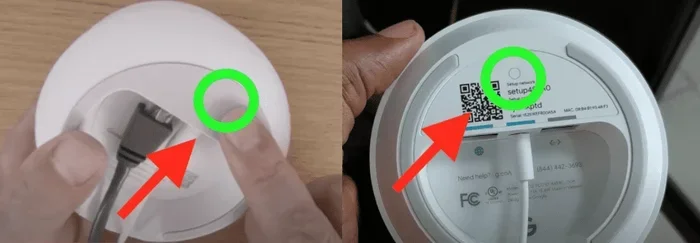
Look at the back of your router. You will see several ports for Ethernet cables and a power cord. Near the bottom, you should find a small button labeled “Reset” or “Factory Reset.” This button is usually recessed into the casing. It is designed this way to prevent accidental presses.
To press the reset button, you need a paperclip, a SIM ejector tool, or a thin pin. Insert the tool into the pinhole and hold it down for 10 to 15 seconds. The router lights will blink and then turn off and back on. This restores the router to its original factory settings, including the default Wi-Fi name and password.
What Happens After a Router Reset
After resetting your router, you will need to set it up again. This means reconnecting to the internet, setting a new Wi-Fi name and password, and configuring any parental controls or port forwarding. It is a good idea to write down your settings before resetting so you can restore them quickly afterward.
For networking devices and other electronic equipment, the reset process follows a similar pattern. Look for a small pinhole button on the back or bottom of the device. Use a thin object to press and hold it. The device will restart and return to its original state.
Where Is the Factory Reset Button on Wearable Devices?
Smartwatches, fitness trackers, and wireless headphones also have reset options. These devices are small, so the reset process is often different from larger gadgets.
Smartwatch and Fitness Tracker Reset
Most smartwatches do not have a physical reset button. You reset them through the device settings or through the paired phone app. On an Apple Watch, you go to Settings. Tap General. Tap Reset. Then choose Erase All Content and Settings.
For fitness trackers like Fitbit and Garmin, the reset is done through the device menu or the companion app. Look for Settings. Then find the option to reset or restore factory settings. Some devices also have a small pinhole button on the back or side for a hard reset, but this is less common.
Wireless Headphones Reset
Wireless headphones from brands like Sony, Bose, and Apple AirPods handle resets differently. For AirPods, you hold the setup button on the back of the charging case for about 15 seconds. The LED light will flash amber and then white. This resets the AirPods to factory settings.
For over-ear headphones, check the manual for the specific reset procedure. Many require you to hold a combination of buttons for several seconds. There is rarely a physical factory reset button. Instead, it is a key combination that triggers the reset.
Common Mistakes People Make When Factory Resetting Devices
Even when you know where the reset button is, mistakes can still happen. Here are the most common errors people make and how to avoid them.
Forgetting to Back Up Data
This is the number one mistake. A factory reset erases everything. Photos, contacts, messages, apps, and settings are all gone forever. Always back up your device to the cloud or a computer before you start the reset process.
Not Charging the Device First
If your device dies halfway through a reset, it can become bricked. This means it will not turn on or work properly. Make sure your battery is at least 50 percent charged before you begin.
Confusing Soft Reset with Hard Reset
A soft reset simply restarts the device. A hard reset wipes everything. Make sure you know which one you are doing. If you only want to fix a minor glitch, try a soft reset first. You do not need to erase everything.
Not Knowing Your Account Passwords
After a factory reset, you will need to log back into your accounts. If you forgot your Google, Apple, or Samsung account password, you may have trouble setting up the device again. Make sure you know your credentials before you reset.
Pressing the Wrong Button
Some devices have buttons that look similar but do completely different things. For example, the WPS button on a router looks like a reset button but it does something entirely different. Always double check the label before you press anything.
Expert Insights on Factory Reset Buttons
We spoke with several tech experts about factory reset buttons and their best advice. Here is what they had to say.
“The most important thing to remember is that not every device has a physical reset button,” says a senior technician at a major electronics retailer. “More and more devices are moving to software-based reset options. Always check the settings menu first before looking for a physical button.”
Another expert adds, “When you do find a physical reset button, the hardest part is holding it long enough. Most people let go too early. You need to hold the button for a full 10 to 15 seconds. The device will not respond right away. Keep holding until you see the lights change or hear a beep.”
One more tip from a car mechanic: “On vehicles, the reset process depends heavily on the make and model. Never assume the process is the same as another car. Always check the owner’s manual or look up your specific model online before you try anything.”
Key Takeaways
- Factory reset buttons are not the same on every device. Phones and laptops use software menus, while routers and some cars have physical buttons.
- Always back up your data before performing a hard reset. Once the reset is complete, you cannot recover your files.
- Look for recessed pinhole buttons on routers, some phones, and older TVs. You will need a paperclip or SIM ejector tool to press them.
- Soft resets do not erase your data. Use a soft reset to fix minor issues before resorting to a full factory reset.
- Car infotainment resets are done through the settings menu in most cases. Physical buttons are rare but do exist on some models.
- When in doubt, check the device manual or search online for your specific model. Every device has its own reset procedure.
- Know your account passwords before resetting. You will need them to set up the device again after the erase.
Conclusion
Finding the factory reset button does not have to be a guessing game. As we have covered, the location varies widely depending on the type of device you own. Phones and tablets mostly use software-based reset options in their settings menus. Laptops follow a similar pattern with reset options built into the operating system. Cars and infotainment systems often hide the reset in their settings or behind a small physical button. Routers are the easiest to find because they have a clearly labeled pinhole on the back. And wearable devices and streaming gadgets typically reset through their companion apps or on-device menus.
The key takeaway is simple. Always back up your data first. Know the difference between a soft reset and a hard reset. And when you are unsure, consult your device manual or look up the specific procedure for your model. With the information in this guide, you now have the knowledge to reset almost any device with confidence. Keep this page bookmarked for the next time your device needs a fresh start.
Remember, a factory reset is a powerful tool. It can fix stubborn software problems, clear out clutter, and prepare a device for its next owner. Use it wisely and you will never be stuck with a malfunctioning device again.
Frequently Asked Questions
Can I reset my device without losing all my data?
Yes, you can perform a soft reset that simply restarts your device without erasing anything. A soft reset is great for fixing minor glitches and freezes. Only a hard reset, also called a factory reset, will wipe all your data and restore the device to its original settings.
What should I do if I cannot find the reset button on my device?
First, check the settings menu on your device. Most modern devices do not have a physical reset button and instead use a software-based reset option. If you still cannot find it, look up your specific device model online or consult the user manual. You can also check the manufacturer’s website for step-by-step reset instructions.
How long does a factory reset take to complete?
A factory reset usually takes between 5 and 15 minutes depending on the device. Phones and tablets may take longer because they erase more data. Routers reset almost instantly. During the reset, do not turn off the device or disconnect it from power. Let the process finish completely.
Will a factory reset remove viruses and malware from my device?
Yes, a factory reset will remove most viruses and malware because it wipes all data and software from the device. However, some advanced malware can survive a reset if it is stored in the device’s firmware. For serious security concerns, it is best to consult a professional technician after performing the reset.
Do I need any special tools to press a factory reset button?
Most recessed reset buttons require a SIM ejector tool, a paperclip, or a thin pin to press them. You do not need any special equipment. Just make sure the tool fits snugly into the pinhole so you can apply steady pressure without damaging the button.
Can I undo a factory reset once it is complete?
No, a factory reset cannot be undone. Once the reset is complete, all data is permanently erased. This is why it is so important to back up your files before you start the reset process. If you have a recent backup, you can restore your data after setting up the device again.