How to Program Garage Door Opener in 2023 Acura MDX
Programming your garage door opener in the 2023 Acura MDX is simple when you follow the right steps. The 2023 Acura MDX comes equipped with a built-in HomeLink system that lets you control your garage door directly from your vehicle. This guide walks you through the entire garage door opener programming process, including troubleshooting tips and maintenance advice for long-lasting performance.
Have you ever pulled into your driveway and wished you could open the garage door without digging through your console for a separate remote? The 2023 Acura MDX makes this possible with its built-in HomeLink system. This smart feature lets you program your garage door opener directly into your vehicle, so everything you need is right at your fingertips. Whether you are a new MDX owner or have been driving one for years, learning how to set up your garage door opener programming is a skill that saves time and adds convenience to your daily routine.
The process is straightforward, but it does require a few specific steps. In this guide, we walk you through everything from locating the HomeLink buttons to solving common problems. You will learn about the different types of garage door frequencies, how to handle rolling code systems, and what to do when things do not go as planned. By the end, you will feel confident programming your garage door opener in the 2023 Acura MDX like a pro.
Key Takeaways
- HomeLink Integration: The 2023 Acura MDX features a built-in HomeLink system that allows seamless garage door control without extra remotes.
- Simple Step-by-Step Process: Programming your garage door opener takes just a few minutes using the HomeLink buttons on the MDX console.
- Rolling Code Support: The system supports rolling code garage doors, which are the most common type in modern homes.
- Troubleshooting Is Easy: Most programming issues can be resolved with simple resets and battery checks.
- Aftermarket Options Exist: If HomeLink doesn’t work for your setup, universal remotes and external receivers offer reliable alternatives.
- Regular Maintenance Matters: Keeping your garage door opener and HomeLink system well-maintained ensures smooth operation for years.
📑 Table of Contents
Understanding the HomeLink System in the 2023 Acura MDX
What Is HomeLink and Why Does It Matter?
HomeLink is a wireless control system built directly into many modern vehicles, including the 2023 Acura MDX. Instead of carrying multiple remotes for your garage door, gate, or lighting system, HomeLink consolidates everything into your car. The system uses radio frequency signals to communicate with your garage door opener, just like a standard handheld remote does. However, because it is integrated into your vehicle, you get a cleaner console and one less device to lose or forget.
For Acura MDX owners, HomeLink is a standout convenience feature. It works with most garage door openers, gate operators, and home automation systems. The 2023 model year includes updated hardware that supports both fixed code and rolling code garage doors. This broad compatibility means that whether your garage door was installed last year or over a decade ago, there is a good chance HomeLink will work with it.
If you are also curious about other smart features in the MDX, you might want to check out whether the Acura MDX has remote start. It pairs well with HomeLink for a fully connected driving experience.
Where Is the HomeLink Button Located in the 2023 MDX?
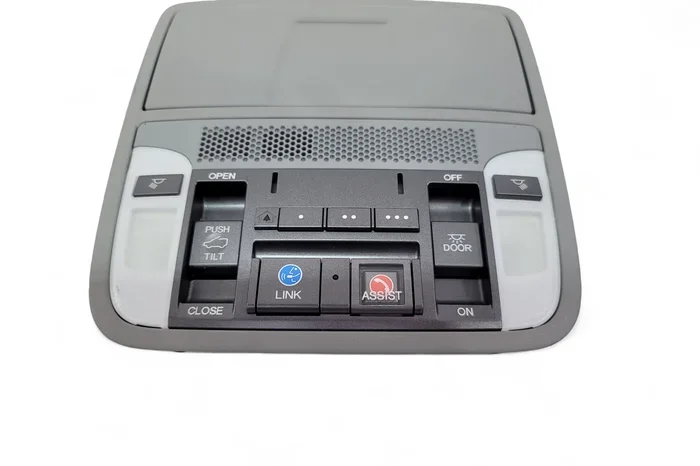
The HomeLink controls in the 2023 Acura MDX are located on the overhead console, near the rearview mirror. You will see three buttons labeled 1, 2, and 3. These buttons are the heart of the HomeLink system. Each button can be programmed to control a different garage door, gate, or home automation device.
Before you start programming, make sure you have the following ready:
- Your garage door remote or opener model number
- The garage door opener motor unit (the box mounted on your garage ceiling)
- A ladder if you need to access the motor unit
- Your vehicle keys or the ignition in the ON position
Having these items within reach will make the process smooth and frustration-free. The HomeLink system in the MDX is designed to be user-friendly, but having your garage door opener information handy speeds things up significantly.
How to Program Garage Door Opener in 2023 Acura MDX
Step-by-Step Programming Process
Programming your garage door opener in the 2023 Acura MDX follows a clear sequence. Here is the complete process broken down into easy steps:
- Prepare Your Vehicle. Press the ignition to the ON/RUN position. Make sure your vehicle is parked outside the garage for safety during the initial programming phase.
- Locate the HomeLink Buttons. Find the three buttons on the overhead console. Press and hold the button you want to use until the indicator light turns on. This usually takes about 20 seconds.
- Enter Training Mode. Once the light is on, release the button. You are now in programming mode. The HomeLink system is ready to learn the signal from your garage door remote.
- Send the Signal. Hold your garage door remote about one to two inches from the HomeLink button. Press and hold the remote button simultaneously with the HomeLink button.
- Wait for Confirmation. The HomeLink indicator light will blink slowly and then stay solid. This means the system has successfully learned the signal. This step usually takes about 30 seconds.
- Test the Connection. Press the programmed HomeLink button to test if the garage door opens or closes. If it works, you are all set!
This process works for most standard garage door openers. If you have a newer garage door system with rolling code technology, the steps are slightly different, which we cover next.
Programming for Rolling Code Garage Doors
Many modern garage door openers use rolling code technology, also called security code or hopping code. This means the remote sends a different code every time you press the button, which prevents unauthorized access. The 2023 Acura MDX HomeLink system supports rolling code programming, but it requires an extra step called “learning” on the garage door motor unit.
Here is how to handle rolling code garage doors:
- Prepare Both Devices. Park your MDX outside the garage. Have your garage door remote and the motor unit manual nearby.
- Press the HomeLink Button. Hold the HomeLink button you want to program until the indicator light blinks. This usually takes 20 seconds.
- Go to the Garage Door Motor Unit. Using a ladder, locate the garage door opener motor. Find the “Learn” or “Smart” button. This is usually a small red, orange, or purple button on the back or side of the motor unit.
- Press the Learn Button. Press and release the learn button on the motor unit. You will typically hear a beep or see a light flash. You now have about 30 seconds to complete the next step.
- Return to Your MDX. Quickly go back to your vehicle and press and hold the HomeLink button for two seconds, then release. Repeat this press-and-hold sequence up to three times if needed.
- Confirm the Signal. The HomeLink indicator should blink slowly and then stay solid, confirming successful programming.
- Test the System. Press the HomeLink button to open or close the garage door.
If this process feels like a lot of steps, do not worry. Once you have done it once, you will remember the sequence. Many owners find that programming the second and third HomeLink buttons becomes even faster after the first one is complete.
Troubleshooting Common Programming Issues
When the Garage Door Won’t Respond
Sometimes the HomeLink system does not pick up the signal on the first try. This is normal and does not mean something is broken. Here are the most common reasons and fixes:
- Distance Issues. Make sure your garage door remote is within one to two inches of the HomeLink button. Moving even a few inches away can weaken the signal.
- Timing Problems. The rolling code learning window is usually only 30 seconds. If you take too long between pressing the learn button and sending the HomeLink signal, you will need to start over.
- Battery in the Remote. A weak battery in your handheld garage door remote can cause signal failure. Replace the battery and try again.
- Interference. Other electronic devices near the overhead console can sometimes interfere with the HomeLink signal. Try moving your phone or other devices away from the console area.
If you have tried all of the above and still cannot get it to work, you may want to consult your 2023 Acura MDX owner manual for model-specific guidance. You can also visit your local Acura dealer for hands-on assistance. If you are considering a visit to a dealership, check out whether you can take your Acura to a Honda dealership for service and support.
Frequency and Signal Problems
Garage door openers operate on specific radio frequencies, typically 300 MHz or 310 MHz in North America. The 2023 Acura MDX HomeLink system is designed to work across these common frequencies. However, older or specialty garage door openers may operate on different frequencies that could cause compatibility issues.
To check your garage door opener frequency, look at the label on the back of the handheld remote or the motor unit. If the frequency does not match the HomeLink system’s supported range, you may need a universal garage door opener or an external HomeLink-compatible receiver.
Quick tip: If you live in an area with many homes close together, signal interference from neighboring garage door openers can occasionally cause programming issues. Try programming your HomeLink system during a quieter time of day to avoid conflicts.
HomeLink vs. Aftermarket Garage Remotes
Benefits of Built-In HomeLink
The built-in HomeLink system in the 2023 Acura MDX offers several advantages over aftermarket remotes:
- No Extra Remote Needed. You eliminate the need to carry a separate garage door remote. Everything is controlled from your MDX console.
- Cleaner Interior. Without a bulky aftermarket remote clipped to your visor, your dashboard stays clean and uncluttered.
- Multiple Device Support. HomeLink can control up to three different devices, such as a garage door, a gate, and a home lighting system.
- Built-In Security. Because HomeLink is integrated into the vehicle, it benefits from the MDX’s overall security systems.
- No Battery to Replace. Unlike handheld remotes, HomeLink does not require its own battery replacement.
When to Use an Aftermarket Remote
There are situations where an aftermarket garage door remote might be the better choice. For example, if your garage door opener uses an uncommon frequency or an older fixed-code system, HomeLink may not be compatible. In these cases, a universal garage door remote provides a reliable backup option.
Another scenario is when you have multiple vehicles and want each one to control the same garage door. Programming HomeLink in each vehicle ensures everyone in your household has easy access. But if you frequently lend your MDX to others, having a universal remote as a backup never hurts.
For more information on keeping your car accessories in top shape, check out how to care for your auto tint and other vehicle maintenance tips.
Maintaining Your Garage Door Opener System
Regular Maintenance Tips
Once you have successfully programmed your garage door opener in the 2023 Acura MDX, a little maintenance goes a long way. Here are some simple tips to keep everything running smoothly:
- Test Monthly. Press the HomeLink button once a month to confirm the connection is still active. If it does not respond, repeat the programming process.
- Clean the HomeLink Buttons. Dust and grime can build up on the overhead console buttons. Wipe them gently with a soft, damp cloth every few months.
- Check the Garage Door Remote Battery. Even though HomeLink is built into the car, your handheld remote still needs a working battery. Replace it once or twice a year.
- Lubricate Moving Parts. Keep the garage door tracks, rollers, and hinges lubricated with a silicone-based spray. This reduces wear and keeps the door opening smoothly.
- Inspect the Sensors. The safety sensors at the bottom of your garage door should be aligned and clean. Dirty or misaligned sensors can prevent the door from closing properly.
When to Seek Professional Help
Most HomeLink programming issues are easy to fix at home. However, if you notice persistent signal problems, unusual noises when the garage door operates, or if the door reverses immediately after closing, it is time to call a professional. These could be signs of a deeper issue with the garage door opener motor or the door mechanism itself.
A certified garage door technician can diagnose and fix most problems quickly. If you are also dealing with window or glass-related issues around your garage, such as tape marks or ice buildup, you might find our guides on removing tape marks from car glass or removing ice from car glass helpful for related maintenance tasks.
Final Thoughts and Expert Recommendations
Programming your garage door opener in the 2023 Acura MDX is one of those small upgrades that makes a big difference in your daily life. The HomeLink system is powerful, flexible, and designed to work with the vast majority of garage door openers on the market today. By following the steps in this guide, you can set up your system in under 15 minutes and enjoy the convenience of hands-free garage access every time you arrive home.
Remember that patience is key during the programming process. If the first attempt does not work, do not get frustrated. Check your battery, clear the signal path, and try again. Most issues resolve quickly with a simple retry. Once your HomeLink is programmed, you will wonder how you ever managed without it.
Take a few minutes today to program your garage door opener. Your future self, pulling into the driveway with arms full of groceries, will thank you. And if you ever need to troubleshoot or reprogram, you now have all the knowledge to handle it confidently.
For more Acura MDX tips and vehicle guides, stay tuned to our site for regular updates on everything from driving techniques to vehicle maintenance and feature breakdowns.
Frequently Asked Questions
Can I program more than one garage door with the 2023 Acura MDX HomeLink?
Yes, the HomeLink system in the 2023 Acura MDX supports up to three programmable buttons. Each button can be set to control a different garage door, gate, or home automation device. Simply repeat the programming process for each button you want to use.
What should I do if my garage door opener is not compatible with HomeLink?
If your garage door opener uses an uncommon frequency or an older fixed-code system, HomeLink may not work directly. In this case, you can purchase a universal garage door remote or an external HomeLink-compatible receiver. These devices bridge the gap between older openers and the modern HomeLink system in your MDX.
How long does it take to program the garage door opener in the 2023 Acura MDX?
Most owners complete the programming process in 10 to 15 minutes. Rolling code garage doors may take a few extra minutes due to the additional learning step on the motor unit. Having all your materials ready before you start helps keep the process quick and smooth.
Do I need to be parked outside the garage to program HomeLink?
Yes, it is recommended to park outside the garage during the initial programming phase. This ensures there are no signal interference issues from the closed garage door or surrounding walls. Once programmed, you can use HomeLink from anywhere.
Can I reset a HomeLink button and reprogram it for a different garage door?
Absolutely. To reset a HomeLink button, press and hold all three HomeLink buttons simultaneously for about 10 seconds until the indicator light turns off. This clears the stored signal. You can then reprogram the button for a different garage door or device using the steps outlined in this guide.
Is the HomeLink system in the 2023 Acura MDX covered under warranty?
The HomeLink system is part of the vehicle’s integrated features and is generally covered under the standard Acura bumper-to-bumper warranty. However, if you install an aftermarket accessory that interferes with HomeLink, that may not be covered. For specific warranty questions, consult your Acura dealer or check your warranty documentation.