Simple Steps to Reset a 2015 Subaru Touch Screen Now
Resetting your 2015 Subaru touch screen is easier than you think. Whether your Subaru infotainment system is frozen, slow, or acting glitchy, a simple touchscreen reset can bring it back to life. This guide walks you through both a soft reset and a hard reset method with clear, easy-to-follow steps. You will also learn common problems a reset fixes and how to prevent issues in the future.
There is nothing more frustrating than tapping your 2015 Subaru touch screen and getting no response. You are trying to change the music, set a navigation route, or adjust the climate, and the display just sits there staring back at you. A frozen or unresponsive screen can turn a simple drive into a headache. But here is the good news. Most of the time, a quick reset solves the problem completely.
This article gives you everything you need to know about resetting a 2015 Subaru touch screen. We cover both the soft and hard reset methods in plain, simple language. You do not need to be a car expert. Just follow along step by step. By the end, you will feel confident fixing the issue yourself and keeping your Subaru infotainment system running smoothly for years to come.
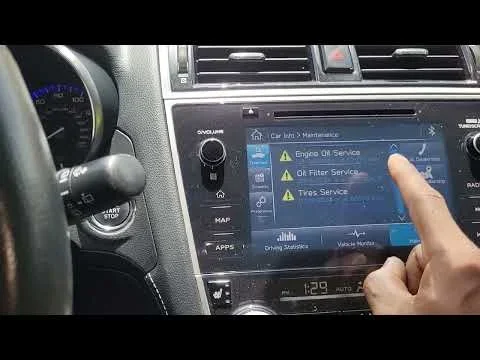
The 2015 Subaru lineup includes models like the Forester, Outback, Impreza, and Legacy. Each one comes with a center display that controls audio, navigation, and vehicle settings. Over time, these screens can lag, freeze, or show strange behavior. A reset refreshes the system and clears out temporary glitches. Think of it like restarting your phone when it starts acting up. It works, and it is quick.
Key Takeaways
- A soft reset is the fastest way to restart your 2015 Subaru touch screen without losing any settings.
- A hard reset requires disconnecting the battery and is best for stubborn screen freezes.
- Common issues like unresponsive buttons, flickering, and slow menus often disappear after a reset.
- Preventive habits such as regular reboots and keeping software updated help avoid future problems.
- Knowing when to seek help from a Subaru dealer saves time and money on unnecessary DIY attempts.
- Always back up your radio presets and navigation favorites before performing a hard reset.
📑 Table of Contents
- Why Your 2015 Subaru Touch Screen Might Need a Reset
- How to Perform a Soft Reset on a 2015 Subaru Touch Screen
- How to Do a Hard Reset on a 2015 Subaru Touch Screen
- Common Problems That a Touch Screen Reset Can Fix
- Preventive Tips to Keep Your 2015 Subaru Touch Screen Running Smoothly
- When to Seek Professional Help for Your Subaru Touch Screen
- Final Thoughts on Resetting Your 2015 Subaru Touch Screen
Why Your 2015 Subaru Touch Screen Might Need a Reset
Before you jump into the reset process, it helps to understand why your screen might be misbehaving in the first place. Car touch screens are small computers. They run software, process inputs, and manage multiple functions at once. Just like any computer, they can slow down or freeze up.
Here are the most common reasons your 2015 Subaru touchscreen might need a reset:
- Software glitches: Sometimes a small bug in the system causes the screen to hang or respond slowly. These glitches build up over time, especially after long drives or extended use of navigation.
- Overloaded memory: If you have lots of saved navigation points, Bluetooth connections, and media files, the system can slow down. The screen needs a refresh to clear temporary data.
- Firmware bugs: Older Subaru models from 2015 may have known software issues that Subaru addressed in later updates. A reset can help clear up some of these problems.
- Moisture or heat exposure: Extreme temperatures or moisture getting into the screen unit can cause intermittent issues. A reset often restores normal function after temperature-related glitches.
- Loose connections: Over time, the cables connecting the screen to the main unit can shift slightly. This causes flickering or unresponsiveness that a reset can sometimes fix.
Understanding the cause helps you decide which type of reset to try. A soft reset works for most minor issues. A hard reset is better for deeper problems like a completely frozen screen or persistent error messages.
How to Perform a Soft Reset on a 2015 Subaru Touch Screen
A soft reset is the easiest and safest way to restart your Subaru center display. It does not erase any of your settings, presets, or saved data. Think of it as a quick refresh. You should try this method first before moving on to anything more involved.
Step-by-Step Soft Reset Instructions
Follow these simple steps to perform a soft reset on your 2015 Subaru:
- Press and hold the power button. The power button on the 2015 Subaru display is usually located in the bottom corner of the screen or on the left side of the unit. Press and hold it for about 10 to 15 seconds.
- Wait for the screen to turn off. The display will go dark. This is normal. Do not panic. The system is shutting down as it should.
- Wait about 30 seconds. Let the system fully power down. This gives the internal components time to reset completely.
- Press the power button again. Hold it for a few seconds until the Subaru logo appears on screen.
- Wait for the system to fully boot up. This may take 30 to 60 seconds. The screen might show a loading bar or the Subaru logo during this time.
- Test the touchscreen. Try tapping a few icons or adjusting the volume. The screen should now respond normally.
Quick Tip: If the soft reset does not work the first time, repeat the process once. Sometimes the system needs two cycles to fully clear a glitch. This is completely normal and nothing to worry about.
What a Soft Reset Fixes
A soft reset works well for minor issues like a slow screen, slight lag when switching between audio and navigation, or a frozen app. It is also great after long road trips when the system has been running continuously for hours. Many Subaru owners find that a quick soft reset once a month keeps their responsive touchscreen performing at its best.
If your screen is completely black and will not turn on at all, a soft reset alone may not be enough. In that case, move on to the hard reset method described below.
How to Do a Hard Reset on a 2015 Subaru Touch Screen
A hard reset is a deeper reset that clears more of the system’s temporary data. You should use this method when a soft reset does not fix the problem. A hard reset is especially helpful when your Subaru display is completely frozen, showing error messages, or not responding to any inputs.
What You Need Before Starting
Before you begin a hard reset, gather a few things:
- Your car keys (to turn the ignition on and off)
- A few minutes of free time (the process takes about 10 to 15 minutes)
- Your radio presets and navigation favorites written down if possible (a hard reset may clear these)
- A clean cloth to wipe down the screen after the reset
Step-by-Step Hard Reset Instructions
Follow these steps carefully to perform a hard reset on your 2015 Subaru touch screen:
- Turn off the ignition. Make sure your car is completely off. Remove the key from the ignition or press the start button to shut the engine down fully.
- Open the exterior bonnet. You will need to access the battery under the hood. If you are unsure how to do this, check out how to open an exterior bonnet for a quick guide.
- Locate the battery negative terminal. This is the black cable connected to the battery. It usually has a negative (-) symbol next to it.
- Disconnect the negative cable. Use a wrench to loosen the nut on the negative terminal. Carefully lift the cable off the battery post. Make sure it does not touch the terminal again while you work.
- Wait at least 5 minutes. This allows the car’s electrical system to fully discharge. The onboard computer and the touch screen will reset during this time.
- Reconnect the negative cable. Place the cable back on the battery post and tighten the nut securely.
- Close the bonnet. Make sure it is latched properly.
- Turn the ignition on. Start the car and wait for the Subaru infotainment system to boot up fully.
- Check the touchscreen. Test the display by tapping icons and adjusting settings. The screen should now work normally.
Important Note: Disconnecting the battery may also reset other settings in your car, such as the clock, radio presets, and some driver preferences. This is normal and nothing to worry about. You can easily set these back up after the reset.
If you are concerned about losing diagnostic codes or settings, it is worth noting that unplugging a car battery does reset codes, but most of these will return once you drive the car again and the system relearns normal operating conditions.
Hard Reset vs. Soft Reset: Which One Should You Use?
Here is a quick comparison to help you decide:
- Soft reset: Quick, safe, and does not erase any settings. Use this for minor freezes, lag, or slow response times.
- Hard reset: More thorough and resets the entire electrical system. Use this when the screen is completely frozen, showing errors, or not responding to a soft reset.
Always try a soft reset first. Only move to a hard reset if the soft reset does not solve the problem. This saves you time and avoids unnecessary disruption to your car’s settings.
Common Problems That a Touch Screen Reset Can Fix
A reset on your 2015 Subaru touch screen can solve a surprising number of issues. Here are the most common problems that owners report, and how a reset helps:
Frozen or Unresponsive Screen
This is the number one reason Subaru owners look for a reset. The screen stops responding to taps, swipes, or button presses. A soft reset usually unfreezes the system within a minute. If the screen is completely locked, a hard reset will almost always bring it back.
Flickering or Dim Display
Sometimes the screen flickers or goes dim for no obvious reason. This can happen after a software update or when the system is low on memory. A reset clears the temporary data causing the flickering and restores a normal brightness level.
Navigation System Not Working
If your Subaru navigation system freezes, shows the wrong location, or will not load maps, a reset can fix the problem. The navigation module runs on the same system as the main display, so refreshing the entire unit often resolves map and routing issues.
Audio System Glitches
Strange audio problems like static, no sound, or the radio switching stations on its own can sometimes be traced back to the touch screen system. A reset refreshes the audio processing and clears up these annoying glitches.
Bluetooth Connection Issues
If your phone will not connect to the car’s Bluetooth system or keeps disconnecting, the touch screen software may be the culprit. A reset re-establishes the connection protocols and often fixes pairing problems.
Slow Menu Navigation
Over time, the menus on your 2015 Subaru display can become sluggish. Tapping an icon takes several seconds to register, or the system takes forever to load a new page. A reset clears the cached data and speeds things back up.
Expert Insight: Many Subaru owners find that performing a soft reset once every few months keeps their system running as smoothly as the day they bought the car. It is a simple habit that prevents most common touchscreen issues before they start.
Preventive Tips to Keep Your 2015 Subaru Touch Screen Running Smoothly
Prevention is always better than fixing a problem after it happens. Here are some simple habits that help keep your 2015 Subaru touchscreen in great shape:
- Restart the system regularly: A quick soft reset once a month clears out temporary data and keeps the system responsive. You do not need to wait for a problem to do this.
- Keep the software updated: Subaru occasionally releases firmware updates for the infotainment system. Check with your dealer to see if an update is available for your model. Updated software often fixes known bugs that cause screen issues.
- Avoid extreme temperatures: Park in shaded areas during hot summer days and use a windshield sunshade. Extreme heat can damage the screen’s internal components over time. In winter, be gentle with the screen when it is cold, as the display can be more sensitive.
- Do not overload the system: Too many saved navigation points, too many Bluetooth paired devices, and too many media files can slow the system down. Periodically clean up unused data to keep things running fast.
- Use the official power button: Always shut down the display using the power button rather than just turning off the ignition. This allows the system to close properly and prevents data corruption.
- Keep the screen clean: Dust and grime can build up on the touch surface and cause inaccurate inputs. Use a soft, microfiber cloth to wipe the screen gently every week or so.
These small habits make a big difference over time. Think of them as routine maintenance for your car’s digital brain. Just like you change the oil to keep the engine running, a regular reset keeps the Subaru multimedia system running at its best.
When to Seek Professional Help for Your Subaru Touch Screen
Most touchscreen issues on a 2015 Subaru can be fixed with a simple reset. But there are times when professional help is the right call. Here are the signs that you should take your car to a Subaru dealer or qualified mechanic:
- The screen remains completely black after both a soft and hard reset. This could indicate a hardware failure rather than a software glitch.
- You see physical damage on the screen, such as cracks, deep scratches, or discoloration. Physical damage requires professional repair or replacement.
- The screen works intermittently and the problem keeps coming back. If resets only provide temporary relief, there may be a deeper wiring or connection issue.
- You see error messages that do not go away after a reset. Persistent error codes could point to a specific component that needs replacement.
- The screen flickers or distorts even after a reset. This might be a problem with the display cable or the display unit itself.
Before visiting the dealer, it is a good idea to read any diagnostic codes your car may be showing. Understanding what the codes mean can help you communicate the problem more clearly to the service technician and potentially save on diagnostic fees.
Many Subaru dealerships offer free or low-cost diagnostic checks for infotainment issues. It never hurts to call ahead and ask. If your car is still under warranty, the repair may even be covered at no cost to you.
Final Thoughts on Resetting Your 2015 Subaru Touch Screen
Resetting your 2015 Subaru touch screen is one of the simplest and most effective things you can do to keep your car’s technology running smoothly. Whether you choose a soft reset for minor issues or a hard reset for a completely frozen screen, both methods are easy to do at home with no special tools or expertise required.
Remember to start with a soft reset. It is quick, safe, and preserves all your settings. If that does not work, move on to the hard reset method. And always try preventive measures to keep future problems at bay. A little regular maintenance goes a long way toward avoiding frustrating screen issues down the road.
Most importantly, do not panic when your screen acts up. Nine times out of ten, a simple reset is all it takes to get everything working perfectly again. Your responsive touchscreen will be back to normal in just a few minutes, and you will be back to enjoying your drive with full access to music, navigation, and all your car’s features.
Keep this guide saved for the next time your 2015 Subaru touch screen gives you trouble. Share it with a fellow Subaru owner who might be dealing with the same issue. And remember, a little know-how goes a long way when it comes to keeping your car running its best.
Frequently Asked Questions
How long does it take to reset a 2015 Subaru touch screen?
A soft reset takes about 2 to 3 minutes from start to finish. A hard reset takes around 10 to 15 minutes, including the time you spend waiting for the battery to discharge. Both methods are quick and do not require any special tools or technical knowledge.
Will resetting my 2015 Subaru touch screen erase my saved data?
A soft reset will not erase any of your saved data, presets, or settings. A hard reset may clear your radio presets, navigation favorites, and clock settings, but these are easy to set up again. Always write down your important settings before performing a hard reset just to be safe.
How often should I reset my Subaru touch screen?
There is no need to reset your screen regularly unless you are experiencing issues. However, performing a soft reset once every few months can help keep the system running smoothly. Think of it as a occasional refresh rather than a routine maintenance task.
What should I do if the touchscreen is completely frozen and will not respond?
Start with a soft reset by holding the power button for 10 to 15 seconds. If that does not work, try the hard reset method by disconnecting the negative battery cable for 5 minutes. If neither method works, the issue may be hardware-related, and you should visit a Subaru dealer for a professional diagnosis.
Can a software update fix touchscreen issues on a 2015 Subaru?
Yes, sometimes touchscreen issues are caused by outdated firmware. Subaru occasionally releases updates that address known bugs and improve system performance. Check with your local Subaru dealer to see if an update is available for your specific model and year.
Is it safe to disconnect the car battery to reset the touch screen?
Yes, it is safe as long as you follow the proper steps. Always turn off the ignition first, disconnect the negative battery cable, and wait at least 5 minutes before reconnecting. Be careful not to let the cable touch any metal surfaces while disconnected. If you are unsure about any step, consult your Subaru owner’s manual or a professional mechanic.