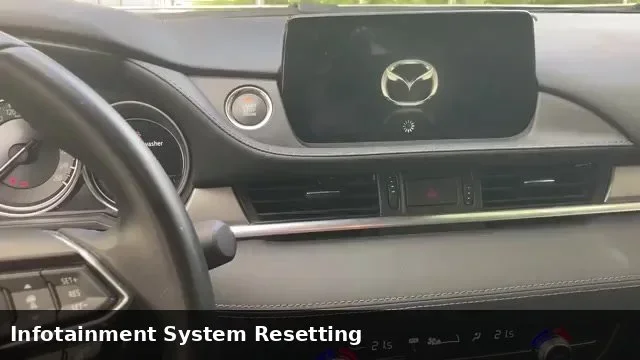
How to Reset the Mazda Screen and Fix Display Issues
Resetting your Mazda screen is easier than you think and can solve most display glitches in minutes. Whether your Mazda touchscreen is frozen, showing a black screen, or acting up, this guide walks you through every method with clear steps. You will learn soft resets, hard resets, battery disconnects, and pro tips to keep your Mazda infotainment system running smoothly.
Have you ever been driving your Mazda and suddenly the screen goes blank? Or maybe it freezes right in the middle of using the navigation system. It is frustrating, right? You are not alone. Many Mazda owners face display issues at some point. The good news is that resetting the screen often fixes the problem fast. In this guide, we will show you exactly how to do it. You do not need to be a tech expert. We will walk you through every step in plain language. By the end, you will know how to handle any Mazda screen problem like a pro.
Your Mazda’s infotainment system controls a lot. Think about it. The screen handles navigation, audio, Bluetooth, backup cameras, and sometimes even climate controls. When that screen starts misbehaving, it can throw a wrench into your whole driving experience. A Mazda display reset is the quickest way to bring everything back to normal. We will cover soft resets, hard resets, battery disconnects, and everything in between. Let us get started.
Key Takeaways
- Soft Reset: A quick reboot that fixes most minor screen glitches without losing any data.
- Hard Reset: A deeper reset that clears stubborn errors and restores your Mazda display to factory settings.
- Battery Disconnect: The most effective method for a full system refresh on any Mazda model.
- Common Causes: Software bugs, loose connections, and outdated firmware are the top reasons screens act up.
- Prevention Tips: Regular updates and proper shutdowns can stop most Mazda screen problems before they start.
- When to Seek Help: Some issues need a professional mechanic or dealer visit.
📑 Table of Contents
- Why Does Your Mazda Screen Need a Reset?
- How to Perform a Soft Reset on Your Mazda Screen
- How to Perform a Hard Reset on the Mazda Screen
- How to Fix Common Mazda Screen Problems
- When to Disconnect the Battery to Reset Your Mazda
- Preventing Mazda Screen Issues in the Future
- When to See a Professional for Mazda Screen Issues
- Mazda Screen Reset Quick Reference Table
- Final Thoughts on Resetting Your Mazda Screen
Why Does Your Mazda Screen Need a Reset?
Before we dive into the how-to, let us talk about why this happens. Understanding the cause helps you prevent future issues. Several things can make your Mazda touchscreen stop working or act weird.
Software Glitches and Bugs
Just like your phone or computer, the Mazda infotainment system runs on software. Sometimes that software hits a bug. A small glitch can cause the screen to freeze, lag, or show strange colors. These issues are more common after a software update or when you have too many apps running at once.
Loose or Damaged Connections
Your Mazda screen connects to the main computer through cables and wiring. Over time, vibrations from driving can loosen these connections. When the connection is weak, the screen might flicker, go black, or display error messages. This is especially common in older Mazdas or those that have been through rough roads.
Outdated Firmware
Mazda releases firmware updates to fix bugs and improve performance. If your system is running old firmware, it might not work properly with newer features. An outdated system can also cause the screen to crash or respond slowly.
Power Supply Issues
The screen needs a steady power supply to work correctly. If your battery is weak or the alternator is not charging properly, the screen might behave erratically. This is why some Mazda screen problems show up when the battery is low.
Moisture or Water Damage
Water can get into the screen unit through cracks or bad seals. Even a little moisture can cause short circuits. If your screen starts acting up after a car wash or driving through heavy rain, moisture might be the culprit.
How to Perform a Soft Reset on Your Mazda Screen
A soft reset is the first thing you should try. It is quick, easy, and does not delete any of your settings or data. Think of it like restarting your phone. Most minor Mazda display problems go away with a soft reset.
Method 1: The Restart Button
Many newer Mazda models have a dedicated restart button on the infotainment unit. Look for a small button on the side or bottom of the screen. Press and hold it for about 10 seconds. The screen will go dark and then turn back on. This is the easiest way to reset the system.
Method 2: Hold the Power Button
If your Mazda does not have a dedicated restart button, try holding the power button on the screen. Press and hold it for 10 to 15 seconds. A menu might pop up asking if you want to restart. Select “Restart” and wait for the system to reboot.
Method 3: Use the Radio Knob
Some Mazda models let you reset the system using the volume knob. Press and hold the volume knob for about 15 seconds. The screen will turn off and then back on. This method works on several Mazda 3, Mazda 6, and CX series models.
Quick Tip: Always try a soft reset first. It solves about 70 percent of Mazda screen freeze issues without any risk to your data or settings.
How to Perform a Hard Reset on the Mazda Screen
If a soft reset does not work, it is time to try a hard reset. A hard reset clears the system cache and forces the infotainment unit to reload from scratch. This fixes deeper issues like persistent freezing, unresponsive touch controls, and error messages that keep coming back.
Step-by-Step Hard Reset Guide
Follow these steps carefully. Each step is important for a successful Mazda reset procedure.
- Turn off the engine. Make sure your Mazda is completely powered down. Put it in park and remove the key or turn the push button off.
- Disconnect the negative battery terminal. Use a wrench to loosen the nut on the negative cable. Pull the cable off the battery post. Wait at least 15 minutes.
- Press and hold the horn button. While waiting, press and hold the horn button on the steering wheel. This drains any remaining power from the capacitors in the infotainment system.
- Reconnect the battery. After 15 minutes, put the negative cable back on the battery post. Tighten the nut securely.
- Start the engine. Turn the key or press the start button. The Mazda screen will boot up. It may take a minute or two to fully load.
- Check your settings. Some settings may revert to factory defaults after a hard reset. You will need to reprogram your radio presets, Bluetooth connections, and navigation preferences.
Expert Insight: A hard reset is like giving your Mazda’s infotainment system a fresh start. It clears out all the temporary data that can build up and cause problems over time. This method works on almost all Mazda models including the Mazda 3, Mazda 6, CX-30, CX-5, CX-90, and CX-70.
How to Fix Common Mazda Screen Problems
Not all screen issues need a full reset. Sometimes a quick fix does the trick. Here are the most common Mazda display problems and how to solve them.
Screen is Black or Blank
A black screen is one of the most common complaints. First, check if the screen is in sleep mode. Try pressing any button on the screen or the volume knob. If nothing happens, the backlight might be faulty. Try the battery disconnect method described above. If the screen still does not turn on, you may need a replacement backlight or display unit.
Screen is Frozen or Unresponsive
When the touchscreen stops responding to your taps, a soft reset usually works. If it does not, try the hard reset. Also check if any apps are running in the background. Close all open apps and try again. Sometimes a frozen screen is caused by a corrupted file in the navigation system.
Screen Flickers or Shows Static
Flickering or static on the screen often points to a loose connection. Check the wiring behind the infotainment unit. If the connections look secure, the issue might be with the display panel itself. In some cases, a firmware update from the dealer fixes flickering issues.
Touchscreen is Not Calibrated
If your taps are not registering in the right spot, the touchscreen needs recalibration. Go to the Mazda settings menu and look for “Touchscreen Calibration.” Follow the on-screen instructions. This feature is available on most Mazda models from 2018 and newer.
Screen Shows Error Messages
Error messages like “System Error” or “Please Restart” are signs that the system needs a reset. Try a soft reset first. If the error persists, do a hard reset. If the error keeps coming back, there might be a deeper hardware issue that needs professional attention.
When to Disconnect the Battery to Reset Your Mazda
Disconnecting the battery is one of the most effective ways to reset your Mazda screen. It works because it clears all temporary memory from the infotainment system. This is similar to how unplugging a car battery reset codes works for other vehicle systems.
Here are the situations where a battery disconnect makes sense:
- The screen freezes repeatedly even after a soft reset.
- You get error messages that will not go away.
- The screen takes too long to boot up.
- Touch controls are completely unresponsive.
- The display shows strange lines or patterns.
Remember, a battery disconnect will also reset other systems in your car. You might need to re-enter your radio station presets and clock settings. Some Mazda models may also need the security code re-entered after a battery disconnect. Check your owner’s manual for specific instructions.
If you want to learn more about how battery resets work across different car systems, check out our article on does unplugging a car battery reset codes for a deeper dive into battery reset procedures.
Preventing Mazda Screen Issues in the Future
The best way to deal with Mazda screen problems is to prevent them from happening in the first place. Here are simple habits that keep your infotainment system running smoothly.
Keep Your Firmware Updated
Mazda releases firmware updates that fix bugs and improve performance. Check for updates through the Mazda Connect system or visit your dealer. Updating your firmware takes only a few minutes and can prevent many common screen issues.
Do Not Overload the System
Too many apps, too much cached data, and too many connected devices can slow down your Mazda screen. Keep your apps organized and delete ones you do not use. Regularly clear the cache through the settings menu.
Use Quality Power Sources
Cheap or incompatible chargers can cause power fluctuations that damage the infotainment system. Always use the charger that came with your Mazda or a certified replacement. Avoid leaving devices plugged in when the engine is off.
Protect the Screen from Moisture
Keep your Mazda’s interior dry. If you wash your car, avoid spraying water directly at the screen area. Make sure all seals around the display unit are intact and in good condition.
Shut Down Properly
Always turn off the infotainment system before shutting down the engine. Holding the power button and selecting “Power Off” ensures a clean shutdown. This prevents the kind of data corruption that leads to screen problems.
For more tips on keeping your car systems in top shape, our article on how to read ABS codes without a scanner covers essential car diagnostic skills that every Mazda owner should know.
When to See a Professional for Mazda Screen Issues
Most Mazda screen problems can be fixed at home with a reset. But some issues need professional help. Here are signs that it is time to visit a mechanic or Mazda dealer.
- The screen stays black even after a full battery disconnect reset.
- You see physical damage like cracks or water stains on the display.
- The screen works intermittently and no reset fixes it.
- You notice a burning smell or hear buzzing sounds from the infotainment unit.
- Multiple electronic systems in your Mazda stop working at the same time.
A professional has the tools and diagnostic equipment to find the root cause. They can check the wiring, test the display panel, and update the firmware properly. Sometimes the issue is a faulty amplifier or a bad connection in the wiring harness. These are not DIY fixes and need a trained technician.
If your screen issue is related to the overall electronics in your vehicle, you might also want to check out our guide on how to add pictures to Uconnect from a phone for tips on managing your car’s display and multimedia system.
Mazda Screen Reset Quick Reference Table
| Problem | Best Fix | Time Needed |
|---|---|---|
| Screen frozen | Soft reset (hold power button) | 1-2 minutes |
| Black screen | Battery disconnect (15 min wait) | 20-30 minutes |
| Touch not responding | Recalibrate or hard reset | 5-10 minutes |
| Flickering display | Check connections or firmware update | 10-15 minutes |
| Error messages | Hard reset | 15-20 minutes |
| Slow performance | Clear cache + soft reset | 5 minutes |
Keep this table handy. The next time your Mazda display acts up, you will know exactly what to do. No more guessing or waiting at the dealer for something you can fix yourself.
Final Thoughts on Resetting Your Mazda Screen
Dealing with a Mazda screen issue does not have to be stressful. Most of the time, a simple reset is all it takes to get everything working perfectly again. Start with a soft reset. If that does not work, move on to a hard reset. And if neither works, try the battery disconnect method. These three approaches cover the vast majority of Mazda infotainment problems.
Remember to take preventive steps too. Keep your firmware updated, protect the screen from moisture, and shut down the system properly. These small habits go a long way in keeping your Mazda screen healthy for years to come.
If you ever feel unsure or the problem keeps coming back, do not hesitate to visit a professional. There is no shame in asking for help. The important thing is that you now have the knowledge to handle most Mazda screen reset situations on your own. You are empowered to fix the problem and get back on the road with confidence.
Frequently Asked Questions
How long does it take to reset a Mazda screen?
A soft reset takes about 1 to 2 minutes. A hard reset takes around 15 to 20 minutes including the wait time. A battery disconnect reset takes about 20 to 30 minutes total. The actual reset process is fast, but you need to give the system time to clear and reboot properly.
Will resetting my Mazda screen delete my saved data?
A soft reset keeps all your data intact. A hard reset may reset some preferences like radio stations and Bluetooth pairings back to factory defaults. A battery disconnect has a similar effect. Your navigation history and saved destinations may also be cleared. It is a good idea to note down important settings before doing a hard reset.
Why does my Mazda screen keep freezing?
Frequent freezing usually points to a software issue, a loose connection, or outdated firmware. Try a soft reset first. If the problem continues, do a hard reset. If freezing persists after both resets, check for firmware updates or visit a Mazda dealer. There could be a hardware fault in the display unit or the wiring harness.
Can I reset my Mazda screen while driving?
No, you should never reset your screen while driving. Pull over to a safe location and turn off the engine before attempting any reset. A reset can cause the screen to go black temporarily, which is dangerous if you are relying on it for navigation or backup camera views while in motion.
What is the difference between a soft reset and a hard reset?
A soft reset is like restarting your phone. It reboots the system without deleting anything. A hard reset clears the system cache and temporary data, and it may reset some preferences. A hard reset is more thorough and fixes deeper issues. Think of a soft reset as a quick fix and a hard reset as a deep clean.
Do I need any special tools to reset my Mazda screen?
No special tools are needed for a soft reset or hard reset. You only need a basic wrench for a battery disconnect reset. All you really need is about 15 to 20 minutes of your time and a calm, patient approach. The process is straightforward and does not require any technical expertise.