How Do I Connect My Toyota Smart Connect Easy Steps
Connecting your Toyota Smart Connect is simpler than you think. This guide walks you through every step to set up your Toyota connectivity app, pair your device, and unlock remote features. You will learn how to download the app, create your account, link your vehicle, and use powerful tools like remote start, lock/unlock, and vehicle tracking.
Have you ever wanted to start your car from across the parking lot? Or check if you locked the doors before heading into the office? Toyota Smart Connect makes all of this possible. It is a powerful suite of connected services that puts your vehicle at your fingertips. In this guide, we will show you exactly how to set it up and get the most out of it.
Whether you own a brand new Toyota or a slightly older model, this guide has you covered. We will break everything down into easy steps. No tech degree needed. Just follow along, and you will be connected in no time. Let us dive in.
Key Takeaways
- Toyota Smart Connect lets you control key vehicle functions right from your phone.
- Setting up the app takes just a few minutes if you follow the right steps.
- You need a compatible Toyota model and a stable Wi-Fi or cellular connection.
- The Toyota app offers features like remote start, lock/unlock, and vehicle location.
- Common issues like login errors or connection drops have simple fixes.
- Keeping your app updated ensures the best performance and security.
📑 Table of Contents
What Is Toyota Smart Connect?
Toyota Smart Connect is Toyota’s connected vehicle service. It uses your smartphone and the Toyota app to communicate with your car. Think of it as a remote control for your vehicle. You can do things like start the engine, lock the doors, or find your car’s location. All from the comfort of your couch.
The service works through a built-in modem in your Toyota. This modem connects to the internet and talks to the Toyota servers. When you open the app on your phone, you are essentially sending commands through that connection. It is fast, secure, and incredibly convenient.
Key Features of Toyota Smart Connect
- Remote Start: Warm up or cool down your car before you get in.
- Lock and Unlock: Secure your vehicle with a tap on your phone.
- Vehicle Location: Find your car in a crowded parking lot.
- Trip Tracking: Monitor your driving habits and fuel usage.
- Maintenance Alerts: Get notified when service is due.
- Roadside Assistance: Request help directly from the app.
Not all features are available on every model. Some services require a subscription or a specific trim level. Check your Toyota’s manual or visit your dealer to confirm what your vehicle supports.
What You Need Before You Start
Before you begin the setup process, make sure you have everything ready. Skipping this step can cause frustration later. Here is a simple checklist to follow.
Step 1: Check Your Toyota Compatibility
Not every Toyota comes with Smart Connect built in. Newer models from 2018 and up generally have the hardware you need. However, some older models may require a dealer-installed module. You can check your vehicle’s compatibility by visiting the Toyota website or calling your local dealer.
If you are unsure about your specific model, try starting your Highlander with your phone first. That will tell you a lot about your vehicle’s connectivity capabilities.
Step 2: Download the Toyota App
You need the official Toyota app on your smartphone. It is available for both iPhone and Android devices. Search for “Toyota” in your app store and look for the official app from Toyota Motor North America. Make sure you download the correct version. There are fake apps out there, so always double-check the developer name.
Step 3: Gather Your Vehicle Information
Have your vehicle identification number handy. You can find it on your dashboard near the windshield or on your driver’s side door jamb. You will also need your Toyota login credentials if you already have a Toyota account. If not, you will create one during setup.
How to Connect Toyota Smart Connect: Step by Step
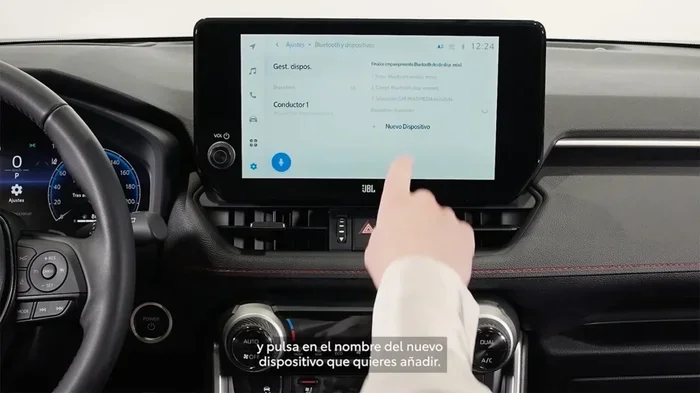
Now for the fun part. Here is the full walkthrough to connect your Toyota Smart Connect. Follow each step carefully, and you will be up and running in under 15 minutes.
Step 1: Create Your Toyota Account
Open the Toyota app on your phone. Tap the “Sign Up” or “Create Account” button. You will need to enter your name, email address, and a strong password. Make sure your email is one you check regularly. You will receive a verification link there.
After you verify your email, log in to the app. You are now inside the Toyota ecosystem. Next, we will link your vehicle.
Step 2: Link Your Vehicle to the App
Once logged in, tap the “Add Vehicle” option. Enter your VIN or use the camera to scan it. The app will recognize your vehicle and pull up its details. You may need to confirm some information, like your model year and trim level.
After your vehicle is linked, the app will start searching for your car’s modem. This can take a minute or two. Make sure your phone has a good internet connection. Wi-Fi works best for the initial setup.
Step 3: Activate Your Smart Connect Services
When your vehicle appears in the app, you will see available services. Tap on each one you want to activate. Some features are free for a trial period. Others require a monthly or annual subscription. Review the pricing carefully before you commit.
Once you activate a service, the app will send a confirmation to your car’s modem. This process usually takes less than a minute. You will see a green checkmark next to each active feature.
If you want to learn more about remote features, check out how you can remote start your Toyota with the key fob as an alternative method when the app is not available.
Step 4: Test Your Connection
Now it is time to make sure everything works. Try locking and unlocking your doors through the app. If your vehicle responds, you are in business. Try the remote start feature next. Stand a safe distance away and watch for the engine to turn over.
If something does not work, do not panic. Go to the next section for troubleshooting tips. Most issues are easy to fix.
Troubleshooting Common Connection Issues
Even with the best setup, you may run into problems. Toyota Smart Connect relies on several things working together. Here are the most common issues and how to fix them.
App Won’t Connect to Vehicle
This is the most common complaint. Usually, it happens because your phone lost its internet connection. Check your Wi-Fi or cellular data first. Then, try closing the app completely and reopening it. If that does not work, restart your phone and try again.
Sometimes the car’s modem needs a reset. Turn your vehicle off, wait 30 seconds, and turn it back on. This refreshes the connection between your car and the Toyota servers.
Login or Account Issues
Forgot your password? No problem. Tap the “Forgot Password” link on the login screen. You will receive a reset email. If you are still having trouble, try clearing the app cache on your phone. On iPhone, delete and reinstall the app. On Android, go to Settings, Apps, Toyota, and clear the cache.
Another common issue is using the wrong Toyota account. If you have multiple accounts, make sure you are logging into the one linked to your vehicle. You can check this in the app settings under “Linked Vehicles.”
Features Not Working After Setup
Some features need a few minutes to fully activate after setup. Wait at least 10 minutes before assuming something is broken. Also, check your subscription status. Free trial features will stop working once the trial ends unless you upgrade.
If your vehicle is older, it may not support all Smart Connect features. In that case, you might want to explore options like unlocking your car with the Toyota app to see which features are available for your specific model.
Maximizing Your Toyota Smart Connect Experience
Now that you are connected, let us talk about how to get the most out of the service. A few simple habits can make a big difference.
Keep the App Updated
Toyota regularly releases app updates with new features and bug fixes. Turn on automatic updates in your app store. This ensures you always have the latest version. Updated apps also work better with the newest security protocols.
Use Wi-Fi When Possible
The Toyota app uses data to communicate with your vehicle. If you have a limited data plan, connect to Wi-Fi when setting up or updating features. This saves your cellular data for other things. Most setup processes do not require much data, but regular use can add up over time.
Explore the Dashboard
Take some time to browse the app’s dashboard. You will find features you may not have noticed at first. Things like trip history, fuel economy reports, and service reminders can help you save money and stay on top of maintenance.
Set Up Notifications
The app can send you alerts about your vehicle. You can get notified when someone locks or unlocks your doors. You can also receive maintenance reminders and low-fuel warnings. Go to the settings and turn on the notifications that matter to you.
Share Access with Family
Toyota Smart Connect lets you share vehicle access with family members. You can add up to five users to your account. Each person gets their own login. This is great for couples or families who share a vehicle. Everyone can lock, unlock, and start the car from their own phone.
Sharing access is easy. Go to the app settings, tap “Share Access,” and enter the other person’s email. They will receive an invitation to join your Toyota account. Once they accept, they can control the vehicle from their own device.
Is Toyota Smart Connect Worth It?
This is a fair question, and the answer depends on your lifestyle. If you rely heavily on your phone for everyday tasks, Toyota Smart Connect is a game changer. The convenience of remote start alone can save you several minutes on cold winter mornings.
For frequent travelers or people with long commutes, the trip tracking and fuel monitoring features add real value. Parents who share a family vehicle will also appreciate the ability to monitor usage and set boundaries.
However, if you rarely use your phone for car-related tasks, you might find the subscription cost hard to justify. Toyota offers different pricing tiers. Some come with a free trial period. Take advantage of that trial to see if the features fit your needs before committing to a paid plan.
Also keep in mind that you can still use traditional methods for most functions. For example, you can always use your key fob to lock and start your car. Smart Connect simply adds a convenient layer on top of what you already have.
Final Thoughts on Connecting Toyota Smart Connect
Setting up Toyota Smart Connect does not have to be complicated. With the right preparation and a little patience, you can have everything running in under 15 minutes. Start by checking your vehicle compatibility, downloading the app, and creating your account. Then follow the step-by-step setup to link your car and activate your preferred features.
Remember to troubleshoot any issues calmly. Most problems have simple solutions. And once you are connected, take time to explore all the features. The more you use the app, the more you will appreciate how it fits into your daily routine.
Toyota Smart Connect is more than a fancy gadget. It is a practical tool that saves time, enhances security, and adds convenience to your driving experience. Give it a try, and see what a difference it makes.
If you are also curious about whether you can start your Highlander with your phone or explore other connectivity options, the steps above will guide you through the basics. The Toyota ecosystem is designed to work together, and Smart Connect is at the heart of that experience.
Now that you know how to set everything up, go ahead and give it a try. Your Toyota is waiting. And the next time you are rushing out the door, you will be glad you took the time to connect.
Frequently Asked Questions
What is Toyota Smart Connect?
Toyota Smart Connect is a connected vehicle service that lets you control your Toyota remotely through the Toyota app. You can lock, unlock, start your engine, and track your vehicle from your phone. It works through a built-in modem in compatible Toyota models.
How much does Toyota Smart Connect cost?
Pricing varies depending on the features you choose. Toyota offers free trial periods for many services. After the trial, you can subscribe to monthly or annual plans. Check the Toyota website or your dealer for the latest pricing details.
Which Toyota models support Smart Connect?
Most Toyota models from 2018 and newer support Smart Connect. Some older models may need a dealer-installed connectivity module. Check your vehicle’s manual or contact your dealer to confirm compatibility with your specific model.
Can I use Toyota Smart Connect without Wi-Fi?
Yes, the app works over cellular data as well as Wi-Fi. However, a stable internet connection is required at all times for the app to communicate with your vehicle. If you lose your connection, some features may not work until you reconnect.
How do I reset my Toyota Smart Connect connection?
To reset, turn your vehicle off, wait 30 seconds, and turn it back on. Then restart the Toyota app on your phone. If the issue persists, try logging out of the app and logging back in. You can also reset your vehicle’s modem through the infotainment system settings.
Can multiple people use Toyota Smart Connect on the same vehicle?
Yes, Toyota Smart Connect supports up to five users per vehicle. Each person gets their own login credentials and can control the vehicle from their own phone. You can add or remove users anytime through the app settings.
=== CONCLUSION ===
Connecting your Toyota Smart Connect is one of the best things you can do for your daily driving routine. It brings convenience, security, and peace of mind right to your pocket. The setup process is straightforward, and the features are genuinely useful. Whether you want to remote start on a cold morning or find your car in a busy lot, Smart Connect delivers. Follow the steps in this guide, troubleshoot any issues calmly, and enjoy the full benefits of your connected Toyota. Your vehicle has more technology than you think. Now you know how to use it.