How Do You Reset the Oil Light on a 2013 Toyota Camry
Resetting the oil light on a 2013 Toyota Camry is a simple process you can do at home in just a few minutes. Whether your oil change indicator is flashing after a recent service or you need to clear a false alert, this guide walks you through every method. We also cover maintenance best practices to keep your Camry running smoothly and prevent future warning lights.
The oil maintenance light on your dashboard can catch you off guard. It pops up at the worst possible time and leaves you wondering what to do next. If you own a 2013 Toyota Camry, you are not alone in dealing with this common issue. Many Camry owners face the same situation, and the good news is that fixing it is straightforward.
This guide will show you exactly how to reset the oil light on a 2013 Toyota Camry step by step. We will cover every method, explain why the light comes on, and share tips to keep your car in top shape. Whether you are a seasoned driver or a beginner, you will find this guide easy to follow.
Let us dive in and get that annoying light off your dashboard.
Key Takeaways
- Quick Reset Method: You can reset the oil light on a 2013 Toyota Camry using the trip meter and steering wheel controls in under five minutes.
- Multiple Methods Available: There are two main ways to reset the oil maintenance light — through the instrument panel menu or by using the trip odometer reset button.
- Oil Changes Matter: Regular oil changes keep your engine healthy and prevent the light from coming back too soon.
- Common Mistakes Happen: Forgetting to turn the ignition to the ON position or pressing the wrong button are the most frequent errors people make.
- Preventive Maintenance Helps: Following a consistent maintenance schedule reduces unexpected dashboard warnings.
- When to See a Mechanic: If the light persists after a reset, it may signal a deeper issue that needs professional attention.
📑 Table of Contents
- Why Does the Oil Light Come On in a 2013 Toyota Camry?
- How to Reset the Oil Light on a 2013 Toyota Camry
- What Oil Does a 2013 Toyota Camry Need?
- How Often Should You Change the Oil in a 2013 Toyota Camry?
- Common Mistakes When Resetting the Oil Light
- Tips to Keep Your 2013 Toyota Camry’s Engine Healthy
- When Should You See a Professional Mechanic?
- Final Thoughts on Resetting the Oil Light on Your 2013 Toyota Camry
Why Does the Oil Light Come On in a 2013 Toyota Camry?
The oil maintenance light is part of your Camry’s oil life system. This system tracks your driving habits and engine conditions to estimate when an oil change is due. It is not just a simple mileage counter. The system considers factors like engine temperature, driving style, and time since the last service.
When the light illuminates, it means the system believes the oil has reached the end of its useful life. Here are the most common reasons the light activates:
- Oil change interval reached: The system has tracked enough miles or driving cycles to trigger the reminder.
- Recent oil change not registered: After an oil change, the system needs to be manually reset.
- Low oil level: Insufficient oil can activate the warning alongside the maintenance light.
- Oil quality degradation: Contaminated or old oil triggers the sensor earlier than expected.
- False alert: Sometimes electrical glitches cause the light to turn on without a real issue.
Understanding why the light comes on helps you respond appropriately. If you recently changed your oil and the light stayed on, a simple reset should fix it. But if the light returns quickly, you may need to check the oil level in my oil tank and inspect for leaks or other problems.
How to Reset the Oil Light on a 2013 Toyota Camry
Resetting the oil light on a 2013 Toyota Camry is quick and does not require any special tools. You can complete the process from your driver’s seat using the steering wheel controls and the instrument panel. Below, we walk you through the two most reliable methods.
Method 1: Using the Trip Meter Reset Button
This is the most common and easiest way to reset the oil maintenance light on a 2013 Camry. Follow these steps carefully:
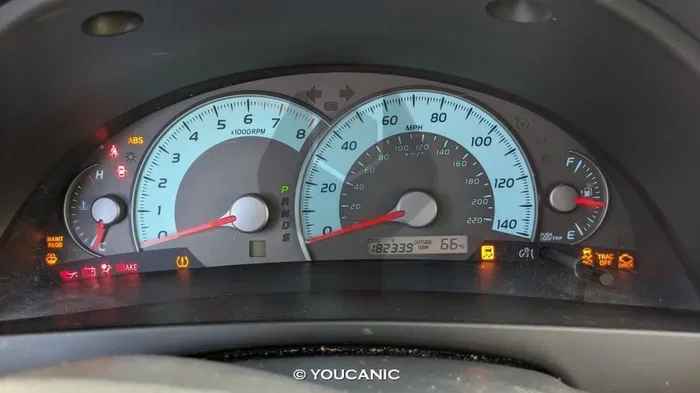
- Turn the ignition to the ON position. Do not start the engine. Just rotate the key to the ON setting or press the push-start button without pressing the brake.
- Locate the trip meter reset button. It is usually on the steering wheel or the instrument panel cluster, near the speedometer.
- Press and hold the reset button. Keep holding it for about five to ten seconds.
- Watch the dashboard display. You should see the oil maintenance indicator start to flash.
- Continue holding the button. After a few more seconds, the flashing light should turn off and display a reset confirmation.
- Release the button. Turn the ignition off and then back on to confirm the light has been cleared.
If the light does not turn off, try repeating the process. Sometimes it takes a second attempt, especially if the ignition was not fully in the ON position. Be patient and make sure you are holding the button long enough.
Method 2: Using the Instrument Panel Menu
The 2013 Toyota Camry has a basic instrument panel display that allows you to access the maintenance menu. Here is how to use it:
- Turn the ignition to the ON position. Make sure the engine is off but the dashboard lights are active.
- Use the steering wheel controls to navigate. The arrow buttons on the left side of the steering wheel let you scroll through menu options.
- Select the Maintenance menu. Look for a wrench icon or a “Maintenance” option on the display.
- Find the oil life reset option. Scroll through the menu until you see the oil life percentage or the reset prompt.
- Press and hold the OK or Set button. Hold it for several seconds until the display shows the reset is complete.
- Turn the ignition off and back on. Verify that the oil maintenance light is no longer visible.
This method works well if the trip meter button method does not produce results. The instrument panel menu gives you access to additional maintenance settings too, such as tire rotation reminders and service interval tracking.
What Oil Does a 2013 Toyota Camry Need?
Using the right oil matters more than most people realize. The wrong oil type can lead to poor engine performance, reduced fuel economy, and even trigger the maintenance light prematurely. For the 2013 Toyota Camry, Toyota recommends 0W-20 synthetic oil as the primary choice. This viscosity grade provides excellent protection for the engine across a wide range of temperatures.
Here is a quick reference for oil options:
- 0W-20 Synthetic: The manufacturer-recommended choice for all 2013 Camry models. Offers the best fuel efficiency and engine protection.
- 5W-30 Conventional: An acceptable alternative in certain driving conditions, especially in warmer climates.
- High-Mileage Oil: A good option if your Camry has over 75,000 miles on the odometer. It contains extra additives to protect aging engines.
Always check your owner’s manual for the exact specifications. Using the correct oil helps your engine run smoothly and extends the time between oil changes. If you are unsure about which oil to use, consult a trusted mechanic or visit your local Toyota dealership.
How Often Should You Change the Oil in a 2013 Toyota Camry?
Oil change frequency depends on your driving habits and the type of oil you use. Toyota’s oil life system in the 2013 Camry uses a condition-based approach rather than a fixed mileage interval. This means the system adjusts the reminder based on how you drive.
In general, here are the recommended guidelines:
- Normal driving conditions: Every 7,500 to 10,000 miles or once every six months, whichever comes first.
- Severe driving conditions: Every 5,000 to 7,500 miles. Severe conditions include frequent short trips, extreme temperatures, heavy towing, or dusty roads.
- Synthetic oil: If you use full synthetic oil, you may be able to stretch intervals slightly, but always follow the system’s recommendation.
The oil life percentage on your dashboard gives you a real-time estimate of remaining oil life. When it drops to 15%, it is time to schedule an oil change. Waiting until the light comes on at 0% is not ideal, as the oil may already be degraded.
Setting up a consistent maintenance schedule helps you stay ahead of oil changes and other service needs. A well-planned schedule prevents unexpected breakdowns and keeps your Camry running reliably for years.
Common Mistakes When Resetting the Oil Light
Even though the reset process is simple, people make mistakes that cause frustration. Here are the most common errors and how to avoid them:
Mistake 1: Not Turning the Ignition Fully to ON
The most frequent mistake is not putting the ignition in the correct position. You need the ON position, not the ACC position and not the START position. The dashboard lights must be fully active for the reset to work. Take a moment to confirm the ignition is in the right spot before pressing any buttons.
Mistake 2: Releasing the Button Too Early
Holding the reset button for too short a time is another common issue. You need to press and hold the button for at least five to ten seconds. If you release it too soon, the system will not register the reset command. Count slowly in your head while holding the button.
Mistake 3: Confusing the Trip Reset with the Oil Reset
The trip meter reset button and the oil maintenance reset serve different purposes. Pressing the trip button accidentally will zero out your mileage reading but will not clear the oil light. Make sure you are using the correct procedure for the oil maintenance system.
Mistake 4: Ignoring Persistent Lights
If the oil light keeps coming back after a reset, do not ignore it. A recurring light may indicate low oil pressure, a faulty sensor, or an oil leak. In these cases, it is wise to have a professional inspect your vehicle rather than repeatedly resetting the light.
Tips to Keep Your 2013 Toyota Camry’s Engine Healthy
Resetting the oil light is just one part of engine care. Here are some practical tips to keep your Camry’s engine in excellent condition:
- Check your oil level regularly. Use the dipstick once a month to ensure the oil level is within the safe range. If you are unsure how, you can learn more about how to check the oil level in my oil tank with simple steps you can do at home.
- Watch for warning signs. Unusual engine noises, dark or gritty oil, and a burning smell under the hood all signal potential problems.
- Use genuine Toyota parts. OEM oil filters and parts are designed specifically for your Camry and provide the best fit and performance.
- Drive smoothly. Aggressive driving, such as rapid acceleration and hard braking, wears down oil faster and triggers the maintenance system sooner.
- Keep up with other maintenance. Oil changes work best when combined with regular tire rotations, brake inspections, and fluid top-offs.
- Address overheating risks. Take steps to prevent a car from overheating by monitoring your temperature gauge and keeping coolant levels topped up.
Small habits make a big difference over time. A well-maintained Camry delivers reliable performance, better fuel economy, and a longer lifespan. Treating your car with consistent care means fewer surprises and lower repair costs down the road.
When Should You See a Professional Mechanic?
There are times when resetting the oil light is not enough. If you experience any of the following situations, it is time to visit a trusted mechanic:
- The oil light returns immediately after a reset.
- You notice a significant drop in oil level between changes.
- The engine makes knocking or grinding sounds.
- The oil appears very dark, thick, or has a burnt smell.
- The check engine light is also illuminated alongside the oil light.
A professional mechanic can run diagnostic tests to identify underlying issues. They can check the oil pressure sensor, inspect for internal leaks, and recommend the right service for your vehicle. Sometimes what looks like a simple reset issue is actually a sign of a deeper mechanical problem that needs attention.
Do not hesitate to seek help when something feels off. Early detection of engine problems saves money and prevents more serious damage in the long run.
Final Thoughts on Resetting the Oil Light on Your 2013 Toyota Camry
Resetting the oil maintenance light on a 2013 Toyota Camry is a task anyone can handle. With the right steps and a little patience, you can clear the dashboard warning in just a few minutes. Whether you use the trip meter button method or the instrument panel menu, the process is simple and effective.
The key is to act promptly when the light comes on. Ignoring it or delaying an oil change can lead to engine wear and reduced performance. Keep up with your oil changes, use the recommended oil type, and follow a regular maintenance routine. Your 2013 Camry will reward you with years of dependable service.
Remember, the oil light is your car’s way of communicating with you. It is not something to fear but rather a helpful reminder to stay on top of basic maintenance. A little attention goes a long way toward keeping your vehicle safe, efficient, and road-ready.
Frequently Asked Questions
Can I drive my 2013 Toyota Camry with the oil light on?
It is not recommended. The oil light indicates that the oil may be past its useful life or that the level is low. Driving with degraded oil can cause increased engine wear and potential damage. Reset the light after an oil change or check the oil level immediately if the light comes on unexpectedly.
How long does it take to reset the oil light on a 2013 Toyota Camry?
The process takes less than five minutes. Once you know the correct steps, you can complete the reset quickly from your driver’s seat. No special tools or mechanic visits are required.
Why does the oil light come back after I reset it?
If the light returns shortly after a reset, it may indicate low oil levels, a faulty oil pressure sensor, or an oil leak. Check your oil level and inspect for leaks. If the problem persists, have a professional mechanic diagnose the issue.
Do I need to use synthetic oil in my 2013 Toyota Camry?
Toyota recommends 0W-20 synthetic oil for the 2013 Camry. While conventional oil may work in some cases, synthetic oil provides better protection, improved fuel economy, and longer intervals between changes. Always refer to your owner’s manual for the exact specification.
What is the difference between the oil change light and the check engine light?
The oil change light specifically indicates that an oil service is due. The check engine light signals a broader range of issues, including emissions problems, sensor failures, or engine misfires. They serve different purposes, and both should be addressed promptly when they illuminate.
Can I reset the oil light without starting the engine?
Yes. You only need the ignition in the ON position, which does not require the engine to be running. Turn the key to ON or press the push-start button without pressing the brake, then follow the reset steps using the steering wheel controls.