How Do You Turn Off RSA on a Toyota Quickly and Easily
Turning off RSA (Road Sign Assist) on a Toyota is simple once you know where to look. Whether you drive a Toyota RAV4, Camry, or Highlander, this guide walks you through the exact steps to disable Road Sign Assist in your vehicle. You will learn how to access your Toyota Safety Sense settings, adjust the dashboard controls, and understand when it helps to keep RSA on or turn it off.
Key Takeaways
- RSA Can Be Turned Off Easily: You can disable Road Sign Assist through your Toyota dashboard or infotainment screen in just a few taps.
- Toyota Safety Sense Controls RSA: RSA is part of the Toyota Safety Sense suite, and you can toggle it on or off like other driver-assist features.
- Steps Vary by Model: The exact process differs slightly between Toyota models, but the general method is the same across most vehicles.
- You Can Reenable RSA Anytime: Turning it off does not permanently remove the feature — you can switch it back on whenever you want.
- Know When to Keep It On: Road Sign Assist is helpful in many driving situations, so consider your needs before disabling it.
📑 Table of Contents
- How Do You Turn Off RSA on a Toyota?
- What Is RSA on a Toyota?
- How to Turn Off RSA on a Toyota — Step by Step
- How to Turn Off RSA on Specific Toyota Models
- Can You Turn Off RSA While Driving?
- How to Turn RSA Back On After Disabling It
- Common Mistakes When Turning Off RSA
- Expert Tips for Managing Toyota Safety Sense Settings
- Final Thoughts
How Do You Turn Off RSA on a Toyota?
Road Sign Assist, or RSA, is a smart feature inside Toyota Safety Sense. It reads road signs and shows you speed limits and other important messages on your dashboard. But sometimes, you just want to turn off RSA on a Toyota and keep things simple. Maybe the alerts are too frequent. Maybe you find them distracting on a long road trip. Whatever your reason, you are not alone. Many Toyota owners ask how to disable this feature.
The good news is that turning off RSA is straightforward. You do not need a mechanic or a dealership visit. In most cases, you can do it yourself in under five minutes. This guide gives you the exact steps for different Toyota models. It also covers what RSA does, why you might want to turn it off, and how to turn it back on later. Let us dive in.
What Is RSA on a Toyota?
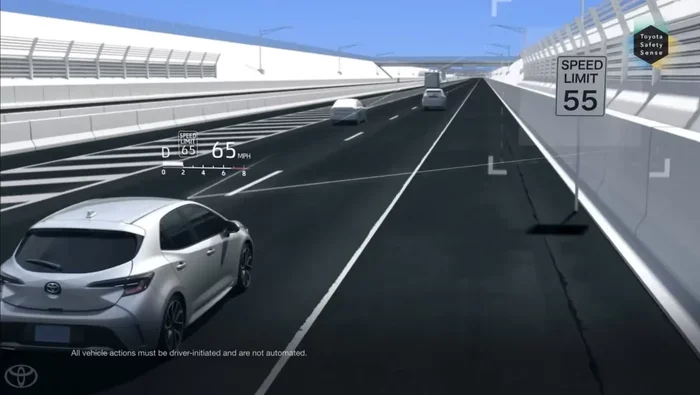
Before you learn how to turn off Road Sign Assist, it helps to understand what it does. RSA is part of the Toyota Safety Sense package. This package includes several driver-assist technologies designed to keep you safe on the road. RSA specifically uses a camera to read road signs. It then displays the current speed limit or other warnings on your instrument cluster.
Here are some key things RSA does:
- Displays speed limit signs on your dashboard or head-up display.
- Alerts you when you exceed the posted speed limit.
- Shows no-passing signs and other road warnings.
- Works with other Toyota Safety Sense features like Pre-Collision System and Lane Departure Alert.
RSA is available on many Toyota models. It is most commonly found on the Toyota RAV4, Camry, Highlander, and newer Tacoma models. If your Toyota has the Toyota Safety Sense package, there is a good chance it includes RSA.
Why Would You Want to Turn Off RSA?
There are several valid reasons to disable RSA Toyota settings. Not everyone finds road sign alerts helpful. Here are the most common reasons drivers turn it off:
- Too many alerts: Frequent warnings can become annoying, especially on roads with many signs.
- False readings: The camera sometimes misreads signs, leading to incorrect speed limit displays.
- Distraction: Some drivers prefer not to have extra information popping up on their dashboard.
- Night driving: RSA may not work well in low-light conditions and can cause confusion.
- Personal preference: You might simply prefer driving without the extra assist.
No matter your reason, you have the right to turn off Road Sign Assist at any time. It does not affect your vehicle’s safety systems permanently.
How to Turn Off RSA on a Toyota — Step by Step
The process to disable RSA on a Toyota depends slightly on your model and year. However, the general method is very similar across most Toyota vehicles. Below, we walk you through the most common steps.
Step 1: Start Your Vehicle
Sit in your driver’s seat and start the engine. Make sure the vehicle is in Park or in a safe stopped position. You need the engine running to access the Toyota Safety Sense settings. Some older models may require you to press the brake pedal before you can access the settings menu.
Step 2: Locate the Setup or Settings Button
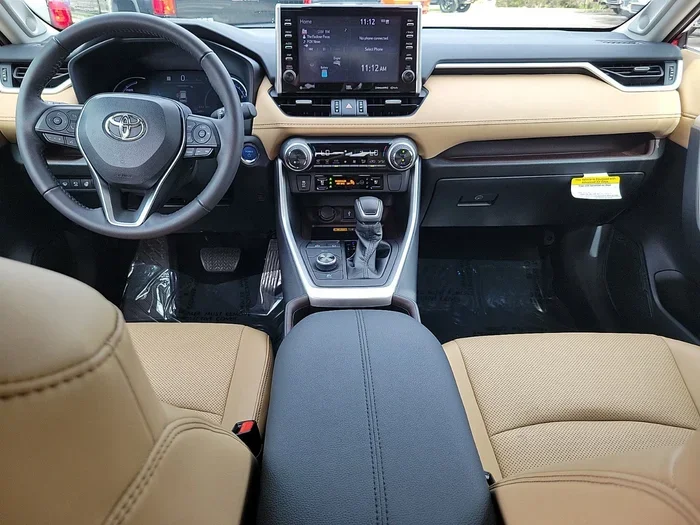
Look at your steering wheel or dashboard. Most Toyota models have a Setup or Settings button on the left side of the steering wheel. Press it. This opens the main vehicle settings menu on your infotainment screen.
If your Toyota uses a touchscreen, look for the gear icon or the word “Settings” on the home screen. Tap it to enter the settings menu. On some older models, you may need to use the steering wheel controls to scroll to the settings option.
Step 3: Navigate to Toyota Safety Sense Settings
Once you are in the settings menu, scroll through the options. Look for a section called Toyota Safety Sense or Safety Sense. This is where you control all the driver-assist features. On some models, it may be listed under “Vehicle Settings” or “Driver Assistance.”
Use the scroll wheel or touchscreen to highlight this option and press Enter or select it. You should now see a list of all the Toyota Safety Sense features, including RSA.
Step 4: Find Road Sign Assist
Inside the Toyota Safety Sense menu, look for “Road Sign Assist” or “RSA.” It is usually listed alongside other features like Pre-Collision System and Lane Departure Alert. Tap on it to open the RSA settings.
You should see an on/off toggle or a button to enable or disable the feature. Some models may also let you choose between different RSA modes, such as “Standard” or “Low.”
Step 5: Turn Off RSA
Toggle the switch to OFF or select the disable option. Your screen may confirm the change. Once you do this, Road Sign Assist is turned off. You will no longer see speed limit signs or alerts displayed on your dashboard.
Quick Tip: If you are not sure you made the change, look for a message on your screen confirming that RSA is now off. Some Toyota models also show a small icon on the dashboard indicating the feature status.
Step 6: Exit the Settings Menu
Press the back button or select “Done” to exit the settings menu. Your changes are saved automatically. You can now drive without RSA alerts.
How to Turn Off RSA on Specific Toyota Models
While the general steps above work for most Toyota vehicles, some models have slightly different processes. Here is a closer look at how to turn off RSA on a Toyota for popular models.
Toyota RAV4 RSA Disable Steps
The Toyota RAV4 is one of the most popular SUVs on the road. If you drive a RAV4 with Toyota Safety Sense, here is how to disable RSA:
- Press the Setup button on the steering wheel.
- Scroll to “Toyota Safety Sense” using the steering wheel controls.
- Select “Road Sign Assist.”
- Toggle the switch to OFF.
- Exit the menu.
On newer RAV4 models with a touchscreen, you can also access these settings by tapping the Settings icon on the home screen, then selecting “Toyota Safety Sense” and finally “Road Sign Assist.”
Toyota Camry RSA Turn Off
The Toyota Camry follows a similar process. The Camry RSA disable steps are:
- Start the engine and press the Setup button.
- Navigate to the Vehicle Settings or Toyota Safety Sense section.
- Find Road Sign Assist in the list.
- Select OFF to disable the feature.
Camry owners with the upgraded infotainment system may also be able to access RSA settings through the touchscreen display. The menu layout is slightly different but the overall path remains the same.
Toyota Highlander RSA Off
The Toyota Highlander, especially the newer models, has a slightly larger infotainment screen. To turn off RSA Toyota Highlander style:
- Tap the Settings icon on the home screen.
- Go to “Vehicle Settings.”
- Select “Toyota Safety Sense.”
- Find “Road Sign Assist” and toggle it off.
Highlander owners should note that the RSA settings may be grouped slightly differently depending on the model year. If you cannot find it, try looking under “Driver Assist” or “Safety Systems.”
Can You Turn Off RSA While Driving?
Yes, you can turn off RSA on a Toyota while driving. The settings menu is designed to be accessible while the vehicle is in motion. However, it is always safer to make changes when you are stopped at a red light or in traffic. Reaching for the steering wheel controls or touchscreen while driving at high speeds can distract you from the road.
Think of it this way: you would not want to fumble through menus at 70 miles per hour. Pull over safely or wait for a stop. Then make your changes. This keeps you focused and alert.
Also, keep in mind that turning off RSA does not turn off other Toyota Safety Sense features. Your Pre-Collision System, Lane Departure Alert, and Adaptive Cruise Control will continue to work normally unless you turn those off separately.
How to Turn RSA Back On After Disabling It
Maybe you turned off RSA and now you miss the road sign alerts. Good news — you can re-enable RSA on a Toyota at any time. Simply follow the same steps you used to turn it off, but toggle the switch back to ON this time.
Here is a quick recap:
- Press the Setup button on the steering wheel.
- Go to Toyota Safety Sense settings.
- Select Road Sign Assist.
- Toggle the switch to ON.
That is all it takes. Your RSA will start working again immediately. The system will recalibrate and begin reading road signs once more. If you notice the feature is not working after turning it back on, try restarting your vehicle. This often fixes minor glitches.
Some owners also ask about the difference between turning off RSA and turning off the entire Toyota Safety Sense package. If you turn off Toyota Safety Sense completely, you will disable all the safety features at once. This is not recommended for daily driving. It is better to turn off just the individual features you do not want, like RSA, while keeping the rest active.
Common Mistakes When Turning Off RSA
Even though the process is simple, there are a few common mistakes drivers make. Avoid these pitfalls to ensure a smooth experience:
- Turning off the wrong feature: Make sure you are selecting Road Sign Assist, not a different Toyota Safety Sense feature. The menus can look similar.
- Not saving the change: Always confirm that your settings have been saved. Look for an on-screen confirmation message.
- Forgetting to re-enable it: If you turned RSA off temporarily, remember to turn it back on when you need it again.
- Ignoring the owner manual: Your specific Toyota model may have unique steps. Check the owner manual if the general steps do not work.
- Confusing RSA with traction control: RSA is different from traction control or steering assist. If you are looking to turn off those features instead, the process is different.
One more important thing: if you are having trouble finding the RSA settings, you can always consult your Toyota owner manual. The manual provides detailed instructions for every Toyota model and year. You can also visit your local Toyota dealership and ask a service advisor for help. They can walk you through the process in person.
Expert Tips for Managing Toyota Safety Sense Settings
Managing your Toyota Safety Sense settings does not have to be complicated. Here are some expert tips to help you get the most out of your vehicle’s features:
- Review your settings regularly: Over time, you may forget which features are on or off. Take a few minutes every few months to review your Toyota Safety Sense settings.
- Adjust sensitivity if available: Some Toyota models let you adjust the sensitivity of RSA and other features. If the alerts are too frequent, try lowering the sensitivity before turning the feature off entirely.
- Keep your camera clean: RSA relies on a camera, usually mounted near the rearview mirror. If the camera is dirty or obstructed, RSA may not work properly. Clean it regularly with a soft cloth.
- Update your software: Toyota occasionally releases software updates that improve Toyota Safety Sense performance. Check with your dealership to see if updates are available for your vehicle.
- Test features after changes: After turning a feature on or off, take a short test drive to confirm it is working as expected.
If you ever feel unsure about your vehicle’s settings, remember that you can always reach out to a professional. Whether you visit a Toyota dealership or consult the owner manual, help is always available. Taking a few minutes to understand your vehicle’s features gives you more confidence behind the wheel.
Final Thoughts
Now you know exactly how to turn off RSA on a Toyota quickly and easily. Whether you drive a RAV4, Camry, Highlander, or another Toyota model, the process is simple and takes just a few minutes. You learned what RSA does, why you might want to turn it off, and the exact steps to disable it. You also learned how to turn it back on whenever you are ready.
Road Sign Assist is a great feature, but it is not for everyone. The beauty of Toyota Safety Sense is that you have full control. You can customize your vehicle’s settings to match your driving style and preferences. So go ahead, make the changes you need, and enjoy a more comfortable driving experience in your Toyota.
Remember, if you ever run into trouble or have questions about your Toyota’s features, do not hesitate to reach out. The Toyota community is full of helpful resources. And your local dealership is always ready to assist. Safe travels and happy driving!
Frequently Asked Questions
Can I turn off RSA on a Toyota while driving?
Yes, you can turn off RSA while driving. However, it is safer to make changes when your vehicle is stopped. Pull over or wait at a red light before accessing the Toyota Safety Sense settings. This keeps your attention on the road.
Does turning off RSA affect other Toyota Safety Sense features?
No, turning off RSA only disables the Road Sign Assist feature. Other Toyota Safety Sense features like Pre-Collision System, Lane Departure Alert, and Adaptive Cruise Control continue to work normally. You would need to turn those off separately if desired.
Can I turn RSA back on after disabling it?
Absolutely. You can re-enable RSA at any time by going back to the Toyota Safety Sense settings and toggling Road Sign Assist to ON. The changes are saved automatically and take effect immediately.
Why does my Toyota RSA keep turning off by itself?
If your RSA keeps turning off, it could be due to a dirty camera, a software glitch, or a low battery. Try cleaning the camera near the rearview mirror and restarting your vehicle. If the problem continues, visit a Toyota dealership for a professional check.
Is it safe to drive without RSA enabled?
Yes, it is safe. RSA is an assistive feature, not a critical safety system. Your other safety features remain active even when RSA is off. However, you will no longer see speed limit alerts or road sign warnings on your dashboard.
How do I find the RSA settings if I cannot locate them?
If you cannot find the RSA settings, consult your Toyota owner manual for model-specific instructions. You can also visit your local Toyota dealership and ask a service advisor to walk you through the process. They can help you quickly and easily.
=== INTERNAL LINKS ===
If you are also wondering about other Toyota safety features, check out how to turn off steering assist in a Toyota for more helpful tips. You may also want to learn how to turn traction control back on if you are adjusting your Toyota’s driver-assist settings. For those who enjoy exploring different driving modes, see how to switch to sport mode while driving a Toyota for a complete guide.