How to Turn Traction Control Back On and Drive Confidently
Knowing how to turn traction control back on is a simple skill every driver should have. Whether you disabled it for off-road driving or after a tire change, restoring this safety feature takes only a few seconds. This guide walks you through the exact steps for most vehicles, explains when to keep it on, and shares expert tips to help you drive confidently on any road surface.
You are driving down a rain-soaked highway, and your car starts to slide. Your traction control system kicks in and saves the day. But then you hit a dirt trail or a snowy back road, and you turn the system off to gain more wheel spin. Later, when you are back on paved roads, you forget to turn the switch back on. That is a moment of panic many drivers experience.
Learning how to turn traction control back on is one of those small skills that makes a huge difference behind the wheel. It takes just a few seconds, but it restores a layer of safety that keeps you and your passengers protected. Whether you drive a sedan, a truck, or an SUV, this guide will walk you through every step with clear, simple instructions.
Traction control is not just a fancy car gadget. It is a life-saving feature that works hand in hand with your anti-lock braking system and electronic stability control. When it is active, your car monitors wheel speed and adjusts engine power to prevent slipping. When it is off, you have more wheel spin, which can be useful in certain situations but risky on regular roads. Let us dive into everything you need to know about restoring traction control and driving with full confidence.
Key Takeaways
- Quick Toggle: Most vehicles let you turn traction control back on with a simple button press near the steering wheel or gear shifter.
- Safety First: Re-enabling traction control improves stability on wet, icy, and uneven road surfaces.
- Check Your Manual: Every car model has a slightly different process, so always refer to your owner’s manual for specifics.
- Warning Lights Matter: A flashing traction control light can signal a deeper issue that needs professional attention.
- Drive Modes Help: Many modern vehicles offer drive mode selectors that let you manage traction control settings easily.
- Regular Maintenance: Keeping wheel speed sensors clean helps your traction control system work reliably.
📑 Table of Contents
- Understanding Your Traction Control System
- Common Reasons You Might Need to Turn Traction Control Back On
- Step-by-Step Guide: How to Turn Traction Control Back On
- When You Should Keep Traction Control On
- Troubleshooting: What to Do If Traction Control Won’t Turn Back On
- Expert Tips for Driving Confidently with Traction Control Active
- Key Takeaways
- Conclusion
Understanding Your Traction Control System
Before you learn how to flip the switch, it helps to understand what your traction control system actually does. Think of it as your car’s invisible co-pilot. It watches the speed of each wheel and compares them in real time. If one wheel starts spinning faster than the others, the system kicks in to slow that wheel down and reduce engine power.
How Traction Control Works
The system relies on wheel speed sensors that sit near each wheel. These sensors send data to your car’s onboard computer. When the computer detects a loss of traction, it either applies the brakes to the spinning wheel or reduces the engine’s power output. This whole process happens in milliseconds, often before you even notice the slip.
Most modern vehicles also pair traction control with the anti-lock braking system, commonly known as ABS. Together, these two systems prevent your wheels from locking up during hard braking and from spinning freely on slippery surfaces. They work as a team to keep your vehicle stable and predictable.
The Role of Electronic Stability Control
Electronic stability control, or ESC, is a related feature that builds on traction control. While traction control focuses on wheel spin, ESC looks at the overall direction your car is traveling. If your vehicle starts to skid or slide sideways, ESC applies brakes to individual wheels to help you stay on your intended path.
Many drivers confuse these systems or assume they are the same thing. They are related but serve different purposes. When you turn traction control back on, you are also reactivating part of the stability control network in most vehicles. That is another reason why keeping this system active on regular roads is so important.
Common Reasons You Might Need to Turn Traction Control Back On
There are several perfectly valid reasons to disable traction control temporarily. The key is remembering to turn it back on when the situation changes. Here are the most common scenarios where drivers switch the system off and then need to re-enable it.
After Off-Road Driving or Getting Stuck
When your vehicle is stuck in mud, sand, or deep snow, turning off traction control allows the wheels to spin freely. This extra spin can help you rock the car loose and regain momentum. Once you are back on solid ground, however, you need to turn traction control back on to restore normal safety functions.
After Changing Tires or Wheels
If you have recently swapped your tires, replaced a wheel, or changed your rim size, the wheel speed sensors may read inaccurate data. Some drivers turn off traction control temporarily to prevent false warnings. After the new tires are properly seated and the sensors recalibrate, you should re-enable the system right away.
During a Vehicle Diagnostic or Reset
Sometimes a mechanic will advise you to turn off traction control as part of a diagnostic procedure or system reset. After the work is complete, the system needs to be manually reactivated. This is a quick step that many people overlook, leaving their vehicle running without full stability assistance.
When Driving on a Track or Dry Pavement
Some car enthusiasts disable traction control on a racetrack to allow more wheel spin and sharper acceleration. If you ever do this, make sure you turn traction control back on before you merge onto public roads. The system is designed for everyday safety and performs best on standard driving surfaces.
Step-by-Step Guide: How to Turn Traction Control Back On
The exact process varies slightly depending on your vehicle make and model. However, the general steps are very similar across most cars on the road today. Here is a detailed walkthrough.
Step 1: Start Your Vehicle
Make sure your car is running and you are seated safely with your seatbelt on. You do not need to be moving to toggle the traction control switch. In fact, it is safest to make this change while your vehicle is parked or moving at a very low speed.
Step 2: Locate the Traction Control Button
On most vehicles, the traction control button is located near the steering column, on the center console, or close to the gear shifter. It often has an icon that looks like a car with wavy lines underneath, representing slipping wheels. Some brands label it as “TCS,” “TRAC,” or “Stability Control.”
If you cannot find the button, check your owner’s manual. The manual will show you the exact location and describe what the icon looks like for your specific vehicle. This is also a great place to learn about any vehicle-specific quirks.
Step 3: Press the Button to Reactivate
Simply press the traction control button once. In most cars, you will hear a soft click or beep, and the dashboard warning light will turn off. That light, which is usually yellow or amber, shows that the system is currently disabled. When the light goes out, the system is back online.
On some vehicles, you may need to hold the button for two to three seconds. Refer to your manual if a single press does not seem to work. The process is different for a few brands that use a longer press-and-hold method.
Step 4: Confirm the System Is Active
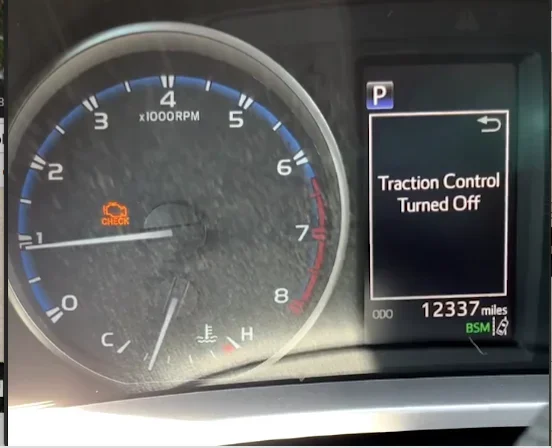
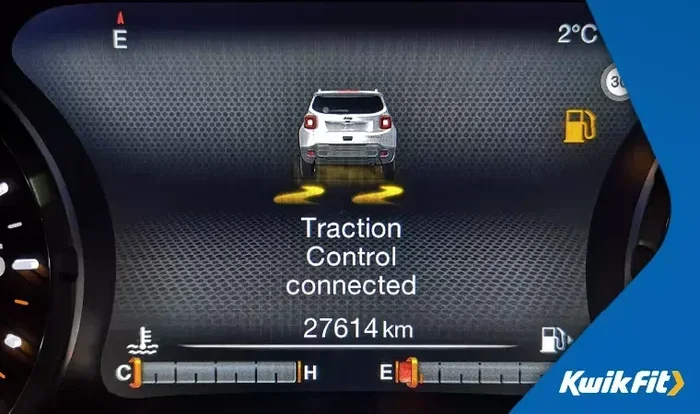
After pressing the button, glance at your dashboard. The traction control warning light should be off. Some vehicles also display a message on the instrument cluster that says “Traction Control Active” or shows the stability control icon as solid rather than flashing.
If the light stays on or starts flashing, the system may have a deeper issue. We will cover troubleshooting in a later section. But for most drivers, a single button press is all it takes to turn traction control back on successfully.
How to Turn Traction Control Back On in Popular Vehicle Brands
Different manufacturers place the button in slightly different spots and use different activation methods. Here are some common examples.
Toyota and Lexus: Look for a button labeled “TRAC” or with a car-and-waves icon. It is usually on the center console near the shifter. Press it once to toggle the system off or on.
Honda and Acura: The button is often marked “VSA” for Vehicle Stability Assist. It sits near the steering wheel area or on the left side of the center console. A single press reactivates the system.
Ford: Ford vehicles often have a stability control button with the acronym “ESC.” Some models also have a dial or switch rather than a button. Check the area around the steering column.
Chevrolet and GMC: These brands typically place the traction control button near the gear selector. It may be labeled “Traction Control” or show the stability icon. Pressing it once restores normal operation.
BMW and Mercedes-Benz: Luxury brands sometimes integrate traction control into a drive mode selector. You may need to switch from a sport or off-road mode back to a standard or comfort mode to fully re-enable all traction assistance features.
When You Should Keep Traction Control On
There are a few situations where traction control is absolutely essential. Keeping it active in these conditions can prevent accidents and keep you safe on the road.
Rainy and Wet Road Conditions
Water on the road creates a thin layer between your tires and the pavement. This reduces grip and increases the risk of hydroplaning. When traction control is active, it constantly monitors your wheel speed and adjusts power delivery to help your tires maintain contact with the road surface.
Turning traction control off in the rain is one of the most common mistakes drivers make. Without it, your wheels can spin freely on wet surfaces, leading to longer stopping distances and a higher chance of sliding through a turn. Always keep traction control on when the roads are wet.
Snowy and Icy Driving
Snow and ice create some of the most challenging driving conditions you will face. Traction control helps prevent your wheels from spinning uncontrollably on slick surfaces. It works alongside winter tires and careful driving to give you the best possible grip.
Some drivers think turning off traction control helps them move forward in deep snow. While a brief burst of wheel spin can help you get unstuck, keeping the system off during normal winter driving is dangerous. Re-enable it as soon as you are moving safely on cleared roads.
Highway and Interstate Driving
Highway driving might seem straightforward, but it comes with its own set of challenges. Sudden lane changes, merging traffic, and unexpected obstacles all require your vehicle to respond quickly and predictably. Traction control helps your car maintain stable handling during these moments, especially on uneven road surfaces or in construction zones.
Even on a clear, dry highway, keeping traction control on gives you an extra safety net. The system works silently in the background, ready to intervene if a tire loses grip unexpectedly.
Troubleshooting: What to Do If Traction Control Won’t Turn Back On
Sometimes you press the button, but the system does not reactivate. The warning light stays on, or it starts flashing. This can be frustrating and a little scary, but it is usually fixable. Here is what to check.
Dashboard Warning Lights to Watch For
Your dashboard uses different light patterns to communicate the health of your traction control system. A solid yellow or amber light usually means the system is manually disabled. A flashing light, on the other hand, often signals a malfunction or sensor problem.
If the light is solid and the button press does not turn it off, try turning your vehicle off and back on again. A simple restart can reset the system and clear a temporary glitch. If the light persists after a restart, move on to the next steps.
Common Sensor Issues
Wheel speed sensors are the most common cause of traction control problems. These small devices sit near each wheel and measure how fast each wheel is spinning. Over time, they can accumulate dirt, debris, or metal shavings from the brake system.
A dirty sensor sends inaccurate data to your car’s computer, which can cause the traction control light to stay on even when the system is active. Cleaning the sensors or having a mechanic inspect them is often all it takes to fix the problem.
When to See a Professional
If restarting the vehicle and checking the sensors do not resolve the issue, it is time to visit a mechanic. The problem could be a faulty control module, a wiring issue, or a deeper problem with the anti-lock braking system that shares components with traction control.
Do not ignore a persistent traction control warning light. Driving without a functioning stability system leaves you more vulnerable on slippery roads and during emergency maneuvers. A quick visit to a trusted repair shop can restore your safety and peace of mind.
Expert Tips for Driving Confidently with Traction Control Active
Once you have successfully turned traction control back on, there are a few driving habits that help you get the most out of the system. These tips come from experienced driving instructors and automotive safety experts.
1. Keep Your Tires Properly Inflated. Underinflated tires reduce the contact patch between the rubber and the road. This makes it harder for the traction control system to do its job. Check your tire pressure at least once a month and before long trips.
2. Replace Worn Tires Promptly. Bald or heavily worn tires have almost no grip on wet or icy surfaces. Even the best traction control system cannot compensate for tires with no tread depth. Regular tire maintenance is one of the simplest ways to support your vehicle’s stability features.
3. Drive Smoothly and Predictably. Sudden jerks on the steering wheel or abrupt throttle inputs can overwhelm the traction control system. Smooth, gradual inputs give the system time to adjust and keep your vehicle stable.
4. Understand Your Drive Modes. Many newer vehicles offer drive mode selectors that let you choose between comfort, sport, and off-road settings. Each mode adjusts how the traction control and stability systems behave. Familiarize yourself with these options so you can switch between them confidently.
5. Do Not Rely on Traction Control Alone. Traction control is a safety aid, not a replacement for safe driving habits. It works best when combined with defensive driving, proper following distances, and awareness of road conditions. Think of it as a backup system, not a primary one.
6. Keep Your Vehicle Clean, Especially the Sensors. Road grime, mud, and salt can coat your wheel speed sensors and affect their accuracy. A regular car wash, especially during winter months, helps keep these sensors working properly.
Key Takeaways
- Quick Toggle: Most vehicles let you turn traction control back on with a simple button press near the steering wheel or gear shifter.
- Safety First: Re-enabling traction control improves stability on wet, icy, and uneven road surfaces.
- Check Your Manual: Every car model has a slightly different process, so always refer to your owner’s manual for specifics.
- Warning Lights Matter: A flashing traction control light can signal a deeper issue that needs professional attention.
- Drive Modes Help: Many modern vehicles offer drive mode selectors that let you manage traction control settings easily.
- Regular Maintenance: Keeping wheel speed sensors clean helps your traction control system work reliably.
Conclusion
Knowing how to turn traction control back on is one of those small skills that pays off big time. It takes just a few seconds, but it restores a critical safety system that protects you and everyone in your vehicle. Whether you disabled it for off-road adventures, a tire change, or a track day, re-enabling it should always be your first step when you return to normal driving.
Remember to check your dashboard after pressing the button. Confirm the warning light is off and the system is active. If something seems off, do not ignore it. Check your sensors, restart your vehicle, and visit a mechanic if needed. Your traction control system works alongside your anti-lock brakes and electronic stability control to keep you safe on every road surface.
Drive confidently. Stay aware. And never underestimate the value of a safety system that is working exactly as designed. With this guide in hand, you now have the knowledge to handle traction control like a pro. Keep your tires maintained, your sensors clean, and your driving smooth, and you will be ready for whatever the road throws your way.
Frequently Asked Questions
Can I drive with traction control off all the time?
You can, but it is not recommended for everyday driving. Traction control helps prevent wheel spin and keeps your vehicle stable on wet, icy, and uneven surfaces. Driving without it increases your risk of losing control, especially in poor weather conditions. Only turn it off temporarily when you need extra wheel spin, such as when stuck in mud or snow.
What does the traction control warning light look like?
The light usually looks like a car with wavy or squiggly lines underneath, representing slipping wheels. It is typically yellow or amber. A solid light often means the system is manually disabled, while a flashing light may indicate a malfunction or sensor problem that needs attention.
Does turning off traction control save fuel?
Not significantly. Traction control uses very little fuel because it only activates when wheel slip is detected. The difference in fuel economy between having it on or off is negligible. The safety benefits of keeping it active far outweigh any tiny fuel savings from turning it off.
How do I know if my traction control sensor is dirty?
A dirty sensor may cause the traction control light to stay on even when the system is working properly. You might also notice the light flickering randomly or coming on during normal driving. A mechanic can clean or inspect the sensors quickly, and it is usually a low-cost fix that restores normal function.
Is traction control the same as electronic stability control?
They are related but not the same. Traction control prevents individual wheels from spinning too fast. Electronic stability control goes further by detecting when the car is sliding sideways and applying brakes to specific wheels to help you stay on your intended path. Most vehicles have both systems, and they work together to improve overall safety.
What should I do if the traction control light stays on after I press the button?
First, try turning your vehicle off and back on again. A simple restart can clear a temporary electrical glitch. If the light persists, check your owner’s manual for specific troubleshooting steps. If the light keeps flashing or stays solid, visit a mechanic to inspect your wheel speed sensors and control module for potential issues.