Does Tesla Auto Lock And Here Is What You Need To Know
Yes, Tesla vehicles do auto lock, and this feature is designed to keep your car secure without any extra effort. The Tesla auto lock system activates when you walk away, shift into drive, or turn off the vehicle. Understanding how this works helps you stay safe and get the most from your Tesla’s smart security features.
Owning a Tesla comes with a lot of modern convenience. One question many new owners ask is whether their car locks itself. The answer is yes. Tesla auto lock is a built-in feature that works quietly in the background to keep your vehicle safe. You do not need to press any button or pull any lever. The car handles everything for you.
This feature is part of what makes Tesla vehicles stand out in the electric car market. Whether you drive a Model 3, Model Y, Model S, or Model X, your Tesla is designed to lock itself under certain conditions. But how exactly does it work? What settings can you change? And what should you do if something goes wrong? Let us walk through everything you need to know about Tesla auto lock in detail.
Understanding your car’s locking system is more than just a nice-to-know. It affects your daily routine, your vehicle’s security, and even your insurance considerations. A well-functioning Tesla door lock mechanism gives you peace of mind every time you walk away from your car. So let us dive in and explore this feature fully.
Key Takeaways
- Tesla auto locks automatically when you walk away, start driving, or shut off the car.
- You can customize lock settings through the touchscreen or Tesla mobile app.
- All Tesla models including Model 3, Model Y, Model S, and Model X support auto lock.
- Walk-away door lock is a standout feature that engages when you take your key fob or phone key with you.
- Common issues like delayed locking or sensor problems are easy to troubleshoot.
- Tesla security features work hand in hand with auto lock to protect your vehicle.
📑 Table of Contents
How Does Tesla Auto Lock Work?
The Tesla auto lock system uses a combination of sensors, software, and your key fob or phone key to determine when to lock the doors. It is not a single trigger. Instead, multiple conditions can activate the lock. This smart design ensures your car locks when it should and stays unlocked when you need it to be open.
Walk-Away Door Lock
The most common way Tesla auto lock activates is through the walk-away door lock feature. When you walk away from your vehicle carrying your Tesla key fob or phone key, the car detects that you have moved beyond a certain range. Within a few seconds, the doors lock automatically. You will often hear a click and see the door handles retract if your vehicle is set to that mode.
This is one of the most appreciated Tesla security features. You do not need to remember to lock your car. It happens on its own. This is especially helpful when you are carrying groceries, holding a phone, or simply walking away quickly. The system works reliably in most conditions, though extreme cold can occasionally slow the response time slightly.
Drive and Shift-Based Locking
Another way Tesla auto lock engages is when you shift the car into drive. Once you put the vehicle in gear, the doors lock automatically. This is a standard safety feature found in many modern cars, but Tesla integrates it seamlessly into the driving experience. When you come to a stop and shift into park, the doors remain locked until you choose to unlock them.
Some owners prefer this method because it adds an extra layer of safety while driving. If you ever forget to lock your doors before pulling away, the car takes care of it for you. This is a small detail that makes a big difference in day-to-day driving.
Power-Off Locking
When you turn off the Tesla and step out, the vehicle can also auto lock. This happens when the system detects that you have left the vicinity of the car. The Tesla vehicle settings allow you to control how quickly this happens and whether it happens at all. You have full authority over this behavior through the car’s settings menu.
Tesla Auto Lock Settings and Customization
One of the best things about Tesla auto lock is that it is customizable. Tesla understands that different drivers have different preferences. Some people want the car to lock the moment they walk away. Others prefer a slightly delayed lock or manual control. You can adjust these settings to match your lifestyle.
Accessing Lock Settings on the Touchscreen
To change your Tesla auto lock preferences, go to the touchscreen and tap Controls. Then select Safety & Security. From there, you will find the Lock Settings option. This menu gives you control over several locking behaviors. You can toggle walk-away locking on or off, adjust the delay time, and choose whether the car locks when you shift into drive.
Here are the main settings you can adjust:
- Walk-Away Door Lock: Enables or disables auto locking when you walk away from the car.
- Lock on Drive: Automatically locks doors when you shift into gear.
- Unlock on Park: Automatically unlocks doors when you shift into park.
- Unlock with Model Key: Allows your phone key or key fob to unlock the car when you approach.
- Key Fob Auto Unlock: Lets the key fob trigger auto unlock when you touch the door handle.
Using the Tesla Mobile App for Lock Control
You can also manage Tesla auto lock settings through the Tesla mobile app. The app gives you remote access to your vehicle’s locking system. You can lock or unlock the car from anywhere. You can also check the lock status in real time. This is incredibly useful if you ever forget whether you locked your car.
The app also sends you notifications if the car detects an unauthorized unlock attempt. This ties directly into the broader Tesla security features ecosystem. You stay connected to your vehicle even when you are not near it.
Quick Tips for Customizing Auto Lock
- Walk away from your car after parking to test if auto lock engages properly.
- Check the lock status on the touchscreen or app after exiting the vehicle.
- Adjust the walk-away delay if your car locks too quickly or too slowly for your comfort.
- Keep your phone key charged. A dead battery means the auto lock system may not detect your key.
- Use the Tesla app as a backup lock method if your key fob is not working.
Does Every Tesla Model Have Auto Lock?
Yes. All current Tesla models come with auto lock as a standard feature. Whether you own a Model 3, Model Y, Model S, or Model X, you will find the auto lock functionality built in. Tesla has made this a core part of the vehicle experience across its entire lineup.
Model 3 and Model Y
The Model 3 and Model Y are the most popular Tesla vehicles on the road. Both models include full auto lock support. The walk-away door lock works seamlessly on these models. The compact size of these vehicles means you are often walking away quickly, so auto lock is especially convenient here.
Model S and Model X
The Model S and Model X also feature Tesla auto lock with all the same capabilities. These larger vehicles have more doors and more complex locking mechanisms, but the auto lock system handles them all with ease. The falcon-wing doors on the Model X lock automatically just like any other Tesla door.
Comparison of Auto Lock Features Across Models
| Feature | Model 3 | Model Y | Model S | Model X |
|---|---|---|---|---|
| Walk-Away Door Lock | Yes | Yes | Yes | Yes |
| Lock on Drive | Yes | Yes | Yes | Yes |
| Unlock on Park | Yes | Yes | Yes | Yes |
| Phone Key Auto Unlock | Yes | Yes | Yes | Yes |
| Key Fob Auto Unlock | Yes | Yes | Yes | Yes |
| Remote Lock via App | Yes | Yes | Yes | Yes |
| Custom Lock Delay | Yes | Yes | Yes | Yes |
As you can see, every Tesla model shares the same core auto lock functionality. There are no trim-level differences that remove this feature. Every Tesla vehicle locks itself the same way.
Tesla Auto Lock vs. Auto Unlock
While Tesla auto lock is the feature that secures your car, auto unlock is its counterpart. Both work together to create a smooth, hands-free experience. Understanding how both systems operate helps you use your Tesla more effectively.
How Auto Unlock Works
Tesla auto unlock activates when you approach your vehicle with your phone key or key fob. The car senses your presence and unlocks the doors automatically. You just touch the door handle, and it pops open. This is called Tesla passive entry, and it is a hallmark of the Tesla ownership experience.
Auto unlock and auto lock are complementary. Together, they mean you rarely need to manually press a button. The car reads your behavior and responds accordingly. This is what makes Tesla smart lock systems feel so futuristic and effortless.
When Auto Unlock May Not Work
There are a few situations where auto unlock might not engage. If your phone battery is low, the Bluetooth signal may be too weak for the car to detect you. Extreme weather conditions can also interfere with the sensors. In these cases, you can use the physical key card or the Tesla app to unlock the doors manually.
Similarly, Tesla auto lock may behave slightly differently if your key fob battery is dying. Always keep your key fob battery fresh to ensure reliable Tesla door lock mechanism performance.
Common Issues with Tesla Auto Lock
While Tesla auto lock is generally reliable, some owners occasionally run into issues. Most of these are easy to fix and do not require a service visit. Knowing what can go wrong helps you troubleshoot quickly.
Delayed Locking
If your Tesla does not lock immediately after you walk away, the walk-away delay setting may be too long. Check the Tesla vehicle settings under Safety & Security. You can shorten the delay to make the lock happen faster. In most cases, this solves the problem completely.
Car Does Not Lock at All
Sometimes the car fails to auto lock entirely. This can happen if the system cannot detect your key fob or phone key. Make sure your Tesla key fob has a working battery. If you are using a phone key, ensure Bluetooth is enabled and your phone is near the car. Restarting the touchscreen can also resolve temporary software glitches.
Interference from Nearby Devices
Other electronic devices can occasionally interfere with the Tesla auto lock signal. This is rare but does happen. If you are near a large crowd or in an area with many wireless signals, the car might not lock properly. Moving away from the interference source usually fixes this.
Cold Weather and Auto Lock
In very cold conditions, the Tesla door lock mechanism can respond more slowly. The electronics and actuators work harder in freezing temperatures. This is normal and not a cause for concern. Once the car warms up, the auto lock function returns to its normal speed.
Expert Tips for Getting the Most from Tesla Auto Lock
Getting the most out of Tesla auto lock is about understanding the system and using it wisely. Here are some expert-backed tips that experienced Tesla owners swear by.
Tip 1: Always Verify the Lock Status
Even though Tesla auto lock works automatically, it is a good habit to glance at the touchscreen or the Tesla app after you leave the car. This takes just a second and gives you confidence that your vehicle is secure. Over time, this becomes second nature.
Tip 2: Use Sentry Mode for Added Protection
Tesla Sentry Mode works alongside auto lock to provide comprehensive security. When Sentry Mode is on, the car uses its cameras to monitor the surrounding area. If it detects a threat, it records video and alerts you. Combined with auto lock, this creates a powerful Tesla security features package.
Tip 3: Keep Your Software Updated
Tesla regularly releases over-the-air updates that improve the auto lock system. These updates can fix bugs, improve sensor accuracy, and add new features. Always keep your vehicle software up to date to ensure the best performance from your Tesla door lock mechanism.
Tip 4: Use the Key Card as a Backup
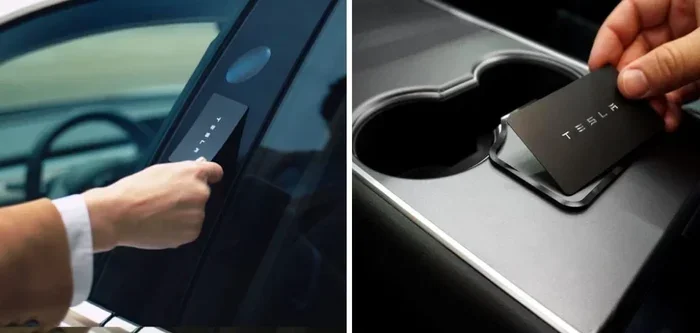
Every Tesla comes with a key card that works as a backup locking method. If your phone key or key fob fails, you can tap the key card on the B-pillar to unlock and lock the car. This is a simple but essential backup that every Tesla owner should know about.
Tip 5: Teach Your Passengers
If you share your Tesla with family or friends, make sure they understand how auto lock works. Some passengers may try to manually unlock the doors after you have already walked away. This can confuse the system. A quick explanation goes a long way in ensuring smooth operation.
Common Mistakes to Avoid with Tesla Auto Lock
Even the best systems can be affected by user habits. Here are some common mistakes that Tesla owners make with auto lock and how to avoid them.
- Leaving the key fob inside the car: The car may not detect that you have walked away, so it will not auto lock. Always take your key fob or phone with you.
- Ignoring low battery warnings: A dying key fob battery leads to unreliable auto lock performance. Replace the battery when the car alerts you.
- Not checking the lock status: Rushing out of the car without verifying the lock can leave your vehicle vulnerable. Always take a quick second to confirm.
- Disabling auto lock without realizing it: It is easy to accidentally turn off walk-away locking in the settings. Periodically check that your preferred settings are still active.
- Relying solely on auto lock for security: While Tesla auto lock is reliable, it should be part of a broader security approach. Use Sentry Mode, park in well-lit areas, and keep your software updated.
Conclusion
Tesla auto lock is a smart, reliable, and highly convenient feature that comes standard on every Tesla vehicle. It works through walk-away detection, drive-based triggers, and power-off sensors to keep your car secure without any effort from you. The system is fully customizable through the touchscreen and the Tesla mobile app, giving you complete control over how and when your car locks.
Whether you drive a Model 3, Model Y, Model S, or Model X, you can count on Tesla auto lock to work seamlessly as part of your daily routine. Combined with Tesla security features like Sentry Mode and the mobile app alerts, it forms a comprehensive safety net for your vehicle. The Tesla door lock mechanism is engineered to be both intuitive and dependable.
Take a few minutes to explore your lock settings, test the walk-away feature, and make sure everything is configured to your liking. A little setup goes a long way toward making your Tesla experience smoother and more secure. With Tesla auto lock working in the background, you can walk away with confidence every single time.
Frequently Asked Questions
How does Tesla know when to auto lock the doors?
Tesla uses a combination of sensors and Bluetooth detection to determine when you have walked away from the vehicle. When your phone key or key fob moves beyond a certain range, the car triggers the auto lock. This process is called walk-away door lock and it happens automatically within a few seconds of you leaving the vehicle.
Can I turn off Tesla auto lock if I prefer manual locking?
Yes, you can. Go to Controls on the touchscreen, then select Safety & Security, and tap Lock Settings. From there, you can toggle off the walk-away door lock feature. You can also disable lock-on-drive if you prefer to control locking manually. Tesla gives you full flexibility over how your vehicle locks and unlocks.
Does Tesla auto lock work when the car is charging?
Yes, Tesla auto lock works while the vehicle is charging at a charging station. The system operates independently of the charging state. However, some owners prefer to keep the car unlocked while charging so they can easily access the vehicle or adjust the charging cable. You can adjust this behavior in your lock settings.
What should I do if Tesla auto lock is not working properly?
First, check that your key fob battery is not low and that your phone key has Bluetooth enabled. Restart the touchscreen by holding down both scroll wheels on the steering wheel until the screen goes black. If the issue persists, check for a software update in the Software section of the settings menu. You can also visit a Tesla Service Center if the problem continues.
Is Tesla auto lock available on all trim levels?
Yes, Tesla auto lock is a standard feature across all trim levels and all models. There are no optional packages needed to access this functionality. Whether you have the base Model 3 or the high-end Model S Plaid, your vehicle includes the same auto lock capabilities.
Can someone unlock my Tesla if I have auto lock enabled?
Tesla’s auto lock system is designed to be secure. The doors lock automatically when you walk away, and they cannot be opened from the outside without a valid key. The Tesla security features including encrypted key communication and Sentry Mode monitoring add extra layers of protection. Your vehicle stays locked and safe when auto lock is active.