How Do I Remove Favorites From My Toyota Radio Fast
Removing favorites from your Toyota radio is a simple process once you know the right steps. Whether you use the Entune system, a touchscreen display, or traditional buttons, this guide walks you through every method. You will learn how to clear individual stations, reset your entire favorites list, and troubleshoot common issues.
Have you ever scrolled through your Toyota radio and found a bunch of stations you no longer listen to? Maybe you set them months ago and forgot about them. Or perhaps you just want a fresh start with your audio presets. Whatever the reason, removing favorites from your Toyota radio is something every Toyota owner should know how to do.
The good news is that it is much easier than most people think. You do not need a mechanic, a special tool, or even a manual. In this guide, we will show you exactly how to delete favorites from Toyota radio systems, no matter which model or year you drive. We will cover everything from the basic steps to advanced troubleshooting tips.
By the end of this article, you will feel confident managing your Toyota infotainment system and keeping your radio presets clean and organized. Let us get started.
Key Takeaways
- Easy Access: You can remove favorites directly from the Toyota radio screen in just a few taps.
- Multiple Methods: Different Toyota models use different systems, so we cover all approaches.
- No Special Tools Needed: Everything can be done right from the driver’s seat.
- Full Reset Option: A factory reset clears all favorites and restores default settings.
- Prevents Clutter: Regularly managing your favorites list keeps your radio experience smooth.
📑 Table of Contents
- Understanding Your Toyota Radio System
- Step-by-Step Guide to Remove Favorites From Toyota Radio
- How to Reset Your Entire Toyota Radio
- Common Problems When Removing Favorites
- Tips to Manage Your Toyota Radio Favorites Efficiently
- When Should You Consider a Full Radio Reset?
- Quick Tips for Different Toyota Models
- Expert Insights on Toyota Radio Management
- Key Takeaways
- Conclusion
Understanding Your Toyota Radio System
Before you start removing favorites, it helps to understand what you are working with. Toyota uses different infotainment systems depending on the model and year of your vehicle. Each system has its own way of handling radio favorites.
What Is the Toyota Entune System?
The Toyota Entune system is Toyota’s flagship multimedia platform. It comes with a touchscreen display, Bluetooth connectivity, and radio presets. Many Toyota owners use Entune to manage their favorite radio stations, music apps, and navigation settings. If your Toyota has a screen on the dashboard, there is a good chance it runs Entune or a similar system.
Some older Toyota models use a simpler radio interface without a touchscreen. In those cases, you will use physical buttons or a dial to navigate and manage favorites. Both systems allow you to store and remove favorite stations, but the process differs slightly.
How Toyota Radio Favorites Work
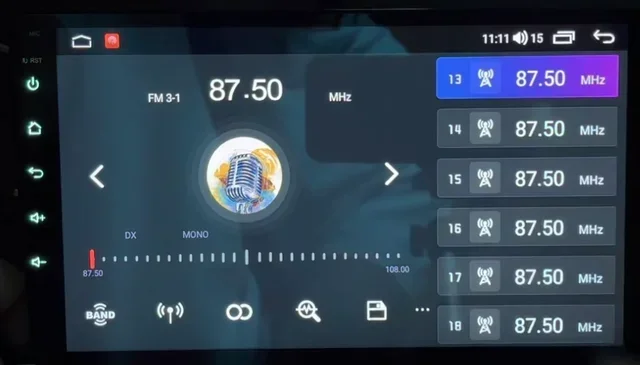
Toyota radio favorites are essentially saved presets. When you tune into a station you like, you can save it to a numbered button or a favorites list. This lets you jump to that station instantly without scrolling through the dial. Over time, these lists can fill up with stations you no longer use.
The favorites system stores data in the radio’s memory. This means the stations stay saved even when you turn off the engine. To remove them, you need to access the radio settings and delete them one by one or clear the entire list.
Some Toyota owners also ask about related tech features. For example, if you have ever wondered can I start my Highlander with my phone, the answer is yes, and it involves the same Entune system that manages your radio favorites.
Step-by-Step Guide to Remove Favorites From Toyota Radio
Now let us get into the actual steps. We will walk you through the most common methods for deleting favorites on Toyota radio. Follow the instructions that match your vehicle.
Method 1: Using the Touchscreen (Entune 3.0 and Newer)
If your Toyota has a touchscreen display, removing favorites is straightforward. Here is exactly what to do:
- Press the Radio button on the dashboard or touchscreen to open the radio interface.
- Tap the Favorites icon. It usually looks like a star or heart symbol.
- Find the station you want to remove from the list.
- Press and hold the station name or the delete button next to it.
- Select Remove from the popup menu that appears.
- Repeat for any other stations you want to delete.
That is it. Your favorites list will update immediately. The removed station will no longer appear in your list.
Some Toyota owners also use their radio system to manage other features. For instance, if you want to add photos to your display, you can learn how to add pictures to Uconnect from your phone using a similar Bluetooth and touchscreen process.
Method 2: Using Physical Buttons (Older Models)
For older Toyota models without a touchscreen, the process is slightly different. You will use the radio controls and preset buttons:
- Turn on the radio and tune to the station you want to remove.
- Press and hold the preset button where that station is saved.
- Look for a delete or remove option on the display.
- Confirm the deletion when prompted.
- Repeat for each preset button you want to clear.
This method works on models like the Toyota Camry, Corolla, and RAV4 from earlier years. The exact button layout may vary, so check your owner’s manual if you are unsure.
Method 3: Using the Toyota App and Remote Features
Newer Toyota models allow you to manage some settings through the Toyota app on your phone. While the app does not directly let you delete radio favorites, you can use it to reset certain system settings. This can be helpful if the touchscreen is not responding properly.
Some Toyota owners also use remote start features alongside their radio management. If you are curious about whether you can remote start your Toyota with the key fob, that is a separate but related tech feature that works through the same connectivity system.
How to Reset Your Entire Toyota Radio
Sometimes you do not just want to remove a few favorites. You want a complete fresh start. A full radio reset clears all favorites, presets, and custom settings. Here is how to do it.
Soft Reset vs. Factory Reset
There are two types of resets you can perform on a Toyota radio:
- Soft Reset: This restarts the radio system without erasing your saved data. It is useful when the radio is frozen or unresponsive. To soft reset, simply turn off the engine, remove the key, wait 30 seconds, and restart.
- Factory Reset: This erases all custom settings, including favorites, Bluetooth pairings, and display preferences. Use this only when you want a completely clean slate.
Performing a Factory Reset on Toyota Entune
To perform a factory reset on most Toyota Entune systems:
- Press and hold the Volume knob for about 10 to 15 seconds.
- Navigate to the Setup or Settings menu on the screen.
- Select Restore Factory Settings.
- Confirm your choice when prompted.
- Wait for the system to restart. This may take a minute or two.
After the reset, all your favorites will be gone. You will need to set up your radio preferences again from scratch.
It is worth noting that a factory reset affects more than just your radio. It resets the entire infotainment system. So make sure you really want to clear everything before you proceed.
Common Problems When Removing Favorites
Even though the process is usually simple, sometimes things do not go as planned. Here are the most common issues Toyota owners face when trying to remove radio favorites, and how to fix them.
The Delete Button Is Not Working
If you press and hold a station and nothing happens, try these fixes:
- Restart the radio system by turning it off and back on.
- Check for software updates. Toyota occasionally releases updates for Entune that fix bugs.
- Make sure you are pressing the right button. Some models require you to tap a small trash can icon instead of holding the station name.
Favorites Keep Coming Back After Deletion
This is a rare but frustrating issue. If your deleted favorites reappear, try a factory reset. The data may be stuck in a temporary cache that only a full reset can clear. You can also try disconnecting the battery for a few minutes to reset the radio memory completely.
Touchscreen Is Unresponsive
A frozen touchscreen can make it impossible to manage favorites. Try a soft reset first. If that does not work, you may need to visit a Toyota dealer. They can run diagnostics and fix any hardware issues with the display.
If you are dealing with other Toyota tech questions, you might find it helpful to check whether you can upgrade your Toyota Entune to the latest version, which often resolves these kinds of glitches.
Tips to Manage Your Toyota Radio Favorites Efficiently
Once you have cleaned up your favorites list, you will want to keep it organized. Here are some practical tips for managing your Toyota radio presets going forward.
Regularly Review Your Favorites
Set a reminder to review your favorites list every few months. Delete stations you no longer listen to. This keeps your list short and easy to navigate. A clean favorites list means less scrolling and more time enjoying your music.
Use Descriptive Names for Presets
If your Toyota radio allows custom names for presets, use them. Instead of just “Station 1,” label it with the station name or genre. This makes it much easier to find what you want quickly.
Limit Your Favorites to What You Actually Use
It is tempting to save every station you come across. But too many favorites create clutter. Keep only the stations you genuinely listen to on a regular basis. A focused list of 10 to 15 stations is usually plenty.
Take Advantage of Bluetooth and Streaming
Many Toyota models now support Bluetooth music streaming and apps like Spotify and Pandora. Instead of saving radio favorites, consider using streaming apps for your music. This takes the pressure off your radio presets and gives you access to millions of songs.
When Should You Consider a Full Radio Reset?
A full radio reset is not something you need to do often. But there are specific situations where it makes sense:
- You are selling or trading in your Toyota. Clearing all personal data, including favorites, protects your privacy.
- The radio system is running slowly. A reset can speed things up by clearing out stored data.
- You have done a lot of customizations. If you have changed many settings and want to start over, a factory reset is the fastest way.
- You are experiencing glitches. Random freezes, audio cutting out, or unresponsive buttons often resolve after a reset.
Remember that a factory reset will erase everything. So make sure you note down any important settings or Bluetooth pairings before you proceed.
Quick Tips for Different Toyota Models
Every Toyota model has slight differences in how the radio system works. Here are some quick tips for popular models:
- Toyota Camry: Use the touchscreen to access the Favorites menu. Press and hold a station to delete it. The Camry’s Entune system is very intuitive for managing presets.
- Toyota Corolla: Older Corolla models use physical preset buttons. Hold the button down for two seconds and select Remove from the menu.
- Toyota RAV4: The RAV4’s touchscreen makes it easy. Simply tap the star icon next to a saved station and choose Delete. The newer RAV4 models with the latest Entune also support voice commands for basic radio controls.
- Toyota Highlander: The Highlander has a larger screen, so managing favorites is very visual. You can also use the Toyota app to sync some settings remotely.
Expert Insights on Toyota Radio Management
Managing your Toyota radio favorites is really about keeping your driving experience personalized and clutter-free. Think of your favorites list like a playlist. You would not keep songs you never listen to in a playlist, right? The same logic applies to your radio presets.
Toyota designed the Entune system to be user-friendly, but it does require a little maintenance over time. Just like you check your oil level or rotate your tires, your radio system benefits from occasional cleanup. A few minutes spent deleting unused favorites can make a big difference in how smoothly your system runs.
One thing many Toyota owners overlook is the connection between the radio system and other vehicle features. For example, if you are having trouble with your radio and also wondering how to get your key out of the ignition, these issues can sometimes be related to the same electrical or system glitches. A radio reset might help with both.
Another important point is that Toyota updates its infotainment software regularly. These updates can improve performance, add new features, and fix bugs related to managing favorites. Always check for available updates if you are experiencing issues with your radio system.
Key Takeaways
- Simple Process: Removing favorites from your Toyota radio is quick and does not require any special tools or technical skills.
- Multiple Methods Available: Whether you have a touchscreen or physical buttons, there is a method that works for your model.
- Factory Reset Clears Everything: Use a factory reset only when you want to wipe all radio settings and start fresh.
- Regular Maintenance Helps: Periodically reviewing and cleaning your favorites list keeps your radio experience smooth.
- Software Updates Matter: Keeping your Entune system updated can fix many common issues with managing favorites.
- Model Differences Exist: Different Toyota models have slightly different interfaces, so check your specific model’s instructions.
Conclusion
Removing favorites from your Toyota radio is one of those small maintenance tasks that makes a big difference in your daily driving experience. Whether you want to delete a single station or reset your entire presets list, the steps are simple and doable in just a few minutes.
We have covered everything from the basic touchscreen method to factory resets and troubleshooting common problems. The key is to understand which Toyota radio system you have and follow the matching steps. With the tips and guidance in this article, you can keep your Toyota radio favorites list clean, organized, and tailored to your current listening habits.
Take a few minutes today to go through your favorites and remove the stations you no longer need. Your future self will thank you every time you hop in the car and find exactly the right station without any extra scrolling. A clean radio setup is a small thing that adds up to a much better driving experience.
Remember, managing your Toyota radio is just one part of staying on top of your vehicle’s technology. Whether you are dealing with radio presets, infotainment settings, or other Toyota features, staying proactive keeps everything running smoothly.
Frequently Asked Questions
Can I remove all favorites from my Toyota radio at once?
Yes, you can remove all favorites at once by performing a factory reset on your Toyota radio system. This will clear all saved presets and favorites, restoring the radio to its original settings. Keep in mind that this also erases other custom settings like Bluetooth pairings and display preferences.
Why can I not delete a favorite station from my Toyota radio?
If you cannot delete a favorite station, try restarting the radio system first. If the problem persists, check for software updates for your Entune system. In some cases, a factory reset is needed to clear stuck data that prevents deletion.
Does removing favorites from my Toyota radio delete my saved stations permanently?
Yes, once you remove a favorite station, it is permanently deleted from your radio memory. You will need to manually save it again if you want to add it back to your favorites list in the future.
How often should I clean up my Toyota radio favorites?
There is no set schedule, but reviewing your favorites every few months is a good habit. If you notice your list has become cluttered or you are having trouble finding stations quickly, it is time for a cleanup.
Can I remove favorites from my Toyota radio using the Toyota mobile app?
The Toyota mobile app does not currently allow direct management of radio favorites. However, you can use the app to manage other connected features. For managing radio favorites, you need to use the radio interface directly in your vehicle.
Will a factory reset affect other Toyota radio features besides favorites?
Yes, a factory reset clears all custom radio settings, including presets, Bluetooth connections, display themes, and audio equalizer settings. You will need to reconfigure these features after the reset is complete.