How To Charge A Tesla Rental Car
Charging a Tesla rental car is simple once you know the basics. This guide covers Superchargers, Level 2 charging, costs, and practical tips to keep your rental powered up. Whether you are picking up a Tesla for a road trip or a weekend getaway, you will learn exactly how to charge it quickly and efficiently.
Renting a Tesla is one of the best ways to experience electric driving. These cars are smooth, quiet, and packed with technology. But if you have never driven one before, you might wonder about charging. How do you plug it in? Where do you find a station? And how long does it take? This guide answers all of those questions and more.
Charging a Tesla rental car is easier than most people think. Tesla has built one of the largest charging networks in the world. You have options at home, at hotels, and at public stations. Whether you are new to electric vehicles or a seasoned driver, this article will help you feel confident.
If you are also curious about how electric vehicles compare to traditional cars, you might want to check out how a car battery works or whether a car can run without a battery. Understanding the basics helps you make the most of your rental experience.
## What You Need to Know Before Charging a Tesla Rental Car
Before you start, it helps to understand a few key things about Tesla charging. Not all chargers are the same, and not all charging speeds are equal. Knowing the differences saves you time and stress.
### How Tesla Batteries Work
Tesla cars use large lithium-ion battery packs. These packs store energy and power the electric motor. When you drive, the battery slowly depletes. When you charge, energy flows back into the pack.
The battery size depends on the model. A Tesla Model 3 has a smaller pack than a Model S. A Model Y holds more energy than a Model 3. When you rent a Tesla, the exact battery size varies. But the charging process works the same across all models.
One thing to keep in mind: electric vehicles behave differently from gas cars. You do not need to wait for a warning light. You can charge whenever it is convenient. In fact, topping off often is better for battery health.
### Types of Charging Levels
Tesla charging comes in three main levels. Each level has a different speed and use case.
Level 1 Charging uses a standard household outlet. It is the slowest option. You might add only 3 to 5 miles of range per hour. This is fine for overnight charging at home, but it is not ideal for road trips.
Level 2 Charging requires a 240-volt outlet, similar to what a dryer uses. It adds about 25 to 30 miles of range per hour. This is the most common option at hotels, parking garages, and some rental properties.
DC Fast Charging (also called Supercharging for Teslas) is the fastest option. It can add up to 200 miles of range in 15 to 30 minutes. These stations are found along highways and in cities.
If you want to learn more about how long different vehicles can sit without being driven, this article on how long a hybrid can sit without being driven offers useful insights about battery maintenance.
## Types of Charging Options for Tesla Rental Cars
When you pick up a Tesla rental, you have several charging options available. Let us break them down so you can plan your trips with confidence.
### Tesla Superchargers
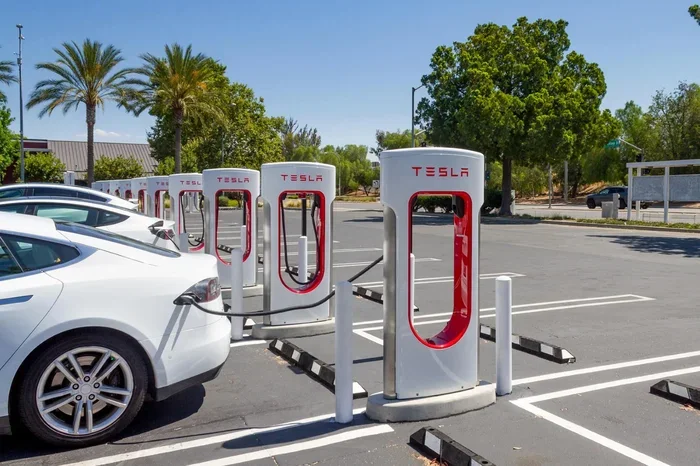
Tesla Superchargers are the backbone of the Tesla charging network. There are over 50,000 Superchargers worldwide. They are designed specifically for Tesla vehicles.
These stations use DC fast charging technology. They deliver high power directly to the battery. The result is very fast charging times. Most Tesla rentals come with access to the Supercharger network.
To use a Supercharger, simply pull into a stall. The car will recognize the charger automatically. You plug in, and the charging begins. You can monitor the progress on the touchscreen or through the Tesla app.
Superchargers are typically located near highways, shopping centers, and popular destinations. They are perfect for road trips and quick top-ups during busy days.
### Destination Chargers
Destination Chargers are Level 2 chargers placed at hotels, restaurants, and other locations. They charge more slowly than Superchargers but are great for overnight stays.
Many Tesla rental locations partner with hotels that offer Destination Chargers. This means you can park your car, plug it in, and wake up with a full battery. It is a very convenient option for travelers.
You can find Destination Chargers using the Tesla navigation system. The car will route you to nearby chargers automatically. This feature makes planning stops on a trip much easier.
### Home and Hotel Charging
If your rental includes a home or hotel charger, you are in luck. Level 2 home charging is the most affordable and convenient option. You simply plug the car in when you arrive and leave it overnight.
Some Tesla rental companies provide a mobile connector in the trunk. This device lets you plug into a standard outlet if needed. It is slower, but it works in a pinch.
For those wondering about fuel tank comparisons, you might find this article on how many gallons a car tank holds helpful for understanding the difference between electric and gas vehicles.
## Step-by-Step Guide to Charging Your Tesla Rental Car
Now that you know the options, let us walk through the actual process. Charging a Tesla rental car follows a simple routine. Here is exactly what to do.
### Step 1: Locate a Charging Station
Open the Tesla app on your phone. The app shows nearby charging stations on the map. You can filter by Supercharger, Destination Charger, or third-party charger.
If you are using the car’s built-in navigation, simply tap the charging icon. The system will suggest the best route to the nearest station. It also shows real-time availability of stalls.
Pro tip: Always check for station availability before you drive there. The app updates in real time. This saves you from arriving at a full station.
### Step 2: Park and Plug In
Pull into the charging stall. Make sure the car is parked correctly within the charging space. Do not block other stalls.
For Superchargers, the cable is attached to the station. Open the charging port on the car. On most Teslas, the port is on the rear left side. You can also open it from the touchscreen or the app.
Connect the charger to the car. The latch will click into place. You will hear a confirmation sound. The charging session has started.
### Step 3: Monitor the Charge
You can watch the charging progress on the car’s touchscreen. It shows the current charge level, estimated time to full, and power rate.
You can also check the status through the Tesla app. This is useful if you step away from the car. The app sends notifications when charging is complete.
Most Teslas stop charging automatically when the battery is full. You do not need to unplug manually unless you are in a hurry.
### Step 4: Pay and Unplug
For Superchargers, payment is automatic. The cost is linked to your Tesla account or the rental agreement. You do not need to do anything extra.
For Destination Chargers and some third-party stations, you may need to use an app or RFID card. Check with the rental company for specific payment instructions.
Once you are ready to go, press the button on the charger handle or the car door. The cable releases. You are all set to drive.
If you are interested in how long it takes to build a car from scratch, this article on how many man hours it takes to build a car provides fascinating insights into the manufacturing process.
## How Long Does It Take to Charge a Tesla Rental Car?
Charging time depends on several factors. The charger type, battery size, and starting charge level all play a role. Here is a realistic breakdown.
### Supercharger Charging Times
A Tesla Supercharger can charge a battery from 10% to 80% in about 25 to 40 minutes. This is the sweet spot for fast charging. Going from 80% to 100% takes longer because the car slows down the charge rate to protect the battery.
For example, a Tesla Model 3 with a mid-range battery can gain about 75 miles of range in 15 minutes at a Supercharger. A Model S or Model X takes a bit longer due to larger batteries, but still charges very quickly.
### Level 2 Charging Times
A Level 2 charger adds roughly 25 to 30 miles of range per hour. A Tesla Model 3 with a depleted battery might take 6 to 8 hours to fully charge on a Level 2 station.
This is why Level 2 charging is best for overnight use. You plug in before bed, and you wake up with a full battery in the morning.
### Level 1 Charging Times
Level 1 charging is very slow. It adds only 3 to 5 miles of range per hour. A full charge from empty could take 40 to 50 hours on a standard outlet.
This option is only practical in emergencies. It is not suitable for daily use or road trips. But it can save you if you are stuck with no other option.
If you are curious about how long a factory takes to build a car, this article on how long a factory takes to build a car offers interesting comparisons between manufacturing time and charging time.
## Tips for Maximizing Your Tesla Rental’s Battery Range
Getting the most out of your Tesla rental battery is all about smart driving and charging habits. Here are practical tips that make a real difference.
### Drive Efficiently
Tesla cars are most efficient at moderate speeds. Driving at 65 to 70 mph on the highway gives you the best range. Going faster drains the battery more quickly.
Use regenerative braking to your advantage. When you lift your foot off the accelerator, the car slows down and recovers energy. This extends your range significantly.
Keep the cabin temperature comfortable but not extreme. Heating and cooling the cabin uses battery power. Pre-conditioning the car while it is still plugged in saves energy for driving.
### Plan Your Charging Stops
For road trips, plan your stops ahead of time. Use the Tesla navigation to find Superchargers along your route. The system automatically adds charging stops to your trip plan.
Try to charge to 80% at each stop. Charging beyond 80% takes much longer and is not necessary for most trips. Stopping at 80% keeps your trip moving smoothly.
If you are renting a Tesla for a city trip, look for Destination Chargers at your hotel and nearby restaurants. You can charge while you eat or sleep.
### Keep the Battery Healthy
Tesla batteries last longer when you follow a few simple rules. Do not let the battery drop below 10% regularly. Try to keep it between 20% and 80% for daily use.
If you are not driving the car for an extended period, charge it to about 50%. This is the optimal storage level. It prevents battery degradation over time.
For more information about battery care, you might want to read about how long a Prius battery lasts or whether a car battery can die while driving. These articles cover general battery health topics that apply to all vehicles.
## Common Charging Mistakes to Avoid
Even experienced EV drivers make charging mistakes. Here are the most common ones and how to avoid them.
### Letting the Battery Get Too Low
Running the battery down to near zero puts extra stress on the pack. It can also leave you stranded if a charger is not nearby. Make it a habit to plug in whenever the battery drops below 20%.
### Ignoring the Charging Cable Condition
Before you plug in, always inspect the charging cable. Look for frayed wires, cracked insulation, or damaged connectors. A damaged cable can cause slow charging or even safety issues.
If the cable looks worn, do not use it. Report the issue to the rental company immediately. They can provide a replacement cable.
### Overcharging at Superchargers
Leaving your Tesla at a Supercharger after it reaches 100% is not ideal. The car continues to draw small amounts of power to maintain the charge. This wastes energy and can slightly reduce battery longevity.
Unplug as soon as the car reaches your target charge level. For most trips, 80% to 90% is plenty.
### Not Using the Right Adapter
Tesla uses a standard connector for its Superchargers and Destination Chargers. But some third-party charging stations require an adapter. Check if your rental includes an adapter for non-Tesla chargers.
If you need to use a different charging network, make sure you have the correct adapter before you arrive. This avoids unnecessary delays.
For those wondering about tire maintenance during your rental, this article on whether you need a tool to change windshield wipers might seem unrelated, but it highlights the importance of checking all car features before hitting the road.
## Frequently Asked Questions
Can I charge a Tesla rental car at any charging station?
Tesla Superchargers are exclusive to Tesla vehicles, so you can use those without any issues. However, for third-party charging stations, you may need an adapter. Many Tesla rental companies provide a CCS or CHAdeMO adapter, but you should confirm this with the rental company before your trip.
How much does it cost to charge a Tesla rental car?
Supercharger costs typically range from $0.25 to $0.40 per kWh, depending on location and time of day. Home charging costs much less, usually around $0.10 to $0.15 per kWh. Some Tesla rental agreements include free Supercharging, so check your rental terms carefully.
Do I need to return the Tesla rental with a full battery?
This depends on the rental company’s policy. Most companies require you to return the car with the same charge level you received it. If you picked it up at 80%, you should return it at 80%. Always check the rental agreement for specific charging requirements.
What happens if the Tesla rental runs out of charge?
If your Tesla runs out of charge, you will need to call roadside assistance. Tesla offers a towing service that can bring a mobile charger or transport the car to the nearest Supercharger. Most rental companies also provide a roadside assistance number in the rental paperwork.
Can I charge the Tesla rental car at home?
Yes, if your rental includes a home charging setup. Many Tesla rental companies provide a mobile connector that works with a standard household outlet. For faster charging, some rentals include a Level 2 home charger. Check with your rental provider for what charging equipment is included.
Is it safe to charge a Tesla in the rain?
Absolutely. Tesla charging systems are designed to be weatherproof. The charging port and cable are sealed and insulated. You can safely charge your Tesla rental in rain, snow, or any weather condition. The car and charger automatically manage the electrical connection safely.
## Final Thoughts
Charging a Tesla rental car does not have to be complicated. With the right knowledge, you can charge quickly, efficiently, and confidently. Tesla’s Supercharger network makes long trips easy. Level 2 chargers at hotels make overnight stays seamless. And the Tesla app keeps you connected every step of the way.
The key is to plan ahead and understand your charging options before you hit the road. Know where the stations are, check your battery level regularly, and follow the simple tips in this guide. You will enjoy a smooth, stress-free electric driving experience.
If you are new to electric vehicles, give yourself grace. It takes a little time to get used to the charging routine. But once you do, you will wonder how you ever drove a gas car.
Remember, every charging session is a chance to learn. The more you charge, the more comfortable you become. Soon, it will feel like second nature.
Enjoy your Tesla rental, and happy driving. The road ahead is electric, and it is going to be a great ride.
Key Takeaways
- Tesla Superchargers are the fastest option: They can add up to 200 miles of range in just 15-30 minutes.
- You can charge at home or at your hotel: A Level 2 charger takes several hours but is convenient overnight.
- The Tesla app makes finding chargers easy: It shows real-time availability and directions to nearby stations.
- Charging costs vary widely: Superchargers cost more per kWh than home charging, but it is still cheaper than gas.
- Avoid common mistakes: Do not let the battery drop below 10%, and always check the charging cable before you plug in.
Frequently Asked Questions
What is How to Charge a Tesla Rental Car?
How to Charge a Tesla Rental Car is an important topic with many practical applications.