How to Remote Start Honda Civic 2023 Fast and Easy
This guide shows you how to remote start Honda Civic 2023 using the key fob and HondaLink app. You’ll learn the exact steps, setup tips, and troubleshooting tricks to get the most from your vehicle’s factory system. Remote start Honda Civic 2023 is fast, secure, and incredibly easy once you know the process.
The 2023 Honda Civic is one of the most popular compact sedans on the road. It offers a blend of fuel efficiency, sporty design, and modern technology. One feature that many owners love is the ability to remote start Honda Civic 2023 from the comfort of their home. Whether you are dealing with a freezing morning or a hot afternoon, remote start makes your driving experience smoother.
Knowing how to use this feature properly can save you time and extend the life of your engine. This guide covers everything you need to know. We will walk you through the step-by-step process, explain the different methods, and share tips to avoid common pitfalls.
Key Takeaways
- The 2023 Honda Civic supports remote start on most trims without any aftermarket parts.
- You can use the key fob or the HondaLink app to start the engine from a distance.
- Always press the brake pedal before driving after a remote start.
- Keep the key fob battery fresh to maintain reliable signal range.
- Remote start runs for up to 10 minutes before automatically shutting off.
- The system locks doors and prevents theft automatically during the remote start cycle.
- Customize climate presets for a perfectly tempered cabin every time.
📑 Table of Contents
- Does the 2023 Honda Civic Come with Remote Start?
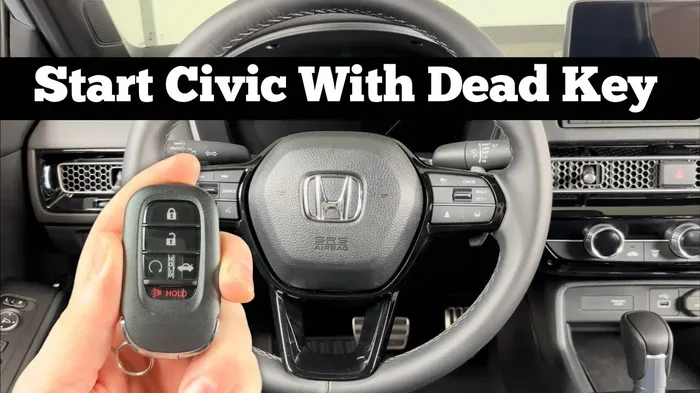
- How to Remote Start Honda Civic 2023 Using the Key Fob
- Using the HondaLink App for Remote Start
- Setting Up and Customizing Your Remote Start System
- Troubleshooting Common Remote Start Issues
- Safety Tips and Best Practices for Remote Starting
- Conclusion
Does the 2023 Honda Civic Come with Remote Start?
Yes, the 2023 Honda Civic includes a remote start system as part of its technology package. The feature works with the key fob and the HondaLink app. You do not need any expensive aftermarket add-ons if you have the right trim level. The base LX trim may not include remote start, but the Sport, EX, Touring, and Si trims typically offer it. Always check your specific model’s equipment list to confirm.
The factory remote start system is designed to work seamlessly with the vehicle’s ignition and security features. It uses a proximity sensor and encrypted signals to prevent theft. This means your remote start Honda Civic 2023 is both convenient and secure.
What You Need to Use Remote Start
- A programmed key fob with a working battery
- A vehicle with the remote start package installed
- A compatible smartphone with the HondaLink app (optional)
How to Remote Start Honda Civic 2023 Using the Key Fob
The key fob method is the fastest way to start your car. You do not need to press any buttons inside the vehicle. Follow these simple steps to get your engine running.
Step 1: Press the Remote Start Button
On the key fob, locate the remote start button. It is usually marked with a circular arrow or the word “Remote.” Press it once. You will see the parking lights flash, and the engine will turn on after a few seconds. The climate control system will activate automatically if you had set it before.
Step 2: Confirm the System is Active
Look at the dashboard. The engine icon should be lit, and the climate control display will show the selected temperature. The doors remain locked, and the vehicle stays in accessory mode. You have up to 10 minutes before the engine shuts off automatically, giving you plenty of time to walk to the car.
Step 3: Enter the Vehicle
Approach the car with the key fob inside your pocket. The doors will unlock automatically when you pull the handle. Press the push button start to turn off the remote start mode and drive away. This entire process takes less than 30 seconds.
Using the HondaLink App for Remote Start
If you prefer using your phone, the HondaLink app offers a powerful alternative. It allows you to start the engine from anywhere with a cellular signal. This is especially useful if you forgot to start the car before leaving the office.
Downloading and Setting Up the App
Visit the App Store or Google Play and search for “HondaLink.” Download the app and create an account. You will need your vehicle identification number (VIN) and a registered email address. Follow the on-screen prompts to link your remote start Honda Civic 2023 to the app.
Once linked, you can access the remote start feature from the home screen. The app also lets you lock doors, flash lights, and check fuel levels. While the Toyota remote start system works similarly, HondaLink offers a streamlined interface for Civic owners.
Starting the Car via the App
Open the HondaLink app and tap the “Remote Start” button. You will be prompted to enter a PIN for security. After verification, the engine will start. You can set a timer for 10 or 15 minutes. The app will notify you when the timer is about to expire. This method is perfect for those cold winter mornings when you want the car fully warmed up.
Key Fob vs HondaLink App: Which Is Better?
Both methods are reliable, but they serve different needs. Here is a quick comparison to help you decide.
| Feature | Key Fob | HondaLink App |
|---|---|---|
| Range | Up to 50 meters | Anywhere with cellular signal |
| Setup | Built-in, no extra steps | Requires app download and pairing |
| Security | Encrypted fob signal | PIN protection and login |
| Best For | Quick daily starts | Starting from a distance or office |
Setting Up and Customizing Your Remote Start System
Customizing your remote start settings ensures the system works exactly the way you want. You can adjust the climate control presets and set automatic engine shutdown timers.
Programming Climate Control Presets
Before using remote start, set your desired temperature inside the car. Use the climate control panel to choose a comfortable setting. The system will remember this preference and apply it every time you remote start. This feature is a lifesaver during cold weather when you want the seats warm and the defroster running.
Adjusting the Engine Run Time
By default, the engine runs for 10 minutes. You can shorten this to 5 minutes if you prefer. The system automatically shuts off after the set time to save fuel and reduce emissions. If you need more time, you can repeat the remote start process while inside the vehicle.
Common Mistakes to Avoid
Many owners make simple errors that prevent remote start from working. One common mistake is leaving the key fob too far away. The system requires the fob to be within a certain range. Another mistake is trying to remote start while the car is already running. Always check that the engine is off before pressing the button. If you are using the HondaLink app, ensure your phone has a stable internet connection. A weak signal can delay the start command.
Some drivers also forget to lock the doors before remote starting. While the system locks the doors automatically, it is good practice to double-check. For those who have learned the basics of driving, these tips will feel familiar and easy to follow.
Troubleshooting Common Remote Start Issues
Even with a factory-installed system, you may encounter occasional issues. Most problems are simple to fix without a visit to the dealer.
Remote Start Does Not Respond
If pressing the button on the key fob does nothing, check the battery. A weak fob battery is the most common cause. Replace it with a CR2032 battery, which is inexpensive and widely available. If the battery is new, stand closer to the vehicle and try again. The remote start range is typically around 50 meters.
Engine Starts but Immediately Stalls
This issue often relates to the brake pedal position sensor. The system requires the brake pedal to be pressed before the engine will stay running. When you remote start, the engine will start but remain in a ready state. You must press the brake and the start button to fully engage the engine. If it stalls, the brake sensor might need recalibration.
HondaLink App Shows an Error Message
App errors usually occur due to server maintenance or outdated software. Check the HondaLink status page for any service disruptions. Restart the app and ensure your phone’s operating system is up to date. You can also try logging out and back in. If the problem persists, contact Honda customer support.
Safety Tips and Best Practices for Remote Starting
Remote start is safe when used correctly. The system is designed with multiple layers of security. Your vehicle cannot be driven without the key fob inside the cabin. This prevents theft and unauthorized use.
Security Features of the 2023 Civic Remote Start
- The engine automatically shuts off if someone tries to move the vehicle without the key fob
- The doors remain locked during the remote start cycle
- The system requires the fob to be within proximity to shift into gear
Expert Insights on Remote Start Usage
According to Honda technicians, remote start is best used for warming up the engine in cold climates. It allows the oil to circulate before you drive. However, idling for long periods is not recommended for modern engines. The 2023 Civic’s direct injection engine benefits from a brief warm-up, but driving gently is the best way to bring the engine to operating temperature. If you want to compare features across brands, the Acura Mdx remote start offers similar functionality with additional luxury features.
Quick Tips for Maximum Comfort
Here are a few quick tips to get the most out of your remote start system:
- Set your climate control to your preferred temperature every time you park
- Use the 10-minute timer and repeat the start if needed
- Keep the key fob battery fresh to avoid signal issues
- Always lock the doors before walking away
- Use remote start only when the car is parked in a well-ventilated area
Conclusion
Mastering the remote start Honda Civic 2023 feature is easier than you think. With just a few button presses on your key fob or a tap on your phone, you can enjoy a perfectly tempered cabin every time. The system is secure, convenient, and built into the vehicle’s core technology. By following the steps outlined in this guide, you will avoid common mistakes and get the most from your Civic.
Take a few minutes today to test your remote start system. Familiarize yourself with the key fob buttons and the HondaLink app. Once you make it a habit, you will wonder how you ever managed without it. Your 2023 Honda Civic is ready to start at your command.
Frequently Asked Questions
Can I remote start my Honda Civic 2023 with the key fob?
Yes, the 2023 Honda Civic supports remote start directly from the key fob. Simply press the remote start button on the fob while within range of the vehicle. The engine will start within a few seconds and the doors will remain locked.
Do I need the HondaLink app to remote start my Civic?
No, the HondaLink app is optional. You can use the key fob for all remote start needs. The app is a convenient alternative if you want to start the car from a longer distance or when you do not have the physical fob with you.
Why does my remote start shut off after 10 minutes?
The factory system is programmed to automatically shut off the engine after 10 minutes to save fuel and reduce emissions. If you need more time, you can repeat the remote start process while standing near the vehicle.
Is it safe to remote start my car in an enclosed garage?
You should never remote start your car in an enclosed garage. The exhaust contains carbon monoxide, which can be dangerous. Always use remote start in a well-ventilated area or outdoors.
What should I do if the remote start button does not work?
First, check the key fob battery and replace it if needed. Stand closer to the vehicle and try again. If the problem persists, the fob may need reprogramming, which a Honda dealer can handle quickly.
Can I adjust the climate control before remote starting?
Yes, the system remembers your last climate control settings. Set your desired temperature before you leave the car, and the system will apply it automatically when you remote start the engine next.