How to Reset the Maintenance Light on Toyota Corolla 2010
Resetting the maintenance light on your Toyota Corolla 2010 is a simple process you can do at home in just a few minutes. This guide walks you through the exact steps using your steering wheel controls and trip meter. You will also learn why the light comes on, how to avoid common mistakes, and when to seek professional help.
The maintenance light on your Toyota Corolla 2010 is one of those dashboard indicators that catches you off guard. You are driving along, minding your own business, and suddenly that little wrench symbol lights up on your instrument panel. It is easy to feel a little panicked. But here is the good news. Resetting the maintenance light on a Toyota Corolla 2010 is something you can do yourself at home. You do not need expensive tools or a trip to the dealership. In this guide, we will walk you through every step of the process. We will also explain why the light comes on, what it means for your vehicle, and how to avoid common pitfalls. Whether you just finished an oil change or the light popped up unexpectedly, this article has you covered.
Let us be real for a second. Dashboard warning lights can be confusing. There is the check engine light, the tire pressure light, the battery light, and then there is the maintenance light. Each one signals something different. The maintenance light, sometimes called the service reminder or service indicator, is specifically tied to your vehicle’s maintenance schedule. It is not a sign that something is broken. Instead, it is a friendly nudge from your car telling you it is time for routine upkeep. On the Toyota Corolla 2010, this light typically appears as a small wrench icon on the dashboard. Once you understand what it means, the reset process becomes much less intimidating.
Before we dive into the step by step reset procedure, let us talk about why this light matters. The maintenance light on your Toyota Corolla 2010 is connected to the vehicle’s onboard computer system. This system tracks your driving habits, mileage, and time intervals. When the computer determines that a service interval has been reached, it triggers the light. For most Toyota Corolla 2010 models, this happens every 5,000 miles or every six months, whichever comes first. The light serves as your personal maintenance reminder. It helps you stay on top of oil changes, tire rotations, fluid checks, and other essential services. Ignoring this light for too long can lead to missed maintenance, which over time may affect your engine health and overall vehicle performance.
Now, let us get into the practical part. Below you will find the complete process for resetting the maintenance light on your Toyota Corolla 2010. Follow these steps carefully and you will have that annoying light off in no time.
Key Takeaways
- Easy DIY Process: You can reset the maintenance light on your Toyota Corolla 2010 without visiting a mechanic or dealership.
- Steering Wheel Controls: The reset is done using buttons on your steering wheel and the trip meter display.
- Oil Life Monitor Reset: Resetting the maintenance light also resets your oil life monitor after an oil change.
- Common Mistakes Exist: Holding buttons too long or too short can cause the reset to fail, so timing matters.
- Regular Maintenance Matters: Keeping up with your maintenance schedule helps prevent unexpected dashboard warnings.
- Multiple Methods Work: There are more than one way to reset the light depending on your trim level.
📑 Table of Contents
- Step by Step Guide to Reset the Maintenance Light
- Understanding the Toyota Corolla 2010 Maintenance System
- Common Mistakes When Resetting the Maintenance Light
- Alternative Reset Methods for Different Trim Levels
- When to Seek Professional Help
- Tips for Staying on Top of Your Toyota Corolla 2010 Maintenance
- Why Regular Maintenance Matters for Your Toyota Corolla 2010
- Quick Tips for a Smooth Reset Process
- Conclusion
Step by Step Guide to Reset the Maintenance Light
Step 1: Turn the Ignition to the On Position
First, make sure your Toyota Corolla 2010 is parked and the engine is off. Insert your key into the ignition. Turn it to the “On” position. This is the position where the dashboard lights up but the engine is not running. You should see all your instrument panel lights activate momentarily. This is normal. You are not starting the car yet. You are simply powering up the electrical system. This step is crucial because the reset procedure requires the vehicle’s computer to be active but the engine to be off.
Step 2: Locate the Trip Meter Reset Button
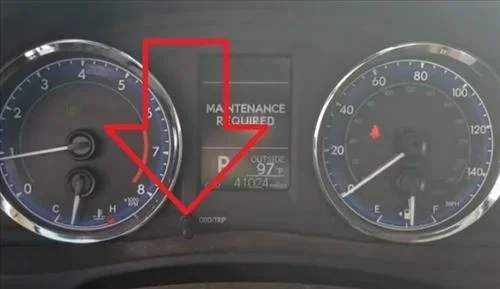
Next, look at the instrument cluster on the left side of your dashboard. Near the speedometer and tachometer, you will find the trip meter display. On the right side of the steering wheel, you will see a set of buttons. One of these buttons is labeled “Trip” or “Reset.” Press and hold the “Trip” button. You need to keep holding it while you move to the next step. This button controls the trip odometer and also serves as the reset trigger for the maintenance light.
Step 3: Toggle the Odometer Display
While continuing to hold the trip button, use the small toggle or scroll buttons nearby to switch the display from the trip meter reading to the odometer reading. You want the odometer number to appear on the instrument panel display. The odometer shows your total mileage. This is the screen you need to see before proceeding to the next step. If you see the trip A or trip B reading instead, keep pressing the toggle until the odometer appears.
Step 4: Release the Trip Button and Turn the Key
Here is where timing matters. While still holding the trip button, turn the ignition key to the “Off” position and then back to the “On” position. Keep holding the trip button as you do this. After a moment, you should see the odometer reading start to flash. This flashing indicates that the system is in reset mode. Once you see the flashing, release the trip button.
Step 5: Press and Hold the Trip Button Again
Now press and hold the trip button once more. Hold it for about five seconds. You should see the odometer reading reset to zero or the maintenance light turn off. If the light goes out and the odometer resets, congratulations. You have successfully completed the Toyota Corolla 2010 maintenance light reset. If nothing happens, repeat the process from Step 1. Sometimes it takes a second attempt.
Step 6: Start the Engine and Verify
Turn the ignition to start the engine. Take a look at the dashboard. The maintenance light should no longer be visible. The wrench icon should be gone from the instrument panel. If the light is still on, do not worry. You can try the process again. In rare cases, you may need to repeat the entire sequence two or three times for it to take effect.
Understanding the Toyota Corolla 2010 Maintenance System
The maintenance system in your Toyota Corolla 2010 is more sophisticated than a simple timer. It uses a smart algorithm to determine when service is due. The system considers several factors to decide when to trigger the maintenance light.
How the Oil Life Monitor Works
The oil life monitor is a key component of the maintenance system. It tracks not just mileage but also driving conditions. Factors like engine temperature, idle time, driving speed, and load all play a role. If you frequently drive in stop and traffic or in extreme temperatures, the system may trigger the maintenance light sooner. This is actually a good thing. It means your car is being smart about protecting your engine. After you get your oil changed, you will need to reset the oil life monitor as part of the maintenance light reset process. If you want more details on this specific reset, you can check out our guide on how to reset your oil life for additional tips.
What Triggers the Maintenance Light
Several things can cause the maintenance light to come on in your Toyota Corolla 2010:
- Mileage Interval: The most common trigger. The light comes on every 5,000 miles.
- Time Interval: Even if you have not driven 5,000 miles, six months will trigger the light.
- Oil Life Expiration: When the oil life monitor reaches zero percent.
- Scheduled Service Due: The system tracks upcoming services like tire rotations and inspections.
- After Oil Change: The light may stay on if the system was not properly reset after service.
Maintenance Light vs Check Engine Light
It is important to understand the difference between the maintenance light and the check engine light. The maintenance light is a routine reminder. It is not an emergency. The check engine light, on the other hand, signals a potential problem with your vehicle’s emissions system or engine. If your check engine light is on, you should address it promptly. You can learn more about dashboard warning lights in our article on getting rid of the service light on your dashboard.
Common Mistakes When Resetting the Maintenance Light
Even though the reset process is straightforward, many people make avoidable mistakes. Here are the most common errors and how to prevent them.
Mistake 1: Releasing the Trip Button Too Early
Timing is everything in this process. If you release the trip button before the odometer starts flashing, the reset will not work. You need to hold the button through the entire sequence. Some people release the button too soon because they think the system has responded. Patience is your best friend here.
Mistake 2: Turning the Key Too Fast
When moving the ignition from “Off” to “On,” do it smoothly. A quick, jerky motion can confuse the vehicle’s computer. The transition needs to be clean and deliberate. Think of it as a gentle movement rather than a snap.
Mistake 3: Not Resetting the Oil Life Monitor
Resetting the maintenance light and resetting the oil life monitor are two different actions on some Toyota models. Make sure both are reset after an oil change. If only the maintenance light is reset, the oil life monitor may still show that service is overdue. This can cause confusion and unnecessary trips to the service center.
Mistake 4: Trying to Reset with the Engine Running
The reset procedure requires the engine to be off. If you attempt it while the engine is running, the system will not enter reset mode. Always start with the engine completely off and the ignition in the “On” position.
Mistake 5: Ignoring the Light After Reset
If the maintenance light comes back on shortly after you reset it, there may be an underlying issue. The light could be signaling that a service item was not completed. Do not just reset it and forget about it. Investigate the cause.
Alternative Reset Methods for Different Trim Levels
Not all Toyota Corolla 2010 models have the same dashboard layout. Depending on your trim level, you may have slightly different controls. Here are a few alternative approaches.
Using the Steering Wheel Controls
Some Toyota Corolla 2010 models use the steering wheel buttons for the reset process. On these models, you will use the arrow buttons on the left side of the steering wheel to navigate the display menu. Press the “Menu” button, scroll to the maintenance menu, and select “Reset.” This method works well for models with a more advanced instrument cluster display.
Using the Odometer Button
On older trim levels, the reset process may involve the odometer button located on the dashboard itself rather than on the steering wheel. Press and hold the odometer button while turning the ignition to the “On” position. The maintenance light should reset after a few seconds. This method is simpler but less commonly used on the 2010 model year.
Using the Vehicle Info Display
If your Toyota Corolla 2010 has the multi information display, the process is slightly different. Navigate to the “Vehicle Info” menu using the steering wheel controls. Select “Maintenance Reset” and follow the on screen prompts. This is the most user friendly method if your model has this feature.
When to Seek Professional Help
Most of the time, resetting the maintenance light is a simple DIY task. However, there are situations where you should consider professional assistance.
- The Light Will Not Turn Off: If you have tried the reset process multiple times and the light stays on, there may be a deeper electrical issue.
- The Light Keeps Coming Back: A recurring maintenance light could indicate an unresolved service item or a faulty sensor.
- Multiple Dashboard Lights Are On: If the maintenance light appears alongside other warning lights, do not attempt a DIY reset. Visit a mechanic.
- You Are Uncomfortable with the Process: There is no shame in visiting a dealership or mechanic. Many will reset the light for free as part of routine service.
For more information about dashboard lights and what they mean, check out our article about driving safely with warning lights on. Understanding your dashboard signals helps you make better decisions about when to DIY and when to seek help.
Tips for Staying on Top of Your Toyota Corolla 2010 Maintenance
Resetting the maintenance light is just one part of the equation. Staying on top of your vehicle’s maintenance schedule is what keeps your Toyota Corolla running smoothly for years to come.
- Keep a Maintenance Log: Write down every oil change, tire rotation, and service visit. This helps you track your service intervals and stay organized.
- Use Quality Parts: Always use OEM or manufacturer recommended parts for your Toyota Corolla 2010. Cheap parts may save money upfront but can cause problems later.
- Follow the Maintenance Schedule: Your owner’s manual has a detailed maintenance schedule. Follow it closely. It is your roadmap for keeping the car in top shape.
- Set Reminders: Use your phone or calendar to set reminders for upcoming services. Do not rely solely on the maintenance light.
- Build a Relationship with Your Mechanic: A trusted mechanic knows your vehicle’s history and can provide personalized advice. Find someone you trust and stick with them.
If you want to create a structured plan for your vehicle, our guide on how to create a maintenance schedule can help you stay organized and never miss a service again.
Why Regular Maintenance Matters for Your Toyota Corolla 2010
Let us take a moment to talk about why maintenance matters so much. Your Toyota Corolla 2010 is a reliable car. It has earned a reputation for durability and longevity. But even the best cars need regular care. Skipping maintenance may seem harmless in the short term. You might not notice any immediate difference. But over time, neglected maintenance catches up with you. Oil gets dirty. Filters get clogged. Fluids lose their effectiveness. Tires wear unevenly. Brakes wear down. All of these small neglects add up to bigger problems and expensive repairs.
On the flip side, staying current with your maintenance schedule can significantly extend the life of your vehicle. Many Toyota Corolla owners report their cars lasting well beyond 200,000 miles. The secret is consistent, timely maintenance. The maintenance light is your car’s way of reminding you to take care of it. When you reset that light after completing service, you are acknowledging that you have taken care of your car. It is a small but important part of being a responsible car owner.
Regular maintenance also helps you maintain your vehicle’s resale value. If you ever decide to sell or trade in your Toyota Corolla 2010, a complete maintenance history is a huge selling point. Buyers are willing to pay more for a car that has been well cared for. So resetting the maintenance light and keeping up with service is not just good for your car. It is good for your wallet too.
Quick Tips for a Smooth Reset Process
- Have your owner’s manual handy: It contains model specific instructions that can help if you get stuck.
- Work in a well lit area: You need to see the dashboard display clearly to follow the steps correctly.
- Be patient: Do not rush through the steps. Each step needs a few seconds to register with the vehicle’s computer.
- Repeat if necessary: If the first attempt does not work, try again. The process is simple but requires precision.
- Complete your service first: Always perform the actual maintenance before resetting the light. Resetting without service just clears the reminder without addressing the need.
Conclusion
Resetting the maintenance light on your Toyota Corolla 2010 is a straightforward process that anyone can do at home. The key steps involve using the trip meter and steering wheel controls to navigate the vehicle’s onboard system and clear the service reminder. Remember to reset the oil life monitor as well, especially after an oil change. Avoid the common mistakes we outlined, and do not hesitate to seek professional help if the light refuses to turn off. Regular maintenance is the foundation of a long lasting, reliable Toyota Corolla. Keep up with your service schedule, reset the light when needed, and enjoy the confidence that comes with knowing your car is in great shape. Your Toyota Corolla 2010 has served you well. A little maintenance goes a long way in keeping it that way.
Frequently Asked Questions
How do I reset the maintenance light on a Toyota Corolla 2010?
Turn the ignition to the “On” position without starting the engine. Press and hold the trip button on the steering wheel, then toggle the display to show the odometer. Release the trip button, turn the key to “Off” and back to “On” while holding the trip button. When the odometer flashes, release the button and press and hold the trip button again for five seconds until the light turns off.
Why does the maintenance light keep coming back after I reset it?
If the maintenance light returns after you reset it, it usually means the underlying service has not been completed yet. The vehicle’s computer still detects that a maintenance interval has not been met. Double check that you have performed the required service, such as an oil change or tire rotation, and then try resetting again.
Can I drive my Toyota Corolla 2010 with the maintenance light on?
Yes, it is generally safe to drive with the maintenance light on. The light is a reminder for routine service, not an emergency warning. However, you should not ignore it for extended periods. Schedule your maintenance as soon as possible to keep your vehicle running properly and to avoid potential issues down the road.
What is the difference between the maintenance light and the check engine light on a Toyota Corolla 2010?
The maintenance light is a routine service reminder that appears at scheduled intervals. It is not a sign of a problem. The check engine light, however, indicates a potential issue with the engine or emissions system. If the check engine light is on, you should have your vehicle inspected as soon as possible.
Do I need any special tools to reset the maintenance light on a Toyota Corolla 2010?
No special tools are needed. You only need your ignition key and the steering wheel buttons. The entire reset process is done through the vehicle’s built in system. If you do not have access to the steering wheel controls, a quick visit to a mechanic or dealership can also accomplish the reset for free.
How often should I reset the maintenance light on my Toyota Corolla 2010?
You should reset the maintenance light every time you complete a scheduled service, such as an oil change or tire rotation. For most Toyota Corolla 2010 models, this happens every 5,000 miles or every six months. Always reset the light after confirming the service has been completed to keep your maintenance tracking accurate.