How to Turn Off Auto Hold on a Hyundai Tucson Explained
Turning off Auto Hold on a Hyundai Tucson is simple once you know where to look. This guide walks you through the exact steps, explains what Auto Hold does, and helps you troubleshoot common problems. Whether you are a new Tucson owner or have been driving one for years, you will find clear, actionable advice here.
Driving a Hyundai Tucson comes with a lot of modern tech. Some of it is brilliant. Some of it takes getting used to. Auto Hold is one of those features that can confuse new drivers. You press the brake, the car stays put, and you wonder how to turn it off. If you have been searching for how to turn off Auto Hold on a Hyundai Tucson, you are in the right place. This guide covers everything from the basic steps to troubleshooting common problems.
Let us be honest. Car features can feel overwhelming sometimes. Manufacturers add safety systems that are meant to help. But when you just want to roll forward a few feet in traffic, pressing the brake every time gets old fast. The good news is that turning off Auto Hold on your Tucson is straightforward. You just need to know where to look and what to do.
This article will give you a clear, step-by-step walkthrough. We will cover the button location, what Auto Hold actually does, and what to do if it is not working right. By the end, you will feel confident handling this feature on your own. No dealer visit needed for the basics.
Key Takeaways
- Auto Hold is a safety feature that keeps your Hyundai Tucson stationary without pressing the brake pedal.
- You can turn it off easily by pressing the Auto Hold button on the dashboard or center console.
- The button location varies slightly depending on your Tucson model year and trim level.
- Common issues include a glowing warning light or the feature not responding when you press the button.
- Regular maintenance helps keep all electronic features, including Auto Hold, working properly.
- Understanding your Tucson settings makes driving safer and more comfortable every day.
📑 Table of Contents
- What Is Auto Hold on the Hyundai Tucson?
- Where Is the Auto Hold Button on a Hyundai Tucson?
- Step-by-Step: How to Turn Off Auto Hold on a Hyundai Tucson
- Common Auto Hold Problems and How to Fix Them
- Should You Keep Auto Hold On or Off?
- How Auto Hold Compares to Similar Features in Other Brands
- Maintenance Tips to Keep Auto Hold Working Properly
- When to See a Professional About Auto Hold Issues
What Is Auto Hold on the Hyundai Tucson?
Before you learn how to turn something off, it helps to understand what it does. Auto Hold is an electronic feature found on many modern Hyundai vehicles. It automatically applies the brakes when you stop. This means you do not have to keep your foot on the brake pedal at traffic lights or in stop-and-go traffic.
When Auto Hold is active, your Tucson stays put even when you lift your foot off the brake. The system holds the car in place on flat ground and on gentle slopes. It uses sensors and the electronic braking system to keep your vehicle stationary. When you are ready to go, you simply press the accelerator and the brakes release automatically.
This feature is especially useful in heavy traffic or on steep hills. It reduces driver fatigue and adds a layer of convenience. But not everyone loves it. Some drivers find it annoying to have the brakes engage automatically. Others worry about the system interfering during certain driving situations. That is where knowing how to disable Auto Hold becomes important.
How Auto Hold Differs from Traditional Braking
Traditional braking requires you to press the pedal every time you stop. With Auto Hold, the car handles that for you. The system holds the brake pressure for you. You can take your foot off the pedal and the Tucson stays still. This is different from a traditional parking brake because it engages and releases automatically.
Think of it like a helper that holds the brake for you. When you are ready to move, the helper lets go. It is a small convenience that makes a big difference in daily driving. But convenience is not for everyone. Some drivers prefer full manual control over their braking.
Where Is the Auto Hold Button on a Hyundai Tucson?
The Auto Hold button on a Hyundai Tucson is easy to find once you know where to look. The location is slightly different depending on your model year and trim level. But in most cases, you will find it in one of two places.
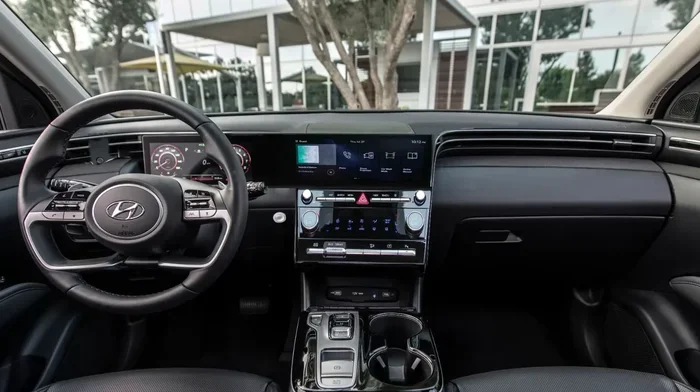
On most Tucson models, the button sits near the center console or the dashboard area around the steering column. Look for a button labeled Auto Hold or marked with a letter A inside a circle. The button usually has a small light that turns on when the feature is active.
Here are the most common locations:
- Center console area — between the front seats, near the shift lever.
- Dashboard left side — near the driver’s left knee area.
- Steering wheel column — on the lower left side of the dash panel.
If you are still unsure, check your owner manual. The manual will show you the exact location for your specific Tucson model. You can also look for the A button on the center stack near the climate controls. Once you find it, pressing it once turns Auto Hold on or off.
Auto Hold Button Location by Model Year
The Tucson has gone through several generations. The button placement has shifted slightly over the years. Here is a quick breakdown:
- 2016-2020 Tucson — The Auto Hold button is typically on the center console, left of the shift lever.
- 2021-2023 Tucson — The button moved to the dashboard area, often near the driver’s left knee.
- 2024+ Tucson — Newer models may have the button integrated into the digital interface or on the center stack.
Take a moment to look around your cabin. The button is not hidden. It is just in a spot that is easy to miss if you have not been told where to look. Once you spot it, you are ready to move on to the next step.
Step-by-Step: How to Turn Off Auto Hold on a Hyundai Tucson
Now for the part you have been waiting for. Turning off Auto Hold is quick and simple. Follow these steps and you will be done in seconds.
- Start your Hyundai Tucson and let the engine run. You do not need to be driving. The feature works when the ignition is on.
- Locate the Auto Hold button on the dashboard or center console. Look for the A in a circle symbol.
- Press the button once. You should hear a click or see the indicator light change.
- Check the dashboard display. The Auto Hold warning light should turn off or change color.
- Test the feature. Come to a stop and lift your foot off the brake. The car should now roll freely instead of holding in place.
That is it. Just one press of the button and Auto Hold is disabled. When you want to turn it back on, simply press the same button again. The light will come back on and the feature will reactivate.
What If the Button Does Not Work?
Sometimes the button does not respond. This can be frustrating. Before you assume something is broken, try these quick fixes:
- Check if the car is in Park. Auto Hold may not respond if the transmission is not in the correct gear.
- Turn the ignition off and back on. A simple reset often fixes electronic glitches.
- Check the fuse box. A blown fuse related to the braking system can disable Auto Hold.
- Look for error messages on the dashboard. Your Tucson may display a warning that gives you a clue about what is wrong.
If none of these steps work, you may need to visit a service center. But before you do, let us talk about some common issues you might run into.
Common Auto Hold Problems and How to Fix Them
Auto Hold is generally reliable. But like any electronic system, it can act up from time to time. Here are the most common problems Tucson owners report and how to solve them.
Auto Hold Light Stays On After Turning It Off
This is the most common complaint. You press the button, but the Auto Hold warning light stays glowing on the dashboard. The feature may still be active even though you turned it off. This usually happens because of a sensor glitch or a minor software issue.
The fix is usually simple. Try turning your Tucson off, waiting 30 seconds, and turning it back on. This resets the electronic control unit. If the light still stays on, you may need to disconnect the battery for a few minutes and reconnect it. This forces a full system reset.
Another thing to check is whether your brake fluid level is adequate. Low brake fluid can cause the Auto Hold system to malfunction. Check the brake fluid reservoir under the hood and top it off if needed.
Auto Hold Does Not Engage When You Want It To
Some drivers report that Auto Hold stops working altogether. The car rolls when it should hold. This can be dangerous, especially on hills. The most common cause is a faulty brake sensor or a problem with the electronic brake control module.
Start by checking the brake pads. Worn brake pads can confuse the Auto Hold sensors. If the pads look fine, the issue may be with the module itself. A diagnostic scan at a repair shop can reveal error codes that point to the exact problem.
Auto Hold Interferes with Hill Driving
Auto Hold is designed to help on hills. But sometimes it causes hesitation when you try to move forward on an incline. The system holds the brakes a beat too long. This can feel jerky or unsettling, especially on steep grades.
The easiest fix is to turn Auto Hold off when driving in hilly areas. You can always turn it back on when you reach flat ground. If you find yourself on hills often, consider keeping Auto Hold off and using the traditional brake pedal instead.
Should You Keep Auto Hold On or Off?
This is a great question and the answer depends on your driving style. Let us look at the pros and cons of keeping Auto Hold enabled on your Hyundai Tucson.
| Keep Auto Hold ON | Turn Auto Hold OFF |
|---|---|
| Less fatigue in stop-and-go traffic | Full manual control over braking |
| Convenient on hills | No unexpected brake engagement |
| Smoother starts at traffic lights | Simpler driving feel |
| Added safety feature | Better for drivers who prefer traditional controls |
There is no right or wrong answer here. It comes down to personal preference. Some drivers love Auto Hold and would never turn it off. Others find it annoying and disable it the first day they get the car. Both approaches are perfectly fine.
If you are new to the Tucson, try keeping Auto Hold on for a week. See how it feels. Then decide if it works for you. You can always switch it off later. The beauty of this feature is that it is fully customizable to your driving habits.
Tips for Getting the Most Out of Auto Hold
- Practice in a safe area. Try Auto Hold in an empty parking lot before using it in heavy traffic.
- Combine it with cruise control. Auto Hold works well with cruise control on highways.
- Stay aware of your surroundings. Even with Auto Hold on, always watch for pedestrians and other vehicles.
- Keep your brake pads maintained. Fresh brake pads help Auto Hold work more smoothly.
How Auto Hold Compares to Similar Features in Other Brands
Auto Hold is not unique to Hyundai. Many car brands offer a similar feature under different names. Understanding how it compares can help you appreciate what your Tucson offers. For instance, Toyota vehicles have a similar system, and turning off steering assist in a Toyota involves a different process than what you just learned for the Tucson.
Some brands call their version Hill Start Assist. Others call it Brake Hold or Smart Hold. The basic idea is the same. The car holds itself still when you stop, and you release the brake to move forward. Each brand implements it slightly differently, but the driver experience is very similar.
Hyundai’s Auto Hold is generally well-regarded. It is smooth, responsive, and easy to use. The button placement on the Tucson is intuitive once you know where to find it. Compared to some competitors, Hyundai makes it very simple to toggle the feature on and off.
How Auto Hold Works with Other Tucson Safety Features
Auto Hold does not work alone. It is part of a larger suite of safety and driver assistance features on the Tucson. These include Electronic Stability Control, Hill Descent Control, and Forward Collision Avoidance. Together, these systems create a safer driving experience.
When Auto Hold is active, it communicates with the stability control system. If the car detects a skid or loss of traction, stability control can override Auto Hold to correct the vehicle. This integration makes the Tucson a safer vehicle overall. You get the convenience of Auto Hold with the peace of mind of a full safety package.
Maintenance Tips to Keep Auto Hold Working Properly
Like any electronic feature in your car, Auto Hold needs regular maintenance to work its best. You do not need to do anything special. Just follow your normal Tucson maintenance schedule and keep an eye on a few key areas.
- Check brake fluid regularly. Low fluid levels can affect the Auto Hold system.
- Replace brake pads when worn. Worn pads can cause sensor errors.
- Keep the battery healthy. A weak battery can cause electronic glitches, including Auto Hold issues.
- Update your software. Hyundai occasionally releases updates that improve Auto Hold performance.
- Clean the brake sensors. Dirt and debris can interfere with sensor accuracy.
If you are wondering about how long you can safely let your car sit without driving, check out our guide on how long a car can idle safely. It covers important topics about vehicle health that relate to electronic systems like Auto Hold.
Also, if you have ever wondered about driving features on other vehicles, such as whether you can turn off steering assist in a Toyota, we have covered that topic too. Understanding how different brands handle similar features can help you make better decisions about your own Tucson.
Regular service visits are important. When you take your Tucson in for an oil change or tire rotation, ask the technician to check the Auto Hold system. It takes just a few extra minutes and can catch small problems before they become big ones.
When to See a Professional About Auto Hold Issues
Most Auto Hold issues can be fixed with simple troubleshooting. But some problems need a professional touch. If you have tried the steps in this guide and Auto Hold still is not working correctly, it is time to see a mechanic.
Here are the signs that you need professional help:
- The Auto Hold light stays on even after a full system reset.
- The brakes engage randomly without you pressing the button.
- You get a brake warning message on the dashboard.
- The Tucson pulls to one side when Auto Hold releases.
- You hear grinding or squealing when Auto Hold engages or releases.
These symptoms could indicate a serious issue with the braking system. Do not ignore them. A qualified technician can run a diagnostic scan and pinpoint the exact cause. In most cases, the fix is straightforward and affordable. But early diagnosis is key to preventing bigger problems down the road.
If you have been searching for how to turn off Auto Hold on a Hyundai Tucson, you now have all the information you need. The process is simple, the fix is fast, and the feature is easy to toggle whenever you want. Your Tucson is a great vehicle, and understanding its features makes you a better driver.
Remember, Auto Hold is there to help you. But you are always in control. If the feature does not suit your style, turning it off takes just one button press. And if you ever need to turn it back on, the same button works in reverse. It is that easy.
Take some time to explore your Tucson’s settings. Play with the different features and find what works best for you. The more you understand your vehicle, the more confident and safe you will be behind the wheel. Happy driving!
Frequently Asked Questions
What does the Auto Hold button look like on a Hyundai Tucson?
The Auto Hold button is marked with a letter A inside a circle. It is usually located on the center console or the dashboard near the driver’s left knee. The button has a small LED light that turns on when Auto Hold is active. Pressing it once toggles the feature on or off.
Can a dead battery cause Auto Hold to stop working on a Tucson?
Yes, a weak or dead battery can cause electronic systems like Auto Hold to malfunction. If your battery is low, the sensors and control modules may not receive enough power to operate correctly. If you notice Auto Hold issues, check your battery health first. A simple battery test at any auto parts store can tell you if it needs replacing.
Is it safe to drive with Auto Hold turned off?
Absolutely. Auto Hold is a convenience feature, not a safety requirement. Turning it off does not affect your brakes, steering, or any other critical safety systems. You will simply need to press the brake pedal when stopping, just like driving older vehicles without this feature.
Why does my Hyundai Tucson Auto Hold light keep flashing?
A flashing Auto Hold light usually indicates a system error or sensor issue. It could be caused by low brake fluid, a faulty brake sensor, or a software glitch. Try resetting the system by turning the ignition off and back on. If the light continues to flash, have a professional diagnose the issue.
Can I adjust Auto Hold sensitivity on my Hyundai Tucson?
Most Tucson models do not offer adjustable Auto Hold sensitivity. The system works at a fixed level designed for most driving conditions. However, you can turn Auto Hold on or off entirely. If the default sensitivity does not suit your needs, disabling it and using manual braking gives you full control over every stop.
Does turning off Auto Hold affect other safety features on the Tucson?
No, turning off Auto Hold does not affect any other safety features. Electronic Stability Control, Forward Collision Avoidance, and other systems continue to work normally. Auto Hold is an independent convenience feature that operates separately from the Tucson’s core safety systems.
=== CONCLUSION ===
Learning how to turn off Auto Hold on a Hyundai Tucson is a quick and simple process that every Tucson owner should know. Whether you find the feature helpful or annoying, having the ability to toggle it on and off gives you full control over your driving experience. The button is easy to locate, and the steps to disable it take just seconds.
Remember to check your owner manual for model-specific details. Keep your brake system well-maintained, and do not hesitate to seek professional help if you notice persistent issues. Your Tucson is packed with smart features designed to make driving easier and safer. Understanding them is the first step to getting the most out of your vehicle.
Now that you know exactly how to handle Auto Hold, you can drive with confidence. Whether you keep it on for convenience or turn it off for a more traditional feel, your Tucson is ready to go. Enjoy the drive!