How to Turn On Traction Control in Volkswagen Jetta
Turning on traction control in your Volkswagen Jetta is simple and can greatly improve safety on slippery roads. This guide walks you through every method, from the dashboard button to the vehicle settings menu. You will also learn what the traction control warning lights mean and how to troubleshoot common problems.
Driving a Volkswagen Jetta feels great, but when the roads get slippery, things can go wrong fast. Wet pavement, icy streets, and loose gravel all challenge your tires grip. That is exactly when your traction control system steps in to help. If you have ever wondered how to turn on traction control in Volkswagen Jetta, you are in the right place.
This guide covers everything you need to know. We will walk you through the exact steps to activate the system. You will also learn what the dashboard lights mean, when to use traction control, and how to fix common problems. Whether you drive a newer model or an older Jetta, this article has you covered.
The traction control system is one of the most important safety features in your car. It works hand in hand with your anti lock braking system and electronic stability control. Together, these systems help you stay in control when conditions get tough. Let us dive in and explore how to make the most of your Jettas traction control.
Key Takeaways
- Traction control helps prevent wheel slippage and keeps your Jetta stable on wet, icy, or gravel roads.
- You can activate traction control using the dashboard button, the infotainment system, or the steering wheel controls depending on your model year.
- The traction control warning light on the dashboard tells you when the system is active or if there is a malfunction.
- Common issues include a faulty sensor or a dead battery, which can cause the system to fail or the wrench light to appear.
- Turning off traction control can be useful in deep snow or mud, but you should always re-enable it for normal driving.
- Regular maintenance keeps the system working properly, just like keeping up with oil changes and battery health.
📑 Table of Contents
- What Is Traction Control and Why Does It Matter?
- How to Turn On Traction Control in Volkswagen Jetta
- Understanding the Traction Control Dashboard Indicators
- When Should You Use Traction Control?
- Common Traction Control Problems and How to Fix Them
- Expert Tips for Maximizing Traction Control Effectiveness
- Frequently Asked Questions
- Conclusion
What Is Traction Control and Why Does It Matter?
Traction control is an electronic system that prevents your wheels from spinning out. When you accelerate on a slippery surface, your tires can lose grip. The traction control system detects this slippage and reduces engine power or applies the brakes to individual wheels. This helps you maintain control of the vehicle.
In a Volkswagen Jetta, the traction control system works automatically in most situations. However, there are times when you may need to turn it on manually or adjust its settings. Understanding how the system works will help you use it more effectively.
The system relies on wheel speed sensors to monitor each wheel. If one wheel spins faster than the others, the system intervenes. This happens in milliseconds, often before you even notice the slippage. It is a quiet but powerful safety net that is always working behind the scenes.
How Traction Control Differs from Stability Control
Many people confuse traction control with stability control, but they are not the same thing. Traction control focuses on preventing wheel spin during acceleration. Stability control goes a step further by helping you steer the car when it starts to skid or slide sideways.
Your Volkswagen Jetta has both systems. They work together to keep you safe. When traction control detects a loss of grip, it can also signal the stability control system to make additional corrections. This teamwork between systems is what makes modern cars so much safer than older models.
How to Turn On Traction Control in Volkswagen Jetta
Now let us get to the main question. How do you actually turn on traction control in a Volkswagen Jetta? The answer depends on your model year and the specific trim level. Most Jettas make it easy, but the exact steps can vary. Here is a breakdown of the most common methods.
Method 1: Using the Dashboard Button
In most Volkswagen Jetta models, you will find a traction control button on the dashboard or center console. Look for an icon that looks like a car with wavy lines underneath it. This is the standard symbol for the traction control system.
To turn on the system, simply press this button. You should see the traction control indicator light up on your dashboard. In some models, pressing the button once deactivates the system, and pressing it again reactivates it. Always check your owner manual to confirm the exact location of the button for your specific year.
If you cannot find the button, it may be located near the gear shifter or on the steering wheel. Some models place it in the infotainment menu instead. We will cover that method next.
Method 2: Through the Infotainment System
Newer Volkswagen Jetta models, especially those from 2019 and later, allow you to control traction settings through the infotainment screen. To access these settings, follow these steps.
First, press the menu button on your touchscreen. Navigate to the vehicle settings section. Look for a section labeled Driving Assistance or Vehicle Dynamics. From there, you should see an option for traction control. Toggle it on or off depending on your preference.
This method gives you more control over the system. You can also adjust other driving assistance features from this same menu. It is a convenient way to customize your driving experience based on current road conditions.
Method 3: Steering Wheel Controls
Some Volkswagen Jetta trims come with steering wheel controls that allow quick access to traction and stability settings. Look for buttons on the left side of the steering column. These buttons often control drive mode selection, which can include traction control adjustments.
Press the drive mode button and cycle through the available options. You may see modes like Normal, Sport, and Snow. The Snow mode effectively enhances traction control by adjusting throttle response and braking behavior. This is especially useful when driving in winter conditions.
Method 4: Automatic Activation
Here is something many Jetta owners do not realize. In most cases, traction control turns on automatically when you start the engine. You do not need to do anything. The system is always active by default, and it will engage whenever it detects wheel slippage.
This means that for everyday driving, your traction control is already working to keep you safe. You only need to manually turn it off in specific situations, such as when you are stuck in deep snow or mud and need the wheels to spin freely.
Understanding the Traction Control Dashboard Indicators
Your Volkswagen Jetta uses dashboard lights to communicate the status of the traction control system. Understanding these lights is essential for safe driving. If you see a warning light, it is important to address it quickly.
The Traction Control Active Light
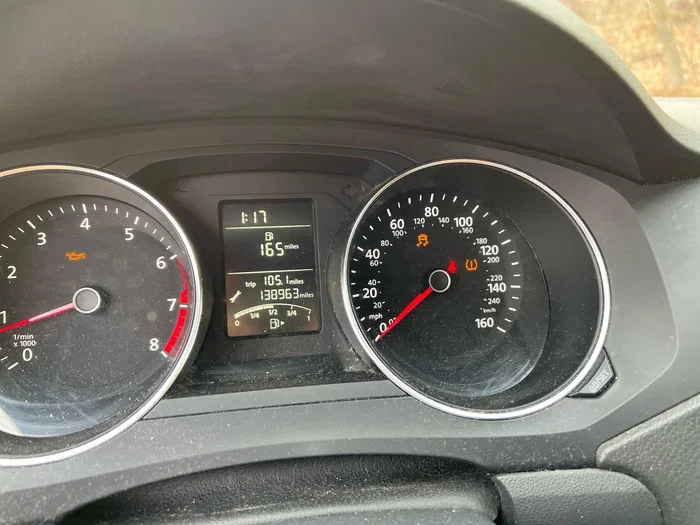
When traction control is active, you will see a small icon on the dashboard. It usually looks like a car with squiggly lines beneath the rear wheels. This light typically appears in yellow or green, depending on your model.
A steady light means the system is active and monitoring your wheels. If the light flashes, it means the system is actively intervening to prevent wheel spin. This is normal and expected when driving on slippery surfaces.
The Traction Control Warning Light
If you see a traction control warning light that stays on constantly, it could indicate a problem. This light often looks like the same car icon but may be accompanied by a message on the digital display.
A constant warning light could mean several things. A faulty wheel speed sensor is one common cause. A problem with the ABS system can also trigger this light. In some cases, a dead or weak battery can cause the wrench light to come on alongside the traction control warning. If you notice this combination of lights, it is best to get your vehicle checked by a professional.
The ESP Light
The Electronic Stability Program light is closely related to traction control. If the ESP light comes on, it means the stability control system has detected a potential skid. The system is working to correct the vehicles path.
In some cases, the ESP light may stay on if there is a system malfunction. This could be caused by a sensor issue or an electrical problem. If the light does not go away after a few minutes, you should have the vehicle inspected.
When Should You Use Traction Control?
Knowing when to use traction control is just as important as knowing how to turn it on. The system is designed to help in specific driving conditions. Here is a breakdown of when traction control is most useful.
Wet Roads
Rain creates a thin layer of water on the road surface. This can cause your tires to hydroplane, which means they lose contact with the road entirely. Traction control helps by reducing wheel spin and maintaining grip. Always keep traction control on when driving in the rain.
Snow and Ice
Snow and ice are some of the most challenging driving conditions. Traction control prevents your wheels from spinning uncontrollably on icy patches. If your Jetta has a Snow driving mode, use it along with traction control for the best results.
However, there is one exception. If your car is stuck in deep snow, you may need to turn off traction control temporarily. This allows the wheels to spin and dig into the snow, helping you gain momentum. Once you are free, remember to turn traction control back on.
Gravel and Loose Surfaces
Gravel roads, dirt paths, and loose surfaces can also cause wheel slippage. Traction control helps manage this by modulating engine power. It prevents the wheels from spinning too fast and losing contact with the surface.
Normal Dry Roads
Even on dry roads, traction control provides an extra layer of safety. It monitors wheel speed and can intervene if a tire suddenly loses grip, such as when hitting a patch of oil or a sharp patch of gravel. For this reason, many drivers keep traction control on at all times.
Common Traction Control Problems and How to Fix Them
Like any electronic system, traction control can experience issues from time to time. Here are the most common problems and what you can do about them.
Faulty Wheel Speed Sensors
The most common cause of traction control issues is a faulty wheel speed sensor. These sensors monitor how fast each wheel is spinning. If one sensor fails, the system cannot accurately detect slippage.
Symptoms of a bad wheel speed sensor include the traction control light staying on and the ABS light appearing. A mechanic can diagnose this with a diagnostic scanner and replace the sensor if needed.
Low Battery Voltage
A weak battery can cause all sorts of electronic problems in your Volkswagen Jetta. The traction control system relies on a stable electrical supply to function properly. If your battery is low, you may see multiple warning lights on the dashboard.
If you suspect a battery issue, have it tested at a repair shop. Replacing an old battery is usually inexpensive and can resolve a host of electrical problems. Interestingly, a bad battery can cause the wrench light to come on, which sometimes gets confused with traction control issues.
ABS System Malfunction
Since traction control works closely with the ABS system, a problem with ABS can affect traction control too. If the ABS module fails or has a wiring issue, the traction control system may not work correctly.
In this case, you will likely see both the ABS light and the traction control warning light illuminated. A professional diagnosis is recommended to pinpoint the exact cause.
Software or Module Issues
In rare cases, a software glitch or a problem with the traction control module can cause the system to malfunction. This is more common in older models or vehicles that have been in accidents.
A software update at a Volkswagen dealership can often resolve this issue. If the module itself is damaged, it may need to be replaced. Always consult a qualified technician for these types of repairs.
Expert Tips for Maximizing Traction Control Effectiveness
Getting the most out of your traction control system is about more than just turning it on. Here are some expert tips to help you use the system effectively and keep it in top shape.
Keep Your Tires in Good Condition
Traction control can only do so much if your tires are worn out. Make sure your tires have adequate tread depth. Replace tires that are bald or cracked. Proper tire maintenance is one of the best ways to ensure your traction control system works when you need it most.
Drive at Safe Speeds
Even with traction control, speeding on slippery roads is dangerous. The system can help you maintain control, but it cannot defy the laws of physics. Always adjust your speed to match road conditions.
Do Not Rely Solely on Technology
Traction control is a helpful tool, but it is not a substitute for safe driving habits. Always stay alert, keep a safe following distance, and avoid sudden maneuvers. Technology works best when combined with attentive driving.
Have the System Checked Regularly
Just like any other safety system in your car, traction control should be checked during routine maintenance. If you notice any warning lights, do not ignore them. Addressing issues early can prevent bigger problems down the road.
Know When to Turn It Off
There are a few situations where turning off traction control makes sense. When you are stuck in snow or mud, the wheels need to spin to gain traction. In these cases, deactivating traction control can help you get unstuck. Just remember to turn it back on once you are moving again.
Another situation is during a track day or spirited driving on a closed course. Some drivers prefer to have full control over wheel spin in these scenarios. But for everyday street driving, keeping traction control on is always the safer choice.
Keep Your Battery Healthy
Your batteries health directly affects the electronic systems in your Jetta. A failing battery can cause erratic behavior in the traction control system. If your car has been sitting idle for a long time, the battery may be weak and unable to support all the electronic systems properly. Just as you would not want your car to sit without being driven for too long, you should not let your battery deteriorate. Regular driving helps keep the battery charged and the systems functioning correctly.
Frequently Asked Questions
Can I drive my Volkswagen Jetta with the traction control light on?
You can drive short distances with the traction control light on, but you should not ignore it. The light indicates a potential issue with the system. Without fully functioning traction control, your safety on slippery roads is compromised. Have the vehicle inspected as soon as possible to identify and fix the problem.
What does it mean when the traction control light flashes?
A flashing traction control light usually means the system is actively working to prevent wheel spin. This is normal when driving on wet, icy, or gravel surfaces. If the light stays on constantly, it could indicate a malfunction in the system that needs professional diagnosis.
Does turning off traction control save fuel?
No, turning off traction control does not meaningfully improve fuel economy. The system only activates when it detects wheel slippage, which is a brief event. Any fuel savings from turning it off would be negligible. Keeping it on provides important safety benefits that far outweigh any minimal fuel impact.
Can a bad battery affect the traction control system?
Yes, a weak or failing battery can cause issues with the traction control system. The system needs a stable electrical supply to operate correctly. A low battery voltage can trigger warning lights and cause the system to behave erratically. If you notice multiple electrical issues, have your battery tested.
How do I know if my traction control sensor is bad?
Common signs of a bad traction control sensor include the traction control warning light staying on, the ABS light illuminating, and the system failing to engage when needed. You may also notice the light coming on more frequently in wet or icy conditions. A diagnostic scan tool can confirm if a specific sensor has failed.
Is it safe to drive in snow with traction control off?
Driving in snow with traction control off can be risky for most drivers. The system helps prevent wheel spin and maintains stability. However, if you are stuck and need the wheels to spin to gain traction, turning it off temporarily can help. Always turn it back on once you are moving freely.
Conclusion
Knowing how to turn on traction control in Volkswagen Jetta is a valuable skill for any driver. The system is designed to keep you safe on slippery roads, and activating it is straightforward in most models. Whether you use the dashboard button, the infotainment screen, or the steering wheel controls, the process is quick and easy.
Remember that traction control works best when combined with good tires, safe driving habits, and regular maintenance. Pay attention to the dashboard lights and address any warnings promptly. A healthy battery and properly functioning sensors are essential for the system to work correctly.
Take a few minutes to familiarize yourself with your Jettas traction control settings. Read the owner manual and experiment with the different drive modes. The more you understand about this system, the more confident and safe you will be behind the wheel. Stay safe, and happy driving.