Why Is Bluetooth Not Connecting to My Car Right Now
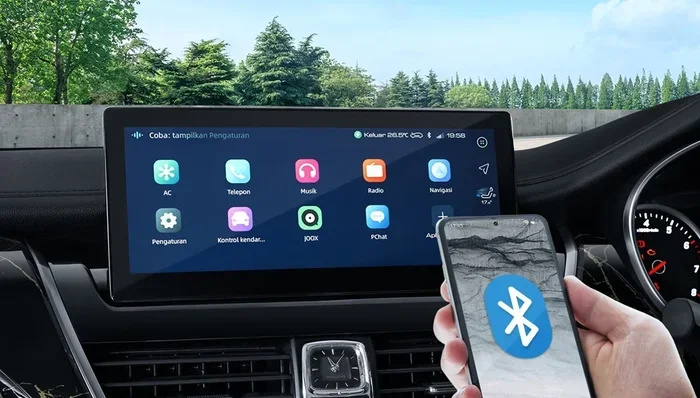
Bluetooth not connecting to your car is a frustrating problem that thousands of drivers face every day. Whether your phone refuses to pair, keeps dropping the connection, or won’t stream music, the cause is usually simple and fixable. This guide walks you through every common reason your Bluetooth is not connecting to your car and gives you step-by-step solutions you can try right now. You will learn how to reset your settings, update your firmware, and prevent connection problems from coming back.
You are heading to work. You press the Bluetooth button on your steering wheel. You expect your favorite playlist to start flowing through your car speakers. Instead, nothing happens. Your Bluetooth is not connecting to your car, and now you are stuck staring at a blank screen on your infotainment display.
This is one of the most common car tech problems drivers deal with every single day. The good news is that you can fix it yourself in most cases. You do not need to be a mechanic or a tech expert. You just need the right information and a little patience.
In this article, we are going to explore every reason why your Bluetooth might not be connecting to your car. We will cover simple fixes, deeper troubleshooting steps, and long-term prevention tips. By the end, you will know exactly what to do when your car Bluetooth stops working.
Key Takeaways
- Restart Both Devices: A simple restart of your phone and car infotainment system fixes most Bluetooth not connecting to car issues.
- Check for Interference: Other wireless devices, USB cables, and even physical obstacles can disrupt your Bluetooth signal.
- Update Firmware and Software: Outdated software on your phone or car system is one of the top causes of Bluetooth pairing problems.
- Clear Old Pairings: Too many saved devices in your car’s Bluetooth memory can cause connection failures.
- Reset Network Settings: Resetting your phone’s Bluetooth and network settings often resolves stubborn pairing issues.
- Visit a Professional: If none of the fixes work, a dealer or auto electrician can diagnose deeper hardware problems.
📑 Table of Contents
- Why Is Bluetooth Not Connecting to My Car?
- Quick Fixes to Try Right Now
- Common Reasons Bluetooth Will Not Connect to Your Car
- How to Troubleshoot Bluetooth Connection Problems Step by Step
- Preventing Bluetooth Connection Problems in the Future
- When to See a Professional for Bluetooth Issues
- Bluetooth Not Connecting to Car: Brand-Specific Tips
- Frequently Asked Questions
Why Is Bluetooth Not Connecting to My Car?
Before you start trying random fixes, it helps to understand what is actually going wrong. Bluetooth not connecting to car problems usually fall into a few clear categories. Let us look at each one so you can pinpoint your issue quickly.
Pairing Failures
The most common problem is that your phone and car simply will not pair. You put both devices in pairing mode, but they refuse to see each other. This usually happens when one device still has an old connection saved in its memory. It can also occur when too many devices are stored in the car’s Bluetooth list.
Another reason for pairing failures is that your phone’s Bluetooth is turned off or stuck. Sometimes the Bluetooth icon appears on your screen, but the wireless radio is not actually active. A quick toggle off and back on often solves this.
Connection Drops and Intermittent Issues
Maybe your Bluetooth does connect, but it keeps cutting out. You are halfway through a song and the audio dies. Or your hands-free call drops every few minutes. This type of problem is often caused by interference from other wireless devices. USB cables plugged into your dashboard, Wi-Fi hotspots, and even other phones in the vehicle can all create signal disruption.
No Audio or Call Audio Only
Sometimes your Bluetooth connects, but you only get sound for phone calls. Music and podcasts do not play. This is a profile mismatch issue. Your car needs to connect to the correct Bluetooth profile for audio streaming, which is different from the profile used for calls.
Bluetooth Works on One Device but Not Another
If your friend’s phone connects to your car just fine but yours does not, the problem is almost certainly on your device. This narrows down the troubleshooting significantly and saves you a lot of time.
Quick Fixes to Try Right Now
Before you dive into deeper troubleshooting, try these simple steps first. Most drivers who search for “Bluetooth not connecting to car” find their solution in one of these fixes.
Turn Bluetooth Off and Back On
This sounds too simple, but it works more often than you think. Go to your phone’s settings, toggle Bluetooth off, wait ten seconds, and turn it back on. Do the same with your car’s infotainment system if it has a power button. This clears temporary glitches and forces both devices to re-establish the connection fresh.
Restart Your Phone
A phone restart clears your Bluetooth cache and resets all wireless connections. Power your phone completely off, wait thirty seconds, and turn it back on. Try connecting to your car again. You will be surprised how often this one step solves the entire problem.
Restart Your Car’s Infotainment System
Most modern cars let you restart the infotainment screen. You can usually do this by holding the power button for ten to fifteen seconds. Some cars require you to hold the volume knob instead. Check your car’s manual for the exact method. Once the system reboots, try pairing again.
Move Your Phone Closer to the Car
Bluetooth has a limited range, usually around thirty feet. If your phone is in your back pocket or in the glove box, the signal might be too weak. Place your phone on the center console or dashboard and try connecting again. This is especially important if you have a phone case that blocks wireless signals.
Delete Old Pairings and Start Fresh
Go into your car’s Bluetooth settings and delete your phone from the saved devices list. Do the same on your phone. Then put both devices back into pairing mode and try connecting again. This forces a clean handshake between the two devices and often resolves stubborn connection issues.
Common Reasons Bluetooth Will Not Connect to Your Car
If the quick fixes did not work, there is likely a deeper cause. Let us walk through the most common reasons Bluetooth is not connecting to your car and what you can do about each one.
Outdated Software on Your Phone
Your phone runs Bluetooth through software drivers. When those drivers are outdated, they may not communicate properly with your car’s system. Always keep your phone updated to the latest operating system version. Check for updates in your phone’s settings under “Software Update” or “System Updates.”
Outdated Car Infotainment Firmware
Your car’s Bluetooth system also needs regular updates. Car manufacturers release firmware updates that fix Bluetooth bugs and improve compatibility with newer phones. Check your car manufacturer’s website or visit your dealer to see if a firmware update is available for your model.
Bluetooth Cache Is Full or Corrupted
Your phone stores Bluetooth connection data in a cache. Over time, this cache can become full or corrupted, which causes pairing failures. On Android phones, you can clear the Bluetooth cache by going to Settings, then Apps, then finding the Bluetooth app, and selecting “Clear Cache.” On iPhones, you may need to reset network settings entirely, which clears all saved Wi-Fi passwords too.
Too Many Devices in Memory
Most car Bluetooth systems can only remember a limited number of paired devices, usually between five and ten. If you have a long list of saved devices, your car might struggle to connect to new ones or even to your regular phone. Go into your car’s Bluetooth settings and delete any devices you no longer use.
Interference From Other Wireless Devices
Bluetooth operates on the 2.4 GHz frequency band. This is the same band used by Wi-Fi routers, microwave ovens, and some USB 3.0 cables. When multiple devices are operating on this frequency at the same time, they can interfere with each other. Try unplugging USB cables from your dashboard, turning off Wi-Fi on your phone, or moving away from other wireless sources.
Phone Case or Metal Obstruction
Thick phone cases, especially those with metal plates or magnetic closures, can block Bluetooth signals. Some magnetic car mounts contain metal magnets that interfere with wireless connectivity. Remove your phone case temporarily and try connecting again to see if this is the issue.
Bluetooth Version Incompatibility
Older car Bluetooth systems may not support the latest Bluetooth versions. If you have a newer phone with Bluetooth 5.0 or higher, it might not pair correctly with an older car system that only supports Bluetooth 2.1 or 3.0. This is not common, but it does happen, especially with older vehicles.
Your Phone Has Too Many Active Connections
If your phone is connected to a smartwatch, wireless earbuds, and a tablet at the same time, it may struggle to maintain a stable connection to your car. Try disconnecting other Bluetooth devices temporarily and see if your car connection improves.
How to Troubleshoot Bluetooth Connection Problems Step by Step
When you are dealing with a persistent Bluetooth not connecting to car issue, a systematic approach works best. Follow these steps in order, and stop when the problem is resolved.
- Step One: Toggle Bluetooth Off and On. This is the fastest way to clear a minor glitch.
- Step Two: Restart Both Devices. Power cycle your phone and your car’s infotainment system.
- Step Three: Delete the Pairing and Re-Pair. Remove the car from your phone and your phone from the car, then pair fresh.
- Step Four: Check for Software Updates. Update your phone and check your car for firmware updates.
- Step Five: Clear Bluetooth Cache. On Android, clear the Bluetooth app cache. On iPhone, reset network settings.
- Step Six: Factory Reset the Car Infotainment System. This is a more drastic step but can resolve deep software issues. Consult your car’s manual for instructions.
- Step Seven: Visit a Professional. If nothing else works, take your car to a dealer or trusted auto electrician.
Most Bluetooth not connecting to car problems are resolved by step three or four. You rarely need to go beyond a factory reset. But having a clear checklist helps you stay organized and avoid missing anything.
Preventing Bluetooth Connection Problems in the Future
Once you get your Bluetooth working again, you will want to keep it that way. Prevention is always easier than troubleshooting. Here are some habits that will help you avoid future Bluetooth connection issues.
Keep Your Software Updated
Regular updates to your phone and car firmware are the single best way to prevent Bluetooth problems. Updates often include bug fixes for known connectivity issues. Turn on automatic updates on your phone and check your car’s software at least twice a year.
Limit Saved Devices
Do not let your car’s Bluetooth memory fill up with old devices. Periodically go through the saved devices list and remove anything you no longer use. This keeps the system running smoothly and reduces connection conflicts.
Avoid Interference
Be mindful of what other wireless devices are active when you are trying to connect. If you notice Bluetooth problems, unplug unnecessary USB cables, turn off Wi-Fi temporarily, and move your phone closer to the car’s antenna.
Use Quality Accessories
Cheap USB cables and low-quality Bluetooth adapters can cause interference and connection drops. Invest in good-quality cables and accessories that are certified for your car model. This small investment saves you a lot of frustration over time.
Do Not Leave Your Phone in the Glove Box
It might be convenient to stash your phone in the glove box, but the metal and plastic can block Bluetooth signals. Keep your phone on the dashboard or center console for the strongest connection.
When to See a Professional for Bluetooth Issues
Most Bluetooth not connecting to car problems are software-related and fixable at home. But sometimes the issue is hardware, and no amount of restarting or resetting will help. Here are signs that you need professional help.
If your car’s Bluetooth has never worked since you bought the vehicle, there may be a wiring issue or a factory defect. If Bluetooth works for calls but you cannot get audio streaming to work at all, the car’s Bluetooth module might need replacement. And if you notice that Bluetooth works intermittently and gets worse over time, there could be a failing antenna or loose connection behind the dashboard.
A dealer can run diagnostic tests on your car’s infotainment system and identify hardware problems quickly. They can also perform firmware updates that are not available to the public. If you have tried every fix in this guide and your Bluetooth is still not connecting to your car, it is time to make that service appointment.
Bluetooth Not Connecting to Car: Brand-Specific Tips
Different car brands have different Bluetooth systems, and some are more prone to connection issues than others. Here are a few brand-specific tips that can help.
Toyota and Lexus vehicles often need a Bluetooth settings reset after a battery disconnect or replacement. The system forgets all pairings when the battery dies, so you will need to re-pair all your devices.
Ford and Lincoln cars with the SYNC system sometimes need a master reset to fix Bluetooth problems. Holding the volume knob and the power button together for about ten seconds usually triggers this reset.
BMW and Mercedes vehicles with the iDrive or MBUX systems can be finicky about Bluetooth profiles. Make sure your phone has the latest version of the car manufacturer’s app installed, as these apps manage Bluetooth connections.
Chevrolet and GMC trucks with the MyLink system benefit from regular firmware updates available through the myChevrolet app. Keeping this app updated ensures the best Bluetooth compatibility.
Honda and Acura vehicles sometimes have issues with the Bluetooth audio streaming profile. If calls work but music does not, try deleting the car from your phone and re-pairing with the audio streaming option enabled.
Frequently Asked Questions
Why Is Bluetooth Not Connecting to My Car Even Though It Is Turned On?
This usually happens because your phone or car has a corrupted Bluetooth cache or an old pairing that is causing a conflict. Try toggling Bluetooth off and on, restarting both devices, and deleting old pairings before attempting to reconnect. In most cases, this clears the issue and allows a fresh pairing to work.
How Do I Reset Bluetooth on My Car?
The reset process varies by car brand and model. Generally, you can go to your car’s infotainment settings, find the Bluetooth menu, and select “Factory Reset” or “Reset Bluetooth.” On some vehicles, you need to hold the power button for fifteen to twenty seconds to reboot the entire system. Check your car’s owner manual for the exact steps.
Can a Phone Case Stop Bluetooth from Connecting to My Car?
Yes, it absolutely can. Thick cases, especially those with metal plates, magnetic closures, or heavy metal construction, can block Bluetooth signals. Remove your phone case temporarily and try connecting again. If the connection works without the case, you have found your culprit.
Why Does Bluetooth Connect to My Car But No Sound Comes Through?
This is usually a profile issue. Your phone is connected to the car for calls but not for audio streaming. Go into your car’s Bluetooth settings and make sure the media audio or audio streaming option is turned on. You may also need to check your phone’s Bluetooth settings and ensure the media audio toggle is enabled for your car connection.
Is Bluetooth Not Connecting to My Car a Sign of a Hardware Problem?
Not usually. In most cases, Bluetooth connection problems are caused by software glitches, outdated firmware, or corrupted settings. Hardware failures are rare but can happen, especially in older vehicles or after water damage. Try all the software fixes first before assuming a hardware issue.
How Can I Improve My Car’s Bluetooth Range and Stability?
Keep your phone close to the car’s antenna, which is usually located near the windshield or dashboard. Avoid having multiple wireless devices active at the same time, as they can create interference. Keep your phone and car firmware updated, and delete old pairings regularly to keep the Bluetooth system running smoothly.