Here is How to Change the Time on Your Toyota RAV 4
Changing the time on your Toyota RAV 4 is quick and easy once you know where to look. Whether your RAV 4 has a digital infotainment screen or an analog dash clock, this guide walks you through every method. You will learn how to adjust the time format, fix common issues, and keep your Toyota RAV 4 clock perfectly synced all year long.
Have you ever glanced at your dashboard and realized your Toyota RAV 4 clock is showing the wrong time? It happens to all of us. Maybe you just swapped out your battery or drove across time zones and forgot to update the clock. Whatever the reason, learning how to change the time on your Toyota RAV 4 is a skill every owner should have.
The good news is that it is not complicated. Toyota designed the RAV 4 with user friendly controls that make this task straightforward. In this guide, we will walk you through every method step by step. By the end, you will know exactly how to adjust your clock whether you drive a 2019 model or the latest 2024 version.
We will also cover common problems like a clock that keeps resetting or displays the wrong format. Plus, we share expert tips that make the whole process even smoother. So grab a seat, and let us get your Toyota RAV 4 clock set to the correct time right now.
Key Takeaways
- Multiple Methods Available: You can change the time through the infotainment system, the dashboard controls, or the instrument cluster depending on your RAV 4 model year.
- 12 Hour and 24 Hour Formats: Most Toyota RAV 4 models let you switch between 12 hour and 24 hour time formats easily in the settings menu.
- No Tools Needed: Changing the time does not require any special tools or dealership visits. It is a simple DIY adjustment anyone can do at home.
- Common Issues Are Fixable: If your RAV 4 clock resets after a battery change or shows the wrong time, a few simple steps usually solve the problem.
- Model Year Matters: The exact steps vary slightly between older and newer RAV 4 models, so knowing your model year helps you find the right instructions faster.
📑 Table of Contents
- Why Getting the Right Time on Your Toyota RAV 4 Matters
- How to Change the Time on Your Toyota RAV 4 Using the Infotainment Screen
- Changing the Time on Older Toyota RAV 4 Models Without a Touchscreen
- Common Problems When Changing the Time on a Toyota RAV 4
- Expert Tips for Keeping Your Toyota RAV 4 Clock Perfectly Accurate
- How Does the Toyota RAV 4 Clock Compare to Other Toyota Models
- Frequently Asked Questions About the Toyota RAV 4 Clock
- Final Thoughts on Changing the Time on Your Toyota RAV 4
Why Getting the Right Time on Your Toyota RAV 4 Matters
You might wonder why the clock matters so much. It seems like a small detail. But think about how often you glance at your dashboard while driving. The time helps you keep track of appointments, commutes, and daily routines. A wrong clock can throw off your entire schedule.
Beyond convenience, your RAV 4 clock also ties into other systems. Some Toyota RAV 4 settings depend on accurate timekeeping. Navigation features, service reminders, and even your trip computer all use the clock as a reference point. When the time is off, these systems may not work as they should.
Another reason to keep your clock accurate is resale value. A well maintained vehicle with all settings correct gives buyers confidence. If you ever plan to sell your RAV 4, small details like a properly set clock show that you cared for the vehicle. It is one of those little things that add up to a big impression.
How to Change the Time on Your Toyota RAV 4 Using the Infotainment Screen
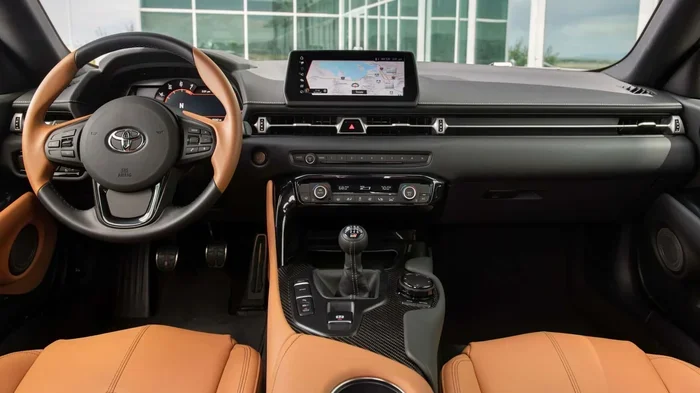
Most Toyota RAV 4 models from 2019 onward come with a touchscreen infotainment system. This is the easiest way to adjust your clock. The process is very similar across the 2019, 2020, 2021, 2022, 2023, and 2024 model years. Here is exactly what to do.
Step by Step Guide for the Infotainment Clock Settings
- Start your Toyota RAV 4 and wait for the infotainment screen to fully load.
- Press the Settings icon on the home screen. It usually looks like a gear wheel.
- Scroll down and tap Clock or Time Settings. The exact label depends on your model year.
- Select the Clock option to access the time adjustment screen.
- Use the up and down arrows to set the correct hour. Tap the minute arrows to adjust minutes.
- Choose AM or PM if your RAV 4 uses the 12 hour format.
- Tap the Confirm or Save button to lock in your new settings.
That is it. Your Toyota RAV 4 clock should now display the correct time. If you have a JBL audio system or the larger 9 inch screen, the menu layout might look slightly different, but the steps remain the same.
Switching Between 12 Hour and 24 Hour Format
One of the most useful features in your RAV 4 settings is the ability to switch between 12 hour and 24 hour time. Some people prefer the 24 hour format because it removes any confusion about morning and evening. Here is how to toggle it.
- Go to Settings on your infotainment screen.
- Tap Clock or Time Settings.
- Look for the Time Format option.
- Select either 12 Hour or 24 Hour.
- Confirm your choice and exit the menu.
This setting is especially helpful if you travel internationally or if you simply prefer the military style clock display. You can always go back and switch it whenever you want. The change takes effect immediately.
Changing the Time on Older Toyota RAV 4 Models Without a Touchscreen
If your Toyota RAV 4 is from before 2019, you might not have a touchscreen. Older models use physical buttons and knob controls on the dashboard or center console. Do not worry. Adjusting the clock on these models is still very simple.
Using the Dashboard Controls
On older RAV 4 models, look for a button labeled Clock or Time on the left side of the dashboard or near the radio controls. Press and hold it for a few seconds until the hours start blinking on the display. Then press the same button again to switch between hours and minutes. Use the tune or seek buttons to adjust each number.
Some models use a knob controller instead of buttons. Turn the knob to highlight the time display, then press it to enter adjustment mode. Rotate to change the numbers and press again to save. The exact method depends on your RAV 4 trim level and model year.
Using the Instrument Cluster Display
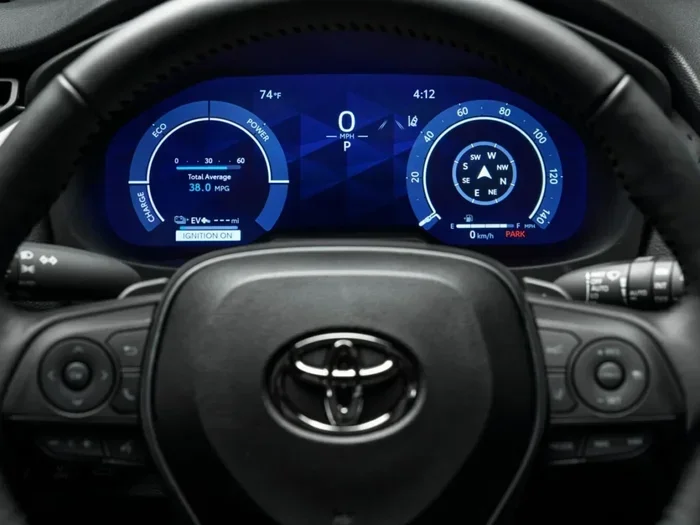
Certain RAV 4 trims show the time right on the instrument cluster behind the steering wheel. To adjust this display, you typically need to use the steering wheel controls. Press the Menu or Set button on the left side of the steering column. Scroll through the options until you see the clock setting. Use the up and down arrows to change the time and press OK to confirm.
If you are not sure which method applies to your specific model, check your Toyota RAV 4 owner manual. It has detailed diagrams and instructions for every trim level. The manual is also available as a free PDF on the Toyota website.
Common Problems When Changing the Time on a Toyota RAV 4
Sometimes the clock on your Toyota RAV 4 does not behave as expected. You might find that it resets every time you turn off the engine or that the display goes blank. These issues are more common than you think, and they are usually easy to fix.
Clock Resets After Battery Disconnect
If your RAV 4 clock resets to midnight every time you disconnect the battery, you are not alone. This happens because the clock settings are stored in the vehicle memory system. When you lose power, those settings get wiped.
The fix is simple. Just go back into the settings menu and reset the time again. To avoid this in the future, consider using a battery maintainer when your RAV 4 sits parked for long periods. This keeps the memory system powered and preserves all your settings including the clock.
Clock Shows the Wrong Time Zone
After daylight saving time or after moving to a new area, your RAV 4 clock might be off by an hour. Some Toyota models have an automatic time zone setting that syncs with GPS data. Check your infotainment settings to see if this option is available. If it is, turning it on ensures your clock always stays accurate without manual adjustment.
Clock Display Is Dim or Not Visible
If your RAV 4 clock is too dim to read or not showing at all, the issue is usually the display brightness setting. Go to Settings and look for Display or Screen Brightness. Increase the brightness and see if the clock becomes visible again. If the display still does not work, it could be a wiring or fuse issue that needs a mechanic to inspect.
Expert Tips for Keeping Your Toyota RAV 4 Clock Perfectly Accurate
Once you have your clock set correctly, you want it to stay that way. Here are some expert tips from experienced Toyota owners and mechanics that help you maintain an accurate clock on your RAV 4.
Sync Your Clock with Your Phone
If your Toyota RAV 4 supports Apple CarPlay or Android Auto, you can sync the clock with your phone. This means your vehicle clock automatically updates whenever your phone connects. It is one of the easiest ways to ensure your RAV 4 always shows the correct time without any manual effort.
Update Your RAV 4 Software Regularly
Toyota releases software updates for the RAV 4 that improve infotainment performance and fix bugs. Sometimes these updates also improve clock accuracy and memory retention. You can check for updates at your local Toyota dealership or through the Toyota app if your model supports it. Just like you might check how to care for your auto tint or maintain other vehicle features, keeping your software up to date is part of good ownership.
Note Your Model Year Specifics
Every Toyota RAV 4 generation has its quirks. The 2019 model might handle clock settings differently than the 2023 model. If you are unsure about your specific vehicle, do not hesitate to visit a Toyota dealer. You can also check if you can take your Toyota to any dealer for service for guidance. They will walk you through the process and make sure everything is set correctly.
Keep a Record of Your Settings
It sounds simple, but keeping a note of your preferred clock format and time zone can save you headaches later. If you ever need to reset your RAV 4 to factory settings or if the battery dies completely, having a quick reference means you can get everything back to normal in seconds.
How Does the Toyota RAV 4 Clock Compare to Other Toyota Models
You might be curious how the RAV 4 clock system compares to other Toyota vehicles. The truth is that Toyota uses a fairly consistent interface across its lineup. The basic steps for changing the time are similar whether you are in a Camry, a Highlander, or a RAV 4.
However, the RAV 4 has some unique features. For example, the RAV 4 hybrid models sometimes have additional display options in the instrument cluster. The clock might appear in the multi information display alongside fuel economy data and trip information. This is a nice convenience that makes it easy to check the time without taking your eyes off the road for too long.
If you are comparing the RAV 4 to other Toyota SUVs, the clock adjustment process is nearly identical. Whether you drive a RAV 4, a Highlander, or a newer Crown, the general approach remains the same. Go to settings, find the clock option, and adjust the time. Toyota keeps this process consistent so that owners do not have to relearn how to use their vehicle every time they switch models.
Some owners also wonder about the clock in their Toyota Bz4X electric SUV. The process is very similar to the RAV 4. If you have a Bz4X, you can charge your Bz4X to 100 and then use the infotainment screen to adjust the clock while the vehicle is charging. It is a convenient time to make small settings adjustments.
Frequently Asked Questions About the Toyota RAV 4 Clock
Can I change the Toyota RAV 4 clock without turning on the engine?
In most Toyota RAV 4 models, you need the ignition in accessory mode to access the clock settings. Simply press the start button without pressing the brake pedal to enter accessory mode. From there, you can use the infotainment screen or dashboard controls to adjust the time. Some newer models may allow limited clock access even with the vehicle off, but full adjustment typically requires at least accessory mode.
Why does my Toyota RAV 4 clock keep resetting to 12:00?
This usually happens when the vehicle battery has been disconnected or has died. The clock settings are stored in the vehicle memory, and a power loss wipes those settings. Simply go back into the settings menu and reset the time. If this keeps happening frequently, it could indicate an electrical issue that a mechanic should inspect.
Can I set the time automatically on my Toyota RAV 4?
Some newer Toyota RAV 4 models have a GPS based time sync feature. This allows the clock to update automatically based on your location. Check your infotainment settings for a time zone or auto sync option. If your model does not have this feature, you will need to adjust the time manually whenever there is a change.
How do I change the time on a Toyota RAV 4 with a digital dial display?
For RAV 4 models with a digital dial display instead of a touchscreen, use the controls on the left side of the dashboard. Press and hold the clock button until the display starts blinking. Use the arrow buttons to adjust hours and minutes, then press the clock button again to save. Refer to your owner manual for model specific instructions.
Does the Toyota RAV 4 clock change with daylight saving time automatically?
This depends on your model year and whether your RAV 4 has the auto time zone feature. Newer models with GPS capability may adjust automatically. For older models, you will need to change the time manually when daylight saving time begins or ends. It is a quick adjustment that takes less than a minute.
Is it safe to adjust the clock while driving?
It is always safer to adjust the clock when your RAV 4 is parked. While the infotainment system does not require the vehicle to be in park for basic adjustments, taking your eyes off the road even for a few seconds can be dangerous. Pull over or wait until you are parked to make any changes to your settings.
Final Thoughts on Changing the Time on Your Toyota RAV 4
Changing the time on your Toyota RAV 4 is one of those simple maintenance tasks that every owner should know how to do. It takes just a few minutes and requires no special tools or visits to the dealership. Whether you have a touchscreen model or an older version with physical buttons, the process is straightforward and user friendly.
We have covered every method in this guide. From the infotainment screen settings to the dashboard controls and instrument cluster display, you now have all the information you need. You also know how to troubleshoot common issues and keep your clock accurate year round.
Remember, taking care of the small details like your clock settings reflects how well you maintain your vehicle. It is the same mindset that drives owners to learn about how to care for your auto tint or how to check if their vehicle is in good condition. These small efforts add up to a better ownership experience and a vehicle that holds its value longer.
If you ever feel unsure about any settings on your Toyota RAV 4, you can always visit your local Toyota dealership for help. You can also take your Toyota to any dealer for service and they will be happy to assist. And if you are interested in other Toyota features, learning how to switch between driving modes or understanding your dashboard lights can make you an even more confident RAV 4 owner.
Now that you know exactly how to change the time on your Toyota RAV 4, go ahead and set your clock right. It is one of the quickest ways to make sure your daily drive goes smoothly. Your RAV 4 is a reliable vehicle, and keeping all its settings correct is a small way to return that reliability every day.