How to Change Toyota Camry Key Battery Step by Step
Changing your Toyota Camry key battery is quick and easy when you follow the right steps. This guide walks you through everything from identifying the correct battery type to reassembling your key fob like a pro. You will learn how to replace the battery in under five minutes and avoid common mistakes that damage the key.
Your Toyota Camry key fob stops working at the worst possible time. Maybe you are standing in the driveway, or you are rushing into a parking garage. The frustration is real, but here is the good news. Changing the battery in your Toyota Camry key is one of the simplest things you can do yourself. You do not need to visit a dealer or pay for expensive service. In this guide, we walk you through every single step with clear instructions and helpful tips.
Whether you have a traditional Toyota Camry key fob or a newer smart key with push button start, the process is very similar. The key fob uses a small coin battery that lasts for several years. When it dies, you just pop open the fob, swap the battery, and you are back on the road. This article covers the Toyota Camry key battery replacement process in detail so you can save time and money.
We will also share tips on how to extend the life of your new battery and what to do if your Toyota Camry key fob not working after a replacement. By the end of this guide, you will feel confident handling this simple maintenance task on your own.
Key Takeaways
- CR2032 battery: Most Toyota Camry key fobs use this common coin-cell battery, making replacement simple and affordable.
- Tools needed: You only need a small flathead screwdriver or a coin to open the key fob housing.
- Step-by-step process: The guide covers opening the fob, removing the old battery, inserting the new one, and reassembling everything correctly.
- Common mistakes: Avoid touching the circuit board with metal tools and make sure the battery is seated properly before closing the fob.
- Battery life: Toyota Camry key fob batteries typically last 2 to 4 years depending on usage frequency.
- Internal links: Learn how to tell if your key battery is low and what to do if your Toyota key fob still does not work after replacement.
📑 Table of Contents
- Understanding Your Toyota Camry Key Fob
- Signs Your Toyota Camry Key Battery Needs Replacement
- Tools and Materials You Will Need
- Step-by-Step Guide to Changing Your Toyota Camry Key Battery
- Common Mistakes to Avoid When Changing Your Toyota Camry Key Battery
- How to Extend the Life of Your Toyota Camry Key Battery
- When to Seek Professional Help
- Conclusion
Understanding Your Toyota Camry Key Fob
Before you start replacing the battery, it helps to understand what you are working with. Toyota Camry key fobs come in a few different styles depending on the model year. Some have a physical key hidden inside, while others are fully keyless. But almost all of them use the same type of small battery to power the remote functions.
What Kind of Battery Does a Toyota Camry Key Fob Use?
The most common battery used in Toyota Camry key fobs is the CR2032. This is a 3-volt coin-cell battery that you can find at almost any grocery store, pharmacy, or auto parts shop. The CR2032 battery is very affordable, usually costing just a dollar or two. It is the same type of battery used in watches, garage door openers, and many other household devices.
Some older Toyota Camry models may use a slightly different battery, but the CR2032 is by far the most common. You can check your owner’s manual to confirm the exact battery type for your specific model year. If you are not sure, just look at the old battery after you remove it. The label on the battery will tell you the model number.
How Long Does a Toyota Camry Key Battery Last?
A Toyota Camry key fob battery typically lasts between two and four years. The exact lifespan depends on how often you use the remote functions. If you press the lock and unlock buttons multiple times a day, the battery will drain faster. If you mostly use the push button start and rarely use the remote, the battery can last even longer.
Cold weather can also shorten battery life. If you live in a region with harsh winters, you might notice the battery dying more frequently. Key fob battery life varies from person to person, so there is no exact expiration date. The best approach is to keep a spare CR2032 battery in your glove box at all times.
Signs Your Toyota Camry Key Battery Needs Replacement
How do you know it is time to replace the battery? There are several clear warning signs that your Toyota Camry key fob is running low on power. Recognizing these signs early can save you from being locked out of your car unexpectedly.
Reduced Remote Range
One of the first signs of a weak battery is a shorter working range. You might notice that you need to be standing right next to the car for the remote to work. Previously, you could unlock the doors from across the parking lot, but now you have to be within a few feet. This is a strong indicator that the battery is losing its charge.
Intermittent Key Fob Function
If your Toyota Camry key fob works sometimes but not other times, the battery is likely dying. You might press the unlock button and nothing happens, then try again a few seconds later and it works. This inconsistent behavior is a classic sign of a low battery. Key fob troubleshooting often starts with checking the battery level.
Key Fob Warning Light on the Dashboard
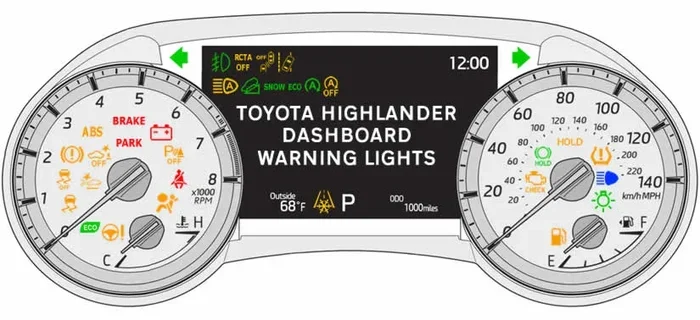
Some newer Toyota Camry models display a warning light on the dashboard when the key fob battery is low. If you see a key-shaped icon or a battery warning on your instrument cluster, do not ignore it. This is your car telling you it is time to replace the fob battery. For more details on recognizing these symptoms, check out our article on how to know if your key battery is low.
Slow Response from the Remote
Another subtle sign is a slow response when you press the buttons. The locks might take a second or two to engage, or the trunk release might feel sluggish. This delay happens because the battery cannot send a strong enough signal to the car’s receiver. If you notice this behavior, it is a good idea to replace the battery soon before it completely dies.
Tools and Materials You Will Need
One of the best things about changing a Toyota Camry key battery is that you need very few tools. You probably already have everything at home. Here is what you will need before you begin the Toyota Camry key battery replacement process.
- CR2032 battery: This is the replacement battery. Buy a quality brand like Energizer or Duracell for the best results.
- Small flathead screwdriver: A tiny flathead screwdriver helps you pry open the key fob casing. You can also use a coin in some models.
- Soft cloth or towel: Place this under your work area to prevent losing small parts.
- Good lighting: Make sure you have a bright light source so you can see inside the key fob clearly.
- Clean workspace: Work on a flat, clean surface to avoid losing the tiny screws or springs inside the fob.
That is it. You do not need any special equipment or technical knowledge. The entire process is designed to be simple enough for anyone to handle. If you want to learn more about related costs, check out our guide on how much it costs to program a push to start key fob for additional context on key fob maintenance.
Step-by-Step Guide to Changing Your Toyota Camry Key Battery
Now let us get into the actual process. Follow these steps carefully and you will have your Toyota Camry key fob working again in just a few minutes. Take your time and be gentle with the internal components.
Step 1: Remove the Emergency Key
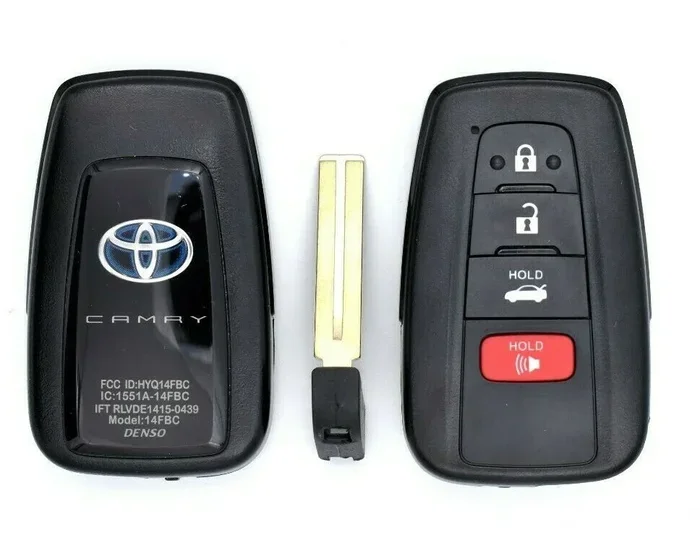
Most Toyota Camry key fobs have a hidden mechanical key inside. Look for a small button or switch on the side of the fob. Press it and the emergency key will slide out. Set the emergency key aside in a safe place. You will not need it for the battery replacement, but keep it nearby so you do not lose it.
Step 2: Locate the Seam on the Key Fob
Hold the key fob in your hand and look for the seam where the two halves of the casing meet. On most Toyota Camry models, the seam runs along the longer edge of the fob. Some models have the seam on the shorter side. Run your fingernail along the edge to find the gap where the two halves separate.
Step 3: Open the Key Fob Casing
Insert the flathead screwdriver or a thin coin into the seam. Gently twist the tool to pop the first clip. Work your way around the fob, releasing each clip one at a time. Be careful not to use too much force. The clips are made of plastic and can break if you are rough with them. Take your time and be patient.
Once you have released all the clips, carefully separate the two halves of the key fob. Set the top half down on your soft cloth. You should now see the internal circuit board and the battery sitting in its compartment.
Step 4: Remove the Old Battery
Look at the old battery. Notice which side is facing up. The positive side usually has a plus sign (+) and sometimes the brand name. The negative side is smooth and has no markings. Use the screwdriver or a small plastic tool to gently pry the old battery out of its slot. Lift it straight up without tilting it. Set the old battery aside for proper disposal.
Important tip: Do not touch the circuit board with metal tools. The small electrical components can be damaged by static electricity or accidental contact. If possible, touch a grounded metal surface before handling the internal parts to discharge any static buildup.
Step 5: Insert the New CR2032 Battery
Take your new CR2032 battery out of the packaging. Hold it with the positive side (marked side) facing up, just like the old battery was positioned. Slide the new battery gently into the slot until it clicks into place. Make sure the battery is seated fully and sits flat in the compartment. A loose battery will cause the key fob to malfunction.
If the battery does not seem to fit, double-check the orientation. The positive and negative sides must match the markings inside the battery compartment. Putting the battery in backwards will prevent the key fob from working.
Step 6: Reassemble the Key Fob
Now it is time to put the key fob back together. Align the two halves of the casing carefully. Press the top half down gently until you hear all the clips click into place. Run your fingernail along the seam to make sure every clip is fully seated. If a clip is not properly engaged, the key fob will feel loose or come apart easily.
Reinsert the emergency key by sliding it back into its slot until it clicks. Test the key fob by standing near your Toyota Camry and pressing the lock or unlock button. You should hear the car respond immediately.
Step 7: Test All Functions
After reassembling the key fob, test every function to make sure everything works properly. Press the lock button and listen for the doors to lock. Press the unlock button and confirm the doors open. Test the trunk release if your model has one. If your Toyota Camry has remote start functionality, try that as well.
If any function does not work, open the fob again and check that the battery is properly seated. Sometimes the battery shifts slightly during reassembly. Also check that the key fob casing is fully closed and all clips are engaged. If the problem persists, the battery may be defective, and you should try a new one.
Common Mistakes to Avoid When Changing Your Toyota Camry Key Battery
Even though this is a simple task, there are a few common mistakes that people make. Avoiding these errors will help you complete the replacement smoothly and protect your key fob from damage.
- Using the wrong battery type: Always use a CR2032 battery unless your owner’s manual specifies otherwise. Using a different battery size or voltage can damage the key fob.
- Forcing the casing open: If the clips are not releasing easily, stop and check your approach. Forcing the two halves apart can crack the plastic and damage the internal circuit board.
- Touching the circuit board with metal tools: Use a plastic tool or your fingernail whenever possible. Metal tools can scratch or short-circuit the delicate electronics inside the fob.
- Not checking the battery orientation: The positive and negative sides matter. Putting the battery in backwards will not damage anything, but the key fob simply will not work until you correct it.
- Rushing the reassembly: Take your time when putting the key fob back together. Make sure every clip is properly seated before you test the fob on your car.
How to Extend the Life of Your Toyota Camry Key Battery
Once you have replaced the battery, you probably want it to last as long as possible. Here are some simple tips to help you get the most out of your new CR2032 battery and avoid frequent replacements.
First, avoid exposing your key fob to extreme temperatures. Leaving the fob in a hot car during summer or in a freezing car during winter can drain the battery faster. Keep the fob in a coat pocket or inside the car when possible.
Second, do not press the remote buttons unnecessarily. Each press uses a small amount of battery power. If you can walk to your car and use the physical key or the push button start, you save the remote battery for when you really need it.
Third, store a spare battery in your glove box. This way, if the battery dies unexpectedly, you have a replacement ready to go. It takes only a few minutes to swap the battery, and having a spare eliminates the stress of being stranded.
Finally, if you notice your Toyota Camry key fob not working after a battery replacement, do not panic. Check the battery orientation first. If that is correct, try holding the fob very close to the car’s push button start sensor and pressing the button. Sometimes the car’s receiver needs to be very close to the fob to establish a connection after a battery swap.
When to Seek Professional Help
In most cases, changing the Toyota Camry key battery is a straightforward DIY task. However, there are situations where professional help makes sense. If you have replaced the battery and the key fob still does not work, the problem might be with the key fob itself rather than the battery. The internal circuit board could be damaged, or the buttons might be worn out.
You should also consider professional help if you need to program a new key fob after a battery replacement. In some cases, the car’s system may need to be reprogrammed to recognize the key fob. Visit a Toyota dealership or a qualified locksmith for this type of service. You can learn more about programming costs in our article on how much it costs to program a push to start key fob.
If you are concerned about being locked out during the battery replacement process, remember that the physical emergency key can always be used to unlock the car door. This is a built-in backup that every Toyota Camry owner should know about. Simply insert the emergency key into the door lock and turn it to unlock the driver’s side door.
Conclusion
Changing the battery in your Toyota Camry key fob is one of the easiest and most useful maintenance tasks you can do. With just a CR2032 battery and a small screwdriver, you can restore full function to your remote in under five minutes. The process is simple, affordable, and does not require any special skills or professional help.
Remember to watch for the warning signs of a dying battery, keep a spare battery on hand, and handle the key fob internals with care. By following the steps in this guide, you will save time and money while keeping your Toyota Camry key fob working reliably for years to come. Take a few minutes today to replace that battery, and you will never have to worry about being locked out of your car again.
If you have any questions about the process or run into any issues, feel free to reach out to a Toyota dealership or a trusted automotive professional. And if you are curious about what else you can do without a working key fob, check out our article on can you drive a Toyota without a key fob for helpful information about backup options.
Frequently Asked Questions
What type of battery does a Toyota Camry key fob use?
Most Toyota Camry key fobs use a CR2032 battery, which is a common 3-volt coin-cell battery. You can find this battery at any grocery store, pharmacy, or auto parts shop for just a couple of dollars. Always check your owner’s manual to confirm the exact battery type for your specific model year.
How do I open my Toyota Camry key fob to replace the battery?
Locate the seam along the edge of the key fob where the two halves meet. Use a small flathead screwdriver or a thin coin to gently pry open the casing by releasing the small clips one at a time. Work slowly around the seam until the two halves separate, then carefully lift out the old battery and insert the new one.
How long does a Toyota Camry key battery last?
A Toyota Camry key fob battery typically lasts between two and four years depending on how frequently you use the remote functions. Cold weather and heavy daily use can shorten the battery life. Keeping a spare CR2032 battery in your glove box is a smart precaution to avoid being caught off guard.
Can I still use my Toyota Camry if the key fob battery dies?
Yes, you can still use your Toyota Camry even if the key fob battery dies. Most Toyota Camry models have a physical emergency key hidden inside the fob that you can use to unlock the door. Once inside, you can start the engine by placing the fob near the push button start sensor, even without a working battery in the fob.
What should I do if my Toyota Camry key fob still does not work after replacing the battery?
First, double-check that the new battery is inserted with the correct orientation, positive side up. Make sure the battery is fully seated in its compartment. If the fob still does not work, try holding it very close to the car’s push button start sensor and pressing the button. If none of these steps work, the key fob’s internal circuit board may be damaged and require professional inspection or replacement.
How can I tell if my Toyota Camry key battery is low?
The most common signs of a low Toyota Camry key battery include reduced remote range, intermittent key fob function, slow response from the remote, and a dashboard warning light in some newer models. If you notice any of these symptoms, it is time to replace the battery. For a detailed guide on recognizing low battery symptoms, visit our article on how to know if your key battery is low.
=== SEO Title ===
How to Change Toyota Camry Key Battery Step by Step
=== META TITLE ===
How to Change Toyota Camry Key Battery
=== URL SLUG ===
how-to-change-toyota-camry-key-battery