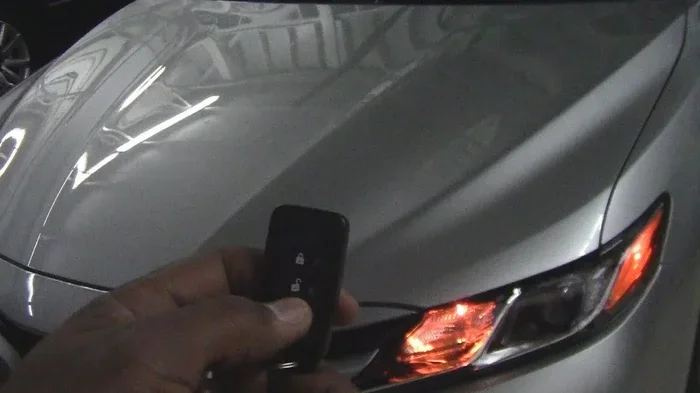
How to Remote Start a Toyota Camry and Stay Warm Today
The remote start Toyota Camry lets you pre-heat your car from inside your home. This guide covers everything from factory features to key fob programming and troubleshooting. You’ll learn how to stay warm and save time every winter morning.
There is nothing worse than stepping into a freezing Toyota Camry on a winter morning. The seats are cold, the steering wheel feels like ice, and you just want heat. A remote start Toyota Camry solves that problem completely. You can turn on the engine from inside your house and let the heater warm everything up. By the time you walk out the door, the car is cozy and ready to go.
Many people think remote start is only for luxury brands or new trucks. That is not true. The Toyota Camry has offered this feature for years, and it works with a simple push of a button on your key fob. Whether you drive a 2015 model or a brand-new 2024 Camry, you likely have the ability to start your car remotely. The key is knowing how the system works and how to use it properly.
In this guide, we will walk you through everything you need to know. We will explain which Camry models support remote start, how to use your key fob, how to program it, and what to do when something goes wrong. We will also share expert tips to get the most comfort and safety from your system. By the end, you will be a pro at staying warm without ever leaving your living room.
Key Takeaways
- Factory remote start is standard on many newer Camry models and works with your original key fob.
- You can program the key fob yourself in just a few minutes with simple steps.
- Aftermarket remote start systems offer extra features like smartphone control and longer range.
- Common issues like a dead key fob battery or weak signal are easy to fix at home.
- Pre-heating your Camry safely saves fuel and keeps the cabin comfortable before you drive.
- Always check your owner’s manual for model-specific remote start instructions and limits.
📑 Table of Contents
What Is Remote Start on a Toyota Camry?
Remote start is a feature that lets you start your car’s engine from a distance. You press a button on your key fob, and the engine turns on. The heater or air conditioner runs automatically based on your last settings. The car stays locked, and the doors remain secure while the engine idles.
On a Toyota Camry, the remote start system is built into the key fob. You do not need any extra devices if your model has the feature. The system uses the same smart key technology that lets you push the start button inside the car. When you remote start, the engine runs for a set time, usually 10 to 20 minutes, and then shuts off automatically.
How Does the Remote Start System Work?
The process is simple. First, you make sure the car is parked and in park. Then you press the remote start button on the key fob. The fob sends a coded signal to the car’s computer. The computer checks that all doors are closed and the transmission is in park. If everything is correct, the engine starts. The climate control system turns on and blows warm air through the vents. You can also set the temperature before you leave the house.
One important thing to know is that the car will not move. The engine idles in place. The locks stay engaged, so no one can open the doors. After the timer runs out, the engine shuts off. If you want more time, you can press the button again within the allowed window. This keeps your Camry warm and ready without wasting fuel.
Which Camry Models Support Remote Start?
Most Toyota Camry models from 2015 onward come with factory remote start. Some earlier models from 2012 and 2014 may have it as part of a package. If you are not sure, check your key fob. A remote start button looks like a curved arrow pointing to a car icon. It is usually located near the top of the fob, above the lock and unlock buttons.
If your Camry does not have a remote start button, you can still add the feature. Aftermarket remote start kits are widely available and work with almost any Camry. These systems plug into the car’s wiring harness and include their own key fob or smartphone app. We will talk more about aftermarket options later in this guide.
How to Remote Start a Toyota Camry Using the Key Fob
Using the factory remote start is easy once you know the steps. The process is the same for most Camry models, but you should always confirm with your owner’s manual. Here is the basic method that works on nearly every Toyota Camry with a push-button start.
Step-by-Step Instructions
- Make sure the car is off. Do not press the engine start button inside the car. The ignition must be in the off position.
- Step out of the vehicle. All doors must be closed and locked. The remote start will not work if a door is open.
- Press the lock button once. This confirms the car is locked and ready to receive the remote start command.
- Press and hold the remote start button. It is the button with the curved arrow. Hold it for about two seconds until you see the lights flash and hear the engine start.
- Walk away from the car. You must be outside the range of the key fob’s normal lock zone. The system is designed this way for safety.
- Enjoy the warm cabin. The heater will run for the preset time. You can get in and drive away when you are ready.
Quick Tips for First-Time Users
- Keep your key fob close to your body. The remote start signal works best when the fob is within a few hundred feet of the car.
- Check the weather forecast. If temperatures are below freezing, remote start is a lifesaver. It thaws the windshield and warms the seats before you even step outside.
- Do not leave the car running unattended for too long. Most Camrys limit the remote start cycle to 10 or 20 minutes. After that, the engine shuts off automatically.
- Always confirm the car is in park. If the transmission is in any gear other than park, the remote start will not engage.
Programming Your Toyota Camry Key Fob for Remote Start
Programming your key fob is the first step to using remote start. In most cases, the Camry comes programmed from the factory. But if you have a new fob, a used fob, or the fob lost its settings, you may need to reprogram it. The good news is that you can do this yourself without visiting a dealer.
Factory vs Aftermarket Remote Start Systems
Before you program anything, it helps to understand the two types of remote start systems. Your Camry may have a factory system, or you may have an aftermarket kit installed.
| Feature | Factory Remote Start | Aftermarket Remote Start |
|---|---|---|
| Cost | Included with the car or package | $200 to $500 for the kit |
| Range | Up to 1,000 feet | Up to 3,000 feet or more |
| Smartphone Control | No (unless paired with Toyota app) | Yes, most kits include an app |
| Installation | None needed | Professional install recommended |
| Key Fob | Original Toyota key fob | Dedicated remote or smart app |
| Reliability | High, integrated with car systems | Good, depends on brand and install |
Factory remote start is the simplest and most reliable option. It uses the same key fob you already carry. Aftermarket systems add features like longer range and phone control, but they require professional installation. If you choose an aftermarket kit, make sure it is compatible with your specific Toyota Camry year.
How to Program a Push-to-Start Key Fob
If your Camry has a push-to-start button and you need to program the key fob for remote start, follow these steps. This process works for most Camry models from 2015 to 2024.
- Sit in the driver’s seat. Close all doors and make sure the car is off.
- Insert the key fob into the slot. Some Camrys have a hidden key slot inside the fob. Place the fob in the ignition slot with the buttons facing up.
- Press and hold the engine start button. Do not press the brake pedal. Hold the button for about 3 seconds until the dashboard lights flash.
- Press the lock button on the fob. You should hear a click and see the lights flash again.
- Remove the fob from the slot. Walk away from the car and press the remote start button. If the engine starts, the programming is complete.
If you run into trouble, the cost to program a push-to-start key fob at a dealership is usually between $50 and $150. They can also check for any technical issues that might prevent remote start from working.
Troubleshooting Common Remote Start Issues
Remote start is a great feature, but sometimes it does not work as expected. Before you panic, check these common problems. Most issues are easy to fix without a mechanic.
Key Fob Battery Problems
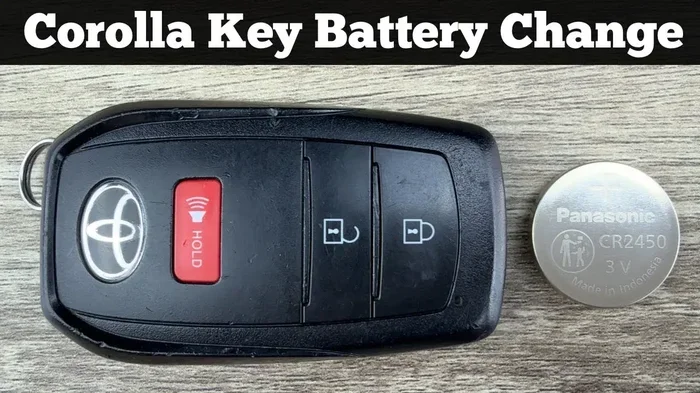
The most common reason for remote start failure is a weak key fob battery. The fob needs a strong signal to reach the car. If the battery is low, the range drops dramatically or the fob stops working entirely.
Replace the battery with a fresh CR2032 or CR2025 coin cell, depending on your fob model. You can do this in seconds. After replacing the battery, test the remote start from a short distance first. If it works, you are good to go. If not, you may need to reprogram the fob using the steps above.
Range and Signal Issues
Toyota Camry remote start works best when you are within 500 to 1,000 feet of the car. If you live in an apartment building or a crowded parking lot, buildings and other cars can block the signal. Try walking closer to your vehicle before pressing the button.
Cold weather can also reduce the fob’s signal strength. Keep the fob close to your body, such as in an inner jacket pocket, to boost the signal. If you still have range problems, the fob antenna inside the car might need inspection.
When the Engine Won’t Start Remotely
If you press the remote start button and nothing happens, check a few things first. Is the car locked? Did you press the lock button before remote start? Is the car in park? The system will not start if any of these conditions are not met.
Another common cause is a flashing red light on the dashboard. This usually means the car’s security system is armed and blocking the remote start. Disarm the alarm by pressing the unlock button on the fob, then try remote start again. If the problem persists, the issue could be a faulty hood latch sensor or a dead 12-volt battery in the car itself.
Expert Tips to Maximize Your Toyota Camry Remote Start
Once you have remote start working, you can use it to make your daily routine much more comfortable. A few simple habits will help you get the most out of the system while keeping your Camry safe and efficient.
Pre-Heat Comfort and Safety
Set your climate control to a comfortable temperature before you leave the house in the evening. When you remote start the next morning, the car will use those settings. You can also turn on the rear defroster remotely to clear ice and fog from all windows. This is especially helpful on snowy days.
Never leave your Camry running remotely in an enclosed space like a garage. The exhaust contains carbon monoxide, which can be deadly. Always remote start with the car parked outside or in a well-ventilated area. The system is designed to shut off if it detects a problem, but you should never take chances.
Using Remote Start with a Used Key Fob
If you bought a used Toyota Camry or a spare key fob, you might need to reprogram it before remote start works. The fob must be paired to your specific car’s security system. Reprogramming a used Toyota key fob is a straightforward process, but it ensures the fob can communicate with the car’s computer. Without proper pairing, remote start will not function.
Saving Fuel and Reducing Wear
Some drivers worry that remote start wastes fuel. In reality, idling for 10 to 15 minutes uses very little gas, especially on modern Camrys with fuel injection. The engine warms up faster when driven, but a short remote start idle cycle does not cause any harm. It actually reduces wear on the starter motor because you are not cranking the engine manually in freezing weather.
Final Thoughts on Remote Starting Your Toyota Camry
The remote start Toyota Camry is one of the most useful features you can have during cold months. It keeps you warm, saves you time, and makes your mornings easier. Whether you use the factory system or an aftermarket kit, the basics are the same: lock the car, press the remote start button, and let the heater do its job.
Remember to keep your key fob battery fresh, stay within the signal range, and always follow safety guidelines. If you run into issues, the troubleshooting steps in this guide will help you fix most problems quickly. With a little practice, remote start becomes second nature. You will wonder how you ever lived without it.
Now that you know how to remote start a Toyota Camry and keep it warm, you can face any winter day with confidence. Stay cozy, stay safe, and enjoy the comfort of your Camry before you even step outside.
Frequently Asked Questions
Can I remote start my Toyota Camry with the factory key fob?
Yes, most Toyota Camry models from 2015 onward come with factory remote start built into the original key fob. Just make sure your fob has the remote start button and that the car is locked and in park before you press it.
How far can I be from my Camry when using remote start?
The factory remote start system typically works within 500 to 1,000 feet. Aftermarket systems can reach up to 3,000 feet or more. Keep in mind that buildings and cold weather can reduce the effective range.
Is it safe to remote start my Camry in a closed garage?
No, never remote start your car in an enclosed garage. The engine produces carbon monoxide, which can build up quickly and become dangerous. Always remote start with the vehicle parked outside in a well-ventilated area.
What should I do if the remote start button does not work?
First, check the key fob battery and replace it if needed. Then make sure the car is locked and in park. If it still does not work, try reprogramming the fob or walking closer to the vehicle. If the problem continues, a dealership can check the system.
Can I add remote start to an older Toyota Camry that does not have it?
Yes, you can install an aftermarket remote start kit on older Camry models. These kits are available for most years and include their own key fob or smartphone app. Professional installation is recommended to ensure proper wiring and compatibility.
How long does the remote start engine run on a Toyota Camry?
Most Toyota Camrys allow the remote start engine to run for 10 to 20 minutes. After that, the system automatically shuts off the engine. You can press the remote start button again within the allowed window to extend the idle time.