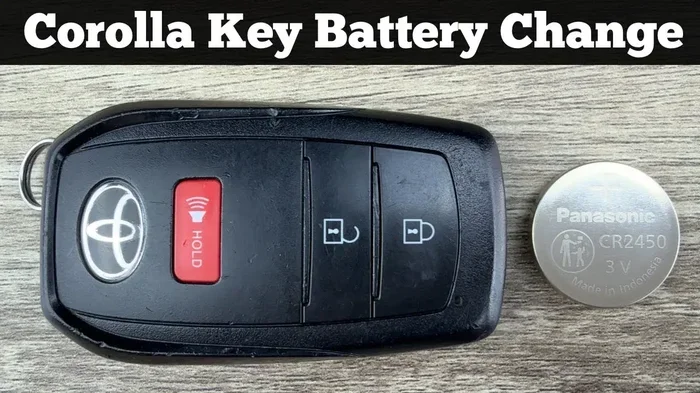
How to Easily Change the Battery on Your Toyota Car Key
Changing the battery on your Toyota car key is a simple DIY task anyone can do. This guide walks you through everything from identifying the right battery type to replacing it in under five minutes. You will save time and money by handling the Toyota key fob battery swap yourself instead of visiting a dealership.
Ever stood by your car, pressing the button on your Toyota car key over and over, hoping it would just work? That frustrating moment is almost always a dead battery. The good news is that how to change battery on toyota car key is one of the easiest maintenance tasks you will ever do. You do not need a mechanic, you do not need to visit a dealership, and you definitely do not need to spend hours on it.
In this guide, we walk you through every single step. From finding the right battery type to popping open your key fob and snapping in a fresh one, we have you covered. Whether you drive a Toyota Camry, a RAV4, or a Highlander, the process is very similar. By the end of this article, you will feel confident handling the job yourself. Let us get started.
Key Takeaways
- Easy DIY Task: You can change your Toyota car key battery at home with basic tools.
- Right Battery Matters: Most Toyota keys use a common CR2032 coin cell battery.
- Recognize Warning Signs: Reduced range and delayed response signal a dying key fob battery.
- Quick Process: The entire battery swap takes less than five minutes.
- Reprogramming May Be Needed: Some Toyota models require a quick reset after battery replacement.
- Prevent Future Issues: Proper care extends your Toyota key fob battery life significantly.
📑 Table of Contents
Why Your Toyota Key Fob Battery Matters
Your Toyota key fob battery is a small but mighty component. It powers the remote locking, unlocking, and in many models, the push-to-start function. Without a working battery, your key fob becomes nothing more than a decorative piece of plastic. You would be stuck manually unlocking your car and possibly even starting it with a hidden physical key.
Most people ignore their key fob until it stops working completely. This reactive approach causes unnecessary stress. A proactive approach, like knowing how to change the battery early, keeps you moving. A fresh Toyota car key battery also ensures your remote signal reaches your car reliably, even from across a large parking lot.
Think about how often you use your key fob every single day. You lock the car, unlock it, open the trunk, and maybe even start the engine remotely. That is a lot of work for one tiny battery. Understanding its importance helps you appreciate why a quick swap makes such a big difference.
How Often Should You Replace the Battery?
Most Toyota key fob batteries last between two and four years. However, usage patterns affect this timeline. If you constantly press buttons, leave the fob near electronic devices, or expose it to extreme temperatures, the battery may drain faster. On average, plan to replace your battery every two to three years as a preventive measure.
Signs Your Toyota Key Battery Is Low
Spotting the warning signs early saves you from being locked out. Your car gives you clear signals when the Toyota car key battery is running low. Paying attention to these signs helps you act before you get stranded.
Here are the most common indicators:
- Reduced Remote Range: You need to stand closer to your car for the fob to work. If you used to unlock your car from twenty feet away and now you must be right next to it, the battery is weak.
- Delayed Response: There is a noticeable lag between pressing the button and the car responding. This delay is a classic sign of a fading battery.
- Intermittent Function: The fob works sometimes but not others. This inconsistency often points to a low battery.
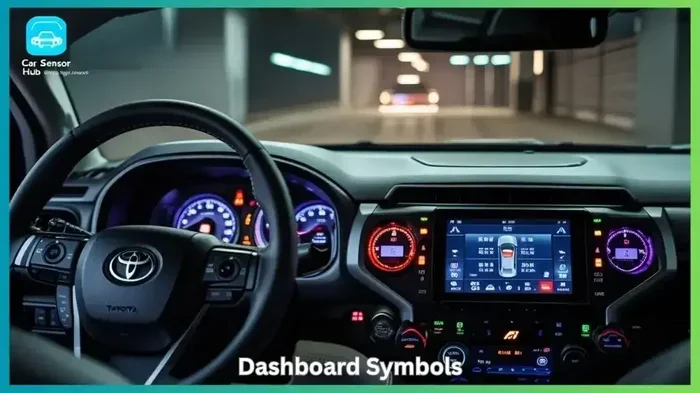
- Warning Light on Dashboard: Some Toyota models display a key fob warning light. This symbol looks like a key or a wireless signal icon.
- Push-to-Start Failure: If your car has a push-button start, a weak battery may prevent the system from recognizing your key.
If you notice any of these signs, do not ignore them. How to change battery on toyota car key takes just a few minutes, and it is far better than dealing with a dead fob at the worst possible moment. You can also check our guide on how to know if your key battery is low for additional tips on identifying battery problems early.
What Battery Does Your Toyota Key Need
Before you open your key fob, you need the right replacement battery. Using the wrong battery can damage the fob or simply not fit. The good news is that most Toyota models use the same common battery type.
The Standard CR2032 Battery
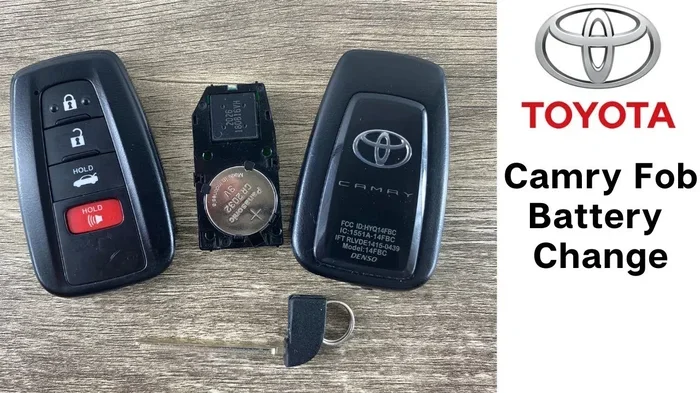
The vast majority of Toyota car key batteries are CR2032 coin cell batteries. This is a 3-volt lithium battery that you can find at almost any grocery store, pharmacy, or gas station. They cost between one and five dollars, making them one of the cheapest replacements you will ever make.
Here is a quick list of where to buy a CR2032 battery:
- Walmart or Target pharmacy section
- Local grocery stores
- Auto parts stores like AutoZone
- Online retailers like Amazon
- Gas station convenience stores
Always check the packaging to confirm it says CR2032. Some stores sell similar batteries with different names, so double-check before purchasing. The positive side of the battery faces up when you install it, which we will cover in the step-by-step section below.
Exceptions and Special Models
While the CR2032 works for most Toyota models, a few older or special edition keys may use a different battery. If you own a rare Toyota model or a key fob that looks different from the standard rectangular shape, check your owner manual. The manual will list the exact battery type for your specific key fob.
Also, if you have a Toyota smart key system with a fold-out physical key, the battery type is still typically CR2032. The compact design of smart keys does not change the battery requirement in most cases.
Step-by-Step Guide to Changing Your Toyota Key Battery
This is the core of our guide on how to change battery on toyota car key. Follow these steps carefully and you will have a working fob in no time. The process is straightforward and requires no special tools.
Step 1: Gather Your Supplies
You need very little to complete this job. Grab the following items before you start:
- A new CR2032 battery
- A small flathead screwdriver or a thin prying tool
- A clean, soft cloth or towel
- Your Toyota key fob
That is it. No expensive equipment needed. The screwdriver can be a basic one from your household toolbox. The soft cloth protects the key fob from scratches during the opening process.
Step 2: Locate the Seam on the Key Fob
Hold your Toyota key fob in your hand and look closely at the edges. You will notice a thin seam running along the length of the fob. This is where the two halves of the fob separate. On most Toyota models, the seam runs along the longer side of the fob.
Some Toyota keys have a small release button or slot near the seam. If you see one, press or slide it gently before prying. This releases any locking mechanism that holds the two halves together.
Step 3: Carefully Open the Key Fob
Insert your flathead screwdriver or prying tool into the seam. Start at one corner and gently work your way around the edge. Use slow, steady pressure. Do not force it. The two halves should pop apart with minimal effort.
Place the opened fob on your soft cloth. This keeps the small internal components from rolling away or getting scratched. Lay the fob with the circuit board facing up so you can see the battery clearly.
Step 4: Remove the Old Battery
You will see the old battery sitting in a small compartment on the circuit board. Note which side faces up before you remove it. On a CR2032 battery, the positive side (marked with a plus sign and the number 2032) faces up.
Gently pry the old battery out using the tip of your screwdriver or a small pair of tweezers. Be careful not to damage the circuit board or the battery compartment. Dispose of the old battery properly at a recycling center or electronics store.
Step 5: Insert the New Battery
Take your fresh CR2032 battery out of the packaging. Hold it with the positive side facing up and carefully place it into the compartment. The battery should sit flat and snugly in its slot. Make sure it is fully seated and not sticking out at an angle.
Double-check the orientation. The positive side must face up, matching the position of the old battery. Putting it in backwards will prevent the fob from working.
Step 6: Snap the Key Fob Back Together
Align the two halves of the key fob carefully. Press them together evenly around the entire seam. You should hear a satisfying click as the two halves lock into place. Run your finger along the seam to confirm there are no gaps.
Do not press too hard on any one spot. Uneven pressure can crack the plastic housing. A firm, even press works best.
Step 7: Test Your Toyota Key Fob
Now for the moment of truth. Stand near your car and press the lock and unlock buttons. You should hear the car respond immediately. Test the range by stepping a few feet back and trying again. If everything works, you have successfully completed the Toyota key battery replacement!
If the fob does not work right away, open it back up and check the battery orientation. Nine times out of ten, a simple orientation fix solves the problem.
Tips After Replacing Your Toyota Key Battery
Replacing the battery is only half the job. A few post-replacement steps ensure everything works smoothly and your new battery lasts as long as possible.
Reprogram Your Key Fob if Needed
In most Toyota models, a simple battery swap does not require reprogramming. However, some newer models with advanced smart key systems may need a quick reset. To reset, sit in your car with all doors closed, insert the key into the ignition, and cycle it from off to on three times within five seconds. The doors should lock and unlock automatically, confirming the system has recognized the key.
If you are unsure about reprogramming your Toyota smart key after a battery change, check your owner manual or consult a Toyota dealer. Some models also require you to press a specific sequence of buttons on the fob itself.
Program Your Garage Door Opener
Many Toyota key fobs double as garage door openers. After replacing the battery, you may need to reprogram the Homelink system. If your fob stopped working with the garage door during the battery issue, a quick reprogram takes just a couple of minutes. You can follow our detailed guide on how to connect your garage door opener to Homelink for step-by-step instructions.
Clean the Key Fob Interior
While the fob is open, take a moment to clean the inside. Use a dry cloth to wipe away any dust or debris from the circuit board. A clean connection between the battery and the contacts ensures reliable performance. This simple habit extends the life of your key fob and prevents intermittent issues.
Monitor Battery Life Going Forward
Set a reminder on your phone to check your Toyota car key battery every two years. Regular replacement before the battery fully dies prevents the inconvenience of a non-working fob. Keep a spare CR2032 battery in your glove box or junk drawer. This way, you are always prepared for a quick swap.
Avoid These Common Battery Drainers
Certain habits shorten the life of your key fob battery. Avoid leaving the fob near other electronic devices, as electromagnetic interference can cause slow battery drain. Do not press the buttons unnecessarily, especially when you are not near your car. Keep the fob away from water and extreme heat, which can damage both the battery and the internal circuitry.
When to Seek Professional Help
Most of the time, how to change battery on toyota car key is a straightforward DIY job. But there are situations where professional help makes sense. If you open your fob and the internal components look damaged or corroded, do not try to fix it yourself. Water damage or worn-out circuitry requires expert attention.
Similarly, if you replace the battery and the fob still does not work, the issue may be with the fob itself rather than the battery. A Toyota dealership or qualified locksmith can diagnose deeper problems. They have specialized tools to test the fob signal and reprogram the system if needed.
Also, if you own a newer Toyota model with a built-in key fob that is integrated into the car’s security system, professional assistance ensures you do not accidentally void any warranties. When in doubt, it is always safe to consult a professional.
Cost Considerations
Replacing the battery yourself costs almost nothing, just the price of a new CR2032 battery. However, if you visit a dealership for battery replacement, expect to pay for labor. Dealerships typically charge between twenty and fifty dollars for a simple battery swap. This makes the DIY approach far more economical.
If you need a completely new key fob because the old one is damaged beyond repair, the cost increases significantly. A replacement Toyota key fob can range from one hundred to four hundred dollars depending on the model and features. This is another reason why taking care of your current fob and replacing the battery regularly is so valuable.
Preventing Future Key Fob Battery Issues
Once you have successfully replaced your Toyota car key battery, a few simple habits keep problems from returning. These preventive measures save you time and frustration in the long run.
First, always store your key fob in a safe, dry place. Avoid tossing it into a cluttered bag where it might get crushed or exposed to moisture. A dedicated pocket or small pouch works perfectly.
Second, keep spare batteries on hand. Having a CR2032 battery ready means you never have to wait when the old one dies. Many people keep spares in their glove box, desk drawer, or travel kit.
Third, be mindful of temperature extremes. Leaving your key fob in a hot car or out in freezing weather accelerates battery drain. Bring your fob inside with you whenever possible, especially during extreme weather conditions.
Fourth, if you notice the early warning signs we discussed earlier, replace the battery immediately. Waiting until the fob completely dies risks leaving you locked out of your vehicle. A proactive replacement is always easier than an emergency one.
Finally, if you ever find yourself in a situation where your car battery is also acting up, remember that some issues can be related. For example, leaving a car door open can drain your car battery, which might compound any key fob issues you are experiencing. Understanding how different car systems interact helps you troubleshoot more effectively.
Conclusion
How to change battery on toyota car key is a skill every Toyota owner should have. It is quick, affordable, and incredibly easy once you know the steps. With just a CR2032 battery and a small screwdriver, you can breathe new life into your key fob in under five minutes. No appointment needed, no dealership visit required, no expensive service charges.
Remember the warning signs, keep spare batteries handy, and treat your key fob with care. These simple habits keep your Toyota key working reliably for years to come. The next time your fob starts acting up, do not panic. Open it up, swap the battery, and get back on the road with confidence.
Your Toyota key fob works hard every single day. Give it the care it deserves with a fresh battery and a clean interior. You will be glad you took a few minutes to learn this essential maintenance task. Now go ahead and give your Toyota key the battery refresh it needs.
Frequently Asked Questions
What type of battery does a Toyota car key use?
Most Toyota car keys use a CR2032 coin cell battery, which is a 3-volt lithium battery. You can find this battery at any grocery store, pharmacy, or auto parts store for just a few dollars. Always double-check your owner manual if you own a rare or older Toyota model, as a small number of keys may use a different battery type.
How do I know when my Toyota key fob battery needs replacing?
The most common signs include reduced remote range, delayed response when pressing buttons, intermittent function, and a warning light on your dashboard. If you need to stand very close to your car for the fob to work, the battery is likely low. You can also check our guide on how to know if your key battery is low for more detailed indicators.
Can I change the Toyota key battery myself?
Absolutely. Changing the battery on your Toyota car key is one of the easiest DIY tasks you can do. You only need a small flathead screwdriver and a replacement CR2032 battery. The entire process takes less than five minutes, and no special tools or technical knowledge is required.
Do I need to reprogram my Toyota key after replacing the battery?
In most Toyota models, a simple battery swap does not require reprogramming. However, some newer smart key models may need a quick reset. To reset, cycle the ignition from off to on three times within five seconds with all doors closed. If you are unsure, your Toyota owner manual provides model-specific instructions.
How long does a Toyota key fob battery last?
A Toyota key fob battery typically lasts between two and four years depending on usage. If you use your remote frequently every day, the battery may drain faster. Extreme temperatures and proximity to electronic devices can also shorten battery life. Replacing the battery proactively every two to three years prevents unexpected failures.
What should I do if my Toyota key fob still does not work after replacing the battery?
If the fob still does not work after a battery swap, first check that the new battery is oriented correctly with the positive side facing up. If the orientation is correct and it still fails, the internal circuitry of the fob may be damaged. In that case, visit a Toyota dealership or a qualified locksmith for diagnosis and repair. Sometimes the issue is not the battery but a worn-out fob that needs replacement.