How to Replace the Toyota Key Fob Battery Step by Step
Replacing the battery in your Toyota key fob is a simple DIY task you can finish in under five minutes. This guide walks you through every step, from opening the fob to choosing the right Toyota key fob battery. You will learn how to replace key fob battery types, avoid common mistakes, and keep your Toyota key fob working like new.
There is nothing more frustrating than reaching for your Toyota key fob and finding it unresponsive. You press the button, and nothing happens. Before you call a dealer or spend money on a replacement, stop. The problem is almost always a dead battery. Replacing the Toyota key fob battery is one of the easiest maintenance tasks you can do at home. In this guide, we walk you through the entire process step by step.
Whether you drive a Toyota Camry, a Toyota RAV4, or any other Toyota model, the key fob battery replacement process is very similar. You do not need special tools or mechanical knowledge. A new battery costs less than five dollars, and you will have your push button start fob working again in minutes. Let us get into it.
Key Takeaways
- Easy DIY Fix: You can replace your Toyota key fob battery at home with basic tools and no technical skills.
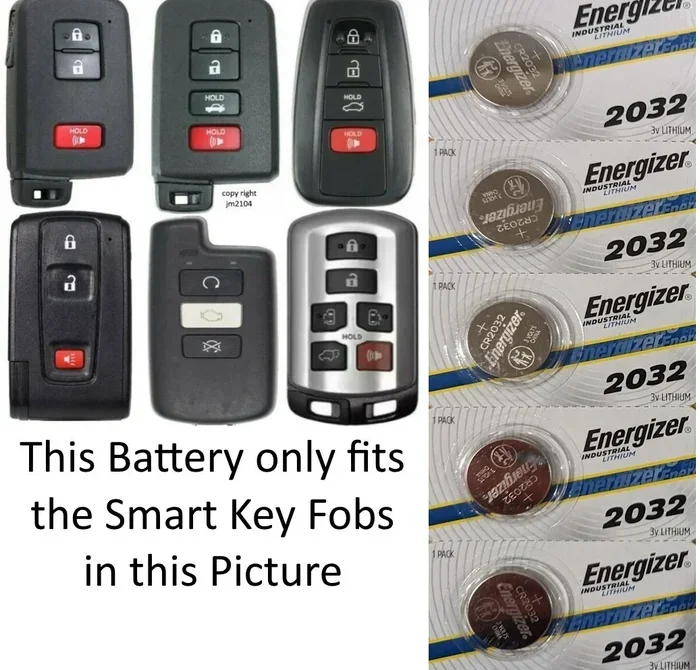
- Right Battery Matters: Most Toyota key fobs use a CR2032 coin cell battery, but always double check your model.
- Quick Process: The entire replacement takes about 3 to 5 minutes from start to finish.
- Prevent Future Issues: Knowing the signs of a key fob battery low warning helps you act before you get locked out.
- Cost Effective: A replacement battery costs just a few dollars, saving you a trip to the dealer.
- Reprogramming May Be Needed: After replacing the battery, some Toyota models require a simple resync step.
📑 Table of Contents
- Why Your Toyota Key Fob Battery Dies
- How to Know When the Battery Is Low
- Tools and Materials You Need
- Step-by-Step Guide to Replacing the Battery
- Reprogramming Your Toyota Key Fob After Battery Replacement
- How to Extend Your Toyota Key Fob Battery Life
- Common Mistakes to Avoid When Replacing the Battery
- When to Seek Professional Help
- Toyota Key Fob Battery Replacement by Model
- Final Thoughts
Why Your Toyota Key Fob Battery Dies
Understanding why your Toyota key fob battery dies helps you prevent surprises. Most Toyota key fobs use a small coin cell battery, typically a CR2032. These batteries last between two and four years depending on usage. If you press your buttons frequently or live in a cold climate, the battery may drain faster.
Cold weather is a big factor. Low temperatures reduce the chemical reaction inside the battery, which means less power reaches your fob. If you notice your Toyota key fob not working more often in winter, the battery is likely the culprit. Another common reason is simply age. If your fob is more than three years old, it is time to check the battery.
Some drivers also notice that their fob works intermittently before it stops completely. This is a clear sign that the battery is weakening. Paying attention to these early warnings helps you replace the battery before you get stranded.
How to Know When the Battery Is Low
Your Toyota gives you several clues when the key fob battery low condition is present. Recognizing these signs early saves you from an inconvenient situation. Here are the most common symptoms:
- Reduced Range: You have to stand closer to your car for the fob to work. Previously, you could unlock the doors from across the parking lot.
- Delayed Response: There is a noticeable delay between pressing the button and the car responding.
- Intermittent Function: The fob works sometimes but not others, especially in cold weather.
- Warning Message: Some newer Toyota models display a warning on the dashboard about the key fob battery.
- Push Button Start Fails: If your Toyota has push button start, the car may not detect the fob when the battery is weak.
If you experience any of these issues, do not wait too long. A fully dead battery means you cannot start the car or unlock the doors remotely. You can always refer to our guide on how to know if your key battery is low for additional signs and tips.
Tools and Materials You Need
One of the best things about replacing a Toyota key fob battery is that you need very few tools. Here is a simple list of what you will need:
- CR2032 battery: This is the most common battery type for Toyota key fobs. You can find it at any grocery store, pharmacy, or auto parts shop.
- Small flathead screwdriver: A thin, flat screwdriver helps you pry open the fob casing safely.
- Soft cloth or towel: This protects the fob from scratches while you work.
- Good lighting: Make sure you can see clearly inside the fob.
That is it. No special equipment. No trip to the mechanic. You can do this in your kitchen or at your desk at work. If you want to understand more about the cost involved, check out our article on how much it costs to program a push to start key fob for related cost insights.
Step-by-Step Guide to Replacing the Battery
Now let us get to the actual process. Follow these steps carefully, and you will have a working fob in no time.
Step 1: Remove the Emergency Key
Most Toyota key fobs have a hidden emergency key inside. Look for a small button or latch on the side of the fob. Press it, and the metal key blade slides out. Set the fob on a soft surface with the open side facing up. The emergency key is useful for unlocking the door manually if your fob dies completely, so keep it accessible.
Step 2: Open the Fob Casing
Locate the seam where the two halves of the fob meet. Use your small flathead screwdriver to gently pry the case apart. Start from the corner near the emergency key slot. Work your way around the edge slowly. The plastic clips are delicate, so do not force it. A gentle rocking motion works best.
Once the case is open, you will see the battery sitting in a small compartment. Take note of how the battery is positioned before you remove it. This makes reassembly much easier.
Step 3: Remove the Old Battery
The old battery is usually held in place by a small metal clip or just sits in a snug slot. Use the tip of your screwdriver or a plastic prying tool to gently lift the old battery out. Pay attention to the orientation. The positive side (marked +) usually faces up. Note which direction the battery sits before you remove it.
Dispose of the old battery properly. Coin cell batteries should not go in regular household trash in many areas. Check your local recycling guidelines or drop it off at a battery recycling center.
Step 4: Insert the New Battery
Take your new CR2032 battery and place it in the compartment with the positive side facing up, just like the old one. Push it gently until it clicks into place under the metal clip. Make sure the battery sits flat and secure. A loose battery will cause intermittent fob problems.
At this point, you can press a button on the fob to test it. If the fob lights up or you hear a beep, the new battery is working. If not, double check the orientation and make sure the battery is fully seated.
Step 5: Reassemble the Fob
Align the two halves of the fob casing carefully. Press them together evenly around the entire edge. You should hear the plastic clips snap into place. Do not use excessive force. If the case does not close smoothly, check that no wires or components are pinched between the halves.
Slide the emergency key back into its slot. Your Toyota key fob is now ready to use again.
Step 6: Test the Fob
Stand near your Toyota and test all the fob functions. Press the lock button. Press the unlock button. Test the trunk release if your fob has one. If your Toyota has push button start, try starting the engine with the fob.
If everything works, you are done. If the fob still does not respond, double check that the battery is the correct type and properly seated. Sometimes the new battery needs a few moments to sync with the car. If problems persist, you may need to reprogram the fob, which brings us to the next section.
Reprogramming Your Toyota Key Fob After Battery Replacement
In most cases, replacing the battery does not require reprogramming. The fob retains its programming even when the battery is removed. However, some Toyota models may need a quick resync after a key fob battery replacement. Here is what to do:
- Method 1: Walk-Away Resync: Simply walk away from your car with the fob and then return. Press the lock button. The car should respond normally.
- Method 2: Ignition Cycle: Insert the key into the ignition (if your fob has a key blade). Turn the ignition to the ON position without starting the engine. Wait 10 seconds. Turn it back to OFF. Repeat this cycle three times. The fob should resync.
- Method 3: Dealer Assistance: If neither method works, visit your local Toyota dealer. They can reprogram the fob quickly and often for free or a small fee.
For more information on fob programming costs and processes, you can read our detailed article on how much it costs to program a push to start key fob. Also, if you ever wonder whether you can remote start your Toyota with the key fob, we have a dedicated guide on that too.
How to Extend Your Toyota Key Fob Battery Life
You just replaced the battery, and you want it to last as long as possible. Here are some simple habits that help extend the life of your Toyota key fob battery:
- Avoid Extreme Temperatures: Do not leave your fob in a hot car or a freezing glove box. Temperature swings degrade batteries faster.
- Press Buttons Only When Needed: Every button press uses a small amount of power. Be deliberate with your fob usage.
- Keep a Spare Battery: Store a spare CR2032 battery in your glove box or junk drawer. This way you are never caught off guard.
- Replace Both Fobs at the Same Time: If you have two Toyota key fobs, replace the batteries in both around the same time. This ensures both fobs stay reliable.
- Check the Battery Yearly: Once a year, test your fob from a distance. If the range seems shorter, it is time for a new battery.
These small habits add up. They keep your Toyota key fob maintenance simple and help you avoid the frustration of a dead fob at the worst possible moment.
Common Mistakes to Avoid When Replacing the Battery
Even though this is a simple task, mistakes happen. Here are the most common errors and how to avoid them:
- Using the Wrong Battery Type: Not all key fobs use a CR2032. Some older Toyota models may use a different battery. Always check your owner manual or the battery compartment markings before purchasing.
- Forcing the Fob Open: The plastic clips break easily. If the case does not open with gentle pressure, stop and reassess. Using a metal tool carelessly can scratch or crack the casing.
- Touching the Battery Contacts with Metal: Avoid letting your screwdriver touch both battery contacts at the same time. This can cause a small short circuit.
- Forgetting to Reprogram: If your fob does not work after replacement, do not assume the battery is defective right away. Try the resync methods first.
- Ignoring the Dashboard Warning: Some Toyota models show a warning light when the fob battery is low. Ignoring this warning can lead to a situation where the fob stops working entirely.
By avoiding these mistakes, you make the battery replacement process smooth and stress free.
When to Seek Professional Help
Most of the time, you can handle a Toyota key fob battery replacement on your own. But there are situations where professional help makes sense:
- The Fob Is Physically Damaged: If the casing is cracked or water damaged, a new battery will not fix the problem. You may need a replacement fob.
- The Car Does Not Detect the Fob: After replacing the battery and trying to resync, if your car still does not detect the fob, there may be a deeper issue with the car’s keyless entry system.
- You Lost the Emergency Key: Without the emergency key, you may not be able to access the fob battery compartment easily. A dealer can help.
- Multiple Fobs Need Replacement: If more than one fob is having issues, there could be a pattern that points to a larger electrical or system problem.
If you find yourself in any of these situations, do not hesitate to visit a Toyota dealer or a qualified locksmith. They have the tools and expertise to diagnose and fix more complex issues.
It is also worth noting that if you are curious about driving your Toyota without a key fob in certain situations, we have a guide that covers that topic. Similarly, if you are wondering about Toyota key fob troubleshooting beyond just battery issues, there are many resources available to help you understand your vehicle better.
Toyota Key Fob Battery Replacement by Model
While the general process is the same across most Toyota models, there are slight variations worth noting. Here is a quick overview of how the process differs by popular Toyota models:
- Toyota Camry: Uses a standard CR2032 battery. The fob opens with a small tab near the key blade. Very straightforward replacement.
- Toyota RAV4: Also uses a CR2032. The newer models have a slightly slimmer fob design, but the battery compartment is accessed the same way.
- Toyota Corolla: The Corolla key fob is compact. The battery compartment is tight, so use a small screwdriver carefully.
- Toyota Highlander: Similar to the Camry in design. The CR2032 battery is easy to access and replace.
- Toyota Tacoma: The Tacoma fob follows the standard Toyota design. Battery replacement is simple and quick.
No matter which Toyota model you drive, the core process remains the same. You open the fob, swap the battery, and reassemble. The simplicity of this process is one of the reasons why DIY Toyota key fob battery replacement is so popular among owners.
Final Thoughts
Replacing the battery in your Toyota key fob is one of the simplest and most satisfying DIY tasks you can do. It takes just a few minutes, costs almost nothing, and saves you from the hassle of visiting a dealer or locksmith. With a new CR2032 battery, a small screwdriver, and this guide, you are fully equipped to handle the job.
Remember to pay attention to the early warning signs of a weak battery. Replace the battery proactively rather than waiting for the fob to die completely. Keep a spare battery on hand, and treat your Toyota key fob with care. These small habits go a long way in keeping your daily driving experience smooth and hassle free.
If you ever run into issues beyond a simple battery swap, do not hesitate to consult your Toyota dealer or a trusted mechanic. But for the vast majority of owners, this guide covers everything you need. Now go ahead, open that fob, and swap in that fresh battery. Your Toyota will thank you for it.
Frequently Asked Questions
What type of battery does a Toyota key fob use?
Most Toyota key fobs use a CR2032 coin cell battery. This is a standard 3-volt battery that you can find at any grocery store or pharmacy. Always check your owner manual to confirm the correct battery type for your specific Toyota model.
How long does a Toyota key fob battery last?
A Toyota key fob battery typically lasts between two and four years. The lifespan depends on how often you use the fob, the distance from your car when pressing buttons, and the climate you live in. Cold weather can shorten battery life significantly.
Do I need to reprogram my Toyota key fob after replacing the battery?
In most cases, no. The fob retains its programming when you replace the battery. However, some Toyota models may require a simple resync. Try walking away from your car and back, or cycling the ignition a few times. If neither works, visit your Toyota dealer for assistance.
Can I drive my Toyota if the key fob battery is dead?
Yes, most Toyota vehicles with push button start will still allow you to drive if the fob battery is dead. You can usually place the fob directly on the start button, and the car will read the fob’s chip even with a dead battery. Check your owner manual for the specific procedure for your model.
How much does it cost to replace a Toyota key fob battery?
A replacement CR2032 battery costs between one and five dollars. The entire process requires no professional labor, so the total cost is just the price of the battery. This makes it one of the cheapest and easiest maintenance tasks you can do for your Toyota.
What should I do if my Toyota key fob still does not work after replacing the battery?
First, double check that the battery is the correct type and properly seated with the positive side facing up. Try resyncing the fob by cycling the ignition or walking away and back. If the fob still does not work, the issue may be with the fob itself or the car’s keyless entry system, and you should consult a Toyota dealer or qualified technician.
=== CONCLUSION ===
Replacing your Toyota key fob battery is quick, easy, and costs just a few dollars. With this step by step guide, you now have everything you need to tackle the job confidently. From recognizing the signs of a key fob battery low warning to inserting the new CR2032 battery and testing all functions, the entire process takes less than five minutes. Keep spare batteries handy, follow our tips to extend battery life, and your Toyota key fob will stay reliable for years to come.