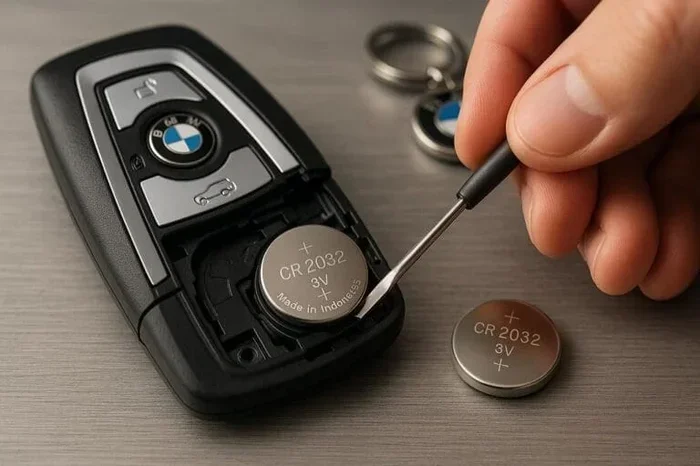
Are Key Fob Batteries Easy to Replace Without Tools
Replacing a key fob battery is one of the simplest maintenance tasks you can do at home. Most key fobs use a common CR2032 coin cell battery that costs just a few dollars. You do not need any special tools or technical skills to get the job done in under five minutes.
Have you ever stood by your car, pressing the remote button over and over, hoping it would finally unlock the door? That frustrating moment usually means your key fob battery is dying. The good news is that fixing this problem is incredibly simple. You do not need a mechanic, a dealership visit, or any fancy equipment. In most cases, a new battery and a steady hand are all you need.
This guide walks you through everything you need to know about key fob battery replacement. We will cover the types of batteries used, the step-by-step process for different fob designs, and tips to avoid common pitfalls. Whether you drive a Toyota, Honda, Ford, or BMW, the basics remain the same. By the end of this article, you will feel confident tackling this quick repair on your own.
Let us start with the most important question: are key fob batteries easy to replace without tools? The short answer is yes. Most modern key fobs are designed for easy battery access. The back cover pops off with a gentle push or a flat screwdriver. Inside, you will find a small coin cell battery sitting in a plastic compartment. Lift it out, drop in a new one, and snap the cover back on. That is really all there is to it.
However, there are a few things you should know before you dive in. Not all key fobs are built the same way. Some require a small flathead screwdriver to pry open the case. Others have a release latch that slides out. And a few luxury vehicles use smart key fobs with internal batteries that are a bit trickier to access. But even in those cases, the process is manageable at home. You just need a little patience and the right information.
Key Takeaways
- Easy DIY Task: Most key fob battery replacements require no tools and take less than five minutes.
- Common Battery Type: The CR2032 button cell battery is used in the majority of key fobs.
- No Dealer Needed: You can save money by replacing the battery yourself instead of visiting a dealership.
- Watch for Warning Signs: A weak key fob signal or reduced range often means the battery is dying.
- Know Your Model: Different car brands have slightly different key fob designs, so check your owner manual first.
- Avoid Common Mistakes: Using the wrong battery type or forcing the case open can damage your fob.
- Reset May Be Needed: Some vehicles require a simple reset after replacing the key fob battery.
📑 Table of Contents
- Why Key Fob Batteries Die and What to Look For
- What Type of Battery Does Your Key Fob Use?
- Step-by-Step Guide to Replacing Your Key Fob Battery Without Tools
- Car-Specific Key Fob Battery Replacement Tips
- Common Mistakes to Avoid When Replacing a Key Fob Battery
- When to Seek Professional Help for Key Fob Battery Replacement
- How to Extend Your Key Fob Battery Life
- Key Takeaways
- Conclusion
Why Key Fob Batteries Die and What to Look For
Understanding why your key fob battery dies helps you stay ahead of the problem. Most button cell batteries last between two and four years. However, cold weather, frequent use, and humidity can shorten that lifespan. If you live in a harsh climate, you might need to replace the battery more often.
Common Signs Your Key Fob Battery Is Low
Your key fob sends signals to your car using a small radio transmitter. When the battery weakens, that signal loses power. Here are the most common warning signs:
- Reduced range: You have to stand closer to the car for the remote to work.
- Intermittent response: The fob works sometimes but not others.
- Delayed unlocking: There is a noticeable lag between pressing the button and the car responding.
- Dashboard warning light: Some newer vehicles display a key fob battery low message on the dashboard.
- Push-start failure: If your car uses a push-button start, a weak fob battery may prevent the engine from starting.
If you notice any of these symptoms, do not wait too long. A completely dead battery means you will need to use the physical emergency key to get into your car. That is doable, but it is much more inconvenient than simply swapping out the battery early.
How Long Do Key Fob Batteries Typically Last?
The average CR2032 battery lasts about two to four years. But this varies based on usage. If you use your remote start feature every day, the battery will drain faster. Similarly, if your fob sits in a crowded keychain with other electronics, the constant signal interference can reduce battery life.
Here are some factors that affect key fob battery life:
- Frequency of use: More presses mean more battery drain.
- Distance from the car: Trying to unlock the car from far away forces the fob to transmit at higher power.
- Temperature extremes: Cold weather reduces battery efficiency significantly.
- Battery brand: Quality brands like Energizer and Duracell tend to last longer than generic options.
- Fob design: Some remote key fobs have more powerful transmitters that use more energy.
What Type of Battery Does Your Key Fob Use?
Not all key fob batteries are the same. Knowing which battery your fob uses is the first step in the replacement process. The good news is that most key fobs use one of just a few common battery types.
The Most Common Key Fob Battery Types
The CR2032 is the undisputed king of key fob batteries. It is a 3-volt lithium coin cell that fits in the vast majority of car key fobs. Here is a quick look at the most common battery types you will encounter:
- CR2032: The most widely used battery. Found in Ford, Toyota, Honda, Chevrolet, and many other brands.
- CR2025: Slightly thinner than the CR2032. Used in some BMW and Mercedes models.
- CR1632: A smaller battery found in compact key fobs.
- CR2016: The thinnest option, used in a few older or smaller fob designs.
- Rechargeable batteries: Some modern fobs use built-in rechargeable cells that cannot be swapped out.
Always check your vehicle owner manual before purchasing a replacement battery. Using the wrong type can damage the fob or prevent it from working properly. The battery type is also usually printed on the old battery itself, so take a moment to read it before you toss the dead battery.
Where to Buy Replacement Batteries
You can find key fob batteries at almost any store. Grocery stores, drugstores, and electronics shops all carry them. Online retailers like Amazon offer bulk packs at great prices. A single CR2032 battery typically costs between one and three dollars. Buying a pack of five or ten saves money if you like to be prepared.
When shopping, look for trusted brands. Energizer, Duracell, and Panasonic are reliable choices. Generic batteries work fine too, but name brands tend to have more consistent performance and longer shelf life.
Step-by-Step Guide to Replacing Your Key Fob Battery Without Tools
Now let us get into the actual process. Replacing a key fob battery without tools is straightforward for most models. Follow these steps carefully and you will have a working fob in no time.
Step 1: Gather Your Supplies
Before you start, make sure you have everything ready. You will need:
- A new CR2032 battery (or the correct type for your fob)
- A clean, flat surface to work on
- A soft cloth or towel to place the fob on
- Optional: a small flathead screwdriver or a thin plastic pry tool
Having everything at hand prevents frustration. You do not want to be halfway through the process and realize you bought the wrong battery.
Step 2: Open the Key Fob Case
This is the part where people sometimes worry about breaking the fob. But opening most key fobs is surprisingly gentle. Look for a small seam or gap along the edge of the fob. Here are the most common methods:
- Thumb pressure: Many fobs split open with just your thumb. Place your thumb on the seam and push firmly. The cover should pop off.
- Flathead screwdriver: If the fob does not open with thumb pressure, insert a small flathead screwdriver into the gap. Gently twist to pry the cover loose.
- Release latch: Some fobs have a small sliding latch on the back. Slide it, and the cover comes off.
- Emergency key slot: A few fobs have a tiny hole on the back. Insert the emergency key blade into the hole to release the cover.
Go slowly and avoid using excessive force. If the cover does not budge, double-check for a hidden latch or screw. Forcing it open can crack the plastic housing.
Step 3: Remove the Old Battery
Once the fob is open, you will see the battery sitting in a small plastic compartment. Note which side faces up. Most batteries have a positive (+) side that faces up. Take a photo with your phone before removing the battery so you can reference it later.
To remove the old battery, you can:
- Use your fingernail to gently pry it out
- Use a small plastic tool to pop it out
- Tilt the fob upside down and let the battery fall out naturally
Do not use metal tools to remove the battery. Metal can short-circuit the fob’s internal electronics. A plastic tool or your fingernail is always the safer choice.
Step 4: Insert the New Battery
Take your new battery and place it in the compartment with the correct orientation. The positive side should face up, matching the position of the old battery. Push it in gently until it clicks into place.
Quick tip: If the new battery feels loose, you can add a tiny piece of tape to hold it in place. This is especially helpful in older fobs where the battery compartment has worn out over time.
Step 5: Snap the Fob Back Together
Align the two halves of the fob and press them together firmly. You should hear a satisfying click when the halves lock into place. Make sure there are no gaps or misaligned edges. A properly sealed fob protects the internal electronics from dust and moisture.
Step 6: Test the Fob
Stand near your car and press the unlock button. The doors should respond immediately. Test all functions including lock, unlock, trunk release, and panic alarm if your fob has them. If the fob works, you are done. If it does not, double-check the battery orientation and make sure the battery is seated properly.
Car-Specific Key Fob Battery Replacement Tips
While the basic process is the same across most vehicles, different car brands have their own quirks. Here are some brand-specific tips to make your key fob battery replacement even easier.
Toyota and Lexus Key Fobs
Toyota and Lexus key fobs are among the easiest to work on. The back cover typically pops off with thumb pressure alone. The CR2032 battery sits in a clear compartment, making it easy to see the battery level. After replacement, the fob usually works immediately with no reset needed.
Honda and Acura Key Fobs
Honda key fobs use a CR2032 or CR2025 battery depending on the model. The fob case has a small groove on the back where you can insert a fingernail to pry it open. Some Honda models require you to remove the key blade from the fob before accessing the battery compartment.
Ford and Lincoln Key Fobs
Ford key fobs generally use a CR2032 battery. The back cover is held in place by small clips. Use a flathead screwdriver to gently release the clips one at a time. Work around the perimeter slowly. Ford also has push-start models where the fob battery affects the push-button ignition system.
BMW and Mercedes Key Fobs
Luxury brands sometimes use slightly different battery sizes. BMW fobs often use a CR2032 but the case is more tightly sealed. Mercedes key fobs may use a CR2025 in some models. For these vehicles, having a small plastic pry tool on hand is helpful. The covers can be snug, but they should still open without excessive force.
Smart Key and Proximity Fobs
Some newer vehicles use smart key fobs that communicate with the car through proximity sensors. These fobs may have internal batteries that are not user-replaceable. In such cases, the entire fob may need to be replaced or serviced by a dealer. However, most smart key systems still use a standard button cell battery for the remote functions, even if the proximity sensor has a separate power source.
Common Mistakes to Avoid When Replacing a Key Fob Battery
Even though key fob battery replacement is simple, people still make mistakes. Here are the most common ones to watch out for:
Using the Wrong Battery Type
This is the number one mistake. A CR2032 and a CR2025 look almost identical but have different thicknesses. The wrong battery may not fit properly or may not make good contact with the fob’s terminals. Always double-check the battery type printed on the old battery or listed in your owner manual.
Forcing the Fob Open
If the fob cover does not come off easily, do not use a hammer or heavy tools. Most fobs are designed to open with minimal force. Look for hidden latches, screws, or release mechanisms. Forcing the case open will crack the plastic and expose the electronics to damage.
Touching the Battery Contacts with Metal
Using a metal screwdriver or metal tweezers to handle the battery can create a short circuit. This can fry the fob’s circuit board. Stick to plastic tools, fingernails, or the battery’s own packaging for removal and insertion.
Ignoring the Battery Orientation
Putting the battery in upside down will not damage the fob, but it will not work either. Always match the positive and negative terminals to the markings inside the fob. Taking a photo before removal is a great habit to build.
Not Testing After Replacement
Some people snap the fob back together and assume everything is fine. Always test the fob before putting it back in your pocket or bag. If it does not work, opening it back up to check the battery placement takes only a few seconds.
Forgetting to Replace the Battery in the Spare Fob
If you have a spare key fob, check its battery too. A dead spare battery means you are stuck if your primary fob fails unexpectedly. Replace both batteries at the same time to stay prepared.
When to Seek Professional Help for Key Fob Battery Replacement
Most of the time, you can handle key fob battery replacement on your own. But there are situations where professional help makes sense. If your fob still does not work after installing a new battery, the problem might be deeper than a dead battery. The fob’s circuit board could be damaged, the antenna inside the fob could be broken, or the key fob itself might need reprogramming.
Also, if your fob uses a non-replaceable internal battery, a professional can open it safely without damaging the housing. Dealerships and locksmiths can also program new key fobs if needed. But for a simple battery swap, you have everything you need to do it yourself.
Here are some situations where you should consider professional help:
- The fob is physically damaged or cracked
- The fob still does not work after a battery replacement
- The fob requires electronic programming after the battery swap
- The battery compartment is damaged or stuck
- You are uncomfortable opening the fob yourself
In these cases, a locksmith or dealership can usually handle the job quickly and affordably. Many locksmiths offer key fob battery replacement as a free or low-cost service.
How to Extend Your Key Fob Battery Life
Once you have replaced your key fob battery, you want it to last as long as possible. Here are some simple tips to stretch the battery life:
- Keep the fob away from other electronics: Storing it in a cluttered keychain with phones and metal keys can cause signal interference and drain the battery faster.
- Store it properly in cold weather: Extreme cold drains batteries quickly. Keep your fob in an inside pocket close to your body for warmth.
- Do not press buttons unnecessarily: Every press uses a small amount of battery power. Only press the button when you actually need to.
- Use the physical key when possible: If you are close to your car, using the manual key instead of the remote saves battery.
- Buy quality batteries: Name-brand batteries from Energizer, Duracell, or Panasonic tend to last longer and perform more reliably than cheap generics.
These small habits add up over time and can add months or even years to your key fob battery life.
Key Takeaways
- Easy DIY Task: Most key fob battery replacements require no tools and take less than five minutes.
- Common Battery Type: The CR2032 button cell battery is used in the majority of key fobs.
- No Dealer Needed: You can save money by replacing the battery yourself instead of visiting a dealership.
- Watch for Warning Signs: A weak signal or reduced range often means the battery is dying.
- Know Your Model: Different car brands have slightly different key fob designs, so check your owner manual first.
- Avoid Common Mistakes: Using the wrong battery type or forcing the case open can damage your fob.
- Reset May Be Needed: Some vehicles require a simple reset after replacing the key fob battery.
Conclusion
The answer to are key fob batteries easy to replace without tools is a clear and resounding yes. This is one of the easiest maintenance tasks you will ever do on your vehicle. With a new CR2032 battery, a clean surface, and about five minutes of your time, you can bring your key fob back to life.
You do not need to visit a dealership or pay for expensive service. You do not need special tools or technical training. The process is simple, affordable, and satisfying to complete on your own. Every time you replace your own key fob battery, you save money and gain confidence in handling basic car maintenance.
Keep spare batteries in your glove box or junk drawer so you are always prepared. Watch for the warning signs of a dying battery and replace it early. And remember, if you ever feel stuck, the steps in this guide are always here to walk you through it. Your key fob is counting on you, and now you have everything you need to keep it working perfectly.
Take a moment today to check your key fob battery level. If it has been more than two years since your last replacement, there is a good chance it is time for a new one. A few dollars and a couple of minutes of your time can save you from the frustration of a dead remote. You have got this.
Frequently Asked Questions
Can I replace my key fob battery without any tools at all?
Yes, in most cases you can replace the battery without any tools. Many key fobs open with just your thumb pressure on a seam or gap. A flathead screwdriver can help with stubborn fobs, but it is not always necessary. Check your vehicle manual for specific instructions.
What happens if I put the key fob battery in upside down?
The fob will not work, but no damage will occur. Simply open the fob again, flip the battery over, and reinsert it with the positive side facing up. Always check the orientation markings inside the fob before inserting the new battery.
How much does a key fob battery cost?
A single CR2032 battery costs between one and three dollars at most stores. Buying a multi-pack can save even more. The total cost of replacing the battery yourself is just the price of the battery, making it one of the cheapest car maintenance tasks you can do.
Will my key fob need reprogramming after I replace the battery?
In most cases, no reprogramming is needed. The fob should work immediately after you insert the new battery and snap the case back together. However, some luxury vehicles like certain BMW or Mercedes models may require a simple reset or reprogramming step.
How do I know which battery my key fob uses?
The easiest way is to look at the old battery once you remove it. The type is printed directly on the battery surface. You can also check your vehicle owner manual or look up your specific fob model online. The most common type is the CR2032 button cell battery.
Can a dead key fob battery prevent my car from starting?
Yes, if your vehicle uses a push-button start system, a dead key fob battery can prevent the car from recognizing the fob and starting the engine. In this situation, most cars have a backup system where you can place the fob directly against the start button to bypass the weak battery signal.