How to Get BMW Digital Key and Unlock Your Car Fast
Getting a BMW Digital Key lets you unlock and start your car using just your smartphone. It replaces the traditional key fob with a sleek, hands-free experience. You can set it up through the My BMW app in minutes, and it works with select BMW models and iPhones or Android devices. This guide walks you through every step, from checking compatibility to troubleshooting common issues.
Imagine walking up to your BMW and unlocking the doors without digging for keys. Your phone buzzes, the car recognizes you, and you’re in. That is the magic of the BMW Digital Key. It is fast, modern, and incredibly convenient.
More and more car owners want to know how to get BMW Digital Key set up on their phones. Whether you just bought a new BMW or you are looking to upgrade your current setup, this guide has you covered. We will walk you through every step in simple, easy-to-follow language.
The BMW Digital Key uses Near Field Communication, or NFC, to connect your phone to your car. Think of it like tapping a payment at a store. You tap your phone near the car, and it unlocks. You can also start the engine without ever taking your phone out of your pocket. It is a game changer for daily driving.
Key Takeaways
- BMW Digital Key lets you use your phone as a car key: No need to carry a physical fob anymore.
- Compatible with iPhone and Android: Works with NFC-enabled smartphones and select BMW models.
- Setup is quick and simple: You can activate it through the My BMW app in just a few minutes.
- Multiple people can share the digital key: Family and friends can access your car with their phones.
- Your phone battery matters: Keep your phone charged, or you may need a backup plan. You can also replace a car key fob battery yourself if you still carry a physical backup.
- Not all BMW models support it: Check your model year and trim before trying to set it up.
- Dealerships can help if you get stuck: Many dealerships replace key fobs and can assist with digital key activation too.
📑 Table of Contents
- What Is BMW Digital Key and How Does It Work?
- Which BMW Models Support Digital Key?
- How to Set Up BMW Digital Key Step by Step
- Benefits of Using BMW Digital Key
- Troubleshooting Common BMW Digital Key Issues
- Can You Share BMW Digital Key With Others?
- BMW Digital Key vs Traditional Key Fob
- Expert Tips for Getting the Most Out of BMW Digital Key
- Final Thoughts
What Is BMW Digital Key and How Does It Work?
The BMW Digital Key is a feature that turns your smartphone into a car key. Instead of carrying a bulky key fob, you just carry your phone. The system uses wireless technology to communicate between your device and your car.
Here is how it works in simple terms:
- Your phone stores a secure digital credential.
- When you approach your BMW, the car detects your phone.
- You unlock the doors by touching the door handle or through the app.
- You start the engine by placing your phone on the wireless charging pad or a designated NFC spot.
The whole process takes seconds. It feels like magic, but it is just smart technology working behind the scenes. The digital key also works even if your phone battery is low, thanks to a special power-saving mode that keeps the NFC chip active for a short time.
Which Devices Are Compatible?
BMW Digital Key works with certain iPhones and Android phones. For iPhone users, you need an iPhone 7 or newer. The best experience comes with iPhone 8 and later models. On the Android side, you need a phone that supports NFC and is compatible with the BMW Digital Key program. Samsung Galaxy phones are among the most popular choices.
Always check the BMW website or your owner’s manual to confirm your phone model is supported. Technology updates quickly, and BMW keeps adding new compatible devices regularly.
Which BMW Models Support Digital Key?
Not every BMW has the Digital Key feature. It depends on the model year, trim level, and optional equipment. Here is a general breakdown of what to look for:
- BMW 3 Series: Supported on models from 2019 onward with the proper package.
- BMW 5 Series: Available on recent models with the comfort access feature.
- BMW X Series: The X3, X5, and X7 offer Digital Key on newer trims.
- BMW 7 Series and 8 Series: These luxury models typically include Digital Key as standard or optional.
If you are unsure whether your BMW supports it, you can check the iDrive system. Look for a “Digital Key” option in the settings menu. If it is there, you are good to go. You can also ask your dealer or check the BMW website for a full list of compatible models.
Some older BMW models can be upgraded with hardware updates at the dealership. It is always worth asking, even if your car did not come with the feature from the factory.
How to Set Up BMW Digital Key Step by Step
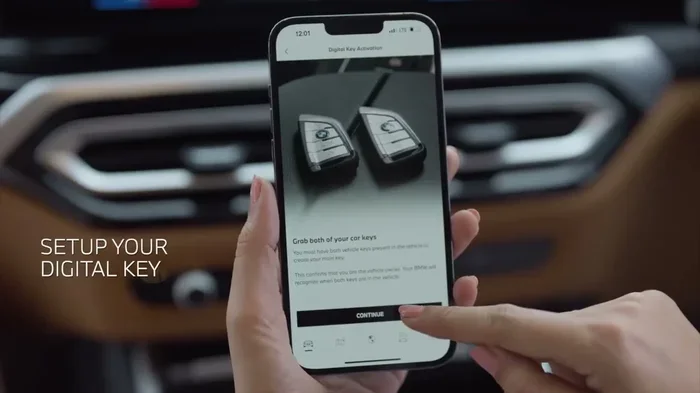
Setting up your BMW Digital Key is easier than you might think. Follow these steps and you will be unlocking your car with your phone in no time.
Step 1: Download the My BMW App
First, download the My BMW app from the Apple App Store or Google Play Store. Make sure your app is up to date. The app is the central hub for all BMW digital services, including the Digital Key.
Step 2: Create or Log Into Your BMW Account
Open the app and sign in with your BMW ConnectedDrive account. If you do not have one yet, you will need to create it. Use the same account that is linked to your vehicle. This ensures the app can find your car.
Step 3: Navigate to the Digital Key Section
Once logged in, go to the “My Vehicle” section. Look for the “Digital Key” option. Tap on it to begin the setup process.
Step 4: Follow the On-Screen Prompts
The app will guide you through pairing your phone with your car. You will need to hold your phone near the NFC antenna on the car. This is usually located near the door handle or the center console. Follow the prompts carefully, and the pairing should complete in under a minute.
Step 5: Test Your Digital Key
After setup, walk up to your car and try unlocking it. Place your phone on the wireless charging pad or the NFC start area to start the engine. If everything works, you are all set. If not, do not worry. We will cover troubleshooting below.
Benefits of Using BMW Digital Key
Why should you switch to a digital key? There are many real-world benefits that make it worth the setup.
- No more lost keys: Your phone is always with you. You never have to worry about misplacing your key fob.
- Hands-free convenience: Unlock and start your car without taking anything out of your pocket.
- Share access easily: You can send a digital key to family members or friends through the app. They can drive your car without needing a physical key.
- Enhanced security: The digital key uses encryption to keep your car secure. Each digital key is unique and tied to your specific phone.
- Remote features: You can lock, unlock, and locate your car from anywhere using the app.
For those who still prefer a physical backup, remember that you can always check if a bad key fob might drain your car battery as a reminder to keep your backup key in good shape.
Troubleshooting Common BMW Digital Key Issues
Even great technology can have hiccups. Here are the most common problems and how to fix them.
Digital Key Not Recognizing My Phone
If your car does not detect your phone, make sure NFC is turned on in your phone settings. Also, check that the My BMW app has permission to use NFC. Restart both your phone and the car’s infotainment system, then try again.
Phone Battery Is Too Low
A very low phone battery can prevent the digital key from working. The car’s power-saving mode helps, but if your battery is completely dead, you will need a backup key. Keep your phone charged, especially before long trips.
Digital Key Stopped Working After an Update
Sometimes a software update on your phone or in the car can reset the digital key pairing. Simply redo the setup process through the My BMW app. This usually takes less than two minutes.
Can I Use Digital Key with a Case on My Phone?
Most thin phone cases work fine. However, very thick or metal cases can block the NFC signal. Remove the case if you experience issues, or try a thinner case designed for NFC use.
Can You Share BMW Digital Key With Others?
Yes! One of the best features of BMW Digital Key is the ability to share access. You can send a digital key to up to five other people through the My BMW app. Each person gets their own unique digital key linked to their phone.
This is perfect for family members, couples, or trusted friends. The person receiving the key does not need to have a BMW account. They just need the app and a compatible phone. You can also set restrictions, such as limiting the speed or setting a time window when the key is active.
Keep in mind that the person you share with must have a phone that supports BMW Digital Key. And just like your own key, their phone must have enough battery to communicate with the car.
BMW Digital Key vs Traditional Key Fob
Both options have their place. Here is a quick comparison to help you decide:
- BMW Digital Key: Uses your phone, no extra device to carry, easy to share, and very modern.
- Traditional Key Fob: Reliable, works even if your phone dies, and does not depend on battery levels of your phone.
Most BMW owners find that using both together is the best approach. Use the digital key for daily convenience, and keep the physical fob as a backup. This way, you always have access to your car no matter what.
If your physical key fob is giving you trouble, you might want to explore your options. Some owners wonder can I drive my car with a low key battery and the answer is usually yes for a short time, but it is best to replace it promptly.
Expert Tips for Getting the Most Out of BMW Digital Key
Here are some insider tips from BMW enthusiasts and tech experts to help you get the best experience:
- Always keep your phone software updated: BMW releases updates that improve digital key performance. Keeping your phone and car software current ensures the smoothest experience.
- Set up a backup key: Even with Digital Key, always have a physical key or key fob stored safely at home. You never know when technology might fail.
- Use a dedicated phone wallet or pouch: Some phone cases have a wallet slot. Keep your digital key phone separate from other devices to avoid NFC interference.
- Enable power-saving mode: In your phone settings, turn on the battery saver for the My BMW app. This keeps the NFC chip active even when your battery is low.
- Visit your BMW dealer for help: If you run into issues you cannot solve, your local dealer can help. Many dealerships replace key fobs and assist with digital key setup as well.
These small habits make a big difference. They ensure your digital key works every single time, without fail.
Final Thoughts
Getting a BMW Digital Key is one of the best upgrades you can make to your driving experience. It is fast, secure, and incredibly convenient. Whether you are rushing to work, running errands, or heading out on a weekend trip, your phone becomes your most important car tool.
The setup process is straightforward, and the benefits are immediate. You will wonder how you ever drove without it. Just remember to keep your phone charged, maintain a backup key, and update your software regularly.
With the BMW Digital Key, you are not just keeping up with technology. You are embracing a smarter, faster, and more connected way to drive. So go ahead, set up your digital key today, and unlock your BMW with a tap.
Frequently Asked Questions
Can I use BMW Digital Key with any iPhone?
BMW Digital Key works with iPhone 7 and newer models. However, the best experience is with iPhone 8 and later. Always check the BMW website for the latest list of supported devices before setting it up.
What happens if my phone battery dies while I am away from home?
BMW Digital Key has a power-saving mode that keeps the NFC chip active for a short time even with a low battery. However, if your phone is completely dead, you will need a physical backup key. Always carry your traditional key fob as a safety net.
Can I set up BMW Digital Key on more than one phone?
Yes, you can. BMW allows you to register up to five phones as digital keys for one vehicle. You can also send digital keys to friends and family through the My BMW app, and each person gets their own unique access.
Is BMW Digital Key secure?
Absolutely. The digital key uses advanced encryption and secure element technology built into your phone. Your car can only be unlocked and started by authorized devices. Even if someone copies your phone, they would not be able to access your BMW Digital Key.
Do I need an active internet connection to use BMW Digital Key?
No. The digital key works using NFC, which does not require internet or cellular service. You can unlock and start your car even in areas with no signal. However, you do need internet the first time you set up the key through the My BMW app.
Can I still use my traditional key fob if I set up BMW Digital Key?
Yes, you can use both. Many BMW owners keep the digital key as their primary method and use the physical key fob as a backup. Having both options gives you the best of both worlds. Just make sure your key fob battery is healthy so it works when you need it.