Can You Replace a Car Key Fob Battery Yourself at Home
Yes, you can absolutely replace a car key fob battery yourself at home. This simple DIY key fob repair task takes just minutes and requires only a small coin cell battery and a basic flathead screwdriver. You will learn the exact key fob battery type you need, how to open your remote, swap the old cell, and test the new one. Thousands of car owners save money every year by handling this key fob battery replacement on their own. By the end of this guide, you will feel confident tackling the job with zero help from a dealer or locksmith.
Have you ever stood by your car, pressing the remote button over and over, hoping it would magically unlock the doors? That frustrating moment usually means your car key battery dead situation has arrived. Before you call a locksmith or drive to the dealer, take a deep breath. The fix is often simpler than you think. You can handle a key fob battery replacement right at your kitchen table.
Replacing a remote key battery is one of the easiest maintenance tasks any car owner can learn. It does not matter if you drive a sedan, SUV, or truck. The process is nearly identical across most vehicle brands. In this guide, we will walk you through every single step. You will learn how to identify the right battery, open your fob safely, swap the old cell, and get your remote working again. Let us get into it.
Key Takeaways
- Replacing a key fob battery is easy: Most cars use a common CR2032 coin cell battery that you can find at any store.
- You need basic tools: A small flathead screwdriver or a coin is usually all it takes to pop open the fob shell.
- It saves money: Doing it yourself costs under $5, while a dealer or locksmith may charge $25 or more.
- Watch for the battery orientation: Matching the positive and negative sides correctly is the most important step.
- Reset may be needed: Some vehicles require a simple reset procedure after replacing the battery.
- Know when to seek help: If the fob still does not work after a battery swap, the issue may be a damaged circuit or worn contacts.
📑 Table of Contents
- Why Your Car Key Fob Battery Dies
- What Battery Does Your Key Fob Need
- Tools You Need for the Job
- Step-by-Step Guide to Replacing Your Key Fob Battery
- When You Need to Reset Your Key Fob
- Common Mistakes to Avoid During Key Fob Battery Replacement
- When to Seek Professional Help
- How to Extend Your Key Fob Battery Life
- Benefits of Replacing the Battery Yourself
- Key Takeaways
Why Your Car Key Fob Battery Dies
Understanding why your key fob battery low problem happens helps you prevent it in the future. Most key fobs rely on a small coin cell battery to power the remote signal. These batteries are reliable, but they do not last forever. Over time, the chemical charge inside the cell weakens. Eventually, the signal becomes too faint to reach your car.
Common Signs of a Failing Key Fob Battery
Your car usually gives you warning signs before the battery dies completely. Watch for these clues:
- Reduced range: You have to stand closer to the car for the remote to work.
- Delayed response: The door unlocks or locks after a noticeable pause.
- Intermittent function: The remote works sometimes but not other times.
- Warning light: Some newer vehicles display a battery alert on the dashboard.
- Multiple presses needed: You must press the button two or three times to get a response.
How Long Does a Key Fob Battery Last?
Most automotive key fob batteries last between two and four years. However, usage patterns affect this timeline. If you use your remote daily, the battery may drain faster. Cold weather also shortens battery life significantly. People who live in harsh winter climates often notice their key fob not working issues appear during the colder months.
The good news is that most fobs use widely available batteries. You do not need a special order or a trip to the dealership. A quick visit to any grocery store, pharmacy, or electronics shop solves the problem.
What Battery Does Your Key Fob Need
Finding the correct key fob battery type is the first real step in the replacement process. The vast majority of car key fobs use a CR2032 battery. This is a standard 3-volt coin cell that you can find in almost any electronics aisle. However, some vehicles use different models, so always double-check before purchasing.
Most Common Battery Types by Vehicle
Here is a quick look at the most frequently used key fob battery replacement options across popular brands:
- CR2032: Used by Toyota, Honda, Ford, Chevrolet, BMW, and most other brands.
- CR2025: Found in some Hyundai and Kia models.
- CR1632: Used in select Mercedes-Benz and older models.
- CR2016: Less common, found in some older European vehicles.
How to Find the Exact Battery for Your Fob
There are three easy ways to confirm the right battery for your car key battery swap:
- Check the owner manual: Your vehicle manual lists the exact battery model under the remote key section.
- Look at the old battery: The number printed on the existing cell tells you exactly what to buy.
- Search online: Type your vehicle make, model, and year along with “key fob battery type” for a quick answer.
Always purchase a fresh battery from a reputable brand. Cheap off-brand batteries may leak or die within months. Brands like Energizer, Duracell, and Panasonic offer reliable options for remote key battery replacements.
Tools You Need for the Job
One of the best things about DIY key fob repair is how few tools you need. You probably already have everything at home. Here is what you will want to gather before you start:
- A new coin cell battery matching your fob model (CR2032 is the most common).
- A small flathead screwdriver or a thin prying tool.
- A clean, soft cloth to place the fob on.
- A well-lit workspace, like a kitchen table or desk.
That is it. You do not need expensive equipment or specialized knowledge. The entire key fob battery replacement process is designed to be simple enough for anyone. Even if you are not handy, you can complete this task in under five minutes.
Pro Tip: Work on a Soft Surface
Place a soft cloth or towel under your fob before opening it. This prevents scratches on the casing. It also catches any small screws or springs that might fall out during disassembly. A little preparation goes a long way in keeping your remote looking brand new.
Step-by-Step Guide to Replacing Your Key Fob Battery
Now comes the fun part. You are going to open your fob, swap the battery, and get back on the road. Follow these steps carefully and you will have a working remote in no time.
Step 1: Remove the Emergency Key
Most modern key fobs hide a small mechanical key inside. Look for a tiny release button or slider on the side of the fob. Press it and slide the emergency key out. This key serves two purposes. It lets you manually unlock the door if the fob fails completely, and it often acts as a prying tool to open the fob shell.
Step 2: Locate the Seam and Open the Fob
Turn the fob over and find the seam where the two halves meet. Insert the flathead screwdriver or the emergency key into the small gap. Gently twist and pry around the entire edge. The shell should pop apart with moderate pressure. Do not force it. If it feels stuck, double-check that you have found the correct opening point.
Quick Tip: Some fobs have a small arrow printed on the casing. This arrow shows you the direction to pry. Following it prevents damage to the clips holding the shell together.
Step 3: Remove the Old Battery
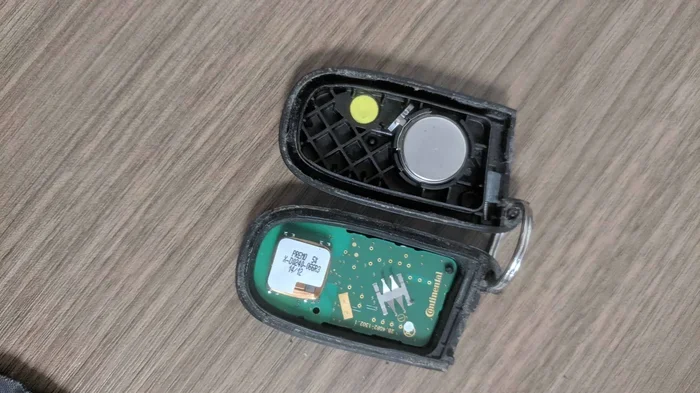
Once the fob is open, you will see the battery sitting in a small compartment. It is usually held in place by a metal clip or a small plastic tab. Use the screwdriver to gently lift the clip or pry the tab. Slide the old battery out carefully. Notice which side faces up. The positive side (marked with a +) typically faces upward.
Important: Do not touch the battery contacts with your bare fingers. Oils from your skin can cause corrosion over time. If possible, handle the battery by its edges.
Step 4: Insert the New Battery
Take your fresh coin cell battery and place it in the compartment. Make sure the positive side faces up, matching the orientation of the old battery. Press the metal clip or tab back down to secure the new cell. Give it a gentle tug to confirm it is seated firmly in place.
Step 5: Reassemble the Fob
Align the two halves of the fob shell carefully. Press them together evenly around the entire edge. You should hear a soft click when the clips snap into place. Do not press too hard in one spot, as this can crack the plastic. Work your way around the fob, applying even pressure.
Step 6: Test the Remote
Stand near your car and press the unlock button. The doors should respond immediately. Try the lock button too. If both functions work, congratulations. You just completed a successful key fob battery replacement at home. If the remote does not work, check the battery orientation and try again.
When You Need to Reset Your Key Fob
In some cases, replacing the battery is not the only step. Certain vehicles require a key fob reset after a battery swap. This is more common with newer models that use advanced rolling-code technology. The reset process varies by manufacturer, so always consult your owner manual for specific instructions.
Reset Procedures for Popular Brands
Here are some general reset steps for well-known brands:
- Toyota and Lexus: Close all doors. Insert and remove the key from the ignition while the door is open. Within 40 seconds, press any button on the fob three times quickly.
- Honda: Turn the ignition to the ON position. Press the fob lock button. Turn the ignition back to OFF. Repeat within five seconds.
- Ford: Turn the ignition from OFF to RUN eight times within 10 seconds, ending on RUN. Press any fob button within eight seconds of the last cycle.
- Chevrolet: Close all doors and the trunk. Turn the ignition to ON and press the fob unlock button. Turn the ignition back to OFF.
If your vehicle is not listed here, search for the specific reset procedure using your car brand and model. Most reset processes take less than a minute and require no special equipment.
Common Mistakes to Avoid During Key Fob Battery Replacement
Even simple tasks can go wrong if you are not careful. Here are the most common mistakes people make during a key fob battery replacement and how to avoid them:
Using the Wrong Battery Model
This is the number one mistake. A CR2032 and a CR2025 look almost identical but have different voltages and sizes. Using the wrong battery can damage the fob circuit. Always verify the model number printed on the old battery before purchasing a replacement.
Forcing the Fob Open
If the shell does not open easily, you are probably not using the correct prying point. Forcing it with excessive pressure can crack the plastic or damage internal components. Take your time. Find the right seam and work around it gently.
Ignoring Battery Orientation
Placing the battery in backwards is a common error. The fob will not work if the positive and negative sides are reversed. Always match the orientation of the old battery when inserting the new one. The markings on the battery make this easy to check.
Forgetting to Replace the Emergency Key
It sounds obvious, but many people reassemble the fob without sliding the emergency key back in. Before snapping the shell closed, make sure the key is properly seated in its slot.
Not Cleaning the Contacts
Over time, the battery contacts inside the fob can develop a thin layer of corrosion. If your fob still does not work after a fresh battery, try cleaning the contacts with a dry cloth or a small amount of rubbing alcohol on a cotton swab. This simple step resolves many key fob troubleshooting issues.
When to Seek Professional Help
Most of the time, a key fop battery replacement solves the problem completely. However, there are situations where professional help becomes necessary. Recognizing these signs early saves you from wasting time and frustration.
If you replace the battery and the fob still does not work, the issue likely goes deeper than a dead cell. The internal circuit board may be damaged. The contact points could be worn out or corroded beyond cleaning. In these cases, a professional locksmith or automotive electronics specialist can diagnose the real problem.
Another reason to seek help is if your fob uses a rechargeable battery instead of a replaceable coin cell. Some modern vehicles, especially luxury brands, use built-in rechargeable batteries that cannot be swapped out by the owner. Attempting to open these fobs may void the warranty or cause permanent damage.
Also, if you lose your only key fob, replacing the battery will not help. You will need a new fob programmed to your vehicle. This is a more complex process that typically requires a dealer or a qualified locksmith with the right equipment.
How to Extend Your Key Fob Battery Life
Once you have completed your replace car key battery project, you probably want the new battery to last as long as possible. Here are some simple habits that help extend the life of your remote key battery:
- Avoid extreme temperatures: Do not leave your fob on the dashboard in direct summer sun or in a freezing car overnight.
- Press buttons gently: Slamming the remote button does not make it work faster and can wear out the internal contacts.
- Keep it dry: Moisture is the enemy of electronic components. If your fob gets wet, dry it thoroughly before use.
- Store it properly: When not in use, keep the fob in a designated spot away from other electronics that may cause interference.
- Replace before it dies completely: Swapping the battery at the first sign of weakness prevents the fob from entering a deep discharge state that can harm the circuit.
These small habits add up. Many car owners find their automotive key fob batteries lasting three to five years with proper care. That is well worth the minimal effort required.
Benefits of Replacing the Battery Yourself
Choosing to handle a key fob battery replacement at home offers several clear advantages. First, it saves you real money. A new battery costs around $3 to $5, while a dealer or locksmith might charge $25 or more for the same job. Second, it saves you time. You do not need to make an appointment or wait in a service lobby. Third, it builds your confidence as a car owner. Once you have successfully replaced your fob battery, you realize how simple many car maintenance tasks really are.
There is also a satisfaction that comes from handling small repairs on your own. You become more self-reliant and less dependent on service centers for every minor issue. This knowledge carries over to other maintenance tasks as well, making you a more informed and capable vehicle owner overall.
Key Takeaways
- Replacing a key fob battery is easy: Most cars use a common CR2032 coin cell battery that you can find at any store.
- You need basic tools: A small flathead screwdriver or a coin is usually all it takes to pop open the fob shell.
- It saves money: Doing it yourself costs under $5, while a dealer or locksmith may charge $25 or more.
- Watch for the battery orientation: Matching the positive and negative sides correctly is the most important step.
- Reset may be needed: Some vehicles require a simple reset procedure after replacing the battery.
- Know when to seek help: If the fob still does not work after a battery swap, the issue may be a damaged circuit or worn contacts.
Frequently Asked Questions
What type of battery do most car key fobs use?
The vast majority of car key fobs use a CR2032 coin cell battery. This is a standard 3-volt battery that you can find at any grocery store, pharmacy, or electronics shop. Always double-check your owner manual or the old battery to confirm the exact model before purchasing.
How do I know if my key fob battery needs replacing?
Common signs include reduced range, delayed response, intermittent function, and needing to press the button multiple times. Some newer vehicles also display a battery warning on the dashboard. If you notice any of these symptoms, it is time for a key fob battery replacement.
Can I use any brand of CR2032 battery for my key fob?
Yes, but it is best to use a reputable brand like Energizer, Duracell, or Panasonic. Cheap off-brand batteries may leak or have a shorter lifespan. Spending a little more on a quality battery ensures reliable performance and prevents potential damage to your fob.
Do I need to reprogram my key fob after replacing the battery?
In most cases, no. The fob should work immediately after you insert the new battery. However, some vehicles with advanced security systems require a simple reset procedure. Check your owner manual for specific instructions related to your car model.
Is it safe to open my key fob at home?
Absolutely. Opening a key fob is designed to be a straightforward process. You only need a small flathead screwdriver and a soft surface to work on. Just be gentle with the clips, handle the battery by its edges, and you will be fine. This is one of the easiest DIY key fob repair tasks you can do.
How much does it cost to replace a key fob battery yourself?
A CR2032 battery costs between $3 and $5 at most retail stores. That is it. There are no labor fees, no service charges, and no trip to the dealer. Compared to paying a locksmith or dealership $25 or more for the same job, doing it yourself is a clear winner.
=== CONCLUSION ===
Replacing your car key fob battery yourself is one of the simplest and most rewarding maintenance tasks you can do. It takes just a few minutes, costs almost nothing, and requires no special skills or tools. You now know how to identify the right battery, open your fob safely, swap the old cell, and test the results. You also understand when a reset is needed and how to avoid common mistakes that trip up first-time DIYers.
The next time your key fob not working issue pops up, you will not panic. You will grab a new battery, open the fob, and handle the fix like a pro. This small bit of knowledge saves you time, money, and the hassle of waiting for professional service. Keep a spare coin cell battery in your glove box, and you will always be prepared for the next car key battery dead moment.
Take action today. Pick up a fresh battery, gather a screwdriver, and give it a try. You will be surprised how easy it really is. Once you have done it once, you will never need to pay someone else to do it again. Your remote key battery is back in your hands, and your car is ready to go.