Play Music via Bluetooth in Your 2014 Maserati GranTurismo
Playing music via Bluetooth in your 2014 Maserati GranTurismo is simple once you know the steps. This guide walks you through pairing your phone, adjusting audio settings, and fixing common Bluetooth issues. You will also learn pro tips to improve sound quality and keep your system running smoothly.
There is nothing quite like cruising in a 2014 Maserati GranTurismo with your favorite playlist flowing through the premium speakers. The Bluetooth feature in this luxury Italian sports car lets you go wireless without any messy cables. Whether you are commuting through city streets or taking a weekend road trip, playing music via Bluetooth in a 2014 Maserati GranTurismo transforms every drive into a personal concert.
Many GranTurismo owners love the car but struggle a bit with the Bluetooth setup at first. The infotainment system looks sleek and modern but it can feel a little confusing if you have not used it before. This guide breaks everything down into simple steps. You will learn how to pair your phone, stream music, make hands-free calls, and fix common problems. By the end, you will feel confident using every Bluetooth feature your GranTurismo has to offer.
The 2014 Maserati GranTurismo comes loaded with technology. The Bluetooth system supports audio streaming and hands-free calling. It works with both Apple and Android devices. You can connect your phone, access your music library, and control playback right from the steering wheel or the center console. Let us dive into everything you need to know.
Key Takeaways
- Pairing your phone is quick: The 2014 Maserati GranTurismo Bluetooth system connects in just a few minutes with clear on-screen steps.
- Sound quality matters: Adjusting EQ settings and using high-quality codecs makes a big difference in your listening experience.
- Troubleshooting is straightforward: Most Bluetooth problems in the GranTurismo are easy to fix with simple resets or updates.
- Multiple devices work: You can pair more than one phone and switch between them seamlessly.
- Hands-free calling is built in: Bluetooth does more than play music it also lets you make and receive calls safely.
- Maintenance keeps it running: Regularly updating your phone and car software prevents most connectivity issues.
📑 Table of Contents
- Understanding the Bluetooth System in Your 2014 Maserati GranTurismo
- How to Pair Your Phone with the GranTurismo
- Optimizing Your Bluetooth Audio Quality
- Hands-Free Calling with Bluetooth
- Troubleshooting Common Bluetooth Issues
- Taking Care of Your GranTurismo Bluetooth System
- Comparing Bluetooth to Other Audio Options
- Final Thoughts on Playing Music via Bluetooth in Your 2014 Maserati GranTurismo
Understanding the Bluetooth System in Your 2014 Maserati GranTurismo
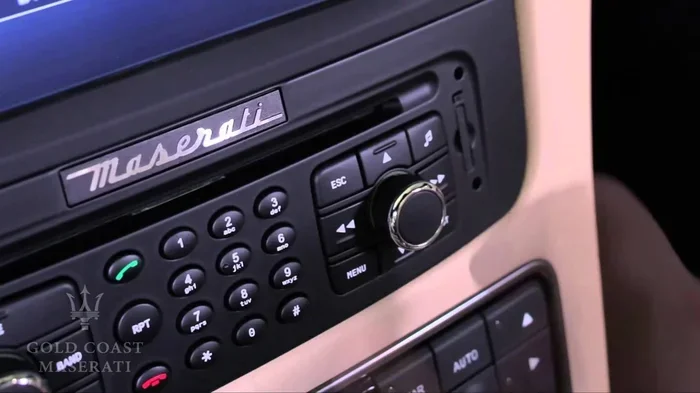
The 2014 Maserati GranTurismo uses the Maserati Multi Media Interface, commonly known as the MMI system. This is the brain behind the infotainment experience. It handles radio, navigation, phone calls, and Bluetooth audio streaming. The system is designed to be intuitive but it does have a learning curve if you are new to Maserati technology.
When you start the car, the MMI display lights up on the center dashboard. You will see several menu options. The Bluetooth function sits within the Phone or Settings menu depending on your specific model configuration. The 2014 model year supports Bluetooth version 2.1 with EDR, which stands for Enhanced Data Rate. This means faster data transfer and better audio quality compared to older Bluetooth versions.
What Bluetooth Can Do in the GranTurismo
The Bluetooth system in the 2014 GranTurismo is not just for music. Here is what you get:
- Wireless music streaming: Play songs, podcasts, and audiobooks from your phone through the car speakers.
- Hands-free calling: Make and receive phone calls without picking up your device.
- Contact syncing: Access your phone contacts through the car display.
- Call history access: View recent calls directly from the MMI system.
- Voice dialing: Some configurations support voice commands for dialing.
Understanding these features helps you get the most out of your Maserati GranTurismo Bluetooth setup. Each feature works together to create a seamless connected driving experience.
How to Pair Your Phone with the GranTurismo
The pairing process is straightforward once you know where to look. Follow these steps carefully and you will be listening to music in under five minutes.
Step 1: Turn on Bluetooth on Your Phone
Go to the settings menu on your smartphone. Toggle the Bluetooth option to on. Make sure your phone is visible to other devices. On iPhones, this is under Settings > Bluetooth. On Android phones, it is under Settings > Connections > Bluetooth. Keep your phone close to the car console during pairing.
Step 2: Put the MMI System in Pairing Mode
Press the Phone button on the steering wheel or tap the Phone icon on the MMI screen. Navigate to Settings and then select Bluetooth. Choose the option to search for new devices. The MMI system will now scan for nearby Bluetooth devices. You should see your phone name appear on the screen.
Step 3: Select Your Phone and Confirm the Pairing
Tap on your phone name when it appears on the MMI display. A pairing code will show up on both the car screen and your phone. Check that the codes match and then confirm on both devices. The system will now save your phone as a paired device. This means the next time you get in the car, the connection should be automatic.
Step 4: Test the Connection
Open a music app on your phone and hit play. The sound should now come through the car speakers. Adjust the volume using the car audio controls or your phone. If music plays, you are all set. If not, do not worry. We will cover troubleshooting in a later section.
Quick tip: The 2014 GranTurismo can store multiple paired devices. This is great if you share the car with a partner or family member. Each person can connect their phone and the system will remember them all.
Optimizing Your Bluetooth Audio Quality
Once your phone is connected, you might notice the sound quality is not quite what you expected. This is common with Bluetooth audio. But the good news is there are several ways to improve it significantly. Bluetooth music streaming quality depends on a few key factors.
Understanding Bluetooth Audio Codecs
A codec is the technology that compresses and sends audio data wirelessly. The 2014 Maserati GranTurismo supports the standard SBC codec. This is the default codec for most Bluetooth connections. While SBC works fine, it does not deliver the highest audio quality. Some phones support advanced codecs like AAC, which offers better sound. iPhones tend to use AAC automatically when connected to compatible car systems.
Adjusting the Equalizer Settings
The MMI system includes an equalizer that lets you fine-tune the sound. Here is how to access it:
- Press the TONE button on the center console.
- Select the equalizer or sound settings option.
- Choose a preset like Jazz, Rock, or Pop.
- Or manually adjust the bass, midrange, and treble sliders.
Playing around with these settings can make a huge difference. If your music sounds too bass-heavy, reduce the low-end frequencies. If vocals sound muffled, boost the midrange slightly. Everyone has different ears and preferences, so take your time to find the right balance.
Volume Control Tips
One thing many GranTurismo owners notice is that Bluetooth volume can feel lower than radio volume. This is normal because Bluetooth audio has a lower maximum output compared to a direct aux connection. To get the best volume:
- Turn the car volume up to about 70-80%.
- Then adjust the volume on your phone to fill the rest.
- Avoid maxing out the phone volume as it can introduce distortion.
This two-step volume method gives you the clearest and loudest sound possible through car Bluetooth audio. It works for the 2014 GranTurismo and most other cars with Bluetooth music streaming.
Hands-Free Calling with Bluetooth
Safety should always come first when driving. The 2014 Maserati GranTurismo Bluetooth system makes it easy to handle calls without taking your hands off the wheel or your eyes off the road. This is one of the most important Bluetooth features in cars and the GranTurismo handles it well.
When a call comes in, the MMI screen will show the caller ID if your contacts are synced. You can answer the call by pressing the green phone button on the steering wheel. To end the call, press the red phone button. The audio from the car speakers automatically switches from music to the call. When the call ends, music resumes from where it left off.
You can also make outgoing calls using the MMI system. Navigate to the Phone menu and select Contacts. Scroll through your synced contacts or use the dial pad. Some owners prefer using voice commands for dialing. This adds an extra layer of convenience and safety.
Managing Call Audio
The car uses its built-in microphone for calls. The microphone is typically located near the rearview mirror area. If callers say they cannot hear you well, the microphone might need cleaning. Dust and debris can build up over time and affect call quality. A quick wipe with a soft cloth can help.
Also, keep in mind that Bluetooth hands-free calling uses a different audio channel than music streaming. This is why you hear a slight change in audio quality during calls compared to when you are listening to music.
Troubleshooting Common Bluetooth Issues
Even with the best car technology, Bluetooth problems can happen. The 2014 GranTurismo Bluetooth system is reliable but it is not immune to occasional hiccups. Here are the most common issues and how to fix them.
Bluetooth Will Not Connect
If your phone will not pair with the car, try these steps:
- Turn Bluetooth off and back on your phone.
- Restart the MMI system by turning the car off and back on.
- Delete the old pairing from both your phone and the car.
- Try pairing again from scratch.
Sometimes the simplest fix is the most effective. A fresh connection often solves the problem immediately.
Music Keeps Disconnecting
If your audio keeps cutting out, the issue might be related to your car battery. A weak or aging battery can cause electronic systems to behave unpredictably. If you notice other electrical issues alongside Bluetooth problems, it might be worth checking the battery. You can learn more about how a weak battery affects car electronics in our article on can a bad battery cause the wrench light to come on.
Another common cause is distance. Bluetooth has a range of about 30 feet. If your phone is buried deep in a bag or tucked in a pocket far from the car console, the signal can drop. Keep your phone in the center console or cup holder for the best connection.
Paired Device Shows Up But No Sound
This issue usually happens when the audio profile is not set correctly. On your phone, go to Bluetooth settings and find the GranTurismo connection. Make sure the Media Audio option is turned on. Some phones also have a separate call audio toggle. Both need to be enabled for full functionality.
Bluetooth Works Intermittently
If the connection works sometimes but not others, try clearing the Bluetooth cache on your phone. On Android, go to Settings > Apps > Bluetooth > Storage > Clear Cache. On iPhone, toggling Bluetooth off and on usually does the trick. Also make sure your phone software is up to date. Outdated software can cause compatibility issues with car Bluetooth systems.
For more car tech troubleshooting tips, check out our guide on do you have to do anything after replacing a key fob battery for general car electronics maintenance advice.
Taking Care of Your GranTurismo Bluetooth System
Like any car technology, the Bluetooth system in your 2014 Maserati GranTurismo benefits from regular care. A little maintenance goes a long way in keeping everything running smoothly. Here are some simple habits that make a big difference.
Keep Your Software Updated
Both your phone and your car benefit from software updates. Phone updates often include Bluetooth improvements and bug fixes. For the car, check with your Maserati dealer about available infotainment updates. Staying current ensures the best compatibility and performance.
Clean the Bluetooth and Audio Connections
Dust can accumulate around the center console and infotainment screen. Use a soft, dry cloth to clean the screen and the buttons regularly. For the Bluetooth module, there is no physical connector to clean, but keeping the area around the console free of debris helps with overall system performance.
Manage Paired Devices
Over time, your GranTurismo can accumulate a long list of paired devices. Old or unused devices take up memory and can sometimes cause connection conflicts. Periodically go into the Bluetooth settings and remove devices you no longer use. This keeps the system clean and responsive.
When to Visit a Dealer
If you have tried all the troubleshooting steps and Bluetooth still does not work, it might be time for professional help. Taking your car to a dealer for diagnostics is a smart move. You can take your Maserati to any authorized Maserati dealership for service and repairs. They have the tools and expertise to diagnose complex electronic issues that go beyond simple Bluetooth fixes.
Comparing Bluetooth to Other Audio Options
While Bluetooth is convenient, the 2014 GranTurismo also offers other ways to play music. Here is a quick comparison to help you decide which method works best for you.
| Feature | Bluetooth | AUX Cable | USB Connection |
|---|---|---|---|
| Wireless Convenience | Yes | No | No |
| Audio Quality | Good | Excellent | Excellent |
| Charges Phone | No | No | Yes |
| Hands-Free Calling | Yes | No | No |
| Ease of Use | High | Medium | High |
| Cable Required | No | Yes | Yes |
As you can see, Bluetooth wins on convenience and hands-free calling. AUX and USB connections deliver slightly better audio quality since they carry a direct digital or analog signal. But for most daily driving, Bluetooth is more than enough. The freedom of going wireless while driving a luxury car like the GranTurismo is hard to beat.
Some owners use both Bluetooth and AUX depending on the situation. For long road trips, they switch to AUX for the best sound quality. For daily commutes, Bluetooth is the go-to for its simplicity. You can also check if your car has a USB port for charging while streaming music via Bluetooth. This combo keeps your phone powered up and your playlist running all day long.
If you are thinking about upgrading your car audio or adding accessories, keep in mind that the 2014 GranTurismo was designed with a specific interior layout. Any modifications should be done carefully to avoid damaging the original systems. For general car accessory questions, our article on how long does it take to fit a new bumper gives you an idea of how long accessory installations can take.
Final Thoughts on Playing Music via Bluetooth in Your 2014 Maserati GranTurismo
The 2014 Maserati GranTurismo is a machine that combines Italian craftsmanship with modern technology. The Bluetooth system is one of the features that makes daily driving more enjoyable. Once you know how to pair your phone, adjust the audio settings, and troubleshoot minor issues, you will never want to go back to cables and wires.
Playing music via Bluetooth in a 2014 Maserati GranTurismo is more than a convenience. It is part of the luxury experience that makes this car special. The ability to stream your personal music library wirelessly through premium Maserati speakers while cruising in style is something every GranTurismo owner should enjoy to the fullest.
Take a few minutes today to go through the pairing steps if you have not already. Experiment with the equalizer settings to find your perfect sound. And remember, if anything feels off, the troubleshooting tips in this guide will help you get back on track quickly. Your GranTurismo is built to deliver an exceptional driving experience and the Bluetooth system is a big part of that.
Stay connected, stay safe, and most importantly, enjoy the drive. Your music, your way, in one of the most beautiful grand touring cars ever made.
Frequently Asked Questions
Can I pair multiple phones with the 2014 Maserati GranTurismo Bluetooth system?
Yes, the 2014 GranTurismo supports multiple paired devices. The system can store several phone connections and you can switch between them easily. Simply go to the Bluetooth settings on the MMI screen and add a new device whenever needed. This is especially useful if you share the car with a partner or family member.
Why is my Bluetooth music quality lower than the radio in my GranTurismo?
Bluetooth audio is compressed during wireless transmission, which can reduce quality compared to a direct aux or USB connection. The 2014 GranTurismo uses the SBC codec by default, which is standard but not the highest quality. Adjusting the equalizer and following the volume tips in this guide can help improve the listening experience significantly.
Can I make phone calls through the Bluetooth system in my 2014 GranTurismo?
Absolutely. The Bluetooth system in the 2014 Maserati GranTurismo supports hands-free calling. You can answer incoming calls using the steering wheel buttons and make outgoing calls through the MMI display. Your phone contacts sync with the car so you can browse and dial directly from the screen.
What should I do if my phone will not connect to the GranTurismo Bluetooth?
Start by turning Bluetooth off and back on your phone. Then restart the MMI system by powering the car off and back on. If that does not work, delete the existing pairing from both devices and try connecting again. Clearing the Bluetooth cache on your phone can also help resolve connection issues.
Does the 2014 Maserati GranTurismo support iPhone and Android Bluetooth connections?
Yes, the 2014 GranTurismo Bluetooth system works with both iPhone and Android devices. The pairing process is the same for both platforms. iPhones tend to automatically use the AAC codec for better audio quality when connected to the car system. Android phones may require you to check that the Media Audio option is enabled in Bluetooth settings.
How do I disconnect a phone from the GranTurismo Bluetooth system?
To remove a paired phone, go to the Bluetooth settings on the MMI screen. Find the device you want to remove and select the option to delete or unpair it. This is helpful when you sell the car or want to replace a connected device. Keeping your paired device list clean helps the system run more smoothly.