How to Use a Hyundai Key Card A Simple Step by Step Guide
Using a Hyundai Key Card is simple once you know the basics. This guide walks you through every step, from accessing your car to replacing the battery. You will learn how the proximity card works, how to troubleshoot common problems, and how to keep your key card running smoothly for years to come.
Have you ever stood in front of your Hyundai wondering how to use that small card instead of a traditional key fob? You are not alone. Many Hyundai owners get the Hyundai Key Card with their vehicle and are not quite sure what to do with it at first. The good news is that using this card is much easier than it looks. Once you understand how it works, you will wonder how you ever lived without it.
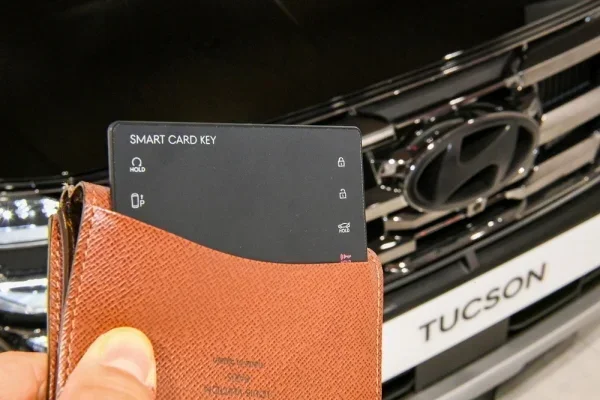
The Hyundai Key Card is a proximity card that lets you access and start your vehicle without any hassle. It uses the same keyless entry technology found in modern car key fobs, but in a slim, card-like format. Whether you drive a Hyundai Sonata, a Tucson, or another model, this guide will help you make the most of your key card. We will cover everything from basic use to battery replacement and common troubleshooting tips.
Key Takeaways
- Easy Access: The Hyundai Key Card lets you lock, unlock, and start your car without pressing any buttons.
- Battery Powered: The key card uses a small battery that typically lasts 2 to 3 years before needing replacement.
- Simple Replacement: You can replace the key card battery yourself in just a few minutes with a coin.
- Works with Push Button Start: The key card communicates with your car’s proximity sensor to start the engine.
- Troubleshooting Is Easy: Most issues are caused by a low battery or interference from other devices.
- Keep a Backup: Always carry a spare key or emergency key in case the key card fails.
📑 Table of Contents
What Is a Hyundai Key Card?
The Hyundai Key Card is a small, credit-card-sized device that replaces or works alongside your traditional car key fob. It is part of Hyundai’s smart key system. This system allows you to access your car and start the engine without inserting a key into the ignition. Instead, your car uses a proximity sensor to detect the key card when it is nearby.
The key card looks like a flat plastic card with a small chip inside. This chip sends a signal to your car when you are within a certain range. Most Hyundai vehicles that come with this feature place the card reader near the driver’s side door handle and the start button. The card is designed to be thin enough to fit in your wallet or pocket, which makes it very convenient for daily use.
Hyundai introduced the key card to give drivers more options. Some people prefer the slim design over a bulky key fob. Others like having both a key card and a fob for backup. Either way, the Hyundai Key Card is built to make your life easier. It is a great example of how modern vehicle access technology has improved over the years.
How Does the Key Card Work?
The key card works using radio frequency identification, or RFID. When you hold the card near the door handle, the car’s sensor reads the unique signal from the card. The car then unlocks the doors. To start the engine, you simply place the card on the start button and press it. The car verifies the signal and allows the engine to turn on. This whole process happens in seconds.
You do not need to press any buttons on the card itself. Everything is automatic. This is similar to how push button start systems work with traditional key fobs. The main difference is that the key card is thinner and does not have buttons for locking or unlocking. It relies entirely on proximity to communicate with the car.
How to Use Your Hyundai Key Card Step by Step
Using the Hyundai Key Card is straightforward once you know the steps. Here is a simple walkthrough of how to use it every day.
Step 1: Unlocking the Doors
To unlock your car, simply touch the door handle with the key card. The proximity sensor on the door handle will detect the card and unlock the doors. You do not need to press any buttons or wave the card around. Just hold it near the handle, and the doors will pop open. This works from a distance of about 1 to 2 feet.
If you have the key card in your pocket or bag, you can still unlock the car by simply touching the handle. The sensor is sensitive enough to pick up the signal through fabric. This is one of the biggest advantages of the keyless entry system. You can walk up to your car with your hands full and still get in easily.
Step 2: Starting the Engine
Once you are inside the car, you need to start the engine. Place the key card on the start button. The start button is usually located on the dashboard or center console. Press the button as you normally would, and the car will recognize the card and start the engine.
Make sure the card is placed flat on the button. If the card is too far away or positioned incorrectly, the car may not start. Some Hyundai models have a specific spot on the dashboard where the card works best. Check your owner’s manual to find the exact location. This is a small detail that can save you a lot of frustration.
Step 3: Locking the Doors
To lock your car, you can use the physical button on the door handle or walk away from the car. Most Hyundai models will automatically lock when you walk away with the key card. This feature is called auto-lock and it works through the proximity sensor. The car detects when the key card moves out of range and locks the doors automatically.
If auto-lock is not working, you may need to press the lock button on the door handle manually. Some drivers also prefer to use the remote start feature if their car supports it. You can check whether your model has this feature by looking at the key card or consulting the manual.
Step 4: Using the Emergency Key
Every Hyundai Key Card comes with a small emergency key hidden inside. This is a traditional metal key that you can use if the card battery dies or the card stops working. To access the emergency key, look for a small release button or slot on the side of the card. Push it, and the metal key will pop out.
The emergency key can be used to manually unlock the driver’s door. Insert it into the key slot on the door handle and turn it. This is a great backup option if you ever find yourself in a situation where the key card is not working. However, the emergency key will not start the engine. You will need a working key card or a replacement for that.
How to Replace the Key Card Battery
Like any remote device, the Hyundai Key Card runs on a small battery. Over time, the battery will lose power and need to be replaced. Most key card batteries last about 2 to 3 years. When the battery starts to die, you may notice that the car does not detect the card as quickly or from as far away.
Signs Your Key Card Battery Is Low
Watch for these warning signs that your key card battery is running low:
- The car takes longer to unlock when you touch the door handle.
- The engine does not start on the first try.
- The key card reader beeps or flashes when you try to start the car.
- You need to hold the card very close to the sensor for it to work.
- The auto-lock feature stops working when you walk away.
If you notice any of these signs, it is time to replace the battery. You can replace your key fob battery yourself at home with just a few simple tools. You will need a small flathead screwdriver or a coin to open the card.
Step by Step Battery Replacement
Follow these steps to replace the battery in your Hyundai Key Card:
- Find the small seam along the edge of the key card.
- Use a coin or flathead screwdriver to gently pry open the card.
- Remove the old battery. Note which side is facing up.
- Insert a new CR2032 battery with the positive side facing up.
- Snap the card back together until it clicks.
- Test the card by unlocking your car or starting the engine.
Replacing the battery is quick and easy. It should take less than five minutes. If the card still does not work after replacing the battery, there may be a different issue. In that case, you may need to try starting your car without a traditional key using alternative methods or seek professional help.
Common Problems and How to Fix Them
The Hyundai Key Card is reliable, but like any electronic device, it can sometimes have issues. Here are the most common problems and how to solve them.
Key Card Not Working
If your key card suddenly stops working, do not panic. The most common cause is a dead battery. Replace the battery following the steps above. If that does not fix the problem, the card may be damaged. Water damage, drops, or exposure to extreme heat can all affect the card’s internal chip.
Another possible cause is interference from other electronic devices. Some phones, wallets with magnetic closures, or other RFID devices can interfere with the key card signal. Try moving away from these devices and testing the card again.
Car Does Not Detect the Key Card
If your car does not detect the key card, first check the battery. A low battery is the number one reason for detection issues. If the battery is fine, try placing the card directly on the start button or very close to the door handle sensor.
Sometimes the car’s proximity sensor can get temporarily confused. Turn the car off and on again, then try again. If the problem persists, you may need to reset the system. Refer to your owner’s manual for reset instructions specific to your Hyundai model.
Key Card Stops Working After Battery Replacement
If the key card stops working after you replace the battery, the new battery may be inserted incorrectly. Check the orientation of the battery. The positive side should face up, matching the old battery’s position. Also, make sure the card snapped back together properly and the battery is making good contact with the terminals.
If the card still does not work, the new battery may be defective. Try a different battery. If none of these steps work, the card’s internal chip may be damaged, and you may need a replacement card from a dealership.
Can You Drive with a Low Key Card Battery?
Yes, in most cases you can still drive your car even if the key card battery is low. The car’s proximity sensor can often still read the card even when the battery is nearly dead. However, you may need to hold the card very close to the start button or door handle for it to work. If you find yourself in this situation, you should replace the battery as soon as possible. You can learn more about driving with a low key battery and what to expect in this situation.
Tips to Keep Your Hyundai Key Card Working Well
Taking care of your key card will help it last longer and work better. Here are some simple tips to keep in mind.
- Keep the card away from water. Water damage is one of the most common reasons key cards fail. Avoid leaving the card in places where it might get wet, like your back pocket in the rain or near a pool.
- Store the card in a safe place. The card has a small electronic chip inside. Dropping it or sitting on it can damage the chip. Keep it in a card holder or a dedicated pocket.
- Avoid extreme temperatures. Leaving the card in a hot car or in freezing temperatures can damage the battery and the chip. Keep it in a temperature-controlled environment when possible.
- Replace the battery on schedule. Even if the card seems to be working fine, consider replacing the battery every two years. This prevents unexpected failures and keeps everything running smoothly.
- Carry the emergency key as a backup. Always keep the small metal emergency key with you. You never know when the key card might fail, and having a backup can save you from a stressful situation.
Hyundai Key Card vs Traditional Key Fob
Both the Hyundai Key Card and a traditional key fob serve the same purpose. They let you access and start your car without using a physical key. However, there are some differences worth noting.
| Feature | Hyundai Key Card | Traditional Key Fob |
|---|---|---|
| Size | Thin, card-sized | Bulkier, fob-shaped |
| Buttons | None | Lock, unlock, trunk, panic |
| Battery Life | 2 to 3 years | 2 to 4 years |
| Emergency Key | Built-in metal key | Built-in metal key |
| Design | Fits in wallet | Requires a keychain or pocket |
| Signal Range | 1 to 2 feet | 1 to 3 feet |
The key card is great for people who want a slim, minimalist option. The traditional key fob offers more features, such as remote locking and trunk release. Some Hyundai models come with both a key card and a key fob, giving you the best of both worlds. You can choose which one to use based on your preference and situation.
Both devices use the same proximity sensor technology and push button start system. The main difference is in size and design. If you prefer a lightweight option that fits easily in your wallet, the key card is the way to go. If you like having extra buttons and a longer signal range, the key fob might be a better fit.
When to Get Professional Help
Most key card issues can be solved at home with a battery replacement or a simple reset. However, there are times when you should seek professional help. If the key card is physically damaged, such as cracked or broken, you will need a replacement card. If the car’s proximity sensor is not working, a dealership or mechanic can diagnose the problem.
You can also visit a dealership if you need a spare key card. They can program a new card to match your vehicle’s system. This is important because a new key card needs to be properly paired with your car. You cannot just buy a replacement card and expect it to work without programming it first.
If you are having trouble with your Hyundai Key Card and none of the troubleshooting steps work, do not hesitate to contact a professional. A dealership technician has the tools and knowledge to fix any issue. They can also check your car’s ignition system to make sure everything is working correctly.
Final Thoughts
The Hyundai Key Card is a smart, convenient feature that makes your daily drive easier. It uses keyless entry and proximity technology to let you access and start your car with just a simple touch. Once you get used to it, you will not want to go back to a traditional key fob.
Remember to keep an eye on the battery and replace it every 2 to 3 years. Store the card safely and always carry the emergency key as a backup. With proper care, your Hyundai Key Card will serve you well for many years to come. If you ever run into issues, the troubleshooting tips in this guide should help you get back on the road quickly.
Using the Hyundai Key Card is all about convenience and simplicity. It is one of those small features that makes a big difference in your daily routine. Now that you know how to use it properly, you can enjoy a smoother, smarter driving experience every time you get behind the wheel.
Frequently Asked Questions
How do I know if my Hyundai Key Card battery is low?
You will notice that the car takes longer to unlock or the key card reader beeps when you try to start the engine. These are clear signs that the battery needs to be replaced. Replacing the battery is quick and easy to do at home.
Can I use my Hyundai Key Card to start the car if the battery is dead?
No, a dead key card battery will prevent the car from detecting the card. However, you can use the emergency metal key hidden inside the card to manually unlock the door. You will need to replace the battery to start the engine again.
Where do I buy a replacement battery for the Hyundai Key Card?
You can buy a CR2032 battery at most drugstores, electronics stores, or online. This is the same type of battery used in many car key fobs and watches. Make sure to buy a fresh battery from a reputable brand.
Can I use a different key card for my Hyundai vehicle?
No, each key card is programmed to a specific vehicle. A key card from another Hyundai car will not work with your vehicle. If you need a replacement, you will need to get one from a Hyundai dealership and have it properly programmed.
How far away does the key card need to be for the car to detect it?
The proximity sensor can detect the key card from about 1 to 2 feet away. You need to hold the card near the door handle or start button for the car to read it. If the battery is low, you may need to hold it even closer.
What should I do if my key card gets wet?
If your key card gets wet, dry it off immediately with a soft cloth. Remove the battery if possible and let the card air dry completely before putting the battery back in. If the card does not work after drying out, you may need to get a replacement from a dealership.
=== CONCLUSION ===
The Hyundai Key Card is a simple yet powerful tool that makes driving more convenient. From unlocking your doors to starting the engine, it handles everything with ease. By following the steps in this guide, you can use your key card confidently every day. Remember to replace the battery on schedule, keep the card safe, and always carry the emergency key as a backup. With a little care and attention, your Hyundai Key Card will keep working flawlessly for years to come.